

It was Tuesday morning when Sarah, a customer support manager at a mid-sized SaaS company, realized she’d spent the last four hours doing something a computer should handle. A customer submitted a support ticket about a billing issue. She read it. Flagged it as billing-related. Checked the customer’s account history. Routed it to the right person. Added a follow-up note. Then did it again for the next ticket. And the next. Four hours of her day gone to pure routing and categorization.
Her team handles 500 support tickets per month. Sarah personally spends about 20 hours per month just sorting, routing, and preparing tickets for her team to solve. That’s a week of her month spent on work that a computer could do in seconds.
She’s not alone. According to McKinsey research, organizations lose roughly 30 percent of operational time to manual handoffs and repetitive decision-making. That number doesn’t have to be your reality. With AI agents workflow automation, Sarah’s 20 hours could drop to 4 hours. Her team could focus on solving complex issues instead of playing traffic cop.
But here’s the catch: AI agents aren’t the same as the workflow automation tools you might already use. They’re not like Zapier or your standard RPA robots. They’re fundamentally different. And whether they’re right for your business depends on understanding that difference.
This guide walks you through what AI agents workflow automation actually is, how it works, when it makes sense for your business, and how to implement it without losing control or blowing your budget.
What Is AI Agent Workflow Automation?
Before we talk about how AI agents workflow automation works, let’s clear up what it actually is. The name is a bit of a marketing mess, so let me untangle it.
Traditional workflow automation is simple: if this happens, then do that. A customer orders something, the system sends an invoice. A form is submitted, the system adds a row to a spreadsheet. These workflows follow one predetermined path. They’re rule-based. Predictable. And powerful, but only for situations you’ve already thought through.
Robotic Process Automation (RPA) is slightly more sophisticated. Instead of rules built into software, you have bots that literally click buttons and type data like a human would. But they’re still following scripts. They can’t handle anything unexpected. If the screen layout changes or a new issue appears, the bot breaks.
AI agents workflow automation is different. Instead of following a predefined path or clicking buttons on a script, an AI agent reads your request, understands the context, reasons through what to do, and then decides which tool to use to solve the problem. The agent doesn’t follow a script. It adapts.
Here’s the key difference: Traditional workflows are locked into one path. AI agents choose their own path based on what they encounter.
How AI Agents Work in Workflows
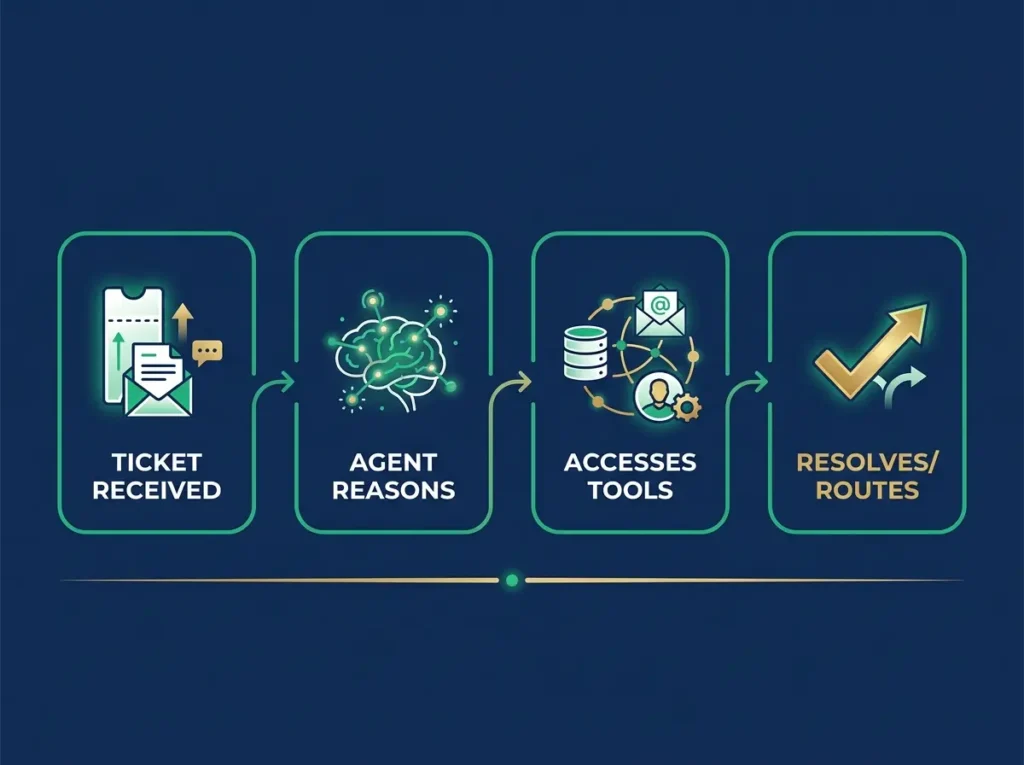
An AI agent in a workflow isn’t like the chatbots you’ve interacted with. A chatbot responds to your question. An agent takes action.
Understanding the broader landscape of generative AI workflows and orchestration helps you grasp how agents coordinate multiple systems and decisions autonomously.
The core components of an AI agent workflow are:
First: Reasoning
An AI agent uses a large language model (an LLM like GPT-4 or Claude) to think through the problem. It reads the incoming request, understands the context, and figures out what needs to happen. This reasoning capability is what separates agents from simple if-then rules.
Second: Memory
The agent has access to context from previous interactions and outcomes. It knows what happened last time something similar occurred. It can learn patterns. If a customer always escalates to the billing team for a certain type of issue, the agent learns that pattern and starts routing similar issues there automatically.
Third: Tools
The agent has access to systems and databases it can call on. In Sarah’s case, the agent can access the support ticket system, the customer database, the knowledge base, and the escalation tools. It can pull information, check history, and trigger actions across multiple systems.
Fourth: Decision Logic
You set the boundaries. You tell the agent what it can and cannot do. It can route tickets but can’t close them without human review. It can check a refund policy but can’t process refunds above $500. These constraints keep the agent doing what you want.
How It Works in Practice
Here’s what happens in practice. A customer submits a support ticket: “I was charged twice for my monthly subscription.”
The AI agent reads the ticket. It understands the issue is a billing problem. It accesses the customer account, sees two charges posted today. It checks the refund policy. For duplicate charges under $100, it’s authorized to process refunds automatically. It calculates the refund amount, processes it, sends the customer a confirmation email, and closes the ticket. All within three minutes. Zero human involvement required.
Compare that to Sarah’s process: read, understand, check account, determine if escalation needed, route or handle, document, follow up. Same outcome, but Sarah’s version takes 15 minutes and creates a bottleneck.
AI Agents vs. Traditional Automation vs. RPA
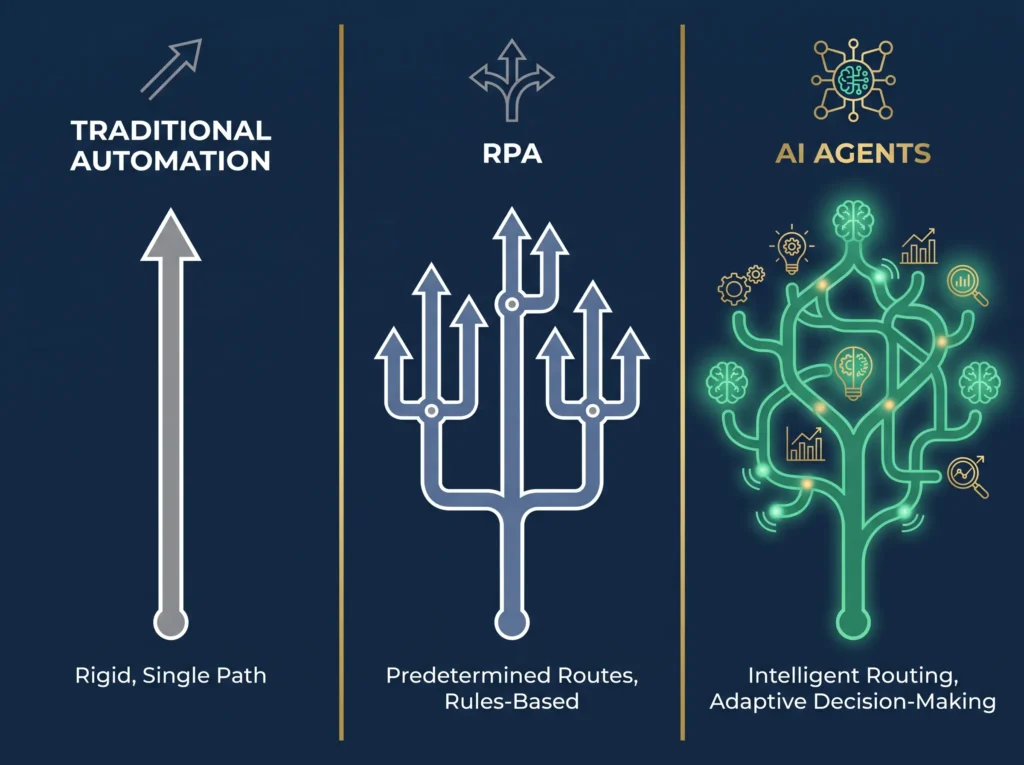
Let me show you when each approach makes sense. This matters because you might already have automation tools that do part of what you need, and throwing AI agents at everything is a mistake.
| Approach | Traditional Automation | RPA | AI Agents |
|---|---|---|---|
| How it works | If X then Y | Bots follow scripts, click buttons | Agent reasons, decides, acts |
| Flexibility | Zero, follows one path | Very low, script must match exactly | High, adapts to new situations |
| Decision-making | No, just executes rules | No, just follows scripts | Yes, reasons through context |
| Speed to setup | Fast (1-2 weeks) | Moderate (4-8 weeks) | Moderate to slow (4-12 weeks) |
| Cost | Low | Medium | Medium to high |
| Maintenance | Low, rarely changes | Medium, breaks when screens change | Medium, needs monitoring |
| Best for | Simple, repetitive, predictable | Complex but fully defined | Complex and variable |
Use traditional automation for simple, fully predictable tasks. You’re sending an invoice after an order is placed. The path never changes. The data format never changes. Traditional automation is fastest and cheapest here.
Use RPA for complex processes that are fully defined but require multiple steps. You need to pull data from five different systems, check approvals, and update a master file. The process is complex, but the steps never vary. RPA can handle it, and you avoid reprogramming workflow software.
Use AI agents for processes that are complex and variable. Your customer support tickets vary wildly. Some need refunds, some need technical help, some need account updates. The agent reads each ticket, understands the unique situation, and routes accordingly. No two tickets are identical, so rigid rules fail. An agent adapts.
Real-World Use Cases by Function

Customer Support Automation
Customer support automation is the most obvious use case. Sarah’s situation is exactly what AI agents excel at. The agent reads the ticket, categorizes the issue, checks the customer’s history and account status, determines if it can handle the issue or needs escalation, and either solves it or routes it with full context. The result: 40 to 60 percent of tier 1 tickets get handled without human involvement. Response time drops from 24 hours to 5 minutes. Your support team stops playing traffic cop and focuses on solving hard problems. The payoff timeline is fast. Most companies see ROI within 4 to 8 weeks.
Finance and Billing Automation
Finance and billing automation is where serious money appears. An agent can process invoices, match purchase orders, check approval limits, handle disputes, and process refunds. It reads incoming invoices, extracts data, validates against POs, routes for approval if needed, and updates your accounting system. Manual invoice processing takes 30 minutes per invoice for a mid-sized company. An agent does it in two minutes. For a company processing 1,000 invoices per month, that’s 460 hours of manual work per year. At a $50/hour fully-loaded cost, that’s $23,000 per year in labor. Implementing an AI agent workflow costs around $10,000 to $20,000 upfront. Payoff happens in less than a year, and the agent gets better over time.
HR and Onboarding Automation
HR and onboarding automation saves time on recruiting and onboarding, similar to how best AI tools for HR professionals streamline talent management. The agent screens resumes against job requirements, schedules interviews, gathers offer acceptance documents, and prepares onboarding tasks. Recruiting teams report 30 to 40 percent reduction in administrative time. Faster hiring means faster productivity from new employees.
Data Processing and Analysis
Data processing and analysis is where complexity creates the biggest opportunity. An agent can read emails or documents, extract specific information, categorize data, find patterns, and route findings to the right team. One financial services company used an AI agent to process mortgage applications. The agent reads the application, extracts key data, runs credit checks, verifies employment, reviews documentation, flags items that need human review, and prepares an analysis for the loan officer. Work that used to take four hours per application takes 30 minutes. And since most applications follow a pattern, the agent handles 70 percent of them completely.
Step-by-Step Implementation Guide
Here’s how to go from “interesting concept” to “live workflow” without buying a thousand-dollar consultant or accidentally breaking your business.
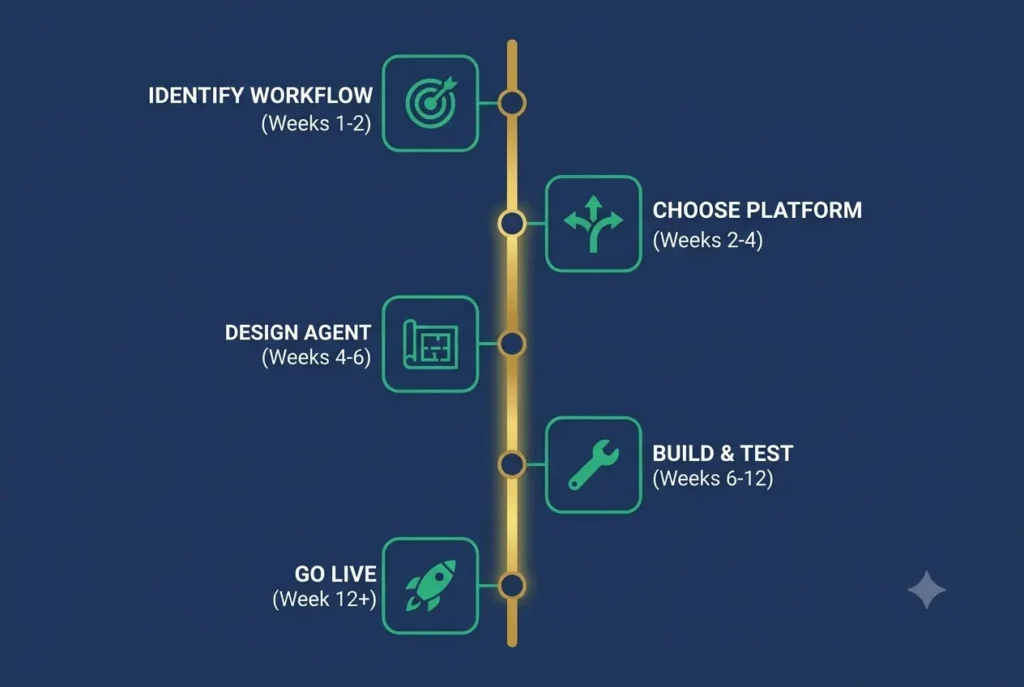
Step 1: Identify Your First Workflow (Weeks 1 to 2)
Pick one workflow. Not five. One. It should have three characteristics: high volume (at least 50 transactions per month), repetitive (the same types of decisions come up again and again), and variable (some unpredictability that rules-based automation can’t handle).
Don’t start with critical workflows. Don’t pick your payment processing or your access control system. Pick something important but not life-or-death. Sarah picked support ticket routing. A finance team might pick invoice processing. An HR team might pick resume screening. A good first workflow is one where mistakes have consequences but not catastrophic ones.
Step 2: Choose Build vs. Buy (Weeks 2 to 4)
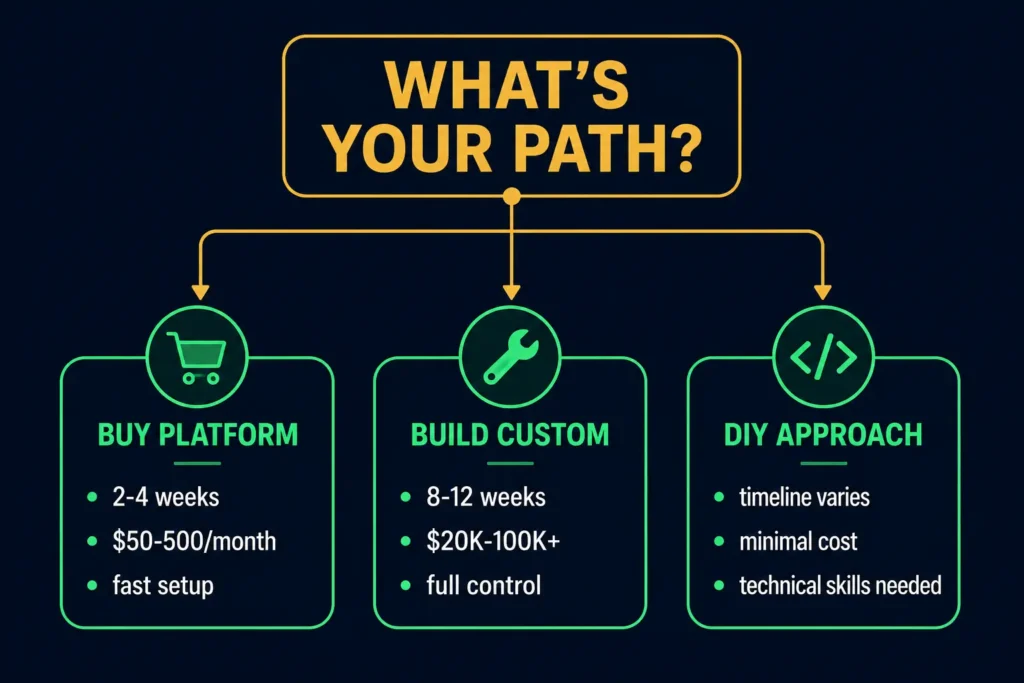
You have three options. Buy a platform like n8n or Make. Build a custom agent. Or use existing tools together in a hybrid approach.
Buying a platform is faster. n8n or Make can have you live in 2 to 4 weeks. You don’t have full control, but you don’t need to hire engineers. Cost is typically $50 to $500 per month.
Building custom means hiring someone who knows AI agent development. Full control, but 8 to 12 weeks timeline and $20,000 to $100,000 upfront cost. Only do this if your workflow is unique or volume is very high.
Hybrid approach: Start with a platform to test and prove the concept. If it works, invest in custom build for performance. If it doesn’t work, you’ve spent weeks instead of months learning that.
Step 3: Design the Agent Workflow (Weeks 4 to 6)
Define what triggers the agent. For Sarah, it’s a new support ticket. Define what the agent can access. Sarah’s agent can access the ticket system, customer database, knowledge base, and refund system. Define what the agent cannot do. It can’t permanently delete tickets or process refunds above $500. Define what success looks like. Sarah’s agent succeeds if it correctly routes 95 percent of tickets without escalation.
Step 4: Build and Test (Weeks 6 to 12)
Build the agent in your chosen platform or with your developer. Run it in a test environment for one week. Then run it parallel with your current process for four weeks. Measure everything: How many tickets does it handle? How many mistakes? How many escalations? Is the quality acceptable? Are people happy with the output?
During this phase, you’ll find issues. The agent misclassifies certain ticket types. It misses edge cases. It needs boundary adjustments. Fix these issues before going live.
Step 5: Go Live and Monitor (Weeks 12+)
Start with 10 percent of volume. Let the agent handle that volume completely while you monitor. Once you hit your quality targets consistently, move to 50 percent. Once that works, go full scale.
Cost Analysis and ROI by Use Case
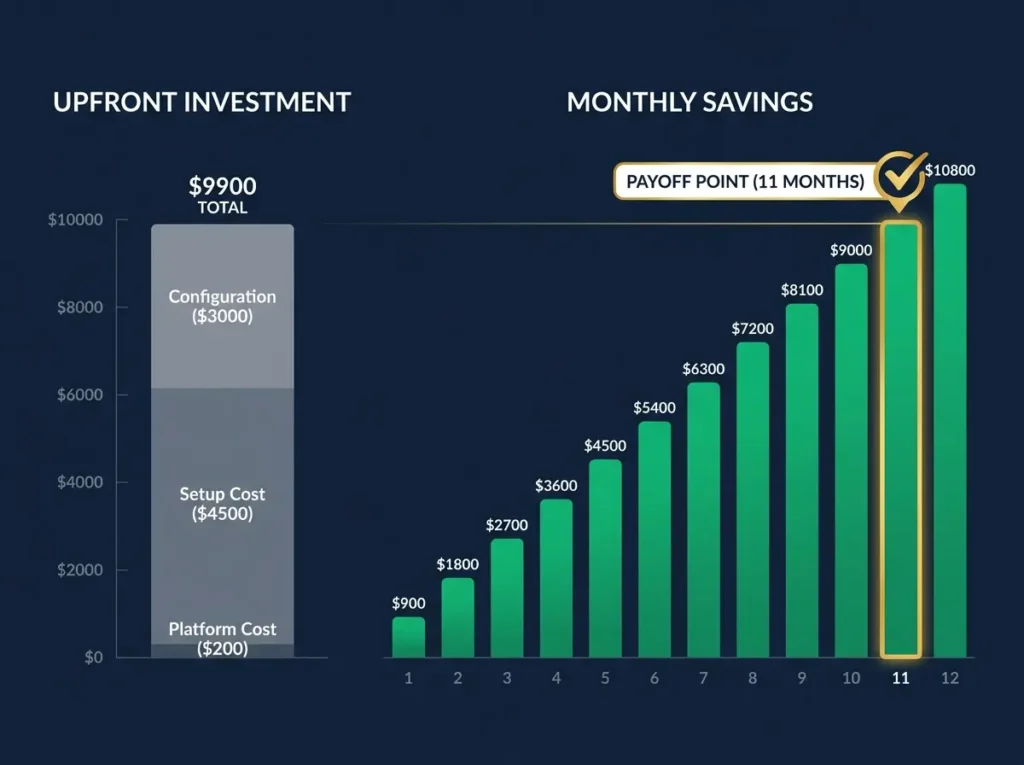
Let me be honest about costs. Many platforms are vague about pricing until you contact sales. But you should know what you’re getting into.
Understanding how AI and productivity tools that save time generate measurable ROI will help you calculate real payback timelines.
For a support team automation, here’s what Sarah actually spent:
Platform: n8n, $200 per month. Integration setup: 30 hours at $150 per hour (contractor) equals $4,500. Configuration and testing: 20 hours at $150 per hour equals $3,000. Total first-year cost: $200 x 12 plus $7,500 equals $9,900.
Hours saved: Sarah was spending 20 hours per month on routing. The agent handles 60 percent of that. That’s 12 hours per month freed up. At her loaded salary ($75 per hour), that’s $900 per month in productivity.
Payoff: $9,900 upfront divided by $900 per month equals 11 months. Actually, Sarah’s support team expanded to handle more tickets with the time freed, so the real ROI is blended with team capacity growth.
What You Might Not Expect
The upfront integration work takes longer than most people estimate. Sarah expected two weeks. It took five weeks because connecting to her legacy support system was messier than expected. Training your team on how to monitor the agent takes time. Tuning the agent’s decision logic takes iteration. You’ll find edge cases the agent didn’t handle right and need to adjust constraints. Budget for 20 to 30 percent more time than platforms promise.
For finance automation with a company processing 1,000 invoices per month, the math looks different. Build cost is $30,000. Monthly platform cost is $500. That’s $36,000 first-year cost. Savings are 28 hours per month at $50 per hour equals $1,400 per month or $16,800 per year. Payoff happens in year two but then saves over $16,000 per year indefinitely.
To understand the full business opportunity, explore 17 best AI tools to make money in 2026, which covers how organizations multiply revenue through automation and efficiency.
Top AI Agent Workflow Platforms
n8n: Best for Flexibility and Control
n8n is the best choice if you want flexibility and you have technical people. The visual builder lets you see everything. Integration library includes 3,000+ apps. You can run it on your own servers or use their cloud version. Cost is $50 to $500 per month depending on usage. Best for startups wanting control.
Make: Best for Ease of Use
Make (formerly Integromat) is best if your team isn’t technical. The visual design is simpler than n8n. Large app library. Transparent pricing starts at $100 per month. Strength is ease of use. Limitation is that advanced customization is harder. Best for non-technical teams and marketing automation workflows.
Zapier: Simplest Option
Zapier is the simplest but also the most limited for AI agents currently. It handles basic automation well but agentic capabilities are emerging. Cost starts at $25 per month. Easiest setup if you already use Zapier. Limitation is you’re constrained by their predefined workflows.
Custom Build: Full Control
Custom build means hiring a developer or exploring AI agent startups that specialize in building tailored agents. Cost is $20,000 to $100,000+ upfront and $2,000 to $5,000 per month ongoing. Full control. Can handle any complexity. Best if your workflow is unique or volume is massive and platform costs become prohibitive.
Risks, Limitations, and When NOT to Use AI Agents
The real limitations matter. Hallucination risk is real. An AI agent can make up information that sounds plausible but isn’t true. A support agent might tell a customer they have a refund credit that doesn’t exist. Data privacy is a real concern. What data are you sending to your agent platform? Make sure it complies with your data policies. Control loss happens. The agent makes autonomous decisions. You need audit trails and the ability to review what it did.
When Should You NOT Use AI Agents?
Don’t use them for critical, high-stakes decisions where errors are catastrophic. Medical diagnosis. Legal judgments. Financial approvals above a certain threshold. Don’t use them for tasks that are simple and fully predictable. If traditional automation already solves it, you don’t need agents. Don’t use them for low-volume work where setup cost doesn’t justify the benefit. If you process 10 invoices per month, an agent costs more than it saves. Don’t use them for highly regulated processes where compliance risk is too high. If every decision needs an audit trail for regulatory purposes, agent autonomy creates problems.
How to Mitigate Risks
To mitigate risks, implement human-in-the-loop controls. The agent suggests a refund. A human approves it. The agent routes a ticket. A human reviews the routing. As you gain confidence, you can remove the human approval for lower-risk decisions. Monitor agent decisions regularly. Build automated monitoring that flags anomalies. Set clear boundaries. Tell the agent exactly what it can and cannot do. Test extensively. Spend 4 to 8 weeks running parallel with your current process before going live.
Buy vs. Build vs. DIY Decision Framework
Here’s how to decide which path makes sense for your situation.
Buy a Platform If
Timeline matters (you need it live in 2 to 4 weeks). Your team isn’t technical and doesn’t have developer resources. Your budget is under $50,000. Your workflow is standard (most platforms have templates you can adapt).
Build Custom If
Your workflow is unique and no platform quite fits. Volume is very high and platform costs become prohibitive at scale. You have mission-critical requirements and need full control. Budget is available ($50,000+).
Use DIY Approach If
You already have automation tools and know how to use them. You want to experiment before committing to a platform. Your workflow is small and low-stakes. Your team has technical skills and wants to learn.
Most companies start by buying a platform, testing the concept, and then moving to custom build if the workflow proves high value. That’s the smart sequence.
FAQ: Your Questions About AI Agent Workflows
Q: How much smarter is AI agent automation than what I already use?
A: Not smarter. Different. Traditional automation executes rules faster than anyone could manually. AI agents adapt to new situations. If your current automation handles 100 percent of your use cases, you don’t need agents. If 20 percent of situations are variable or unexpected, agents help.
Q: Can I really let an agent make decisions without human approval?
A: Not at first. Start with human-in-the-loop. The agent suggests a decision and a human reviews it. As the agent proves itself accurate and consistent, you remove the human review for certain decision types. After four to eight weeks of monitoring, you might remove review for 80 percent of decisions while keeping it for high-risk ones.
Q: What’s the biggest mistake people make with AI agents?
A: Expecting the agent to be perfect on day one. They’re not. The agent will make mistakes. You’ll find edge cases it doesn’t handle right. You’ll realize you set bad boundaries. Budget for four to eight weeks of tuning.
Q: How long before the agent gets better at its job?
A: Weeks to months depending on volume and feedback. The agent needs 100 to 200 iterations before you see significant improvement. If you process 500 tickets per month, that’s three to five months. If you process 100, that’s longer.
Q: Should I build the agent myself or hire someone?
A: Simple workflow and you have a developer on staff: they can probably build a basic agent with a library like LangChain. Complex workflow: hire a specialist in agent development. Medium complexity: hire a contractor to build it, then your team maintains it.
Implementation Mistakes to Avoid
Mistake 1: Picking Too Complex a First Workflow
Don’t start with your critical payment processing system. Start with something important but forgiving.
Mistake 2: Not Setting Clear Boundaries and Constraints
The agent needs to know exactly what it can and cannot do. Vague instructions lead to unexpected behavior.
Mistake 3: Expecting Perfection on Day One
The agent will make mistakes. You’ll find edge cases. This is normal.
Mistake 4: Not Measuring Results Before and After
How much time is actually saved? How many mistakes? What’s the quality? Measure this so you know if the agent is working.
Comparing your baseline productivity before implementation against post-deployment metrics is critical. Review 100 ways to make money with AI for insights on tracking measurable business improvements.
Mistake 5: Removing Human Oversight Too Soon
Keep a human in the loop for at least four to eight weeks. Even when the agent is 95 percent accurate, that 5 percent error rate on 500 transactions per month is 25 mistakes. Keep review in place until you’re comfortable with the error rate.
Key Takeaways
- AI agents workflow automation is fundamentally different from RPA or traditional automation. The agent reads, reasons, decides, and acts. It adapts to variable situations.
- The strength is handling complexity with variability. If your process is simple and predictable, traditional automation works better. If it’s complex and always changing, agents shine.
- Start with your highest-volume, highest-variability workflow. This gives you the most obvious ROI and the quickest payoff.
- Platform or custom build is a real trade-off. Platform is 2 to 4 weeks and $50 to $500 per month. Custom is 8 to 12 weeks and $20,000 to $100,000 upfront.
- Expect 6 to 10 weeks until payoff. You’re not cutting months of work. You’re cutting weeks of work per month, which compounds.
- Human oversight is critical for at least the first 4 to 8 weeks. The agent needs monitoring. It will make mistakes.
- The biggest opportunity is workflows you currently can’t automate because they’re too variable for traditional rules.
- The biggest risk is losing control if you don’t set clear boundaries.
- Agentic workflows aren’t a future technology. They’re live now. Companies are using them in production today.
To expand your understanding of emerging agent technologies and business applications, explore AI tools for business automation, which covers how modern enterprises leverage intelligent automation.
- The founder who automates their first workflow before competitors do gains a competitive advantage. Focus matters more than being perfect.
Your Next Step
Pick one workflow. Not five, one. Define it precisely. “Our support team spends 20 hours per month sorting and routing tickets.”
Test with a platform. n8n or Make. Two to four weeks. Low cost. See if the agent actually saves time and handles the workflow correctly.
Measure results. Before and after. Time saved. Error rate. Customer satisfaction if applicable.
Decide. If the pilot works, expand to the next workflow or invest in custom build. If it doesn’t work, you’ve spent weeks learning that, not months.
That’s it. Don’t overthink it. Just start.








Leave a Reply