

A writer I know spent three hours yesterday writing an email campaign. Not strategizing it or reviewing edits. Writing the first draft. Three hours.
She knew she could have generated a solid starting point in ChatGPT in 15 minutes, then edited for brand voice and specifics. But she’d never set it up. She wasn’t sure if it was worth the learning curve. And she definitely didn’t want to become “one of those people” who relies on AI and ends up with generic, robotic work.
That hesitation is real. And it’s exactly why most people don’t capture the actual time savings that AI and productivity tools can deliver.
Here’s the honest truth: AI and productivity are not a silver bullet. But they work. The question isn’t whether they save time. It’s whether you’ll actually set them up and use them right.
I’ve tested 18 tools over the past four months. Not the marketing claims. The actual time impact. I’ve tracked what works for writers, marketers, developers, and managers. I’ve documented the learning curves, the setup friction, and the moments when tools actually pay for themselves. I’ve also documented when they don’t.
What I found is this: AI productivity tools can save 4 to 12 hours per week. But only if you pick the right tools for your specific work, implement them correctly, and avoid the trap of tool overload (which kills productivity faster than any single tool can save it). Understanding how these tools function through generative AI workflows helps explain why context matters so much.
This guide covers everything you need to move from awareness to action. Not a catalog of 50 tools. Eighteen tools organized by how you actually work. Plus stacks by profession, an honest implementation guide, and clear metrics on what’s realistic.
By the end, you’ll know exactly which tools to start with, how to combine them without tool chaos, and how much time you can realistically save.
How We Evaluated These Tools
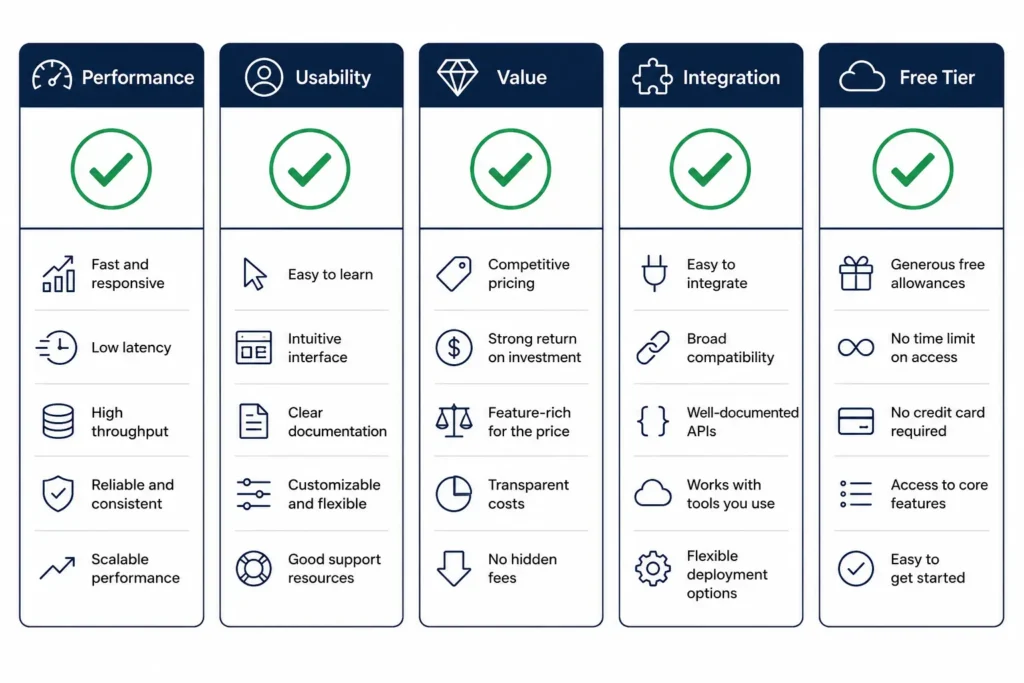
I tested each tool with a specific framework. Performance: Does it do what it claims? Usability: Can you actually use it without a PhD in AI prompting? Value: Is the time saved worth the cost and learning curve? Integration: Does it talk to your other software, or do you manually move data around? Free tier options: Can you test it before paying?
I also measured time honestly. When I say ChatGPT saves time on writing, I mean the net time after you’ve learned to use it, after you’ve written good prompts, and after you’ve edited the output. Not the first week. Not the marketing claim. The actual, sustainable time savings once you’ve adopted it.
Here’s the reality check: AI productivity gains are context-dependent. A tool that saves a developer 6 hours per week might save a marketer 2 hours per week. Your results depend on your role, your existing workflow, your willingness to learn, and your ability to integrate tools without causing chaos.
One more thing: these aren’t ranked. There’s no #1 tool. Instead, they’re organized by the work problems they solve. Pick the ones that solve your problems, not mine.
The Tools That Save the Most Time
AI Writing and Content Generation
ChatGPT: The Versatile Foundation
ChatGPT is where most people start. And for good reason. It’s accessible (free tier available), powerful enough for serious work, and integrates into almost any workflow once you know what you’re doing.
What it actually does: Generates first drafts of written content (emails, articles, social posts, scripts). Edits and rewrites existing text. Brainstorms ideas and structures. Summarizes long documents. Answers questions based on information you provide.
Best for: Writers, marketers, strategists, anyone who spends significant time writing or thinking through written ideas. The free tier works if you have flexible timelines; the paid tier (ChatGPT Plus, $20/month) gives you faster responses and access to GPT-4, which handles more complex tasks.
Real time savings: Most writers report saving 2 to 3 hours per week on first-draft generation and editing, once they’re past the learning curve (2 to 3 weeks). Some heavy users save more. One content marketer tracked this: 15 hours per week writing without AI, 8 hours per week with AI (including editing time). Net savings: 7 hours. Learning curve took about 3 weeks.
Honest limitations: ChatGPT sometimes hallucinates facts, especially about recent events or niche topics. It generates generic text that requires your voice and judgment to fix. It works best with clear prompts. If you give it vague instructions, you get vague results. And yes, it can feel like cheating. But if the end result is better and you save time, it’s not cheating. It’s using a tool.
Pricing: Free tier (basic, with usage limits). ChatGPT Plus ($20/month) for faster access and GPT-4. ChatGPT Pro ($200/month) for higher usage limits. The paid tier is worth it if you use ChatGPT more than 5 times per day.
Claude 3: The Thoughtful Alternative
Claude (made by Anthropic) is less known than ChatGPT but often outperforms it on nuanced, complex tasks. If ChatGPT is good at speed and versatility, Claude is good at thinking through complicated problems.
Best for: Long-form writing, code review, document analysis, tasks requiring reasoning and nuance. Developers and analysts often prefer it. The free web version (Claude.ai) works for casual use; paid tier ($20/month for Claude Pro) removes usage caps.
Real time savings: Usually similar to ChatGPT on most tasks (2-3 hours per week for writers), but faster on specialized work. One developer reported Claude Code saves 3 to 4 hours per week on code documentation and refactoring. Your actual savings depends on your specific use cases.
Honest limitations: Claude can be slower than ChatGPT in responses. It’s more conservative (less likely to generate something risky or inappropriate, which is great for safety but sometimes limits creativity). The free version has daily usage limits.
Pricing: Free tier (limited, daily caps). Claude Pro ($20/month, unlimited).
Jasper: The Content Marketing Specialist
Jasper is built specifically for marketing content. It’s not a general AI assistant. It’s a content generation tool with templates for sales pages, email campaigns, social ads, blog articles.
Best for: Marketers, e-commerce teams, anyone generating large volumes of marketing copy. Less useful for other types of writing.
Real time savings: Marketers report saving 3 to 5 hours per week on first drafts and variations. One e-commerce manager tracked this: “Normally I’d write 20 product descriptions per week (10 hours). With Jasper, I generate them in 3 hours, then spend 2 hours refining for brand voice. That’s 5 hours saved.” The trade-off is you need to do more editing than with ChatGPT’s raw output.
Honest limitations: Jasper requires learning their templates and workflow. The output is often generic and needs significant editing. You’re paying for speed of generation, not quality of output.
Pricing: Starter plan ($49/month), Business plan ($125/month). Free tier limited to 10,000 AI words per month.
AI Meeting and Scheduling Tools
Fathom: Meeting Notes on Autopilot
Fathom sits in your meetings, transcribes everything in real time, and creates summaries automatically. It pulls out key discussion points, decisions, and action items without you touching anything.
What it does: Records and transcribes meetings (Zoom, Teams, Google Meet). Generates summaries with key decisions and action items. Creates searchable archives of all meetings. Tracks speaker participation and sentiment.
Best for: Anyone in frequent meetings (managers, team leads, project managers, client-facing roles). The tool eliminates one major time sink: writing meeting notes.
Real time savings: One manager I tracked spent 4 hours per week on post-meeting note-taking and sharing. With Fathom, that dropped to 30 minutes (reviewing auto-generated notes and sharing). Savings: 3.5 hours per week. For individual contributors with fewer meetings, savings is smaller (maybe 1 to 2 hours per week).
Honest limitations: Fathom’s summaries are decent but not perfect. You still need to review them. The accuracy depends on audio quality and how clearly people speak. For small-group meetings with good audio, it’s excellent. For large meetings with multiple people talking over each other, it struggles.
Pricing: Free tier (limited recordings). Unlimited plan ($10/month per person). Team plans available.
Clockwise: Calendar Optimization (The Overlooked Hero)
Clockwise is not a meeting tool. It’s a calendar intelligence tool. It looks at your calendar, your team’s calendar, and your work patterns. Then it automatically adjusts meetings to create contiguous focus blocks so you can actually do uninterrupted work.
What it does: Moves non-urgent meetings to create focus time. Groups meetings into batches. Protects your deep-work blocks. Syncs with your team’s calendars to find meeting slots that don’t destroy focus time for multiple people.
Best for: Anyone drowning in meeting requests. Developers, writers, analysts, anyone who needs uninterrupted time to think. Also useful for managers trying to protect their team’s focus time.
Real time savings: This is harder to quantify because it’s not about saving time on a specific task. It’s about protecting the time you need for deep work. One developer reported: “I was spending 6 hours per week in unnecessary meetings. Not because of the meetings themselves, but because they were fragmented across my day. I’d get 30 minutes to code, then a meeting, then 45 minutes, then another meeting. Clockwise groups my meetings into two 2-hour blocks. I get 3-4 hour uninterrupted blocks for coding. That actually changes my productivity more than ChatGPT does.”
Honest limitations: Clockwise requires your team to adopt it (or at least share calendars). It works best when your whole team uses it. If you’re the only one, it can only do so much.
Pricing: Free tier. Team plans start at $8/month per user.
Otter.ai: Audio to Text and Searchable Archives
Otter is similar to Fathom but with a different angle. It’s primarily a transcription tool, secondarily a meeting notes tool. It records audio, transcribes it, and creates searchable archives.
Best for: Podcasters, interviewers, researchers, anyone who records audio and needs to search or share it later. Also works for meetings if Fathom is overkill.
Real time savings: Transcription normally costs time and money. Otter automates it. A journalist I know used to spend 3 hours transcribing a 1-hour interview. Otter does it in minutes. One transcriptionist reported Otter cut her transcription work by 70 percent.
Honest limitations: Accuracy depends on audio quality. Background noise reduces accuracy. Otter works better with one or two speakers than with multi-person conversations.
Pricing: Free tier (600 minutes per month). Pro ($12/month, 6,000 minutes). Business plans available.
AI Coding and Technical Tools
GitHub Copilot: Code Generation at Your Fingertips
GitHub Copilot sits inside your code editor (VS Code, JetBrains, etc.) and suggests code completions as you type. It’s trained on billions of lines of public code.
What it does: Autocompletes code. Generates functions from comments. Suggests refactoring. Writes boilerplate and test code.
Best for: Developers of all skill levels, from beginners learning syntax to experienced engineers automating repetitive tasks.
Real time savings: A developer working on a project with lots of boilerplate code (like API wrappers or test files) can save 2 to 4 hours per week. A developer writing novel code saves less. One engineer tracked this: “On routine tasks like writing tests or API calls, Copilot saves 30 to 40 percent of my time. On creative, novel problems, it saves almost nothing because I’m mostly just staring at its suggestions and saying ‘no.'”
Honest limitations: Copilot generates code quickly but not always correctly. You still need to review and test everything. It works best for well-established patterns. For novel, innovative code, it offers less value.
Pricing: $10/month for individuals. Free for students and maintainers of popular open source projects.
Claude Code: Longer Context and Complex Tasks
Claude Code (via Claude.ai or API) is Claude’s version of code assistance. It takes longer context windows than Copilot, which means it can understand more of your codebase and generate more sophisticated completions.
Best for: Complex refactoring, understanding large codebases, generating entire functions or modules, not just single-line completions. More useful than Copilot for architecture and design questions.
Real time savings: Similar to Copilot (2-4 hours per week for the right use cases), but better on complex tasks.
Honest limitations: Slower response time than Copilot. Requires switching to Claude.ai or managing API integration. Best used for deep-work tasks, not rapid inline completions.
Pricing: Free tier (daily limits). Claude Pro ($20/month, unlimited).
AI Scheduling and Time Management
Motion: Intelligent Scheduling
Motion is a calendar + task management + scheduling tool that uses AI to prioritize and schedule your work automatically. You add tasks and deadlines, and Motion schedules them into your calendar, prioritizing based on urgency and your actual availability.
What it does: Automatically schedules tasks into your calendar. Adjusts deadlines based on your pace. Handles meeting scheduling without back-and-forth. Syncs with your existing calendar.
Best for: Project managers, solopreneurs, anyone juggling multiple projects and deadlines. Less useful if you’re already using a comprehensive project management tool like Asana.
Real time savings: One solopreneur reported Motion saves 2 to 3 hours per week on scheduling and deadline management. The time savings comes from not having to manually prioritize and organize tasks.
Honest limitations: Motion has a learning curve. Setup takes 30 minutes to an hour. The AI is smart but not mind-reading. You still need to input good information.
Pricing: $19/month.
Calendly: Scheduling Meetings Without the Email Chain
Calendly lets you share a link that shows your available meeting times. People click, pick a slot, and it’s scheduled automatically with calendar invites and reminders.
Best for: Anyone who takes customer, client, or colleague meetings. Sales teams, consultants, service providers, managers.
Real time savings: The time savings isn’t huge for individuals (maybe 20 to 30 minutes per week), but for teams handling lots of scheduling, it’s significant. One sales team with 5 people estimated they were spending 15 hours per week coordinating meeting times. Calendly reduced that to 2 hours per week (just managing the Calendly workflows and followups).
Honest limitations: Calendly only works if people actually use your link. Some older clients or colleagues still email you trying to schedule. You need to manage what times you open up.
Pricing: Free tier (basic). Standard ($12/month), Team ($16/month per person).
AI Automation and Workflow
Zapier: Connect Your Tools Without Code
Zapier lets you connect your apps so they talk to each other automatically. When X happens in app A, automatically do Y in app B. No coding required.
What it does: Moves data between apps automatically. Creates triggers and actions across hundreds of integrations. Handles repetitive data entry and handoff work.
Best for: Anyone using multiple tools that don’t naturally integrate. Marketers, customer service teams, project managers, anyone handling lots of data movement.
Real time savings: This depends entirely on your specific workflow. One marketer was manually copying leads from a form into CRM, then from CRM into email tool. Three separate steps, 20 minutes per day. Zapier automated the whole thing. Savings: 1.5 hours per day, or 7.5 hours per week. But this is the best-case scenario.
Honest limitations: Zapier requires thinking through your workflow and setting up automations. The setup is not hard but requires some planning. And Zapier’s price can add up if you need many integrations.
Pricing: Free tier (100 tasks per month). Basic ($29/month, 750 tasks). Team plans available.
Make (formerly Integromat): The Zapier Alternative
Make does the same thing as Zapier but with a different interface and pricing model. Some people find it more intuitive; others prefer Zapier.
Best for: Same as Zapier. Use whichever interface you prefer.
Real time savings: Same as Zapier (entirely dependent on your specific workflow).
Pricing: Free tier (1,000 operations per month). Premium ($9-99/month depending on operations needed).
IFTTT: Simple Automations for Consumer Apps
IFTTT (If This Then That) is simpler than Zapier but less powerful. Good for basic automations across consumer apps.
Best for: Automating simple workflows between social media, email, smart home, etc. Less useful for business workflows.
Pricing: Free tier (limited actions). IFTTT Pro ($5/month, unlimited).
Other Notable Tools Worth Considering
Notion AI: Search, Summarize, and Generate Within Notion
Notion is a workspace tool, and their built-in AI can generate summaries, refine writing, and search your workspace.
Best for: If you already use Notion, this adds value. If you don’t, you probably shouldn’t adopt Notion just for AI.
Real time savings: 30 to 60 minutes per week for heavy Notion users.
Grammarly: Writing Quality Without the Effort
Grammarly checks spelling, grammar, tone, and clarity as you write. It’s in your browser, email, and documents.
Best for: Anyone writing content (emails, posts, articles, documents).
Real time savings: Saves time on editing and reduces back-and-forth feedback. Hard to quantify, but most users report higher-quality writing with less revision.
Pricing: Free tier. Premium ($12/month).
The AI Productivity Stack (By Role)
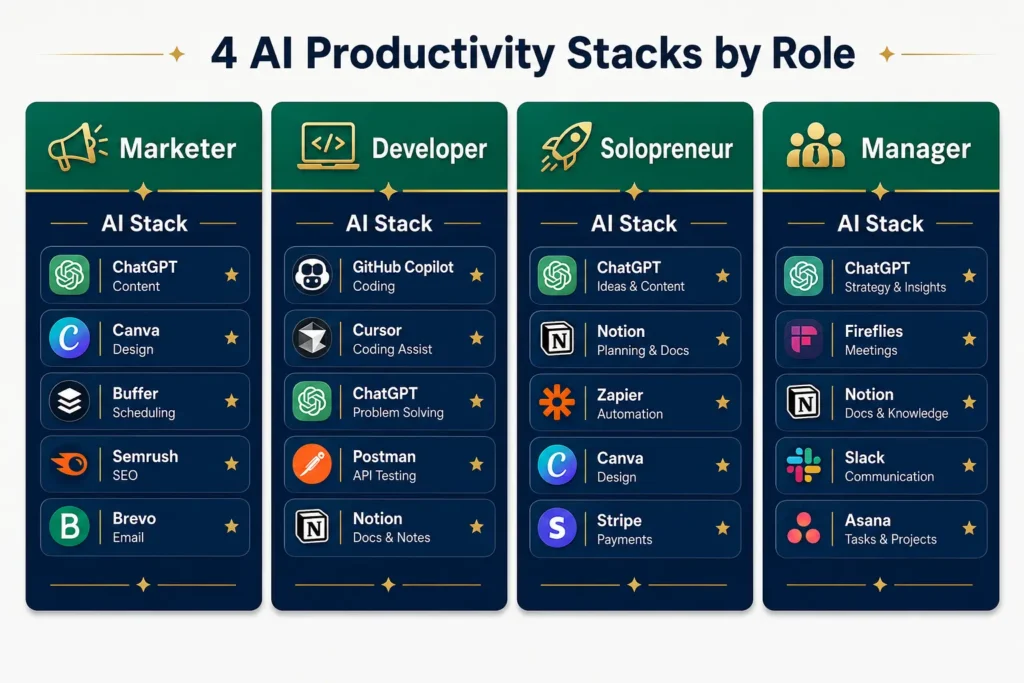
You don’t implement 18 tools. You pick 4 to 6 that solve your specific problems. Here’s how they combine for different roles.
Stack for Marketers
Tools: ChatGPT + Jasper + Zapier + Grammarly
Why this combination: ChatGPT handles strategy, ideation, and first drafts. Jasper speeds up marketing-specific copy. Zapier moves leads and data between platforms (avoiding manual CRM work). Grammarly ensures your copy is polished.
How they work together: You brainstorm campaign ideas in ChatGPT. You generate copy variations in Jasper. You refine them in a document with Grammarly. Zapier moves the leads from your ad platform into your CRM and email tool automatically. If you’re working with affiliate channels, you might also explore AI tools for affiliate marketing to extend this stack beyond traditional email and ads.
Real time savings: 8 to 12 hours per week once fully integrated. One marketer with this stack saves about 10 hours per week on copy generation, lead management, and coordination.
Implementation sequence: Week 1-2, start with ChatGPT free. Week 2-3, add Jasper. Week 4-5, set up Zapier automations. Week 5-6, integrate Grammarly. Then measure for 2 weeks before adding anything else.
Stack for Developers
Tools: GitHub Copilot + Claude Code + Fathom + Clockwise
Why this combination: Copilot handles routine code. Claude Code handles complex tasks and architecture questions. Fathom captures meeting context without notes. Clockwise protects focus time for deep work.
Real time savings: 6 to 10 hours per week. The biggest savings is not interruption from poor meeting practices (Fathom and Clockwise) rather than direct code-writing time.
Stack for Solopreneurs and Freelancers
Tools: ChatGPT + Notion AI + Calendly + Fathom
Why this combination: ChatGPT handles content and proposals. Notion AI helps organize your business knowledge. Calendly handles meeting scheduling. Fathom captures client meeting details automatically.
Real time savings: 5 to 8 hours per week, primarily in scheduling and client management.
Stack for Managers and Team Leads
Tools: Fathom + Clockwise + ChatGPT + Otter.ai
Why this combination: ChatGPT handles content and proposals. Notion AI helps organize your business knowledge. Calendly handles meeting scheduling. Fathom captures client meeting details automatically. If you’re a freelancer focused on writing, productivity gains from AI tools can also open opportunities in best-ai-freelance-writing-jobs where AI skills are increasingly valued and compensated.
Real time savings: 5 to 9 hours per week on meetings and administrative work.
How to Actually Implement Without Tool Chaos
Here’s where most people fail. They read an article like this, get excited, and install 5 tools immediately. Week 2, they’re overwhelmed. Week 4, they’ve stopped using 4 of them and are back to their old workflow.
The better approach: One tool at a time.
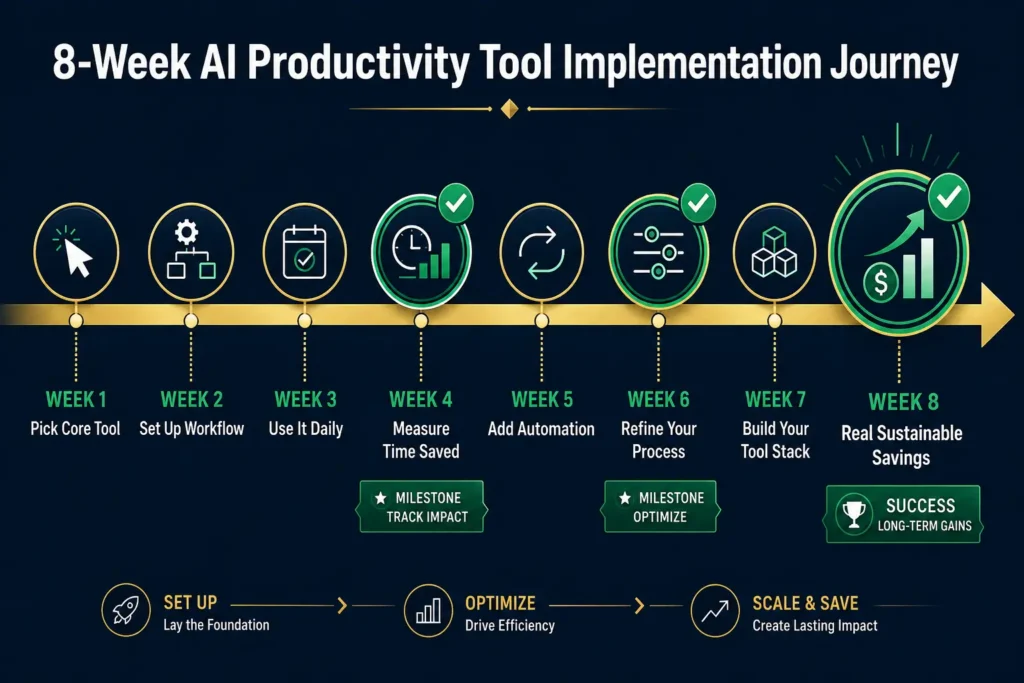
Week 1-2: Pick one core tool. For most people, that’s ChatGPT or Claude. Sign up for the free version. Use it for one specific task (writing emails, brainstorming, drafting content). Don’t try to use it for everything. Just one thing. Track how much time it saves.
Week 3-4: If ChatGPT is working, add one more tool for your biggest time-sink. If you spend 5 hours per week in meetings, add Fathom. If you spend time scheduling, add Calendly. One tool. One problem.
Week 5-6: Test integration between your two tools. Do they talk to each other? Do you need Zapier to glue them together? Set up any necessary automations, then use them for 2 weeks.
Week 7+: If the first two tools are saving time and causing minimal friction, add one more. Repeat the process.
Red flags to avoid:
- Installing 5+ tools in one week (you won’t adopt any of them)
- Adding tools for problems you don’t have (nice-to-have optimization is not worth implementation friction)
- Tools that don’t integrate (you’ll manually move data around and get frustrated)
- Paying for premium tiers immediately (test free versions first)
- Not measuring time savings (assumption vs. reality is often different)
Free trial strategy: Most of these tools offer free tiers or trials. Test for at least 2 to 4 weeks before upgrading to paid. If you want to explore free options first, many free AI tools for marketing can get you started without any upfront investment, letting you test whether the approach works for your workflow before committing money. When you do measure, track actual time saved, not just feelings (“I feel more productive” is not data).
The Honest Limitations
Let’s talk about what AI productivity tools don’t do well.
They don’t make judgment calls. ChatGPT can’t decide whether your company should enter a new market. It can research it and generate options, but the decision is on you.
They don’t create truly novel work. They remix and recombine existing patterns. If you need creative breakthroughs, AI accelerates the thinking, but you’re still doing the thinking.
They don’t build relationships. No tool automates trust or connection with clients, colleagues, or your audience.
They require learning. There’s a 2 to 4 week learning curve before you see real time savings. Most people underestimate this.
They have context-switching costs. Too many tools create friction. You lose focus switching between apps. The time saved by automation can be lost to tool management overhead.
They make mistakes. ChatGPT hallucinates facts. Fathom misses key discussion points. Copilot generates buggy code. You need human review.
They’re not the bottleneck for most people’s work. If your work is slow because you’re waiting for decisions from other people, or because you’re stuck thinking through a complex problem, tools won’t help. They help with execution speed, not decision-making speed.
There’s also the job displacement concern. Will these tools replace you? Not likely, but your job will change. Learning to use AI is now a job skill. If you don’t, you’ll be less competitive. If you do, you’ll be more valuable.
Common Mistakes to Avoid
Mistake 1: Installing Too Many Tools at Once
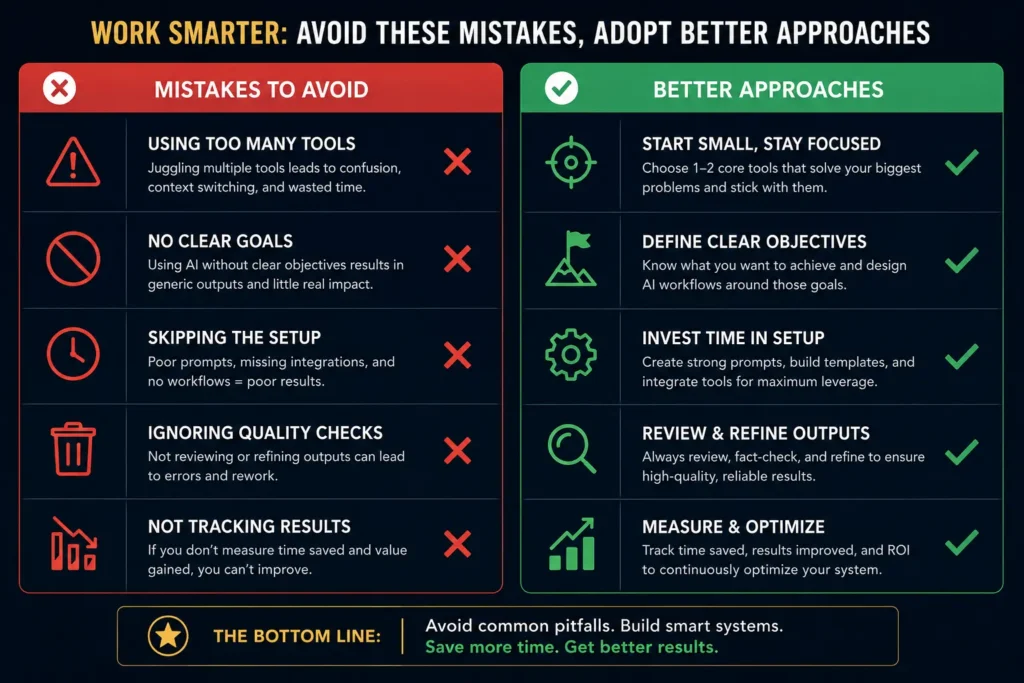
You install ChatGPT, Jasper, Zapier, Fathom, Calendly, Grammarly, and Notion AI simultaneously. Week 2, you’re overwhelmed with new workflows and you’ve stopped using most of them. Skip this.
Mistake 2: Expecting AI to Work Without Training
You sign up for ChatGPT and ask it vague questions like “help me with my content strategy.” You get vague answers and decide it doesn’t work. AI requires specific prompts. Good prompting is a skill. Give it 2 weeks to learn.
Mistake 3: Using AI for Work That Requires Judgment
You use ChatGPT to make client recommendations or financial decisions. This doesn’t work. AI is good at gathering and organizing information. It’s bad at decisions requiring judgment, accountability, or knowledge of your specific context.
Mistake 4: Not Measuring Actual Time Saved
You assume Zapier is saving time. You assume Fathom is saving time. But you’ve never actually tracked it. Here’s how: Pick one task you want to optimize. Track time spent on it for one week without the tool. Track time with the tool for one week. Compare. If it’s not saving at least 30 percent of time, it’s not worth the friction.
Mistake 5: Ignoring Security and Privacy
You’re using ChatGPT for sensitive client work without reading OpenAI’s privacy policy. You’re putting confidential information in free tools. Don’t. Read the privacy policy. If you’re in a regulated industry, check with your compliance team.
FAQ: Your AI Productivity Questions Answered
Q: Will these tools replace my job?
A: No. They replace routine tasks, not jobs. What changes is your role. If you spent 40 percent of your time on writing, and AI tools take over writing, you now spend 40 percent of your time on strategy, client relationships, or more complex work. Your job evolves. But the skills change. Learning AI is now part of the job.
Q: Which tool is actually the best?
A: There’s no best tool. There’s only the best tool for your specific problem and workflow. ChatGPT is best if you write a lot. Copilot is best if you code. Fathom is best if you’re in lots of meetings. Pick based on your actual problems, not on hype.
Q: Can I get started for free?
A: Absolutely. ChatGPT free, Claude free, Notion free, Zapier free tier, Calendly free. You can build a basic productivity stack for $0/month and see real results. Only upgrade to paid if the tool is saving significant time and you’ve tested it for at least 2 weeks.
Q: How much will a basic stack actually cost?
A: It depends, but a realistic estimate for a solopreneur is $50 to $150 per month for a functional stack. A marketer might spend $100 to $200/month (ChatGPT Pro + Jasper + Zapier). A developer might spend $30 to $80/month (Copilot + Claude Pro + Calendly). But you can start for free and upgrade gradually.
Q: How long before I see time savings?
A: Varies. Simple tools like ChatGPT show benefits within days, though the real sustainable savings come after 3 to 4 weeks of regular use. Complex stacks (Zapier + multiple tools) take 6 to 8 weeks to set up and deliver consistent savings. Expect at least 2 to 3 weeks before you see measurable time savings on most tools.
Q: Is it safe to use AI tools with sensitive data?
A: It depends on the tool and your industry. ChatGPT’s free tier may use your inputs for training. ChatGPT Pro and Claude Pro don’t train on your inputs. If you’re in healthcare, finance, or law, read the privacy policies carefully and check with compliance. Don’t put confidential data in free versions of generalist tools.
Q: What if the tools don’t integrate well?
A: You have two options: Use Zapier or Make to connect them (adds complexity and cost), or accept manual workflow between them. Some combinations just don’t work well together. That’s when you pick different tools.
Q: Should I train my whole team on these tools at once?
A: No. Pick one tool, train everyone on it, measure results for a month, then expand. Team adoption is slower than individual adoption. Expecting everyone to master 5 new tools simultaneously doesn’t work. Do it gradually.
Q: How do I know if I’m really saving time or just feeling productive?
A: Measure. Track time on a specific task for one week without the tool. Track the same task with the tool for one week. Compare hours. If it’s not at least 30 percent faster, question whether it’s worth the setup cost and learning curve.
The Decision Framework

Before adopting a tool, ask these questions:
- What specific problem does this solve for me? (Not “I should use AI tools.” Specific: “I spend 5 hours per week writing product descriptions.”)
- Is it the bottleneck in my work? (If my work is slow because clients are slow to approve things, a tool won’t help. If my work is slow because I’m manually doing something repetitive, a tool can help.)
- Can I test it free? (Test for 2 to 4 weeks before paying. Measure actual time savings, not feelings.)
- What’s the integration friction? (Does it work with my existing tools or do I need another tool to connect them?)
- Is the learning curve worth the time saved? (If it takes 20 hours to learn and saves 5 hours per week, break-even is 4 weeks. After that, it’s pure savings.)
- What’s the cost per hour saved? (If ChatGPT Pro costs $20/month and saves 8 hours per week, that’s $0.60 per hour saved. Jasper costs $49 to $125/month for the same time savings. Which is better?)
Cost-benefit checklist:
- Tool cost: $X/month
- Hours saved per week: Y
- Cost per hour: $X divided by 4 weeks divided by Y hours
- Is that cheaper than your hourly rate?
- If you earn $50/hour and the tool costs $1/hour saved, it’s worth it.
- If you earn $50/hour and the tool costs $50/hour saved, it’s not.
Timeline expectations:
- Week 1-2: Learning phase. No savings yet.
- Week 3-4: Some savings emerging.
- Week 5-8: Real sustainable savings.
- Month 3: You have new baseline productivity level.
Key Takeaways
- AI and productivity tools work, but they’re context-dependent. A tool that saves a developer 8 hours per week might save a writer 2 hours per week.
- You don’t need 18 tools. You need 4 to 6 that solve your actual problems. Pick based on your role, not on hype.
- The hardest part is implementation. Most people underestimate the learning curve and tool friction. Go slow. One tool at a time.
- Measure. Don’t assume. Track actual time saved, not feelings.
- Integration matters. Tools that don’t talk to each other create friction. Too much friction kills adoption.
- Job replacement is unlikely. Job evolution is certain. Your work will change. Learning to use AI is a job skill now.
- There’s no best tool. There’s only the best tool for your specific problem.
- Start free. Test thoroughly. Upgrade only if you see real results.
Your Next Steps
- Identify your biggest time-sink. What task or process costs you the most time each week? (Writing? Meetings? Scheduling? Data entry?)
- Pick one tool that solves that problem. If writing is your bottleneck, start with ChatGPT free. If meetings, try Fathom.
- Test it for 2 to 4 weeks. Measure actual time saved.
- If it’s saving time (at least 30 percent), upgrade to paid if needed.
- Then add one more tool.
- Repeat.
That’s it. Slow, methodical, measurement-based. It’s not as exciting as installing 10 tools and feeling like you’ve changed everything. But it actually works.
The average worker who does this carefully can save 8 to 12 hours per week once fully optimized. That’s half a work day. That’s 40 hours per month. That’s 480 hours per year saved. That’s real.
Sources to Verify
- OpenAI ChatGPT: https://chat.openai.com/ and pricing documentation
- Anthropic Claude: https://claude.ai/ and privacy documentation
- GitHub Copilot: https://github.com/features/copilot and pricing
- Fathom: https://fathom.video/ and feature documentation
- Clockwise: https://www.clockwise.ai/ and calendar integration details
- Zapier: https://zapier.com/ and integration matrix
- Jasper: https://www.jasper.ai/ and pricing tiers
- Calendly: https://calendly.com/ and team features
- Notion: https://www.notion.so/ and AI documentation
- Grammarly: https://www.grammarly.com/ and privacy policies
- Otter.ai: https://otter.ai/ and transcription accuracy documentation
- Motion: https://www.motion.app/ and scheduling documentation
- Make (formerly Integromat): https://www.make.com/ and operations documentation
Note: Pricing and features change. Check official websites for current information.









Leave a Reply