

Introduction: The Marketing Budget Crisis That AI Actually Solves
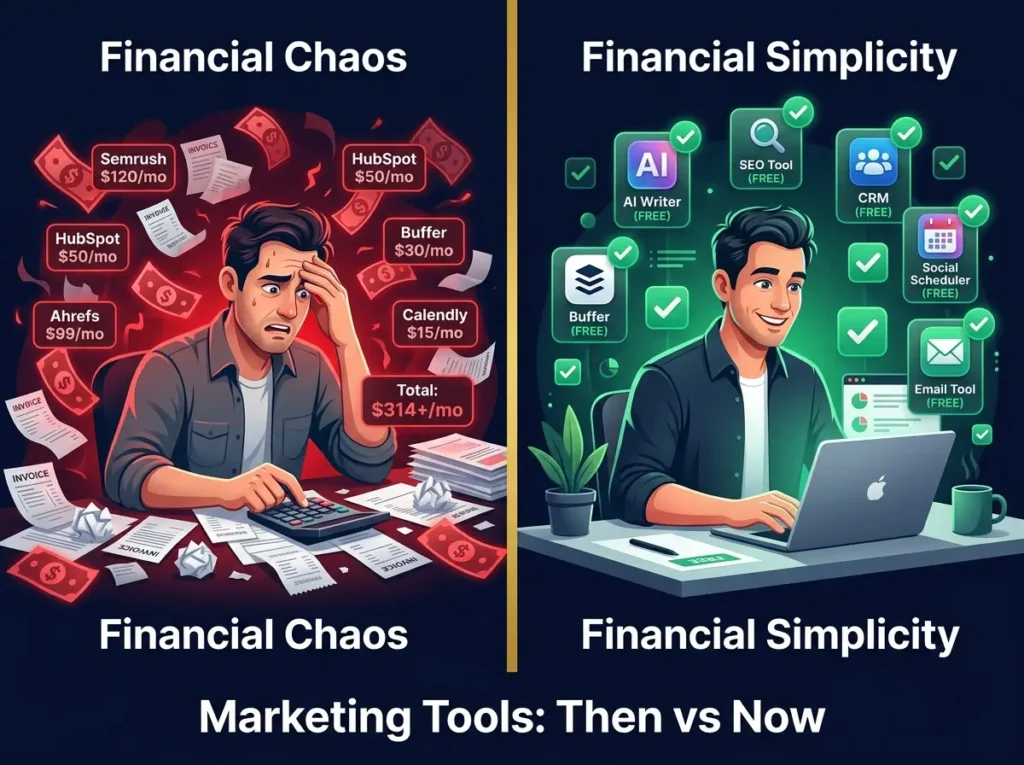
Here’s what I’ve been hearing from marketers lately: “My software bill is larger than my ad spend.”
It’s not an exaggeration. A small business owner told me last month that she was paying $847 per month for marketing tools. Her team consisted of herself and one part-time contractor. She had a blog, an email list of 5,000 people, and a Facebook page. Yet somehow, she was paying nearly nine hundred dollars monthly just for software.
When I asked which tools she actually used consistently, she couldn’t name more than five.
This is the state of marketing in 2026. We’ve created a tooling industry that makes more money than the actual marketers do.
But something shifted in the last couple years. Free AI tools for Marketing became genuinely useful.
I’m not talking about limited free trials. I’m talking about real, sustainable free plans that let you do actual marketing work. Tools that were built by major companies to stay competitive. Tools that have been improved so much that the free version is often better than the paid version of smaller competitors.
If you’re a solopreneur, a freelancer, a blogger, someone starting their first business, or a small team trying to maximize your limited budget, you can now build a legitimate marketing operation using entirely free tools.
This guide covers 40+ free AI marketing tools I’ve actually tested. Not theoretical tools. Not tools that technically have a free tier but make it impossible to work. Real tools that real marketers are using right now to write content, rank in search, build email lists, grow social media, create graphics, analyze data, and automate workflows.
The goal here is practical. By the end of this article, you’ll know which tools fit your specific situation, how to avoid the common traps that waste time, and how to build a marketing stack that doesn’t cost you anything but still moves the needle.
Why Your Marketing Budget Feels Impossible Right Now
Let me paint the picture of what happened to marketing costs in the last five years.
In 2020, you could get serious work done with five or six key tools. Maybe $200-300 per month if you chose carefully.
By 2024, the same work required ten to fifteen tools, and the bill was over $1,000 monthly. Companies realized they could raise prices on tools people relied on. They also realized they could fragment their offerings so you need multiple tools instead of one comprehensive platform.
Meanwhile, your client budgets haven’t grown. Your boss hasn’t increased your budget. But your tool costs have tripled.
This created an opening. Free AI tools filled that gap.
The reason free tools are actually good now is because companies like OpenAI, Google, Anthropic, and Meta have competing interests. They want you in their ecosystem. They want your data. They want your loyalty. So they give away powerful tools for free to build that relationship.
ChatGPT is free because OpenAI wants you comfortable using their API. Google Search Console is free because Google wants your search data. Canva is free because Canva wants you dependent on their system. Buffer is free because Buffer wants you to eventually upgrade.
The result is that small businesses and solo marketers have access to tools that, ten years ago, would have cost $200 or more per month.
What Changed: Why Free Tools Actually Work Now
Before we dive into specific tools, let’s understand what’s actually different about 2026.
Five years ago, free marketing tools had real limitations. They were either genuinely weak and mostly for learning, severely limited with caps that made them unusable for real work, designed purely as lead generation for paid tools, or abandoned and not maintained.
Today, the best free tools are different. They’re built by major companies. They get updated regularly. They handle real business volume. You can actually run a business on them.
The catch is you need to understand what each tool does well and where it has limits. You also need to know that free doesn’t mean every feature is free. It means the core functionality is genuinely available without payment.
For example, ChatGPT free includes powerful AI capabilities. It has limits on daily usage, but those limits are high enough for most small businesses. Google Search Console is completely free and unlimited. Canva free has thousands of templates and real design capability.
These aren’t crippled versions. They’re real tools with real limits.
The Most Important Truth About Free AI Tools For Marketing
Before we go through 40+ tools, I want to be clear about something.
Free tools won’t make bad marketing good. They won’t guarantee rankings or sales. They won’t replace strategy or audience understanding.
What they will do is speed up good marketing. They will handle the busywork. They will help you test ideas faster. They will let you do more with fewer people.
If your marketing strategy is “post random content and hope people buy,” free tools won’t fix that. If your strategy is solid and you’re just struggling with execution speed, free tools are a game-changer.
Content Creation Tools: 8 Free Options for Faster Writing
Let’s start with content creation because it’s usually the biggest time drain for marketers.
Writing is hard. Blank page syndrome is real. Even experienced writers spend time just figuring out where to start. Add in editing, revising, and formatting, and a 2,000-word article easily takes four to six hours.
AI tools can’t write the article for you. But they can handle the structural work and give you a really good starting point.
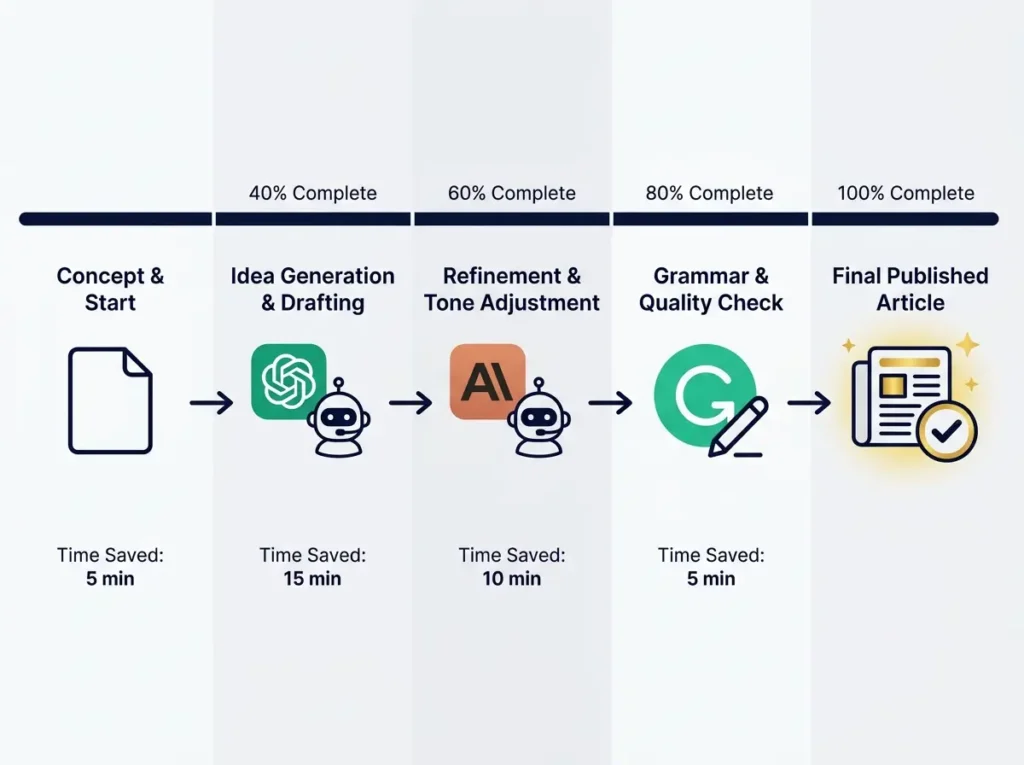
ChatGPT is the obvious choice here. Most marketers know about it. The free version is genuinely useful. You can ask it for article outlines based on keywords. You can ask it to expand sections. You can ask it to rewrite things in different tones. You can ask it to create social media captions from blog posts.
The limitation is that ChatGPT free has daily usage limits and sometimes gets slower during peak hours. It also generates content that can be a bit generic if you don’t give it detailed instructions. But for structuring your thinking, it’s extremely useful. Most bloggers save 3 to 6 hours per week using ChatGPT for outline creation and first draft expansion.
Best for: Article outlines, email copy, social captions, FAQ generation, product descriptions, content repurposing. Time saved: 3-6 hours per week.
Claude is different. It’s better at longer content and has a more natural writing style. If you’re writing something longer than 2,000 words, Claude often produces better drafts. The free version has decent daily limits that work for most small business content needs.
Claude is particularly strong at rewriting. If you have rough notes or existing content that reads stiffly, Claude can transform it into something that sounds more human. Many marketers use Claude specifically for the rewriting phase rather than initial drafting. The output feels less AI-generated than other tools.
Best for: Long-form blog posts, editing and rewriting, document summarization, turning notes into articles, tone improvement. Time saved: 2-4 hours per week on rewriting.
Google’s Gemini is useful if you already live in Google Workspace. It integrates with Google Docs, Gmail, and Google Sheets, which makes it valuable for teams that already use those tools. It’s decent for brainstorming and generating ideas, though not as strong as ChatGPT for specific tasks.
The benefit of Gemini is integration. You can ask it questions directly in Gmail or create content inside Google Docs without switching between tools. That workflow benefit alone makes it worth trying if you’re already in the Google ecosystem.
Best for: Content ideas, research assistance, campaign brainstorming, simple copy drafting, Google Workspace users. Time saved: 2-3 hours per week for integrated workflow users.
Perplexity AI is useful for research-backed content because it actually searches the internet and provides sources. This prevents you from having to manually research before writing. You ask Perplexity a research question and get back well-sourced information with citations.
This is particularly valuable for journalists, researchers, and content creators who need to cite sources. Instead of searching manually, you get research aggregated and sourced automatically. It’s like having a research assistant.
Best for: Research, topic validation, competitor research, content briefs, finding source-backed facts. Time saved: 2-3 hours per week on research.
Copy.ai is more focused on short marketing copy like email subject lines, ad copy, and social media posts. It’s less useful for long-form content but faster for quick promotional writing. You can generate multiple variations of sales copy and pick your favorite.
Many ecommerce marketers use Copy.ai specifically for product description variations and ad headlines. It generates options quickly so you can test different angles without spending hours brainstorming.
Best for: Sales copy, outreach emails, product copy, short-form marketing content. Time saved: 1-2 hours per week on promotional writing.
Rytr offers a simple AI writing interface for shorter marketing copy. It’s useful for beginners who want quick outputs without a complex setup. You select your use case (blog post, email, ad copy, etc.) and Rytr generates options.
The learning curve is minimal, which makes it good for people new to AI writing tools. However, the free tier is limited in monthly word count, so it works better for occasional writing than heavy production.
Best for: Short blog sections, product descriptions, ad copy, captions, emails. Time saved: 1-2 hours per week for occasional copywriting.
7. Notion AI (Included in Notion Pro)
Notion AI is only useful if you already use Notion for your content planning and notes. But if you do, it’s extremely valuable because it understands your existing content and can help organize and expand it. It’s not free, but Notion Pro at $8-10/month is extremely affordable.
If you’re managing a content calendar in Notion, Notion AI can help turn your outlines into full sections, summarize meeting notes, and organize scattered ideas into structured content. It’s particularly useful for team collaboration.
Best for: Content planning, notes, internal documentation, idea organization, meeting summaries. Value: Great if you already use Notion.
8. Grammarly (Free with limitations)
Grammarly is not just a grammar checker. The free version helps improve clarity, tone, and readability. It catches basic grammar issues but the paid version has more advanced rewriting suggestions.
For marketers, even the free version is valuable because it makes sure your copy is clear and professional. It catches common mistakes that make marketing copy sound amateur. Many marketers run all their content through Grammarly before publishing.
Best for: Editing blog posts, improving email tone, fixing grammar, making copy clearer, professional communication. Time saved: 30 minutes to 1 hour per article in editing.
SEO and Keyword Research Tools: 8 Free Options for Finding Opportunities
This is where many marketers waste time and money.
They buy expensive SEO tools when the best SEO data is available free from Google. Google Search Console shows you exactly which keywords are sending traffic to your site, which pages need improvement, and which keywords are almost ranking.
Use that data before buying anything else.
9. Google Search Console (Free)
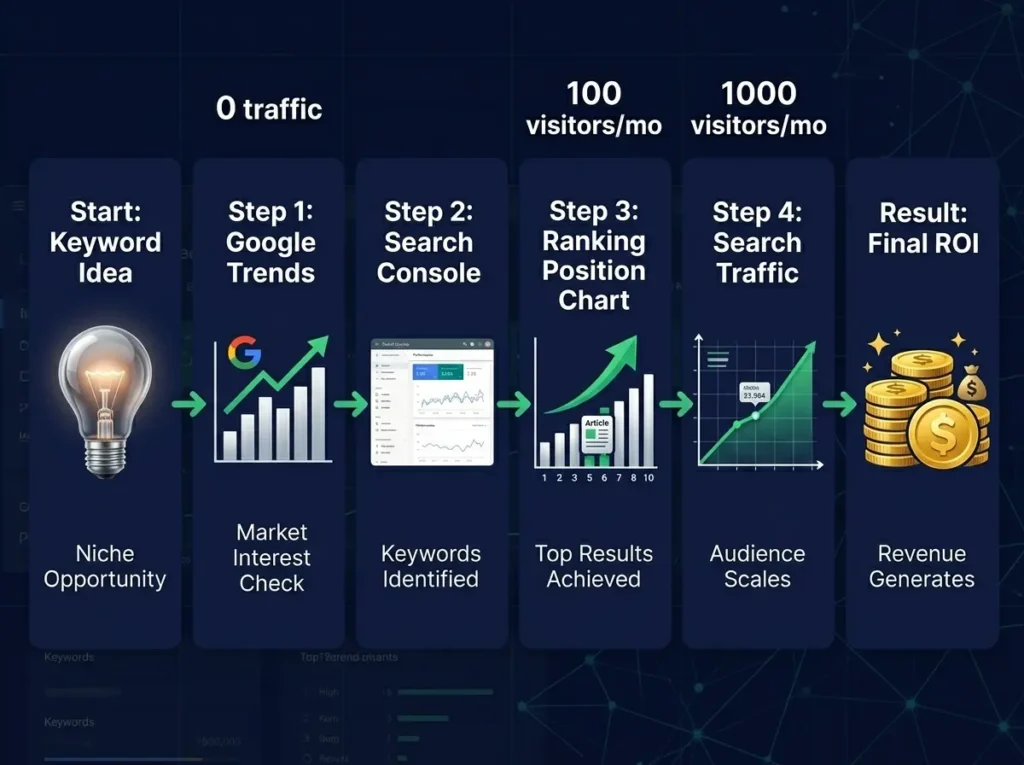
Google Search Console is one of the most important free SEO tools for website owners. It shows which queries bring impressions and clicks to your website, which pages are ranking, and where your content has SEO opportunities.
This isn’t theoretical. It’s your real data. You can see exactly which keyword queries bring traffic, what your average ranking position is, and which pages are getting impressions but no clicks. That last metric is gold because it tells you which pages just need better titles or meta descriptions to move from position 8 to position 3.
Best for: Finding real keywords, tracking clicks and impressions, monitoring ranking position, finding low-CTR pages, checking indexing issues, improving existing articles. Value: Invaluable, completely free.
Google Trends helps marketers understand search interest over time. It’s useful for identifying seasonal trends, comparing topics, and finding rising search demand.
Before you spend weeks writing about a topic, check if anyone is actually searching for it. Google Trends shows you which topics are growing and which are dying. It also shows seasonal patterns, which helps with content planning. If a topic is seasonal, you know when to publish and promote.
Best for: Trend research, seasonal content planning, comparing topics, finding regional interest, validating article ideas. Time saved: Prevents wasted work on dead topics.
11. Ubersuggest Free (Limited)
Ubersuggest offers free keyword suggestions, SEO difficulty estimates, domain insights, and content ideas. It’s basic compared to the paid version, but for someone new to SEO, it’s plenty.
You can search a keyword and see related keywords, search volume estimates, and SEO difficulty. The free version has daily search limits but that’s usually enough for planning your content strategy.
Best for: Keyword ideas, SEO difficulty estimates, competitor research, content planning. Time saved: 1-2 hours per week on keyword research.
12. Semrush Free Tools (Limited)
Semrush offers limited free access to keyword research, domain overview, backlinks, and SEO insights. The paid version is much deeper, but the free access can still help beginners understand your competitive landscape.
The free tools let you do one free search per day, which is enough to understand competitor strategies without paying. You can see what keywords competitors rank for and what content performs well.
Best for: Competitor research, keyword overview, backlink snapshots, domain analysis, SEO planning. Limitation: Only one free search per day.
13. Ahrefs Free Tools (Limited)
Ahrefs offers several free SEO tools, including backlink checkers, keyword generators, and webmaster tools. The free version gives you limited access but it’s useful for occasional competitive research.
You can check backlinks for any domain, which helps you understand who links to competitors and where your link opportunities might be. You can also see keyword difficulty estimates.
Best for: Backlink checking, keyword ideas, site audits, competitor snapshots. Limitation: Limited data requires paid plan for depth.
14. AnswerThePublic (Free tier)
AnswerThePublic helps find question-based keywords. It’s useful for blog sections, FAQ ideas, and search intent research.
You enter a keyword and AnswerThePublic shows you all the questions people are asking about that topic. This is valuable because it tells you what your audience actually cares about. You write content answering these questions instead of guessing.
Best for: FAQ ideas, question keywords, content angles, long-tail topics. Time saved: 1-2 hours per week on content planning.
15. AlsoAsked (Free tier)
AlsoAsked helps marketers understand related questions around a search topic. It visualizes the “People Also Ask” section from Google search results.
When you search a keyword in Google, you see a “People Also Ask” section. AlsoAsked shows you all of those questions in one place. This helps you structure your content to answer what people actually want to know.
Best for: People Also Ask research, FAQ sections, content structure, topic expansion. Daily limit: Limited free searches per day.
16. Google Keyword Planner (Free)
Google Keyword Planner is technically for Google Ads, but it’s useful for organic research too. You can see search volume data and keyword suggestions without running ads.
You need a Google Ads account, but you don’t need to spend money. Create an account, go to Keyword Planner, and search keywords to see monthly search volume and competition levels. This is more accurate than estimate tools.
Best for: Keyword volume data, competition research, keyword expansion ideas. Setup: Requires Google Ads account (free).
17. Moz Free Tools (Limited)
Moz offers several free SEO tools including link research, keyword research, and domain analysis. You get a limited number of free searches but the tools are high quality.
Moz’s domain authority metric is still the most respected in SEO, so their tools are worth knowing. Free access is limited but useful for occasional research.
Best for: Keyword research, domain authority checking, SERP analysis, link research. Limitation: Limited searches per month.
Email Marketing Tools: 8 Free Options for Building Lists and Sending Campaigns
Email is where small businesses and solo marketers make real money. Your email list is the one audience you truly own.
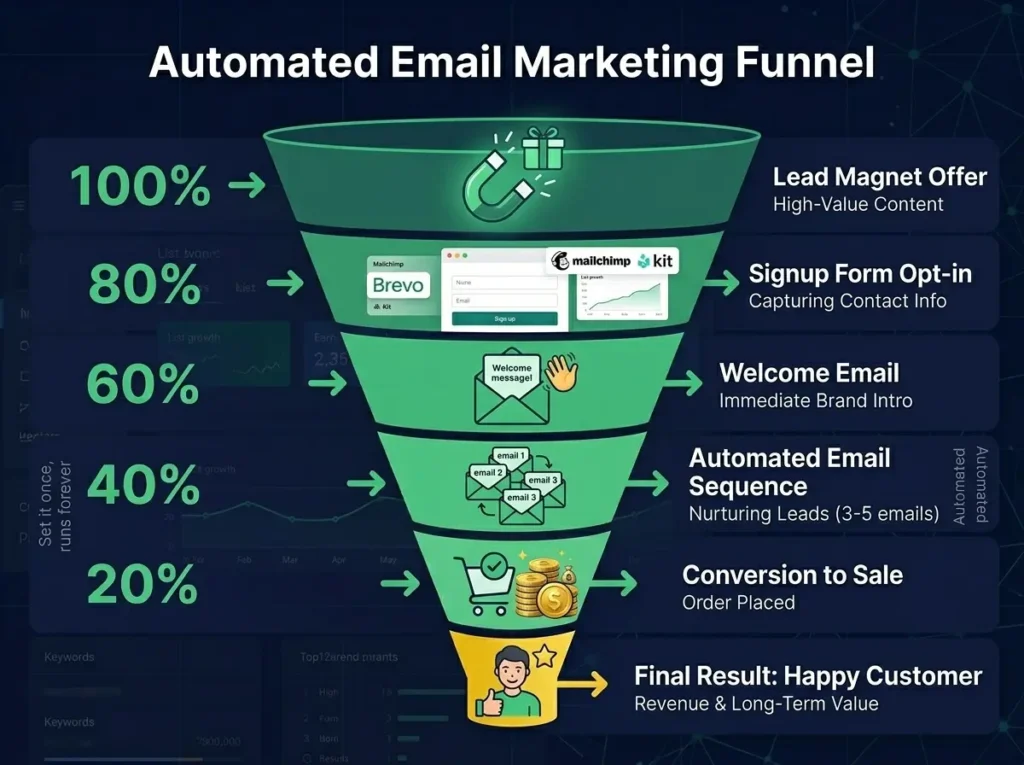
Free email marketing tools are especially useful for starting your first list. As you grow, you may eventually upgrade, but you don’t need to pay anything to get started and prove the system works.
18. Brevo (Free)
Brevo has unlimited emails on free plan, which is valuable for small businesses. It focuses on email volume instead of charging immediately based on contacts. You can send 300 emails per day free.
That’s enough for most small businesses. A 1,000-person list sending one email per day comes to 30,000 emails per month, well within the free limits. Brevo is particularly good for beginners because it’s simple to use.
Best for: Email campaigns, basic automation, contact management, small business email marketing, CRM-style marketing. Best for: Starting email marketing without spending money.
19. Mailchimp (Free tier)
Mailchimp is the most well-known email marketing platform. The free plan is useful for beginners who want to test newsletters and basic email campaigns.
The limitation is that Mailchimp has contact limits on free tier. Once you hit those limits, you need to upgrade. But for starting your first list and learning email marketing, it’s perfectly adequate.
Best for: Beginner newsletters, small email lists, simple campaigns, basic templates, audience testing. Perfect for: First-time email marketers.
20. Kit (Free)
Kit, formerly ConvertKit, is designed specifically for creators and newsletter writers. It’s free for creators with smaller lists and becomes paid based on subscriber count once you grow.
If you’re building a newsletter business, Kit is designed specifically for that use case. It has built-in affiliate features and creator-friendly templates.
Best for: Creators, bloggers, coaches, newsletter businesses, digital products. Perfect for: Newsletter-focused creators.
MailerLite is known for a simple interface and beginner-friendly email marketing features. The free plan includes email building, landing pages, and forms, which is more than most competitors offer.
MailerLite is particularly good if you need landing pages for lead magnets. You can build the landing page and capture emails in one platform.
Best for: Newsletters, landing pages, forms, simple automation, creators and small businesses. Great for: Integrated landing page and email building.
22. EmailOctopus (Free tier)
EmailOctopus is a lightweight email marketing tool that works well for simple newsletters. It’s less feature-rich than bigger platforms but perfectly functional for email marketing.
EmailOctopus pricing is based on subscriber count, so they’re generous with free limits relative to other platforms. Good option if you need something simple.
Best for: Simple newsletter sending, budget-conscious creators, basic automation, clean email campaigns. Best for: Simplicity-focused marketers.
23. HubSpot Free (Limited)
HubSpot offers free CRM tools that can support basic email marketing, contact management, forms, and lead tracking. It’s not just email.
HubSpot is powerful once you understand it, but there’s a learning curve. The free version gives you CRM, basic email, and forms. As you grow, their paid tools are excellent.
Best for: CRM, lead capture, contact management, basic email outreach, small sales and marketing teams. Good for: Teams wanting integrated CRM plus email.
24. Substack (Free)
Substack is different from traditional email tools. It’s a newsletter platform that allows you to build email audiences directly. You write posts on Substack and they go out via email.
The interesting part is that Substack is free and you keep 100% of subscription revenue. If readers want to pay for your newsletter, you get the money. This makes Substack unique as a monetization platform, not just a marketing tool.
Best for: Building newsletter businesses, creating paid newsletters, email-first content. Unique: Built-in monetization.
25. Convertkit (Free for small lists)
ConvertKit is a newsletter tool built specifically for creators. The free tier lets you build an audience without paying, and you pay only when you exceed subscriber limits.
ConvertKit has become the standard for serious newsletter creators because it integrates affiliate programs, sponsorships, and paid newsletters into the platform.
Best for: Creators, newsletter writers, bloggers, digital creators wanting monetization. Best for: Professional creators wanting integrated monetization.
Social Media Tools: 8 Free Options for Scheduling and Growing
Social media can take a lot of time if every post is created and published manually. Free social media tools help marketers schedule posts, organize content calendars, and review basic performance.
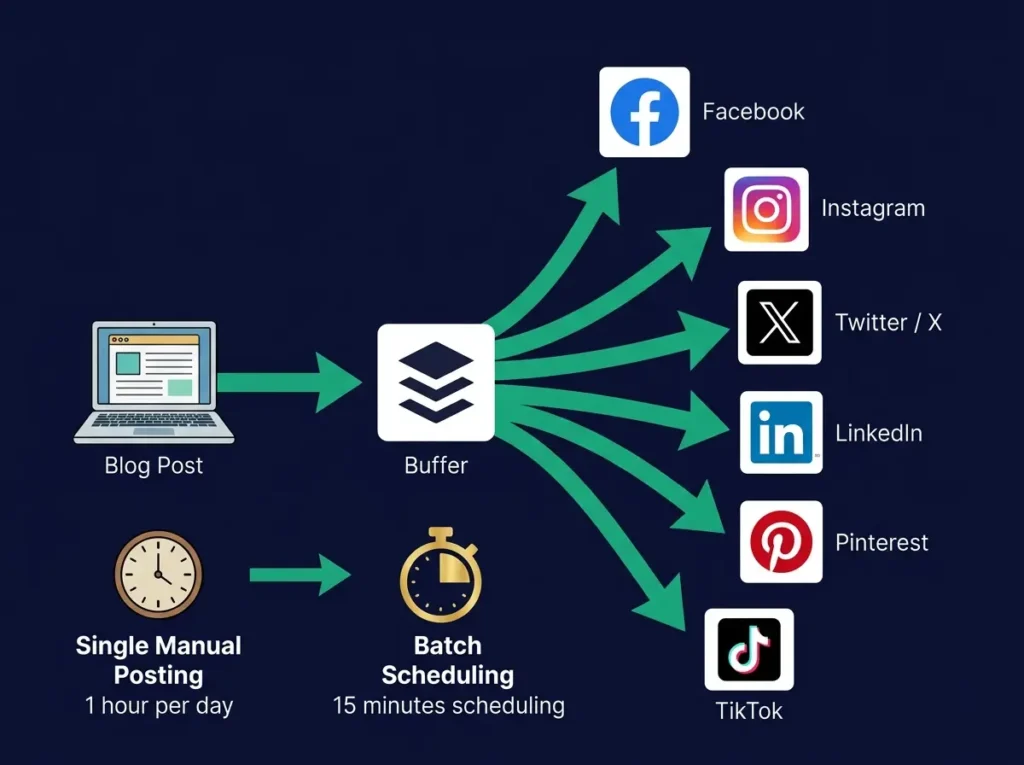
26. Buffer (Free tier)
Buffer is one of the easiest free social scheduling tools for beginners. It helps you plan and schedule posts across Facebook, Instagram, Twitter, and LinkedIn.
The free plan lets you schedule a limited number of posts but it’s enough to test the system. You create content once and schedule it across platforms, which saves hours per week compared to manual posting.
Best for: Scheduling posts, basic social media planning, repurposing content, small creators and businesses. Time saved: 2-3 hours per week on social posting.
27. Meta Business Suite (Free)
Meta Business Suite is free for managing Facebook and Instagram pages. It helps with scheduling, inbox management, basic analytics, and content planning.
This is the native Facebook and Instagram management tool. You don’t need a third-party tool if you only manage Meta platforms. It’s native, it’s free, and it integrates directly with your accounts.
Best for: Facebook pages, Instagram accounts, post scheduling, message management, basic analytics. Perfect for: Businesses focusing on Meta platforms.
28. Later (Free tier)
Later is useful for visual social media planning, especially for Instagram and Pinterest-style content workflows. It’s more visual than Buffer and better for image-focused platforms.
If you focus on Instagram, Pinterest, or visual content, Later is better than Buffer because it’s built for visual content first.
Best for: Instagram scheduling, visual content calendar, Pinterest planning, creator content workflows. Great for: Visual-first marketers.
29. Hootsuite (Free trial)
Hootsuite is a more advanced social media management platform. It may be more useful for teams, agencies, or businesses managing multiple channels and team members.
The free trial gives you full access temporarily, but if you need ongoing free access, Hootsuite isn’t your best option. However, for testing advanced workflows, the trial is valuable.
Best for: Multi-channel management, social scheduling, social analytics, team workflows. Note: Primarily trial-focused for advanced use.
30. Canva (Free)
Canva isn’t just for design, though we’ll cover that later. Canva also includes content planning and publishing features depending on the plan.
You can create graphics and schedule them directly from Canva, which means you’re not switching between tools. Design, then schedule, all in one place.
Best for: Creating and planning visuals, social media templates, Pinterest pins, Instagram posts, simple brand assets. Time saved: 2-3 hours per week creating graphics.
31. Linktree (Free)
Linktree is simple but valuable. It lets you create one page with multiple links, which you can update without changing your bio link.
If you have five different things you want to promote (YouTube, newsletter, products, affiliate links), Linktree puts them all behind one link. You update the page and your Instagram bio link stays the same.
Best for: Managing multiple links, A/B testing link arrangements, driving traffic to various destinations. Perfect for: Creators with multiple offerings.
32. TubeBuddy or VidIQ (Free tier)
These are YouTube optimization tools. They help creators understand what keywords to use, how to optimize titles and descriptions, and track channel performance.
If you’re using YouTube as part of your marketing, these tools help you understand what works on the platform.
Best for: YouTube keyword research, video SEO, channel analytics, competitor research. Great for: YouTube-focused creators.
Design and Graphics Tools: 6 Free Options for Creating Visuals
Visual content matters because people often notice the image before they read the headline. For blogs, Pinterest, YouTube thumbnails, Instagram posts, ads, and landing pages, design affects clicks.
Free AI design tools help you create professional-looking content without hiring a designer for every small task.
33. Canva (Free)
Canva is one of the most useful free design tools for marketers. It offers templates for social media, presentations, thumbnails, blog graphics, infographics, resumes, ads, and more.
The Canva free version has thousands of templates. You don’t need design skills. You just pick a template, customize the text and colors, and export. The quality is professional.
Best for: Pinterest pins, blog featured images, social media posts, presentations, infographics, lead magnets, simple brand design. Time saved: 1-2 hours per week on graphic creation.
34. Adobe Express (Free)
Adobe Express is useful for quick social graphics, short videos, flyers, and promotional designs. It’s cleaner than Canva for simple needs.
Adobe Express is owned by Adobe so it integrates with other Adobe tools if you use them. For quick graphics, it’s faster than Canva.
Best for: Social graphics, quick video edits, promotional designs, brand visuals. Great for: Simple, quick graphics.
35. Pixlr (Free)
Pixlr is a browser-based photo editor with AI editing features. It’s useful when you need quick image adjustments without leaving your browser.
You can resize, crop, adjust colors, remove backgrounds, and apply effects. It’s simpler than Photoshop but more powerful than basic editors.
Best for: Image editing, background changes, quick photo improvements, social graphics. Perfect for: Quick image edits.
36. Remove.bg (Free with limits)
Remove.bg uses AI to remove image backgrounds quickly. This is useful for product images, thumbnails, and ads.
Upload an image and Remove.bg removes the background automatically. The free version has resolution limits but works for most web usage.
Best for: Product images, profile photos, ad creatives, thumbnail design. Time saved: 5-10 minutes per image compared to manual removal.
37. Piktochart (Free tier)
Piktochart is useful for infographics, reports, and data visuals. You don’t need design skills to create professional-looking infographics.
Piktochart templates handle the design work. You just add your data and text. Great for visualizing information.
Best for: Infographics, reports, visual summaries, presentations. Perfect for: Data visualization.
38. Icons8 (Free tier)
Icons8 offers icons, illustrations, photos, and design assets. It helps marketers make graphics more professional without needing custom graphics.
The free tier has millions of icons and illustrations. You can download them and use them in your designs.
Best for: Icons, illustrations, app visuals, blog graphics. Great for: Adding polish to designs.
Analytics Tools: 5 Free Options for Understanding What Works
Marketing without analytics is guessing. Free analytics tools help you understand what is working, what isn’t working, and where users drop off.
39. Google Analytics 4 (Free)
Google Analytics 4 helps website owners track traffic, user behavior, events, conversions, and audience sources. It’s completely free and incredibly powerful.
GA4 shows you everything. Which traffic sources bring engaged users. Which pages people visit. Where they leave. Which content converts. There’s a learning curve, but it’s worth climbing because GA4 tells you what’s actually working.
Best for: Website traffic analysis, conversion tracking, traffic source reports, user behavior, campaign measurement. Value: Invaluable, completely free.
40. Looker Studio (Free)
Looker Studio helps marketers create free dashboards and visual reports from different data sources. You can connect GA4, Search Console, and other tools to create custom reports.
Instead of looking at raw tables, you see visual dashboards. This makes it easier to understand your data and share it with others.
Best for: Marketing dashboards, client reports, SEO reports, traffic summaries, performance visualization. Time saved: Hours on manual reporting.
41. Microsoft Clarity (Free)
Microsoft Clarity is a free behavior analytics tool that shows heatmaps and session recordings. You see exactly how users interact with your website.
Clarity shows you where people click, where they scroll, where they get confused. This tells you what works and what needs improvement on your website.
Best for: Heatmaps, session recordings, user behavior analysis, landing page improvement, conversion research. Perfect for: Understanding user behavior.
42. Hotjar (Free tier)
Hotjar offers heatmaps, recordings, surveys, and feedback tools. It’s similar to Clarity but with survey capabilities.
You can ask visitors questions while they’re on your site. This gives you direct feedback about what’s confusing or what they’re looking for.
Best for: User feedback, heatmaps, website behavior, conversion optimization. Great for: Direct user feedback.
43. Google Search Console (Already covered)
Search Console shows you how your site appears in search and what keywords bring traffic. It’s the most important free SEO analytics tool.
Video and Repurposing Tools: 4 Free Options
Video is important because audiences are spending more time on short-form platforms, YouTube, webinars, podcasts, and social clips.
Free video tools help you repurpose content instead of creating everything from scratch.
44. Descript (Free tier)
Descript is useful for editing video and audio through text. You record or upload a video, Descript transcribes it, you edit the transcript, and the video edits itself.
This is powerful because editing through text is much faster than traditional video editing. You don’t need to learn video editing software.
Best for: Podcast editing, video editing, transcription, clips, repurposing. Time saved: 2-3 hours per hour of video edited.
45. CapCut (Free)
CapCut is widely used for short-form video editing. It offers templates, captions, transitions, and mobile-friendly editing.
CapCut is popular because it’s simple and powerful. You can create professional short-form videos without learning complex software.
Best for: TikTok videos, Reels, YouTube Shorts, captions, fast mobile editing. Time saved: 30 minutes to 1 hour per short video.
46. Loom (Free tier)
Loom is useful for screen recordings, tutorials, walkthroughs, and quick video communication. You record your screen or camera and Loom hosts the video.
Great for product demos, training videos, and explanations. The video is automatically hosted and you get a shareable link.
Best for: Screen recordings, product demos, training videos, client communication, internal explanations. Perfect for: Quick video communication.
47. YouTube Studio (Free)
YouTube Studio is free and provides analytics, content management, audience insights, and basic editing features for YouTube creators.
If you upload to YouTube, YouTube Studio shows you everything about your channel performance. It tells you which videos people watch, how long they watch, where they leave, and who your audience is.
Best for: YouTube analytics, video performance tracking, audience research, content optimization. Perfect for: YouTube creators.
Customer Support and Chatbot Tools: 3 Free Options
Marketing doesn’t stop when someone visits your site. If users have questions and nobody answers, you may lose leads.
Free chatbot and support tools help you answer common questions, collect leads, and reduce manual support work.
48. Tidio (Free tier)
Tidio offers live chat and chatbot features for websites. It’s useful for small businesses that want to answer visitor questions quickly.
You add one line of code to your website and Tidio chat appears. Visitors can message you or the chatbot can answer common questions automatically.
Best for: Website live chat, chatbot automation, lead capture, customer questions. Perfect for: Quick visitor support.
49. Chatbase (Free tier)
Chatbase lets you create a chatbot trained on your website or documents. It can answer common questions based on your content.
Upload your FAQ, knowledge base, or documentation and Chatbase builds a chatbot that answers questions based on that content. Visitors get instant answers.
Best for: FAQ chatbots, website support, knowledge base chat, lead qualification. Perfect for: Automated support.
50. HubSpot Free Chat (Free)
HubSpot offers free live chat and CRM-connected tools. Conversations save into your CRM so you don’t lose context.
This is useful if you’re already using HubSpot for CRM. Chat conversations become contact records automatically.
Best for: Website chat, lead capture, CRM tracking, small B2B businesses. Great for: HubSpot users.
Building Your Actual Stack
You don’t need all 50 tools. Here are five realistic stacks for different business types.
Stack 1: Blogger or Content Creator (Free)
For building a content-focused business through blogging, YouTube, or newsletters:
Content creation: ChatGPT for outlines, Claude for long-form rewriting. SEO: Google Search Console, Google Trends, AnswerThePublic. Email: MailerLite or Kit for growing newsletter. Social: Buffer for scheduling posts to multiple platforms. Design: Canva for all graphics. Analytics: Google Analytics 4 for traffic tracking. Tracking: Spreadsheet for monitoring which content makes money.
Total cost: Zero dollars per month. Time to implement: 4-6 hours setup, then 10-15 hours per week of actual work.
Stack 2: Small Service Business (Free to $50/month)
For a service business with clients or selling services:
Content: Claude for long-form content. SEO: Semrush free tools for competitor research. Email: Brevo for email campaigns (free until you hit daily send limit). Social: Meta Business Suite if you focus on Facebook/Instagram. Design: Canva for social graphics and documents. Analytics: Google Analytics plus Microsoft Clarity for behavior tracking. Support: Tidio for live chat answering visitor questions.
Total cost: Free to $10/month if you upgrade Brevo. Time to implement: 3-4 hours setup, then 8-10 hours per week of marketing work.
Stack 3: Ecommerce Business (Free to $100/month eventually)
For selling products online:
Content: ChatGPT for product descriptions and marketing copy. Email: Klaviyo free tier (designed for ecommerce). Social: Later for Instagram/Pinterest, Buffer for other platforms. Design: Canva for product graphics and social content. Analytics: Google Analytics 4 plus Microsoft Clarity. Support: Tidio for answering customer questions. Affiliate tracking: Simple spreadsheet to track commissions if you add affiliate program.
Total cost: Free initially, eventually upgrade Klaviyo when your subscriber list grows.
Stack 4: Freelancer or Agency (Free to $200/month potentially)
For agencies or freelancers managing multiple client projects:
Research: Perplexity for client research. Content: Claude plus ChatGPT for different client needs. SEO: Google Search Console (free) plus Semrush free tools. Reporting: Looker Studio for creating client dashboards. Social: Buffer for scheduling posts. Design: Canva for client graphics. Analytics: Google Analytics for all client sites. Video: CapCut for creating short-form promotional videos.
Total cost: Mostly free. May upgrade some paid tools as client work grows.
As your marketing team grows from one person to multiple people, managing that team and their workflows becomes important. Our comprehensive guide to the best AI tools for HR professionals covers automation and management tools that help when scaling your marketing team.
Stack 5: Solopreneur or Founder (Free)
For solo founder building a business from scratch:
Writing: ChatGPT and Claude for all content. Research: Perplexity for fact-checking and research. Email: Mailchimp or Brevo to start list building. Social: Buffer to schedule posts. Design: Canva for everything visual. Analytics: Google Analytics and Looker Studio. Chat: Tidio for answering customer messages.
Total cost: Zero dollars. This stack proves the system works before spending money.
Common Mistakes Marketers Make With Free Tools
Mistake 1: Using too many tools
You don’t need all 50. Master five before adding more. Every new tool adds complexity. Five great tools are better than 20 mediocre ones.
Mistake 2: Publishing raw AI content
AI drafts need human editing. Always add your personal experience, real examples, original data, and unique perspective. Raw AI content is obvious and doesn’t rank as well.
Mistake 3: Building on tools without understanding limits
Read the fine print. If a tool limits exports, or emails, or team members, understand that limit before building your workflow around it. Some free plans have limits that make them unsuitable for your actual use.
Mistake 4: Uploading sensitive data to free tools
Be careful with customer information and business secrets. Free tools often have less security than paid versions. Review privacy policies before uploading confidential information.
Mistake 5: Choosing tools based on popularity
Use what works for your workflow, not what’s trending. The most popular tool isn’t always the best tool for your specific situation.
Mistake 6: Not measuring results
Even free tools should be measured. Track time saved, traffic gained, conversions, list growth. If a tool doesn’t help you actually achieve something, stop using it.
Mistake 7: Expecting tools to replace strategy
Tools execute strategy faster. They don’t create strategy. You need to understand your audience, find profitable angles, and build authority. Tools just help you do those things at higher speed.
As your marketing grows and you’re managing multiple content pieces, email sequences, and social posts across platforms, many marketers take it further by automating entire workflows. Our guide to generative AI workflows shows how to connect these free tools together and automate repetitive tasks without needing additional tools.
The Reality: When Free Tools Aren’t Enough
Free tools are genuinely powerful. But there are real limits.
You might hit email sending caps and need to upgrade. You might need team access and free tools don’t support multiple users. You might want deeper analytics than free tools provide. You might need integrations that require paid tools.
That’s fine. The goal with free tools is to prove the system works before spending money.
Many successful marketers stay on free tools for longer than you’d think. Others upgrade within months because the work requires it. Both approaches work.
The key is to start free, measure what works, and upgrade only on tools that are actually limiting growth. Don’t upgrade because you think you should. Upgrade when the tool is holding you back.
Your Next Step: Pick One Tool This Week
The biggest mistake is trying to implement everything at once.
Pick one free tool this week. Actually use it for real work. See how much time it saves. See whether it fits your workflow.
If it works, add another tool next week. If it doesn’t, try a different one.
Build your stack tool by tool, proving each one actually helps before adding the next.
The marketers who win aren’t the ones with the most tools. They’re the ones who build simple workflows, create consistent content, measure results, and improve based on data.
FAQ
Can I really build a marketing business on free tools?
Absolutely. Millions of people do. The limitation is usually not the tools. It’s either budget for paid advertising or time to create content. Free tools don’t fix budget limits but they fix the software cost problem.
Which single tool should I start with?
Start with whatever your biggest problem is. If writing is hard, start with ChatGPT. If ranking is hard, start with Google Search Console. If social is overwhelming, start with Buffer. Solve your biggest problem first.
When should I upgrade to paid tools?
Upgrade when the free tool is actively limiting growth. Not when you think you should. When actual growth is being limited. For example, upgrade email when you hit daily sending limits and need to send more. Upgrade SEO tools when free data isn’t enough to make decisions.
Are free tools okay for professional client work?
Generally yes, but check the terms. Some free tools require attribution or limit commercial use. Always read the fine print. Most are fine for professional work, but verify.
How do I avoid overwhelm with so many options?
Start with three tools maximum. Master those before adding more. Three tools that solve your main problems are better than 50 that create confusion.
Do free tools produce lower quality than paid?
Not necessarily. Often the opposite. Free tools are frequently better because companies are competing for market share. The gap between free and paid has never been smaller.
An interesting opportunity for marketers is staying informed about new AI startups entering the market. Many of these startups create tools that eventually become free versions to gain market share. Our guide to generative AI startups covers the companies building the AI tools you’re using and potential future tools to watch as the landscape evolves.
How long before I see results using free tools?
Depends on what you’re measuring. Content ranking takes 2-3 weeks. Email list building takes consistent effort over months. Website traffic takes 3-6 months of consistent work. Free tools speed up execution, not timeline. Strategy and consistency matter more than tools.
The Bottom Line: You Don’t Need to Spend Money to Start
The marketing industry has spent years making you think you need expensive tools.
You don’t. Not to start. Not to test ideas. Not to learn. Not to build a real audience.
Free AI marketing tools in 2026 are genuinely capable. They have real limits, sure. But those limits don’t apply to most small businesses and solo marketers.
Start with free tools. Build your system. Prove it works. Track the results. Then upgrade only when the tool is actively holding you back.
This approach separates people who treat marketing as a cost center from people who treat it as an investment. The investment approach works better.
For those interested in building careers around AI marketing tools or joining the companies creating these tools, the compensation for skilled AI and product roles is growing rapidly. Our analysis of AI product manager salaries shows the earning potential in the AI tool-building industry if you want to move from using tools to creating them
Pick one tool. Start this week. Measure what changes.









Comments (3)
AI Tools for Affiliate Marketing: 35+ Tools That Multiply Your Commissions in 2026 - Trendoutsidersays:
June 2, 2026 at 7:06 pm[…] For a broader perspective on free AI tools available to marketers across all industries, including those beyond affiliate-specific use cases, our comprehensive guide to free AI tools for marketing covers 40+ options. […]
13 Best Conversational AI Tools for Real Estate Agents 2026says:
June 5, 2026 at 7:33 pm[…] explore more budget-friendly options beyond just lead qualification, check out our guide on free AI tools for marketing. Many of these same tools support real estate marketing, lead capture, email automation, and […]
AI Business Solutions: 50+ Tools & ROI Strategies for 2026says:
June 15, 2026 at 5:52 pm[…] For a deeper look at how marketing automation works with AI, check out our comprehensiveguide to free AI tools for marketing, which covers budget-friendly options that complement yourcustomer service […]