
If your website runs on PHP, there’s an important security update you shouldn’t ignore.
On October 21, 2026, the PHP project released emergency fixes for two critical vulnerabilities that could allow an attacker to execute malicious code on a vulnerable web server without logging in. (PHP Vulnerabilities 2026)
The vulnerabilities are identified as CVE-2026-109618 and CVE-2026-109619. Both received a severity score of 9.2 under the CVSS 4.0 scoring system.
Security researchers and government agencies have been tracking the incident under the name PHP2Shell.
The warnings quickly reached beyond the developer community. The European Union Agency for Cybersecurity, the UK National Cyber Security Centre, CERT-EU and WordPress all urged affected organizations to take action.
On October 23, PHP also disclosed a third issue, CVE-2026-115560, involving an unusual session configuration. That vulnerability is being handled separately because its known attack conditions are much more restrictive.
So what does this mean if you run a WordPress blog, an online store, a business website or an application built with PHP?
Do you need to update WordPress? Could your website already be compromised? And how do you know whether your hosting provider has installed the necessary fixes?
Here’s what the official advisories actually say, what remains uncertain and what you should do next.
What Happened to PHP in October 2026?
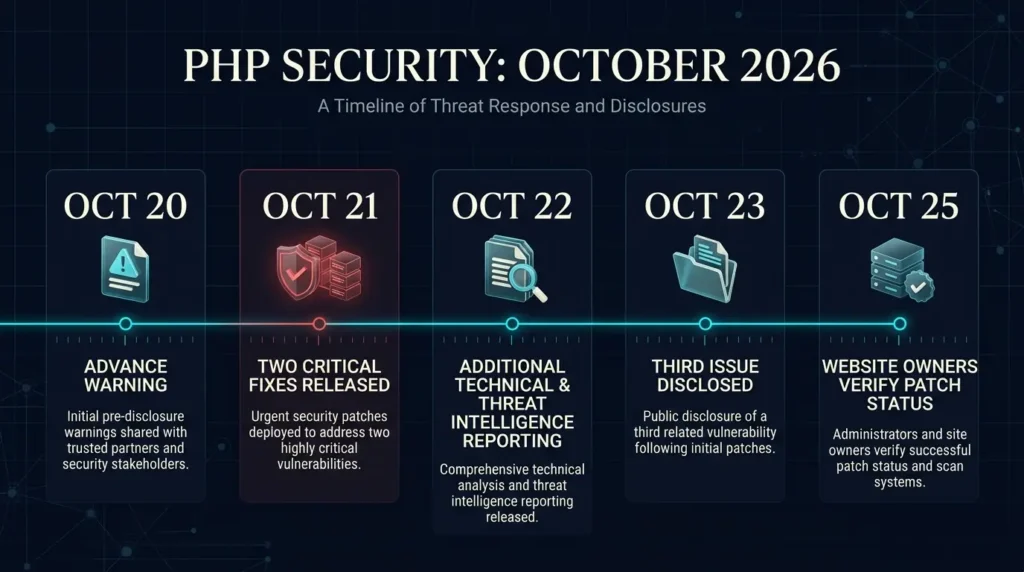
The PHP security team announced on October 20 that it was preparing an urgent release to address two critical vulnerabilities.
The fixes became available on October 21.
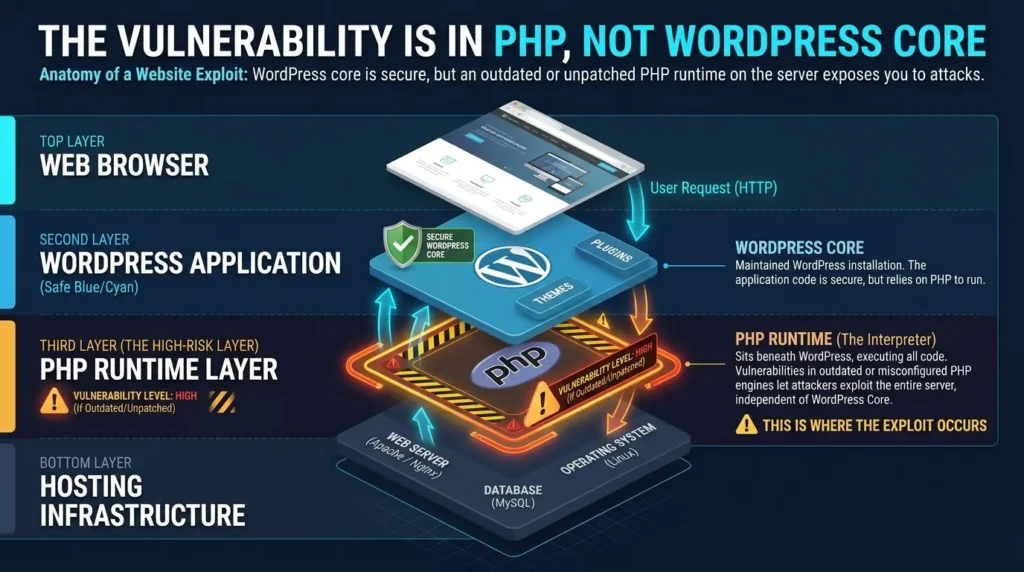
Both vulnerabilities affect PHP itself, rather than one particular WordPress plugin or website theme.
That distinction matters.
PHP is the programming language running behind a large number of websites and applications. It processes requests, works with databases, manages sessions and helps generate the pages visitors see in their browsers.
When a vulnerability exists in the underlying PHP runtime, it can affect multiple types of applications using that runtime.
The two October vulnerabilities involve internal memory handling. Under specific circumstances, PHP could continue processing information that had not been initialized correctly or that referred to memory already released.
Researchers demonstrated that these problems could be turned into remote code execution in certain environments.
In everyday language, that means a malicious request could potentially make a vulnerable server run commands chosen by an attacker.
That is a serious risk, especially for websites exposed to the public internet.
However, it does not mean every PHP website can be compromised in the same way or that every vulnerable website has already been attacked successfully.
The timeline
| Date | What happened |
|---|---|
| October 20 | PHP announced an upcoming critical security release |
| October 21 | PHP released fixes for CVE-2026-109618 and CVE-2026-109619 |
| October 21 | WordPress and national cybersecurity agencies published urgent guidance |
| October 22 | Additional threat intelligence and technical assessments emerged |
| October 23 | PHP disclosed CVE-2026-115560 and recommended a temporary configuration change |
| October 25 | Website owners should still verify patch installation and review their exposure |
The official PHP security announcement contains the release details and links to the underlying technical advisories.
What Is PHP2Shell?
PHP2Shell is the name used for the pair of critical PHP vulnerabilities disclosed in October 2026.
The name refers to the possibility that an attacker could use a flaw in PHP to gain the ability to execute commands on a vulnerable server.
It is not a separate programming language, a WordPress plugin or a new version of PHP.
It is a label for a security incident involving the PHP runtime.
The two main vulnerabilities are:
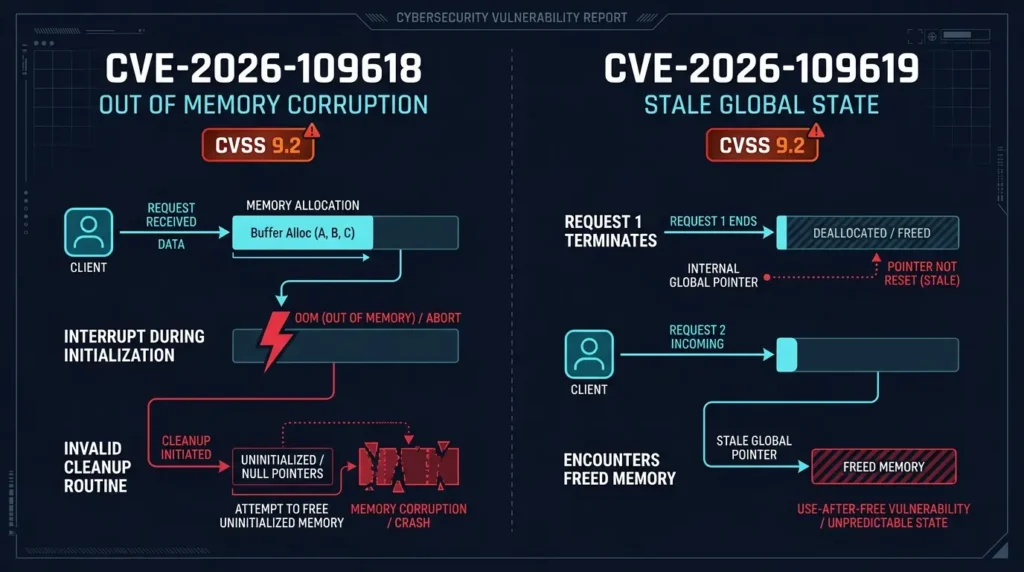
CVE-2026-109618: A memory corruption issue connected to out of memory error handling.
CVE-2026-109619: A problem involving stale internal state that can survive after the memory associated with a request has been released.
Both are rated critical.
The underlying technical conditions differ, which is why website administrators need the official PHP security updates rather than assuming that blocking one suspicious request pattern will resolve everything.
CVE-2026-109618 Explained
The first vulnerability concerns what happens when PHP runs into a memory limit at a particularly unfortunate moment.
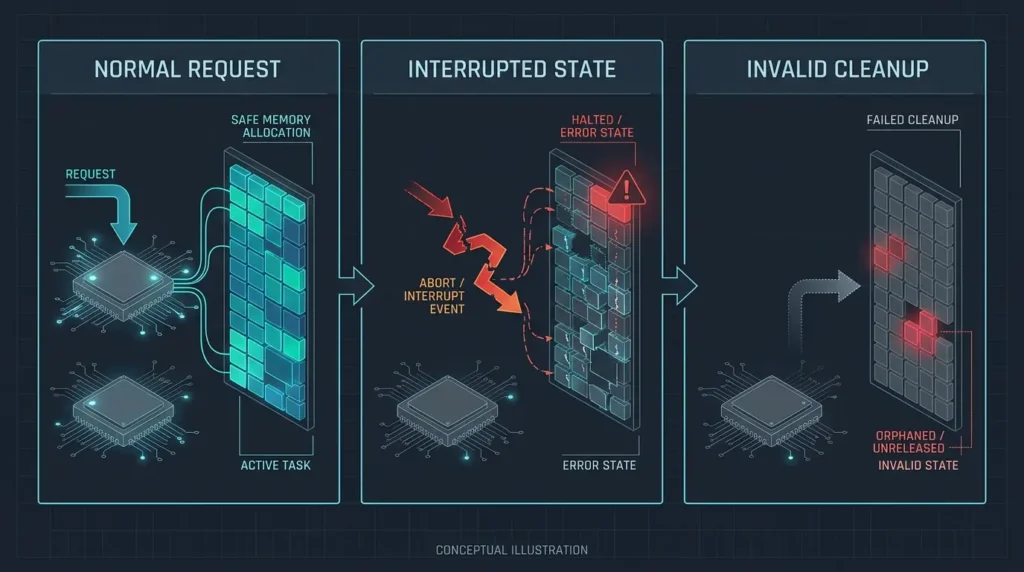
PHP uses internal memory structures to process incoming requests. Some of those structures may be created while the server is handling form submissions or uploaded data.
Normally, PHP manages the memory used by these operations and cleans up afterward.
But researchers identified circumstances in which an out of memory error could interrupt processing while some internal information was only partially initialized.
During cleanup, PHP could then treat invalid memory information as though it were legitimate.
This can result in memory corruption.
The PHP Foundation confirmed that researchers demonstrated remote code execution through this issue on Apache with mod_php using default settings. Remote code execution was also confirmed through application level paths involving PHP-FPM.
The critical point is that an attacker may not need an account on the affected website.
A vulnerable server can be exposed simply by accepting web requests.
That does not make exploitation automatic. The attacker still needs to meet the necessary technical conditions.
But it explains why security agencies treated the issue as urgent.
CVE-2026-109619 Explained
The second vulnerability involves stale global state.
A PHP worker may process many requests during its lifetime.
Under normal circumstances, information belonging to one request should not remain accessible after that request has finished and its memory has been released.
Researchers discovered that certain fatal errors could leave internal state pointing to memory that was no longer valid.
A later request handled by the same worker might then interact with that stale information.
This is related to a class of memory safety problems known as use after free.
Depending on the circumstances, such errors can cause crashes, expose information or become part of a more serious exploit.
The PHP Foundation reported that the researcher demonstrated remote code execution against a real application running on Apache with mod_php.
The confirmed technical paths include session handling and certain fatal error conditions.
The security update addresses the underlying problem.
Simply hiding PHP error messages does not repair the vulnerability.
Which PHP Versions Are Vulnerable?
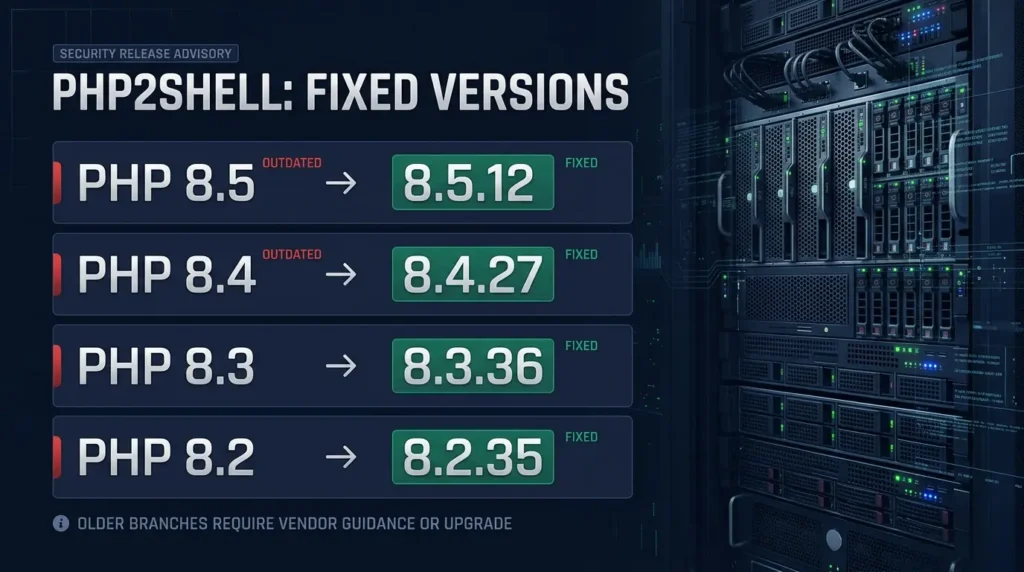
The official security release identifies the following fixed versions.
| PHP branch | Vulnerable versions | Fixed version |
|---|---|---|
| PHP 8.5 | Earlier than 8.5.12 | 8.5.12 |
| PHP 8.4 | Earlier than 8.4.27 | 8.4.27 |
| PHP 8.3 | Earlier than 8.3.36 | 8.3.36 |
| PHP 8.2 | Earlier than 8.2.35 | 8.2.35 |
| PHP 8.1 and older | Older branches are affected | Upgrade or obtain a verified vendor security fix |
If you’re running one of the four currently supported branches, the corresponding October 21 security release is the version you should be looking for.
There is one important complication for Linux users.
Some Linux distributions and enterprise support providers maintain their own PHP packages and apply security patches without changing the version number in the same way as upstream PHP.
For example, a vendor maintained package may include the necessary security fix even if its displayed version looks older than the upstream release.
That is why administrators should check the vendor’s security advisory and package revision rather than relying on the version number alone.
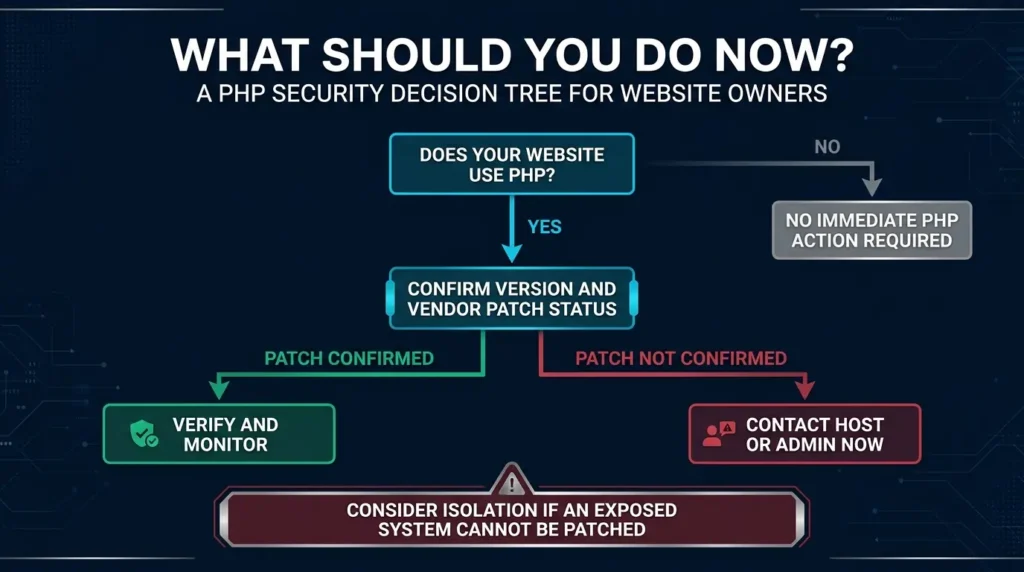
For ordinary shared hosting customers, the most practical step is to ask the hosting provider to confirm that the October 21 PHP fixes have been deployed.
What about PHP 8.1 and older?
These versions are no longer receiving regular security updates from the PHP project.
Some operating system vendors provide extended support and backported security patches.
The PHP team also made limited source patches available for PHP 7.4, 8.0 and 8.1 because of the severity of this incident.
Those patches do not mean the old branches have returned to normal support.
If your website depends on an outdated PHP release, you should plan a supported upgrade rather than treating a one time emergency patch as a long term solution.
PHP 8.2 is also approaching the end of its official security support period on December 31, 2026.
Are WordPress Websites Affected?
Yes, WordPress websites can be affected when they run on a vulnerable PHP installation.
But this is not a vulnerability in WordPress core.
WordPress uses PHP to perform much of its work on the server.
If the underlying PHP environment is vulnerable, updating WordPress plugins or installing the latest WordPress core release does not, by itself, fix these two PHP vulnerabilities.
In its October 21 security announcement, WordPress specifically encouraged site owners to update PHP immediately.
WordPress also stated that no WordPress core update was required or planned to address these PHP issues.
That means website owners should focus on the server environment.
Does this affect WooCommerce websites?
Potentially, yes.
WooCommerce runs on WordPress, which relies on PHP.
A store using a vulnerable PHP runtime could therefore be exposed to the same underlying security issues.
That does not mean WooCommerce itself introduced the vulnerabilities or that every WooCommerce store is exploitable.
The actual risk depends on the server’s PHP version, configuration, available attack paths and security controls.
Because online stores may handle customer accounts, orders and commercially sensitive information, operators should treat PHP patch verification as a priority.
What about Drupal, Joomla, Laravel and other PHP applications?
The same general principle applies.
Applications that run on an affected PHP runtime may inherit exposure to these vulnerabilities.
However, the precise exploitability can vary by application and server configuration.
The safest approach is to patch the runtime and check for additional vendor guidance relevant to the application.
How to Check Your PHP Version in WordPress
You don’t need to be a developer to check the PHP version reported by WordPress.
- Sign in to your WordPress administration dashboard.
- Open Tools.
- Select Site Health.
- Open the Info tab.
- Expand the Server section.
- Find the PHP version.
Compare the reported version with the fixed release table above.
If it appears older, don’t immediately assume the website is compromised.
First check whether your hosting provider has applied a vendor backport.
If you use managed WordPress hosting, the provider may control PHP updates on your behalf.
If you use a VPS or dedicated server, the responsibility may belong to you or your server administrator.
A note for shared hosting users
Your hosting dashboard may show several available PHP versions.
Choosing the newest available version is not always the same as confirming that the exact security fix has been installed.
A hosting provider might still be rolling out patched builds or using distribution maintained packages.
Ask for confirmation of the relevant CVE fixes.
You can send this message:
Subject: Urgent PHP Security Patch Confirmation
Hello,
Could you please confirm whether my hosting environment has been patched against CVE-2026-109618 and CVE-2026-109619, disclosed on October 21, 2026?
Please confirm the PHP version currently running on my website, whether the required security fixes are installed, and whether any action is needed from my side.
If my environment uses a vendor maintained PHP package, please confirm the relevant patched package version.
Thank you.
How to Update PHP Safely
The exact procedure depends on your hosting environment.
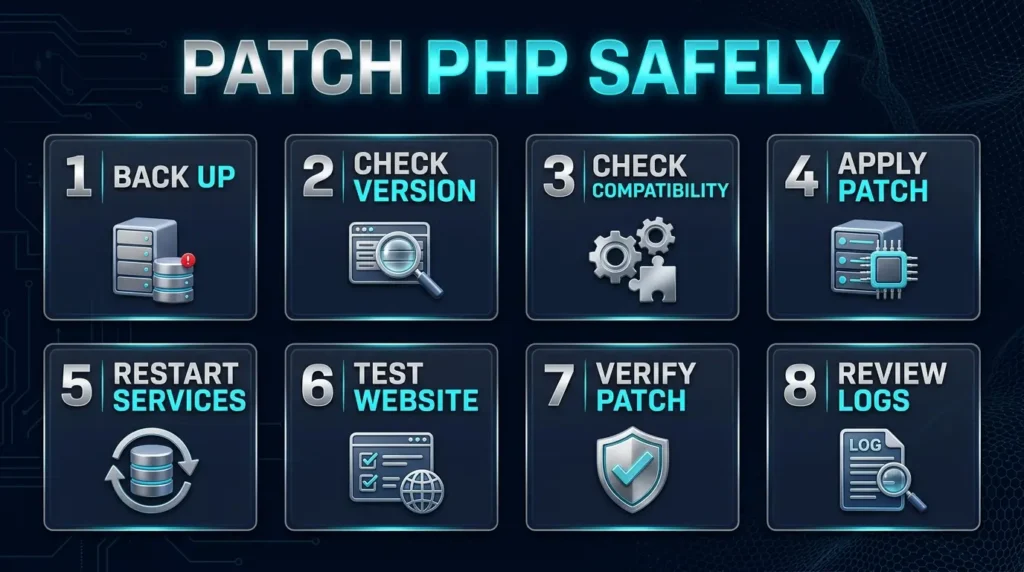
For a WordPress site, follow this general sequence.
Step 1: Create a backup
Make sure you have a recent backup of your website files and database.
Ideally, verify that the backup can be restored.
A backup is especially important when changing PHP versions because older themes and plugins may have compatibility issues.
Step 2: Check the current PHP version
Use WordPress Site Health or your hosting control panel.
For administrators with server access, the command below can report the command line PHP version:
php -v
Remember that the command line version may differ from the PHP version serving your website.
Step 3: Check plugin and theme compatibility
Review whether your installed plugins and theme support the target PHP version.
If you’re moving from an old PHP branch to a much newer one, test the change in a staging environment where possible.
Step 4: Install the security update
On managed hosting, follow your provider’s instructions or ask them to apply the patch.
On a server you manage, use the appropriate supported operating system packages or official PHP releases.
Do not download PHP packages from unfamiliar websites.
Step 5: Restart affected PHP services
Server administrators should ensure the updated runtime is actually being used by the relevant web workers.
The required service restart or reload procedure depends on the environment.
Step 6: Test the website
Check the homepage, login, contact forms, search, uploads and any important user workflows.
For ecommerce websites, test the cart and checkout carefully.
Step 7: Confirm the patched version
Verify the version or vendor package revision used by the web server, not just the command line.
Check the host’s patch confirmation if you’re on shared hosting.
Step 8: Review security logs
If your website was exposed before patching, review relevant server and security logs for unusual activity.
Patching closes the vulnerability but does not automatically remove an attacker who may already have gained access.
What If You Cannot Update PHP Immediately?
This is where caution is especially important.
The PHP security team published temporary measures that can reduce exposure to certain known attack paths.
But the team explicitly warned that only installing the security update fully addresses these vulnerabilities.
For administrators, the official guidance includes changes to memory handling limits, request size restrictions and session related configuration.
For example, the PHP team recommends disabling session upload progress in appropriate configurations by setting:
session.upload_progress.enabled=0
The configuration must take effect before request parsing, and affected workers need to be restarted.
However, this does not protect against every possible attack path.
Another mitigation discussed by PHP involves changing the memory limit configuration. That measure can also have operational consequences and should not be applied casually.
If you are not responsible for server administration, don’t copy unfamiliar PHP configuration settings into your website without understanding their effects.
Contact your hosting provider.
For systems that cannot be patched promptly, the UK National Cyber Security Centre and CERT-EU recommend considering temporary isolation from public networks.
That may be disruptive, but for an exposed critical system it can be safer than leaving an unpatched runtime accessible.
The complete mitigation details are available in the official PHP security advisory.
The Third PHP Vulnerability: CVE-2026-115560
On October 23, PHP published an additional advisory concerning session upload progress.
This issue is separate from the two critical vulnerabilities patched on October 21.
According to the PHP project, exploitation requires an unusual combination of application behavior and configuration.
The application must begin with a particular session serialization handler, switch handlers at runtime, and then start a session while upload progress remains enabled.
PHP considers this combination uncommon.
The project therefore plans to address CVE-2026-115560 in its next regular bugfix release rather than issuing another emergency release immediately.
As a precaution, PHP recommends disabling session upload progress until that release if the relevant configuration conditions may apply.
The setting is:
session.upload_progress.enabled=0
The important distinction is that the October 21 patches address the first two critical vulnerabilities, while this third issue has its own conditions and follow up guidance.
Administrators should read the October 23 PHP advisory rather than assuming that the three issues are identical.
Have Attackers Already Exploited PHP2Shell?
There are credible reports of exploit attempts and public proof of concept activity.
However, the evidence needs to be interpreted carefully.
Security researchers have demonstrated that the vulnerabilities can be exploited under particular conditions.
Government cybersecurity agencies have warned that the release of technical details and proofs of concept increases the risk of malicious activity.
Threat intelligence reporting also describes attempts observed before and around the official patch release.
But an attempted exploit is not the same thing as a confirmed successful compromise.
On October 23, the Dutch National Cyber Security Centre reported that it knew of one possible exploitation case abroad, but could not confirm that the attempt had succeeded.
The agency also said that exploitation appeared more complex than its initial assessment suggested, reducing its estimate of the likelihood of widespread exploitation.
This does not make the vulnerabilities harmless.
It means the correct message is:
The flaws are critical and require urgent patching, but claims that every PHP website is already being hacked are not supported by the available evidence.
For website owners, patching remains the priority.
Could Someone Steal Data Through These Vulnerabilities?
Remote code execution can be serious because it may give an attacker the ability to run commands in the security context of a vulnerable process.
Depending on that process’s permissions and the surrounding environment, an attacker could potentially access files, manipulate application behavior or attempt to move further into the system.
The PHP vulnerabilities also involve memory handling, which can create risks involving sensitive information.
However, what an attacker can actually access depends on the specific exploit, server permissions and application configuration.
It would be misleading to claim that these vulnerabilities automatically expose every website database or every customer’s personal information.
The responsible response is to patch, assess exposure and investigate signs of compromise where warranted.
How Do You Know Whether Your Website Was Hacked?
There is no single symptom that proves a PHP2Shell attack occurred.
A website may behave normally even after a security incident.
Possible warning signs include unfamiliar administrator accounts, unexpected file changes, unusual server processes, suspicious outgoing network activity and unexplained modifications to website content.
These signs are not specific to PHP2Shell, but they deserve investigation.
If you suspect compromise:
- Preserve relevant logs and evidence.
- Contact your hosting provider or security team.
- Limit further exposure.
- Review unfamiliar accounts and recent changes.
- Rotate affected credentials after establishing a safe recovery process.
- Restore from a known clean backup if advised by your incident response team.
- Verify the underlying PHP vulnerability is patched before returning the site to normal operation.
Do not assume that installing a WordPress security plugin can establish whether the server was compromised.
Application security plugins may provide useful monitoring, but a runtime level vulnerability requires investigation at the appropriate infrastructure level.
Does a Firewall Protect Against PHP2Shell?
A web application firewall may reduce exposure to certain malicious requests.
Hosting providers and security vendors have been developing or deploying protections in response to this incident.
But a firewall rule is not equivalent to updating PHP.
The underlying vulnerabilities affect internal runtime behavior, and attackers may use different paths to reach the vulnerable conditions.
The official PHP guidance is clear that temporary mitigations are incomplete.
Use firewall protections as additional defense, not as an excuse to postpone security updates.
Why Did These Vulnerabilities Take So Long to Fix?
One of the most revealing parts of this incident comes from the PHP Foundation itself.
In a public explanation published on October 21, the Foundation said that signs of the memory handling problem had emerged during work connected to an external security audit in 2024.
At the time, developers had not established a practical remote code execution path.
Fixing the underlying issue also presented difficult tradeoffs.
Some proposed solutions risked breaking compatibility with existing software. Others could introduce denial of service problems or require substantial changes across PHP extensions.
The Foundation acknowledged that limited resources and difficulties reaching decisions contributed to the delay.
It described the situation as a structural failure and outlined changes to its security processes.
This is an important lesson from the incident.
A vulnerability can exist for a long time before researchers find a reliable way to exploit it.
And fixing deeply embedded runtime behavior can be much more complicated than correcting an ordinary application bug.
The Foundation’s explanation is available in Today’s PHP Security Release, and How We’re Strengthening PHP Security.
What Website Owners Should Do Today
If you own a website but don’t manage the server yourself, the action plan is straightforward.
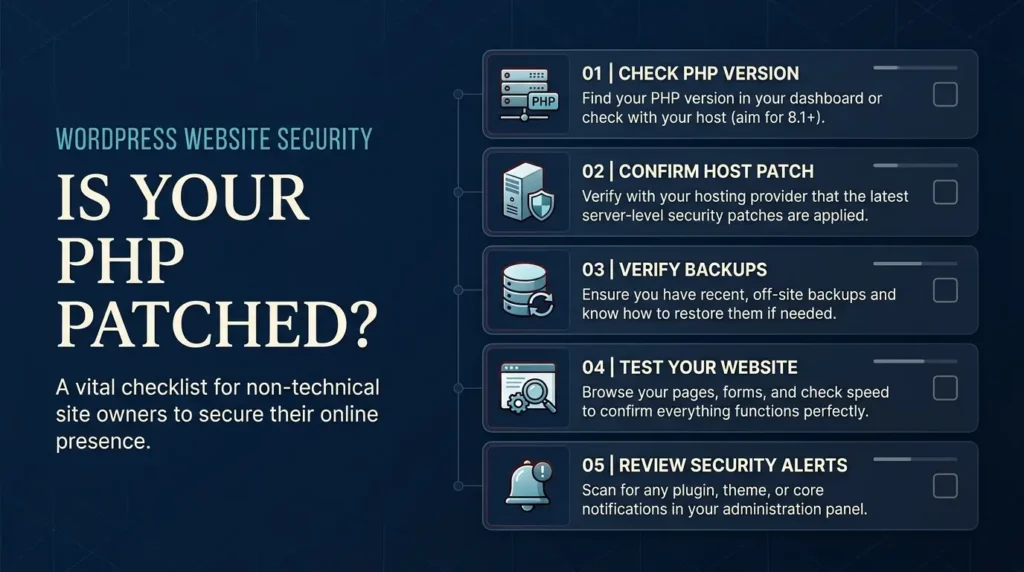
First, identify your hosting provider.
Second, check the PHP version reported by your website or hosting dashboard.
Third, contact the provider and ask whether the October 21 fixes for both CVE identifiers have been applied.
Fourth, keep WordPress, themes and plugins updated as part of your normal security maintenance.
Fifth, ensure you have reliable backups and know how to restore them.
Finally, if you operate a business critical website, ask whether the provider has reviewed relevant logs for attempted exploitation.
You don’t need to become a PHP security researcher to take these steps.
You do need to make sure the people responsible for your hosting environment have acted.
A practical priority order
Highest priority: Publicly accessible PHP systems that are unpatched, particularly those supporting sensitive services.
Next priority: Managed hosting accounts where patch status is unclear.
Then: Older PHP environments that need a broader migration plan.
Even if your website appears unaffected, confirming the patch is worthwhile.
What This Means for Website Performance and SEO
A serious server compromise can affect more than security.
It may cause downtime, unexpected redirects, altered pages, malicious content or other problems that damage the experience of visitors and search engines.
However, there is no evidence that Google automatically penalizes a website simply because it used a vulnerable PHP version.
The SEO concern is what happens if a website becomes unavailable, compromised or serves harmful content.
After any major server maintenance, check that your important pages still load correctly.
Review redirects, canonical tags, XML sitemaps and Google Search Console for unexpected errors.
TrendOutsider’s Google UGC Fresh Data Program guide explains the distinction between website accessibility, crawling and indexing.
Our Google Lens SEO guide also covers checking image accessibility and page performance, which can be useful after major website changes.
Security maintenance and SEO are different responsibilities, but both depend on a reliable website.
Frequently Asked Questions About the October 2026 PHP Vulnerabilities
What are the critical PHP vulnerabilities discovered in October 2026?
They are CVE-2026-109618 and CVE-2026-109619, two critical vulnerabilities in PHP’s internal memory handling that can allow remote code execution under certain conditions.
What is PHP2Shell?
PHP2Shell is the name used for the pair of critical PHP vulnerabilities disclosed in October 2026.
How serious are the PHP vulnerabilities?
Both vulnerabilities have a CVSS 4.0 severity score of 9.2 out of 10, placing them in the critical category.
Which PHP versions fix PHP2Shell?
PHP 8.5.12, 8.4.27, 8.3.36 and 8.2.35 contain the October 21 fixes. Vendor maintained packages may also contain backported fixes.
Is WordPress vulnerable to PHP2Shell?
WordPress websites can be affected if their servers run vulnerable PHP versions. The vulnerabilities are in PHP itself, not WordPress core.
Do I need to update WordPress to fix these vulnerabilities?
Updating WordPress is good security practice, but it does not replace the required PHP runtime security update.
Can PHP2Shell be exploited without logging in?
Yes. The PHP Foundation confirmed that unauthenticated remote code execution is possible under certain conditions.
Are PHP2Shell attacks happening in the wild?
Exploit attempts and public demonstrations have been reported. The extent of confirmed successful compromise remains uncertain, so claims of widespread successful exploitation should be treated cautiously.
Does Cloudflare or another firewall completely protect my website?
No firewall should be treated as a complete substitute for the PHP security fixes. Protective rules may reduce exposure but do not repair the underlying vulnerabilities.
Is PHP 8.1 safe?
PHP 8.1 is no longer supported by the PHP project. Some vendors offer extended security support or backported fixes, but upgrading to a supported branch is the preferred long term approach.
What is CVE-2026-115560?
It is a separate issue disclosed on October 23 involving session upload progress and an unusual session serialization configuration. PHP plans to address it in its next regular bugfix release and has published interim guidance.
Can I check my PHP version from WordPress?
Yes. Open Tools, Site Health, Info, then Server in the WordPress dashboard.
Should I take my website offline?
If a critical public facing system cannot be patched promptly, security agencies advise considering temporary isolation. The appropriate decision depends on the environment and should be made with the hosting provider or security administrator.
Will installing a WordPress security plugin fix PHP2Shell?
No. Security plugins may provide additional protection or monitoring, but they do not replace the PHP runtime patch.
What should I do first?
Contact your hosting provider and confirm that both October 21 PHP security fixes have been installed.
Final Verdict
The October 2026 PHP security incident is serious, but it is also manageable when website owners and hosting providers act quickly.
Two critical vulnerabilities exposed weaknesses in PHP’s internal memory handling. The PHP project released fixes on October 21, and cybersecurity agencies around the world urged organizations to install them.
A third issue disclosed on October 23 requires attention in certain unusual configurations.
For most website owners, the immediate question isn’t whether they understand every technical detail.
It’s whether their hosting environment has been patched.
Check your PHP version.
Ask your provider for confirmation.
Keep reliable backups.
And don’t assume that updating WordPress alone solves a problem in the PHP runtime.
The most important security step today is to verify that your PHP installation has received the October 21 fixes.
Official sources
- PHP Security Releases and October 23 Advisory
- PHP Foundation Technical Explanation
- WordPress Critical PHP Security Release
- CERT-EU Critical PHP Vulnerabilities Advisory
- ENISA Joint Statement on PHP Vulnerabilities
- UK National Cyber Security Centre Guidance
- Dutch National Cyber Security Centre Updates
Editorial disclosure: This article is based on publicly available security advisories and statements reviewed on October 25, 2026. TrendOutsider has not independently exploited the vulnerabilities, tested production servers or verified the security status of any individual website. Exploitation reports and vendor guidance may change as investigations continue.









Leave a Reply