

Claude Haiku 5.5 is Anthropic’s newest small AI model, released on October 7, 2026. It promises faster responses, stronger performance, and dramatically lower API costs than its predecessor, Claude Haiku 4.5. For developers, the starting price is just $0.10 per million input tokens and $0.50 per million output tokens… but those rates apply only to prompts of up to 100,000 tokens.
That pricing detail is important. So is the difference between using Haiku in the Claude app and paying for it through an API.
Imagine running an online business that receives thousands of customer questions every day.
Some questions are complicated. A customer wants to dispute a payment, change a subscription, or resolve a technical issue involving several systems.
But many are simple.
Where is my invoice?
Can I change my email address?
Which department handles refunds?
Does this document mention a particular contract term?
Sending every question to the most powerful… and most expensive… AI model might work. But it can be a costly way to handle repetitive tasks.
That’s the problem Claude Haiku 5.5 is designed to solve.
Anthropic has positioned its latest Haiku model as a fast, economical option for high-volume work, including classification, summaries, information extraction, database queries, and supporting larger AI agents.
The interesting part isn’t simply that a new model has arrived.
It’s that smaller AI models are becoming capable enough to handle a much larger share of everyday digital work.
But is Haiku 5.5 actually good enough? How much does it cost? Is it available for free? And when should you choose Sonnet or Opus instead?
Let’s look at what Anthropic has confirmed, what its benchmarks suggest, and where the practical limitations begin.
What is Claude Haiku 5.5?
Claude Haiku 5.5 is a language model developed by Anthropic, the company behind Claude.
It belongs to the Haiku family, which prioritizes speed and efficiency within Anthropic’s model lineup.
A simple way to understand the Claude family is to think about different types of work.
Haiku is designed for quick, frequent, cost-sensitive tasks.
Sonnet offers a broader balance of capability, speed, and cost.
Opus is intended for demanding work that benefits from stronger reasoning and more capable agentic behavior.
These are general product positions, not rigid rules. The best model still depends on the actual task.
According to Anthropic’s October 7 announcement, Haiku 5.5 is its most capable small model to date.
The company highlights improved performance in knowledge work, computer interaction, and coding-related evaluations.
It also introduces adaptive thinking to the Haiku family, allowing the model to adjust its reasoning effort according to the task and developer settings.
Claude Haiku 5.5 at a glance
| Specification | Claude Haiku 5.5 |
|---|---|
| Developer | Anthropic |
| Release date | October 7, 2026 |
| API model ID | claude-haiku-5-5 |
| Context window | 1 million tokens |
| Maximum standard output | 128,000 tokens |
| Inputs | Text and images |
| Outputs | Text |
| Reasoning | Adaptive thinking |
| Default effort | Medium |
| Knowledge cutoff | June 2026 |
| Starting API input price | $0.10 per million tokens |
| Starting API output price | $0.50 per million tokens |
These specifications come from the official Claude Haiku 5.5 model documentation.
The model supports a large context window, but that doesn’t mean every task needs to use it.
For most routine requests, a short prompt is cheaper, easier to manage, and often more practical.
What’s new in Claude Haiku 5.5?
The release introduces several changes that matter for people building real applications.
1. Much lower pricing for shorter prompts
For prompts up to 100,000 tokens, Anthropic reduced the listed input and output token prices by 90% compared with Haiku 4.5.
That’s a substantial reduction for applications processing many relatively short requests.
But it isn’t the whole pricing story.
Longer prompts fall into a higher pricing tier, and Anthropic’s updated tokenizer can produce a different number of tokens for the same text.
We’ll break down the costs shortly.
2. Adaptive thinking
Haiku 5.5 supports adaptive thinking.
Rather than applying the same reasoning behavior to every task, the model can vary its thinking according to the request.
Developers can influence that behavior using an effort parameter.
For example, a straightforward request to classify a support ticket might not need the same depth of reasoning as an ambiguous question involving several documents.
That flexibility can help teams balance responsiveness and capability.
It doesn’t guarantee that every request will use fewer tokens or produce the right answer.
3. A one-million-token context window
The model supports up to one million tokens of context.
That creates possibilities for applications working with lengthy documents, codebases, or large collections of text.
However, a large context window should not be confused with perfect memory or perfect retrieval.
A model can still overlook relevant details, misinterpret information, or struggle with conflicting instructions.
Long inputs also cost more and may cross the 100,000-token pricing threshold.
4. Improved computer-use performance
Anthropic reports major improvements over Haiku 4.5 on its selected computer-use evaluations.
This is relevant to systems that navigate software interfaces or complete multi-step digital tasks.
But a benchmark result is not a guarantee that an AI agent can safely operate any website or application.
Real interfaces change. Permissions differ. Unexpected dialogs appear. Some actions require human authorization.
5. Stronger performance on selected knowledge-work tasks
Anthropic reports substantial improvements in evaluations involving professional tasks, information retrieval, and reasoning.
That makes Haiku 5.5 more interesting for document-heavy business workflows.
Still, the results are model-provider benchmarks. They are useful evidence, but they are not a substitute for testing the model against your own documents and success criteria.
6. Better suitability for AI subagents
A larger AI agent may need to delegate dozens of small jobs while solving a complicated problem.
For example, one subagent might inspect a document, another might classify an issue, and another might summarize a tool response.
Using a smaller model for those jobs can reduce operating costs.
Anthropic explicitly positions Haiku 5.5 as a companion to Sonnet and Opus in these workflows.
Claude Haiku 5.5 pricing explained
The price is one of the most compelling parts of this release.
It’s also where misleading comparisons can happen.
API models are commonly priced according to the number of tokens they process.
Input tokens represent material sent to the model, such as instructions, documents, and conversation history.
Output tokens represent the response the model generates.
With Haiku 5.5, the unit prices depend on prompt length.
Official API pricing
| Model or prompt tier | Input per 1M tokens | Output per 1M tokens |
|---|---|---|
| Haiku 5.5 — prompts up to 100K tokens | $0.10 | $0.50 |
| Haiku 5.5 — prompts over 100K tokens | $0.50 | $2.50 |
| Haiku 4.5 | $1.00 | $5.00 |
| Sonnet 5.5 | $2.00 | $10.00 |
Source: Anthropic’s Haiku 5.5 pricing announcement.
The price tier is based on the prompt’s length, not simply how many tokens you consume across an entire month.
For example, processing one million input tokens across thousands of small requests is not the same as sending one enormous prompt containing more than 100,000 tokens.
The first workload may qualify for the lower tier throughout. The second may fall under the higher tier.

A realistic API cost example
Imagine a business processes 100,000 customer messages in a month.
Assume each request uses:
- 2,000 input tokens.
- 300 output tokens.
- A prompt comfortably below 100,000 tokens.
That’s a total of:
200 million input tokens
and
30 million output tokens.
At Haiku 5.5’s lower-tier list prices:
Input cost: 200 × $0.10 = $20
Output cost: 30 × $0.50 = $15
Illustrative total: $35 per month in base model token charges.
At Haiku 4.5’s published token rates, the same token quantities would cost:
Input: 200 × $1.00 = $200
Output: 30 × $5.00 = $150
Illustrative total: $350.
That’s a $315 difference under these assumptions.
But don’t interpret this as a promise that every business can process 100,000 support conversations for $35.
The example excludes infrastructure, application development, human review, external tools, retries, additional conversation turns, and other possible costs.
It also holds token counts constant, even though Anthropic says Haiku 5.5’s newer tokenizer can count the same material differently.
For a real budget, measure token usage using the model you actually deploy.
Why Anthropic says average costs are about 75% lower
You might wonder why Anthropic describes the average reduction as approximately 75% when the short-prompt list prices are 90% lower.
There are several reasons.
The 90% reduction applies to requests up to 100,000 tokens.
For longer requests, the published price reduction compared with Haiku 4.5 is 50%.
Anthropic also accounts for its newer tokenizer, which can consume more tokens for the same material.
Its overall estimate considers the mix of workloads seen on the previous Haiku model.
The useful conclusion is straightforward:
Haiku 5.5 can be dramatically cheaper, especially for short, high-volume requests. But your actual savings depend on your workload.
Prompt caching and batch processing
Developers may be able to reduce costs further through supported caching and batch-processing features.
Anthropic lists cache-read rates starting at $0.01 per million tokens for qualifying short prompts, while the Batch API offers a 50% discount on input and output charges.
Those savings come with implementation details and eligibility requirements.
Check the Claude Platform pricing documentation before calculating a production budget.
Is Claude Haiku 5.5 free?
Yes, Haiku 5.5 is available to select in Claude’s Free experience, according to Anthropic.
It is also available in the Pro, Max, Team, and Enterprise offerings.
That doesn’t mean every user gets unlimited access.
Free usage remains subject to applicable limits, and availability or quotas may vary by product, account, and demand.
For someone who wants to try Haiku 5.5 without writing code, the simplest route is to open Claude and check the available model selector.
Claude app versus Claude API
This distinction is important.
Using Claude in a browser or mobile app means interacting with the consumer or team product under its plan rules.
Using the Claude API means integrating the model into software and paying according to API usage and applicable terms.
A free Claude account is not the same as unlimited free API credits.
Likewise, subscribing to a paid Claude plan doesn’t necessarily make every external API request free.
Anthropic’s Claude Haiku product page provides current product availability information.
Claude Haiku 5.5 vs Haiku 4.5 vs Sonnet 5.5
The question isn’t simply whether Haiku 5.5 is better than Haiku 4.5.
For developers and businesses, the more useful question is which model offers enough capability at an acceptable cost.
| Consideration | Haiku 4.5 | Haiku 5.5 | Sonnet 5.5 |
|---|---|---|---|
| Main position | Previous small model | Latest efficient small model | More capable general-purpose model |
| Input API price | $1.00/1M | From $0.10/1M | $2.00/1M |
| Output API price | $5.00/1M | From $0.50/1M | $10.00/1M |
| Adjustable reasoning effort | Not the new Haiku 5.5 implementation | Adaptive thinking | Adaptive thinking |
| Best general fit | Existing legacy workflows | High-volume and latency-sensitive tasks | More demanding, well-scoped tasks |
| Complex agentic coding | Less suitable | Improved, but limited | Generally stronger choice |
The Haiku 5.5 rates shown above are starting rates for eligible short prompts.
When Haiku 5.5 makes more sense
Choose Haiku 5.5 when your workload contains many repetitive or moderately complex requests and cost or response time matters.
Examples include classifying incoming messages, generating short summaries, extracting fields from documents, and routing requests.
When Sonnet 5.5 makes more sense
Choose Sonnet 5.5 when the work involves more demanding reasoning, coding, or multi-step execution and the added capability justifies the higher cost.
When Opus may be worth considering
For especially complex work, Anthropic positions Opus as a stronger option.
A common architecture is to use a more capable model to plan or review difficult tasks while delegating smaller operations to Haiku.
That isn’t always necessary. A simple workflow can be better than a complicated multi-model system.

How good is Claude Haiku 5.5? What the benchmarks actually show
Anthropic’s launch materials report major improvements across selected evaluations.
Here are several notable results.
| Benchmark | Haiku 4.5 | Haiku 5.5 |
|---|---|---|
| OSWorld 2.1 offline computer-use subset | 15.7% | 72.4% |
| Humanity’s Last Exam, without tools | 10.2% | 45.9% |
| Humanity’s Last Exam, with tools | 18.7% | 57.4% |
These are Anthropic-reported evaluation results, not tests conducted by TrendOutsider.
They indicate progress on the specific tasks and conditions measured.
They do not mean the model will complete 72.4% of all browser automations successfully or answer 57.4% of every difficult real-world question correctly.
Benchmarks vary in methodology, prompting, tool availability, scoring, and environment.
What early customers reported
Anthropic also published comments from organizations evaluating the new model.
HubSpot reported strong results on its simulated CRM task suite.
AlphaSense described improvements in document-question-answering evaluations.
Asana reported latency improvements in testing for its AI Teammates product.
These are relevant examples of real organizations evaluating Haiku 5.5, but the claims come through Anthropic’s launch materials and customer statements.
They shouldn’t be presented as independently replicated TrendOutsider findings.
The practical lesson is that the model looks promising enough to test, particularly for structured business tasks.
Whether it is the best option for your own workflow still requires evaluation.
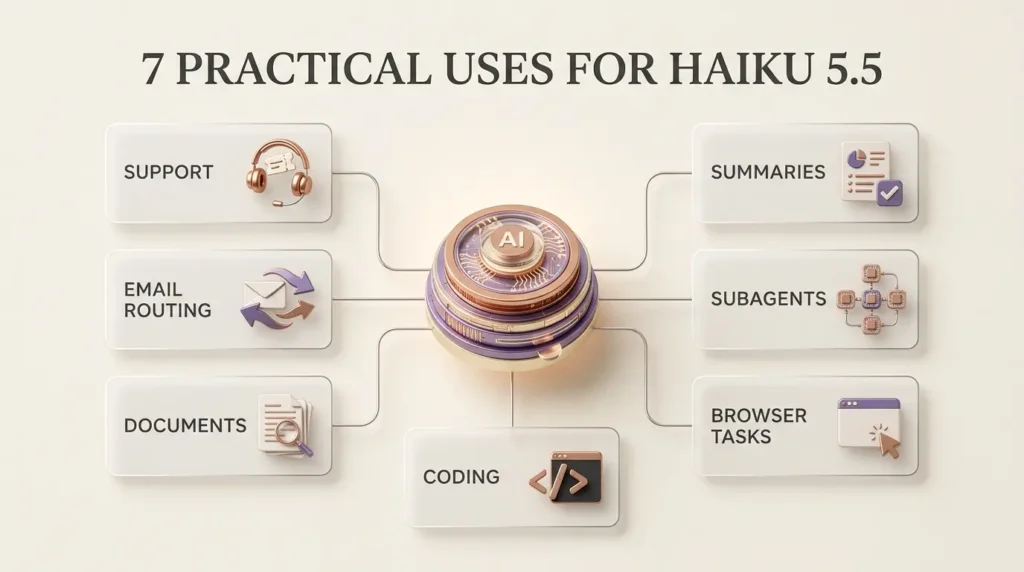
Seven real-world uses for Claude Haiku 5.5
The most valuable use cases aren’t necessarily the most glamorous.
They’re the tasks that happen hundreds or thousands of times and consume attention without requiring expert judgment every time.
1. Customer support classification and response drafts
Imagine a SaaS company receiving hundreds of support tickets every day.
A Haiku-powered workflow could read each message and assign a category:
Billing.
Technical issue.
Account access.
Feature request.
Cancellation.
It could also produce a concise summary and suggest a response for an employee to review.
For example, a customer writes:
“I upgraded yesterday, but my account still shows the old plan. I was charged already.”
The system could identify a billing-and-account issue, flag that payment verification is required, and route it to the appropriate team.
What it should not do is invent a refund, claim that a payment was reversed, or change the customer’s account without the necessary authorization.
Best fit: High-volume support triage with human escalation.
Main limitation: Incorrect classification can delay important cases.
2. Email sorting and internal request routing
Many businesses receive emails that need to reach the right department.
An AI model can classify incoming requests and extract basic details.
For example, it could identify whether an email concerns sales, finance, partnerships, or technical support.
A structured output might contain:
department: finance
priority: normal
action: request invoice details
This can reduce manual sorting.
However, an email containing urgent legal, financial, or security concerns should not be handled solely through a simple automated label.
Best fit: Repetitive, clearly defined inbox workflows.
Main limitation: Ambiguous messages and sensitive information require safeguards.
3. Document extraction and summarization
A business might receive contracts, invoices, reports, or onboarding documents.
Haiku 5.5 can process text and image inputs and return structured information.
A workflow could extract invoice numbers, dates, vendor names, or relevant clauses.
The large context window makes it possible to provide substantial source material.
But the system still needs validation.
If an invoice amount is wrong, the downstream accounting consequences can be serious.
For important data, compare extracted fields with the original document and use deterministic validation wherever possible.
Best fit: First-pass extraction and document organization.
Main limitation: Long context doesn’t guarantee flawless extraction.
4. Meeting notes and report summaries
A team might need a concise summary of a long meeting transcript.
Haiku could produce:
A short overview.
Key decisions.
Open questions.
Assigned action items.
Potential follow-up messages.
This is particularly useful when employees need quick updates rather than a full transcript.
However, action items and commitments should be checked before they are distributed.
An AI model can misattribute a statement or interpret a suggestion as a final decision.
Best fit: Draft summaries with an accountable reviewer.
Main limitation: Speaker attribution and nuance can be lost.
For a broader overview of these applications, see TrendOutsider’s guide to AI and productivity tools.
5. Subagents inside larger AI systems
This may be the most strategically interesting use case.
Imagine a larger AI agent working on a complex software-development task.
It needs to inspect several files, summarize documentation, classify error messages, and identify relevant sections of code.
Instead of making the main model perform every small operation, the system can delegate suitable tasks to a cheaper subagent.
Haiku 5.5 is designed for this kind of supporting role.
The main agent can handle planning and difficult decisions, while Haiku processes smaller requests.
But delegation isn’t automatically beneficial.
Extra model calls introduce coordination overhead, latency, and potential errors.
A well-designed system must decide when delegation is worthwhile.
TrendOutsider’s AI agents workflow automation guide explains the broader difference between autonomous agents and traditional automation.
6. Browser assistance and repetitive digital tasks
Haiku 5.5’s improved computer-use results make it interesting for browser-based workflows.
Possible tasks include navigating an internal dashboard, gathering information from approved systems, or assisting with repetitive form-based processes.
The crucial word is assisting.
A production system needs permissions, monitoring, and clear boundaries.
A model should not be trusted to approve payments, change account permissions, or submit sensitive information simply because it performed well on a benchmark.
Best fit: Low-risk, supervised digital operations.
Main limitation: Interface changes, unexpected states, and tool errors.
7. Lightweight coding and developer support
Developers may use Haiku 5.5 for focused tasks such as:
Explaining a function.
Generating a small test case.
Summarizing a code diff.
Classifying bug reports.
Finding likely documentation references.
Preparing structured information for a larger coding agent.
These tasks can be valuable because they occur repeatedly during development.
For difficult architecture decisions, complicated debugging, or major code changes, a stronger model may still be preferable.
Best fit: Narrow, repetitive developer tasks.
Main limitation: Code quality and correctness still require testing.
Why smaller AI models matter for business automation
Consider a business building an automated customer-support system.
It might need to perform five operations for each request:
Read the incoming message.
Identify the category.
Retrieve relevant account information.
Draft a response.
Determine whether human review is necessary.
Not all five operations require the same model.
A smaller model might handle categorization and summarization.
A stronger model might be reserved for complex cases.
Traditional software could perform deterministic checks, such as verifying whether an invoice number exists.
A human could approve refunds or resolve disputes.
This combination is often more sensible than asking one AI model to handle everything.
The hidden cost of using the strongest model everywhere
Model quality matters.
But using a premium model for every minor classification task can make an otherwise useful automation expensive at scale.
The opposite mistake is equally dangerous.
Choosing the cheapest model for every task can create errors, retries, manual correction, and unhappy customers.
The goal is not simply to minimize the cost per token.
It’s to minimize the cost per correctly completed task.
That’s a much better measure of practical value.
For a wider perspective on implementing AI in organizations, see our AI business solutions and ROI guide.
How to start using Claude Haiku 5.5
There are two main paths.
Option A: Try it in Claude
If you want to experiment without coding, visit Claude in your browser or mobile app.
Sign in and check the model selector for Haiku 5.5.
Start with a simple task.
For example:
“Summarize this customer support message in two sentences, identify the issue category, and list any information needed before replying. Do not assume actions have already been completed.”
Review the response for accuracy.
Then try a more ambiguous message.
This helps reveal whether the model handles the types of requests you actually care about.
Option B: Use the Claude API
Developers can integrate the model using the API identifier:
claude-haiku-5-5
The Claude Platform model documentation provides the supported model ID, capabilities, pricing, and platform availability.
Before deploying an application, review the current API documentation, account permissions, rate limits, and data-handling requirements.
Start with a small test set.
Measure latency, accuracy, token usage, and error rates.
Don’t move directly from one successful demonstration to a fully automated production system.
A practical model-evaluation framework
If you’re deciding whether to switch from Haiku 4.5 or another model, test the new model using your own workload.
A useful evaluation might contain 100 representative tasks.
For customer support, that could include routine questions, ambiguous billing issues, urgent complaints, and messages containing incomplete information.
Measure four things.
Accuracy
Did the model classify the request correctly?
Did it extract the right facts?
Did it avoid inventing details?
Speed
How long did the complete request take?
Measure end-to-end response time, not just an isolated provider benchmark.
Cost
How many tokens did the task consume?
What was the total API charge?
How many retries or extra tool calls were required?
Human correction
How often did a person need to fix the result?
A cheap model that frequently needs correction may be more expensive in practice than a stronger model.
An illustrative decision example
Suppose Model A costs $0.002 per task and succeeds 90% of the time.
Model B costs $0.006 per task and succeeds 99% of the time.
The cheapest model is not automatically the best choice.
If each failed task costs several dollars in employee time or customer dissatisfaction, Model B could offer better economics.
These figures are hypothetical and are included to illustrate the decision—not as measured Haiku 5.5 performance.
Where Claude Haiku 5.5 may not be the right choice
Every model has limitations.
Haiku 5.5 is no exception.
Complex coding projects
Anthropic’s own launch materials indicate that Sonnet and Opus remain stronger choices for demanding agentic coding tasks.
Haiku can support a coding workflow without necessarily being the best model to lead it.
High-stakes decisions
Medical, legal, financial, and safety-critical decisions need appropriate expert oversight.
Lower cost and faster responses do not eliminate the risk of mistakes.
Sensitive business data
Before sending confidential information through an API or cloud service, review the applicable terms, security controls, retention settings, and organizational requirements.
Don’t assume every Claude product or integration has identical data-handling rules.
Very long prompts
The one-million-token context window is useful, but prompts above 100,000 tokens have higher token rates.
Long inputs can also increase latency and make evaluation more difficult.
Tasks requiring guaranteed correctness
Language models can produce plausible but incorrect answers.
For tasks that require exact calculations, permissions, or financial transactions, combine the model with deterministic software and appropriate human controls.
What Claude Haiku 5.5 means for the future of AI agents
AI agents are becoming more practical as developers learn to divide work between models, tools, and conventional software.
A large model may plan a complicated operation.
A small model may summarize information or classify a tool response.
A database can retrieve exact records.
A rules engine can enforce permissions.
A human can approve consequential actions.
That architecture can be more efficient than trying to make one model perform every step.
But the quality of the system depends on the entire workflow.
A poorly designed agent with five models can be less reliable than a simple automation with one model.
If you’re exploring these systems, our generative AI workflows guide explains how AI fits into repeatable business processes.

Frequently asked questions
When was Claude Haiku 5.5 released?
Anthropic announced Claude Haiku 5.5 on October 7, 2026.
Is Claude Haiku 5.5 free?
Haiku 5.5 is available to select in Claude’s Free offering, subject to usage limits. API usage is billed separately according to applicable pricing.
How much does Claude Haiku 5.5 cost?
For prompts up to 100,000 tokens, the starting API prices are $0.10 per million input tokens and $0.50 per million output tokens. Higher rates apply to longer prompts.
Is Claude Haiku 5.5 really 90% cheaper?
Its published input and output token rates are 90% lower than Haiku 4.5 for eligible short prompts. Anthropic estimates approximately 75% lower average operating costs across its considered workload mix.
What is the context window?
Haiku 5.5 supports a one-million-token context window.
Can Claude Haiku 5.5 understand images?
Yes. Anthropic documents text and image inputs, with text output.
Can it generate images?
Its documented output modality is text. Image generation is not listed as a native output capability for the model.
Is Haiku 5.5 better than Sonnet 5.5?
Not for every task. Haiku emphasizes speed and efficiency, while Sonnet is generally more appropriate for demanding work where additional capability is worth the cost.
Can I use Haiku 5.5 for coding?
Yes, especially for focused coding assistance and supporting tasks. More complex agentic coding may benefit from Sonnet or Opus.
Is Haiku 5.5 available through AWS and Google Cloud?
Anthropic lists availability through supported cloud platforms, including Amazon Bedrock and Google Cloud, as well as other supported deployment options.
Does Haiku 5.5 support reasoning?
Yes. It supports adaptive thinking with adjustable effort.
Should I switch my business automation to Haiku 5.5 immediately?
Test it first. Compare accuracy, total cost, latency, and correction rates on representative tasks before migrating production workloads.
Final verdict: Claude Haiku 5.5 makes capable AI cheaper to use repeatedly
Claude Haiku 5.5 isn’t interesting only because Anthropic released another model.
It’s interesting because it changes the economics of repetitive AI work.
At its lowest pricing tier, developers can process substantial volumes of text at much lower listed token rates than before.
The model also brings stronger reported benchmark performance, adaptive thinking, and a large context window.
Those improvements make it worth evaluating for support systems, document workflows, routing, and subagent tasks.
But the most important buying decision remains unchanged.
Don’t choose a model because its headline benchmark is impressive.
Don’t choose one simply because its token price is low.
Choose the model that completes your actual task accurately, reliably, and at a sustainable total cost.
For casual users, Haiku 5.5 is an accessible way to experience a faster Claude model.
For developers, it’s a serious candidate for high-volume workloads.
For businesses, the opportunity is broader: build systems where the right amount of intelligence is applied to the right task.
The future of useful AI may depend as much on choosing the right-sized model as on building a more powerful one.
Sources and editorial methodology
This article is based on Anthropic’s October 7, 2026 announcement, official Claude model specifications, product availability information, pricing documentation, and published evaluation results.
Seven external references used in the article:
- Anthropic — Introducing Claude Haiku 5.5
- Claude Platform — Haiku 5.5 technical documentation
- Claude Platform — API pricing
- Anthropic — Claude Haiku product page
- Claude web application
- Anthropic — Claude model family
- Claude API documentation
Editorial disclosure: This is a researched product guide, not a claim that TrendOutsider independently benchmarked or deployed Claude Haiku 5.5. Benchmark and customer-testing figures are attributed to Anthropic and its published materials. Pricing examples are illustrative and exclude additional operating costs. Product pricing, limits, and availability should be rechecked before publication.








Leave a Reply