
Quick answer: GPT-6 brings a more visual, interactive ChatGPT experience, faster progressive answers, and improvements in tasks involving web research and complex reasoning. Its biggest everyday change is Intelligent UI, which lets ChatGPT create interactive diagrams, calculators, comparisons, and other useful interfaces directly inside a conversation. However, availability depends on your plan, model selection, and rollout status.
For years, using ChatGPT has followed a familiar routine.
You type a question. It gives you an answer. Maybe the response includes a table, a few links, or some code. If you want something more interactive, you usually have to open another application or ask ChatGPT to build it separately.
GPT-6 is starting to change that.
Imagine asking how to divide a restaurant bill and receiving a calculator you can actually adjust. Or asking about a complicated scientific concept and getting a diagram you can explore instead of five dense paragraphs.
That’s the idea behind OpenAI’s latest ChatGPT update.
But the launch also comes with confusing model names, different access levels, and bold performance claims that deserve a closer look.
So in this GPT-6 vs GPT-5 guide, we’ll explain seven meaningful changes, show practical prompts you can try, and help you decide whether the new experience is worth using—or paying for.
GPT-6 vs GPT-5: The biggest differences at a glance
Before comparing features, there’s an important detail.
GPT-5 isn’t one single, unchanging product. OpenAI released several GPT-5-generation models, including GPT-5.6. Its published GPT-6 performance comparisons often use GPT-5.6 as the baseline.
That means a claim such as “GPT-6 is faster than GPT-5” needs context. Faster at what? Compared with which model? Under what conditions?
Here’s what the official announcements establish.
| Feature | Earlier GPT-5-generation ChatGPT | GPT-6 ChatGPT |
|---|---|---|
| Typical answer format | Primarily text, tables, and supported media | Text plus dynamically assembled interactive interfaces |
| Interactive calculators and tools | Often required separate tools or additional creation steps | Can appear directly in supported conversations |
| Complex explanations | Text and existing visual features | Can include purpose-built interactive diagrams |
| Answer delivery | Depends on model and reasoning mode | Can begin answering while continuing to think or search |
| Web research | Supported | OpenAI reports improvements in search decisions and answer quality |
| Model options | Multiple GPT-5-generation choices | GPT-6 options with plan-dependent thinking levels |
| Availability | Depends on older model and plan | Phased rollout across eligible ChatGPT plans |
This is a comparison of product capabilities and OpenAI’s published claims—not a controlled independent benchmark of every GPT-5 model against GPT-6.
The practical question is whether the new features improve the work you do.
1. GPT-6 introduces Intelligent UI: ChatGPT is becoming more interactive
The headline feature of the October 7 release is called Intelligent UI.
In the official GPT-6 announcement, OpenAI explains that ChatGPT can combine written answers with visuals and interactive components depending on the question.
That sounds technical, but the everyday difference is easy to understand.
Ask an ordinary question, and you may still get a normal written answer.
Ask something that would benefit from interaction, and ChatGPT may build a more useful experience around it.
Example: Splitting a restaurant bill
Imagine five friends sharing dinner.
Instead of manually calculating each person’s share, you could ask:
Try this prompt:
Create an interactive bill splitter for five people. The total is $186 before tip. Let me adjust the tip percentage, change the number of people, and see how much each person owes.
With Intelligent UI, a supported GPT-6 conversation may display controls that let you change those values directly.
The advantage isn’t that ChatGPT suddenly learned division. Previous models could calculate a bill.
The difference is that the calculation can become an interactive tool without requiring you to leave the conversation.
Example: Comparing products
Suppose you’re deciding between three laptops.
You could ask ChatGPT to organize them by price, battery life, portability, and performance.
A visual comparison may make the trade-offs easier to understand than a long paragraph.
Of course, the quality of the recommendation still depends on accurate product information.
A beautiful comparison is not useful if its prices or specifications are wrong.

2. GPT-6 can create interactive tools when you need them
This is closely related to Intelligent UI, but it deserves separate attention.
Instead of choosing a dedicated website for every small calculation or planning task, you may be able to ask ChatGPT to create a temporary tool tailored to your situation.
OpenAI’s examples include bill splitters, retirement savings calculators, and playable games.
That opens up interesting possibilities for everyday work.
Seven useful prompts to try
1. Monthly budget calculator
Build an interactive monthly budget calculator. Let me enter income, rent, utilities, groceries, transport, and savings. Show the remaining balance and update the totals when I change a value.
2. Savings planner
Create an interactive savings calculator with adjustable starting balance, monthly contribution, annual interest rate, and number of years. Show a chart and explain the assumptions.
3. Study planner
Create a seven-day study planner for learning the basics of artificial intelligence. Let me mark topics as completed and see my progress.
4. Freelance pricing calculator
Build a calculator that helps me estimate a freelance project quote based on hours, hourly rate, expenses, and desired profit margin.
5. Travel budget planner
Create an adjustable travel budget for a five-day trip, with accommodation, meals, transportation, activities, and emergency expenses.
6. Small-business break-even calculator
Build a simple break-even calculator where I can change fixed monthly costs, selling price per unit, and variable cost per unit.
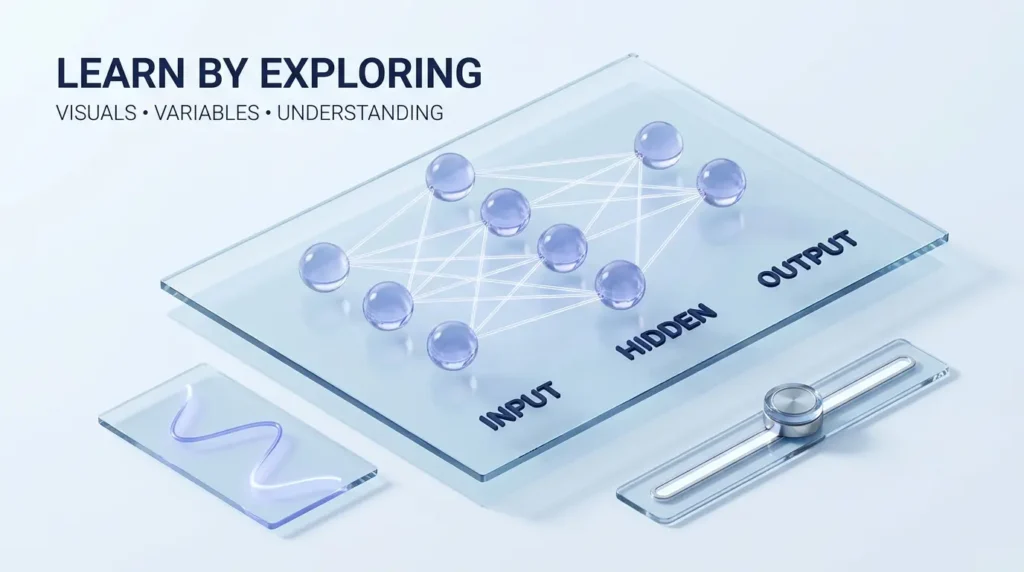
7. Learning diagram
Explain how a neural network works using an interactive diagram. Let me explore the input layer, hidden layers, and output layer.
These prompts illustrate possible uses of Intelligent UI. The exact response may vary by device, model, plan, and whether the feature has reached your account.
For business owners interested in going beyond calculators and building repeatable processes, our AI business solutions and ROI guide explores the broader practical considerations.
3. GPT-6 can begin answering while it is still thinking
Anyone who has used a reasoning-focused AI model knows the experience.
You ask a difficult question.
Then you wait.
Sometimes the eventual answer is useful enough to justify the delay. Other times, the silence makes the interaction feel slower than it needs to.
GPT-6 introduces a different approach.
OpenAI says ChatGPT can begin presenting useful parts of an answer while continuing its reasoning or using tools.
Rather than waiting for every step to finish, the response can develop progressively.
What does that look like?
Imagine asking:
“Compare three approaches to launching an online business. Include startup costs, risks, and a practical recommendation.”
A supported GPT-6 response may begin with an initial comparison and then add more detailed findings as its work continues.
The important distinction is that an early answer is not necessarily the final answer.
If you’re using the result for a purchase, investment, technical decision, or business commitment, wait for the response to finish and verify its important claims.
Is GPT-6 actually faster?
OpenAI reports that GPT-6 Instant begins answering questions requiring web search 44% sooner on average than GPT-5.6 Instant in its internal evaluation.
That’s a meaningful reported improvement, but it measures the time until an answer begins—not necessarily the time required to finish every task.
Your experience may vary with the question, model settings, server conditions, and tools being used.
4. GPT-6 aims to make complex subjects easier to understand
Think about the last time you tried learning a difficult topic online.
Maybe it was compound interest, a statistics concept, a technical diagram, or how a camera works.
A well-written explanation helps.
But sometimes you don’t fully understand something until you can change a variable and watch the result.
That’s where Intelligent UI could become especially valuable.
OpenAI’s examples include interactive explanations of mathematical and scientific concepts.
Example: Understanding compound interest
A traditional explanation might give you a formula and a worked example.
An interactive explanation could let you change:
- Your initial savings.
- Your monthly contribution.
- The assumed annual return.
- The number of years.
You could then see how each change affects the projected outcome.
The underlying math hasn’t changed. The learning experience has.
Example: Learning statistics
Consider the central limit theorem.
It’s an important concept, but the explanation can feel abstract to someone encountering it for the first time.
An interactive visualization can make it easier to see how sampling distributions behave as assumptions and sample sizes change.
The value comes from making an idea easier to explore, not from adding visuals for decoration.
5. GPT-6 improves web research, according to OpenAI
One of the most common frustrations with AI-generated answers is that they can sound convincing even when important details are missing.
That becomes especially problematic when the subject is current.
Prices change. Products launch. Companies update policies. Research findings are revised.
An AI assistant needs to know when its existing knowledge isn’t enough.
OpenAI says GPT-6 has improved its decisions about when to search the web and how to use retrieved information.
The company also reports stronger results on an internal evaluation involving difficult questions that require identifying the most important part of the user’s request.
What this could mean in practice
Suppose you ask:
“What changed in Google’s latest AI product announcement, and which features are available to small businesses today?”
A useful answer should distinguish between announced capabilities, private previews, and features that customers can actually access.
That distinction is more valuable than a polished summary that treats every announced feature as generally available.
For example, our Google Gemini Agent for Work guide examines that exact issue: separating Google’s newly announced agent capabilities from actual availability.
Important: The link above should be checked against the final live permalink after that article publishes.
A practical research habit
Even with an improved AI model, verify:
- Dates of announcements.
- Official pricing pages.
- Product availability by country or plan.
- Original research and source documents.
- Claims that could affect financial or business decisions.
AI-assisted research is most valuable when it makes evidence easier to examine, not when it replaces verification.
6. GPT-6 introduces new model choices—but the names can be confusing
If you’ve seen references to GPT-6 Sol, Luna, and Astra, you may wonder whether they’re the same thing.
They aren’t.
OpenAI uses different model configurations for different experiences and levels of capability.
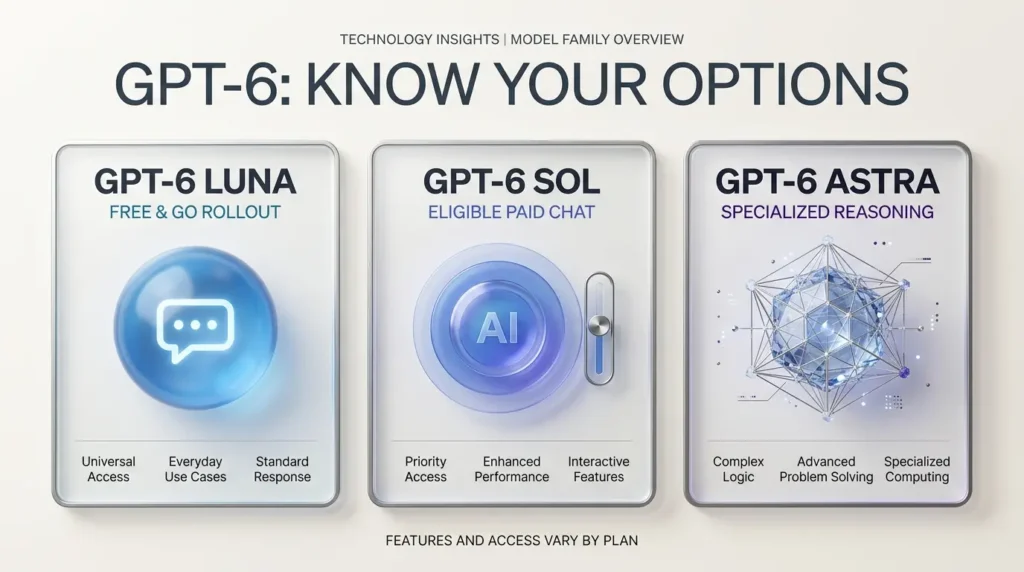
The October ChatGPT release describes GPT-6 Sol for eligible paid Chat experiences and GPT-6 Luna for Free and Go tiers.
The company also offers GPT-6 Astra for specialized high-capability use cases and Pro-level reasoning experiences.
Availability and model selection depend on the plan and interface.
GPT-6 models explained
| Model | General positioning | What readers should know |
|---|---|---|
| GPT-6 Sol | Paid ChatGPT conversational experience | Supports Intelligent UI at eligible thinking levels |
| GPT-6 Luna | Free and Go rollout | Designed for broader everyday access |
| GPT-6 Astra | Specialized, higher-capability reasoning | Different experience and eligibility; Pro reasoning does not support Intelligent UI |
The exact options visible in your account may differ during rollout.
According to OpenAI’s model documentation, Intelligent UI is associated with supported GPT-6 Chat modes from Instant through Extra High.
The separate Pro reasoning option does not support Intelligent UI.
This matters because selecting the most computationally intensive model doesn’t necessarily give you every interface feature.
What about ChatGPT Work and Codex?
The October 7 Intelligent UI release applies to the Chat experience.
OpenAI specifically states that the models powering Work and Codex were not changed as part of that release.
That’s another reason to avoid treating every product carrying the GPT-6 name as one identical experience.
7. GPT-6 includes reported improvements in safety and reliability
A more capable AI system should also be better at recognizing when it should not perform a requested action.
OpenAI says GPT-6 improves its handling of safety-sensitive situations, including recognizing real-world risks and communicating limitations more clearly.
The company reports stronger resistance to certain adversarial attempts to bypass safeguards.
It also describes improvements in responding to legitimate requests without unnecessary refusals.
Those are positive goals.
However, no model is perfectly accurate, secure, or immune to manipulation.
For businesses, the sensible approach remains the same:
Use AI to assist with work, but maintain human review where mistakes could cause meaningful harm.
If you’re planning to connect AI systems to email, customer records, or business applications, our AI agents workflow automation guide explains why permissions and oversight matter.
Is GPT-6 free? Who can use it in October 2026?
This is one of the most searched questions surrounding a major ChatGPT release.
The short answer is that GPT-6 access is being rolled out across different ChatGPT plans, but the specific model, thinking level, and features depend on eligibility.
OpenAI announced the new Chat experience for Plus, Pro, Business, and Enterprise on October 7, with Free and Go rollout beginning October 8.
Enterprise availability also depends on administrator settings.
GPT-6 availability by plan
| ChatGPT plan | What the launch announced |
|---|---|
| Free | GPT-6 Luna rollout beginning October 8 |
| Go | GPT-6 Luna rollout beginning October 8 |
| Plus | GPT-6 Sol in eligible Chat modes |
| Pro | GPT-6 Sol, with additional eligible reasoning options |
| Business | GPT-6 Sol, subject to workspace settings |
| Enterprise | GPT-6 Sol, subject to administrator controls |
Rollouts can take time, and the model picker may not look identical for every user.
For the most current details, check OpenAI’s ChatGPT release notes and its model availability guide.
Does Intelligent UI cost extra?
OpenAI’s model documentation says Intelligent UI does not have a separate usage quota.
However, your existing plan, model, and tool limits still apply.
That is not the same as unlimited access to every GPT-6 capability.
How to try GPT-6 and Intelligent UI
If GPT-6 is available in your account, getting started should be straightforward.
Step 1: Open ChatGPT
Visit the official ChatGPT website or use a supported, updated application.
Step 2: Check your model options
If your plan includes a model selector, look for GPT-6 and the available thinking settings.
If GPT-6 isn’t visible yet, it may still be rolling out to your account.
Step 3: Ask for something that benefits from interaction
Try:
Build an interactive monthly savings calculator with adjustable contributions, interest rate, and time period. Include a chart and explain the assumptions.
You don’t need a special command to activate Intelligent UI. ChatGPT decides when an interactive response would be useful.
Step 4: Try a visual explanation
For example:
Explain how a solar panel generates electricity using a labeled visual diagram and a beginner-friendly explanation.
Step 5: Evaluate the result
Check whether the tool or visualization is accurate, usable, and genuinely easier to understand than a conventional response.
If it isn’t, ask ChatGPT to simplify it or provide a text explanation instead.
GPT-6 vs GPT-5: Is upgrading worth it?
That depends on what you actually use ChatGPT for.
If you mainly ask straightforward questions, draft short emails, or brainstorm ideas, the improvement may feel less dramatic.
If you regularly work with complex explanations, comparisons, calculations, or research, Intelligent UI and progressive answers may be more useful.
For students
The biggest potential benefit is learning through diagrams, adjustable examples, and visual explanations.
For freelancers
Interactive calculators and planning tools could help with estimates, schedules, and project decisions.
For small-business owners
GPT-6 may make it easier to explore business scenarios, understand data, and prepare structured plans.
But that is different from giving an AI agent permission to operate your business software.
For actual workflow automation, consider the specialized platforms discussed in our best AI agents for small businesses guide.
Verify this internal link against the published permalink before scheduling.
For everyday users
The most immediate benefit may simply be that ChatGPT becomes easier to use for tasks that previously required switching between websites or apps.
When a paid plan might make sense
Consider upgrading if you regularly reach your plan’s limits or need specific models, thinking levels, or features that your current plan does not provide.
Don’t upgrade solely because a new model has launched.
First, try the capabilities available on your current plan and identify what is genuinely missing.
Five limitations you should know before relying on GPT-6
New features are exciting, but the limitations matter just as much.
1. Interactive doesn’t automatically mean accurate
A beautifully designed calculator can still use incorrect assumptions.
Check the inputs and formulas when the results matter.
2. Not every answer needs an interface
A simple question may be better answered with one clear paragraph.
More visuals do not automatically mean more value.
3. Rollout and plan differences can be confusing
The experience described in a product announcement may not immediately match what you see in your account.
4. AI-generated research still requires verification
Even if web research improves, current facts should be checked against reliable sources.
5. Complex work still needs human judgment
Business decisions, medical concerns, legal questions, and significant financial choices deserve appropriate expert review.

What GPT-6 tells us about the future of AI
The most interesting part of GPT-6 may not be a benchmark score.
It’s the direction of the interface.
For decades, software has usually asked people to learn how an application works.
You open a spreadsheet to calculate something. You visit a mapping app to plan a route. You find a calculator to explore a financial scenario.
Now, conversational AI is moving toward a different model.
You describe the problem, and the software attempts to shape an interface around it.
That doesn’t mean traditional applications will disappear.
Dedicated software still offers reliability, specialist features, collaboration controls, and workflows that a generated interface may not reproduce.
But it does suggest a future where more small, everyday tools can be created on demand.
For users, the important question becomes less about which application to open and more about how clearly they can describe what they need.
Frequently asked questions
What is the main difference between GPT-6 and GPT-5?
The most visible difference in the October 2026 ChatGPT update is Intelligent UI, which can combine text with interactive elements such as calculators, diagrams, and comparisons. OpenAI also reports improvements in response delivery, web research, and safety.
Is GPT-6 better than GPT-5.6?
OpenAI reports improvements over GPT-5.6 in selected internal evaluations. However, the best choice depends on the task, and those results should not be interpreted as proof that GPT-6 wins every possible comparison.
Is GPT-6 available for free?
OpenAI announced that the GPT-6 Luna rollout would begin for Free and Go users on October 8, 2026. Actual access may vary during rollout.
What is ChatGPT Intelligent UI?
Intelligent UI is a capability that lets ChatGPT present certain answers through interactive visuals, forms, diagrams, calculators, and other interface elements when useful.
Do I need to write special prompts to use Intelligent UI?
No. OpenAI says ChatGPT can select an appropriate response format automatically. You can still explicitly request a calculator, interactive diagram, or visual comparison.
Does GPT-6 replace GPT-5 completely?
No. OpenAI’s documentation indicates that older selectable models remain available in supported contexts. Model availability depends on your plan and settings.
Is GPT-6 Sol the same as GPT-6 Astra?
No. They are different configurations and experiences. Astra is associated with specialized high-capability reasoning, while Sol powers eligible paid ChatGPT conversational modes.
Can GPT-6 create websites and apps?
ChatGPT can assist with code and, in supported contexts, generate interactive tools. However, a conversational interface is not automatically a production-ready website or application. More complex software still requires development, testing, security review, and deployment.
Is GPT-6 safe for business information?
Businesses should review their account settings, organizational policies, permissions, and data-handling requirements before entering sensitive information. No AI model should be assumed risk-free.
Final verdict: GPT-6 changes more than the answer
The biggest shift in GPT-6 isn’t that ChatGPT can write another paragraph or solve another equation.
It’s that the answer itself can become something you use.
A comparison can become interactive. A calculation can become adjustable. A difficult concept can become a visual explanation.
Combined with faster progressive responses and reported research improvements, that makes GPT-6 an important step in the evolution of conversational AI.
But the smartest way to evaluate it is still surprisingly simple.
Try it on a real problem.
Ask it to build a calculator you need, explain something you’ve struggled to understand, or organize a decision you’ve been putting off.
Then judge the result by whether it saves time, improves understanding, or helps you make a better-informed choice.
That’s a more useful measure than the excitement surrounding a model name.
Sources and editorial methodology
This article was prepared using official product announcements and documentation available as of October 9, 2026, for publication on October 12.
Primary sources:
- OpenAI — GPT-6 and Intelligent UI for Everyone
- OpenAI — ChatGPT Release Notes
- OpenAI — GPT-6 and Other Models in ChatGPT
- OpenAI — Product Release Notes
Independent coverage:
Editorial disclosure: TrendOutsider has not conducted independent controlled benchmarks comparing every GPT-5 and GPT-6 model. Performance figures attributed to OpenAI come from its published evaluations. Example prompts are suggestions for readers to try, not claims of verified firsthand testing. Features and access may change after publication.







Leave a Reply