
Introduction
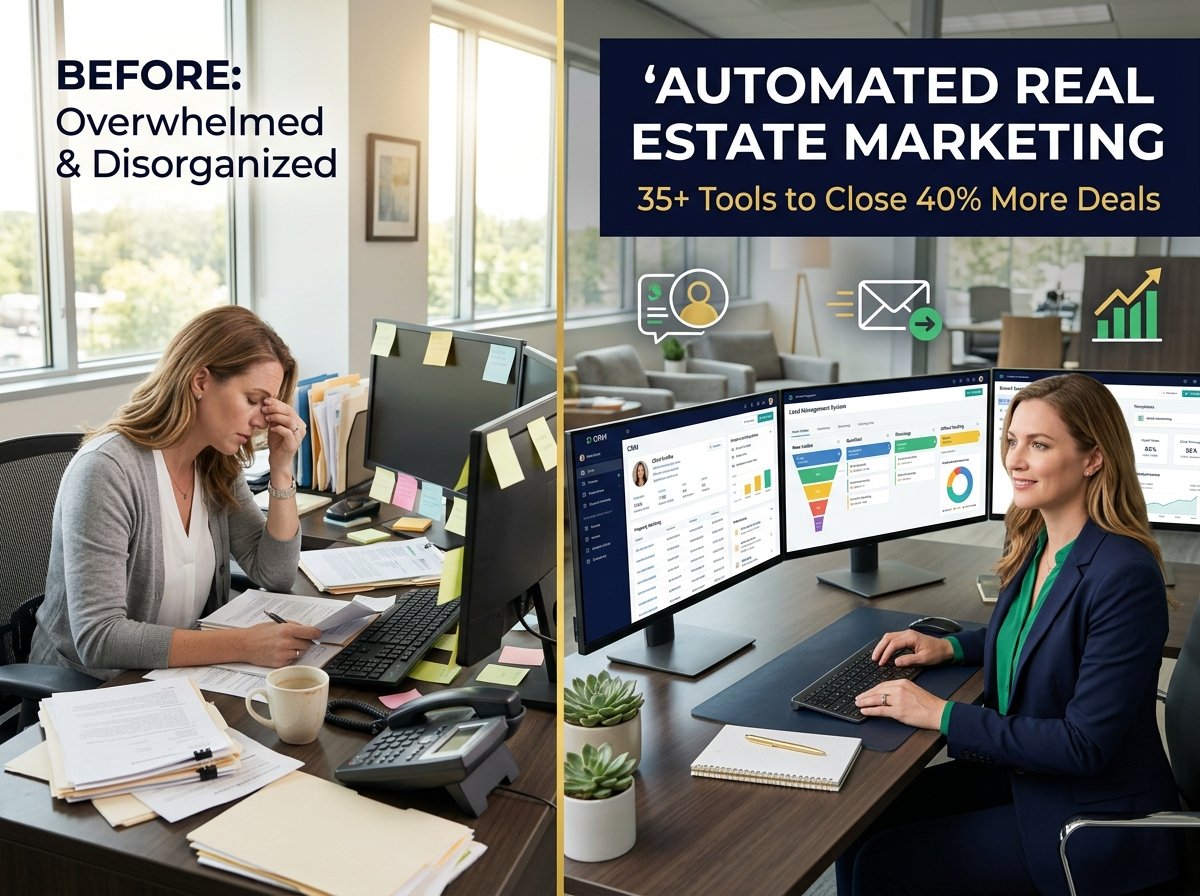
Real estate agents are drowning in busywork. I’ve talked to hundreds of them, and the story is always the same. They wake up feeling busy. They end the day feeling busier. But they can’t point to anything concrete they actually accomplished.
A buyer inquiry comes in at 9 PM. A seller wants a valuation. Ten different people ask the same question about neighborhood schools. An open house produced five leads. A showing appointment needs confirming. An email campaign should go out. Social media should be updated. The CRM should be organized. Meanwhile, the agent hasn’t shown a single property or had one meaningful conversation with a qualified buyer.
This is the problem that automation solves. Not by replacing agents. But by removing the repetitive work that prevents agents from doing the work that actually makes money.
The agents closing 30, 40, 50 deals per year aren’t working longer hours than the agents closing five deals. They’re working smarter. They’ve implemented systems that handle the stuff that doesn’t require their personal judgment. Lead capture happens automatically. Follow-up happens on schedule. Reminders go out without them thinking about it. Scheduling happens without back-and-forth emails. Then when it’s time for a real conversation, they’re ready.
This guide walks you through the tools that actually work, the strategies that convert, and the specific workflows that scale. Not theoretical tools. Not software that technically exists but requires a PhD to use. Tools that real agents are using right now to manage their time better and close more deals.
What is Automated Real Estate Marketing?
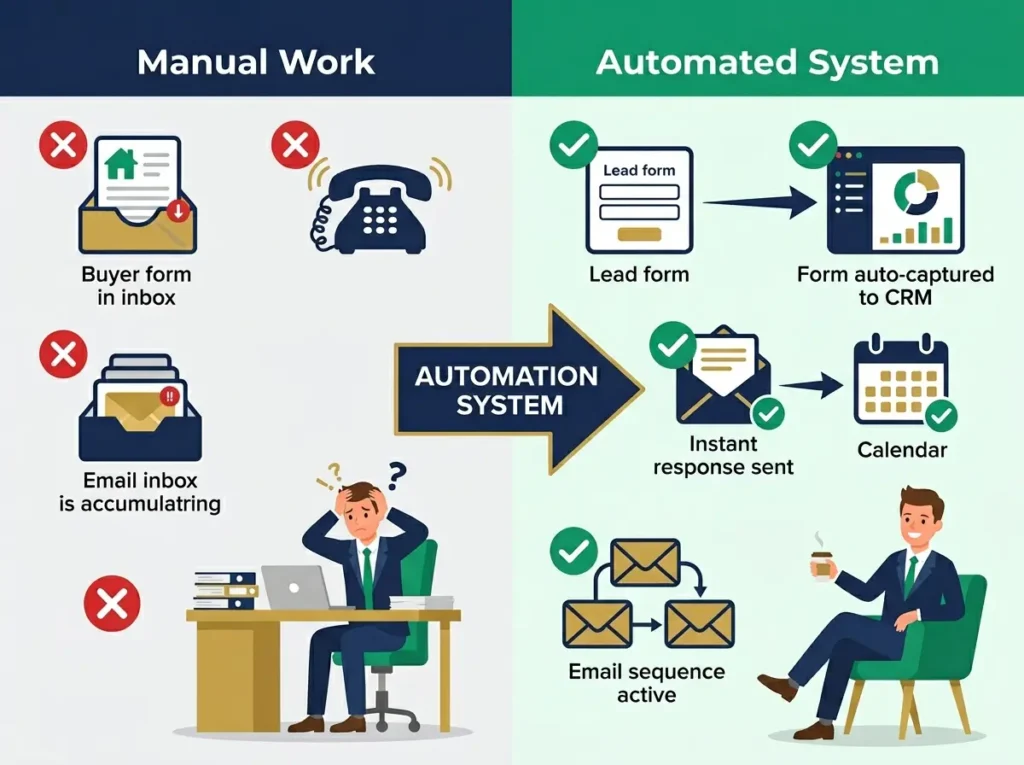
Automated real estate marketing means using technology and workflows to handle the repetitive parts of your marketing and lead management so you can focus on the parts that require your personal attention.
Here’s what actually happens. A buyer finds your website. They fill out a form asking about homes in a specific area. Before you even finish showing another property, automation captures that lead. It sends an instant response. It asks qualifying questions. It adds the contact to your CRM. It creates a task reminder for you. It starts an email sequence that’s helpful instead of salesy.
You’re not managing any of this. The system is. Meanwhile, you’re actually working with clients instead of drowning in administration.
What automation handles: Lead capture from your website, Zillow, Realtor.com, Facebook ads, open house sign-ins. Instant response messages so leads don’t get lost. Automatic qualification so you know who’s serious. CRM data entry that you don’t have to type manually. Email sequences that nurture buyers and sellers without you writing individual messages. SMS reminders for showings and appointments. Social media posting so you’re consistent. Appointment scheduling so buyers book their own time. Task management so nothing gets forgotten.
What automation doesn’t handle: Real relationships. That’s you. Honest conversations about someone’s actual situation. That’s you. Trust building. That’s you. Negotiating contracts. That’s you. Understanding local market dynamics. That’s you.
The best automation is like having a competent assistant who handles administration so you can focus on the actual business of real estate.
Why Real Estate Agents Need Automated Marketing in 2026
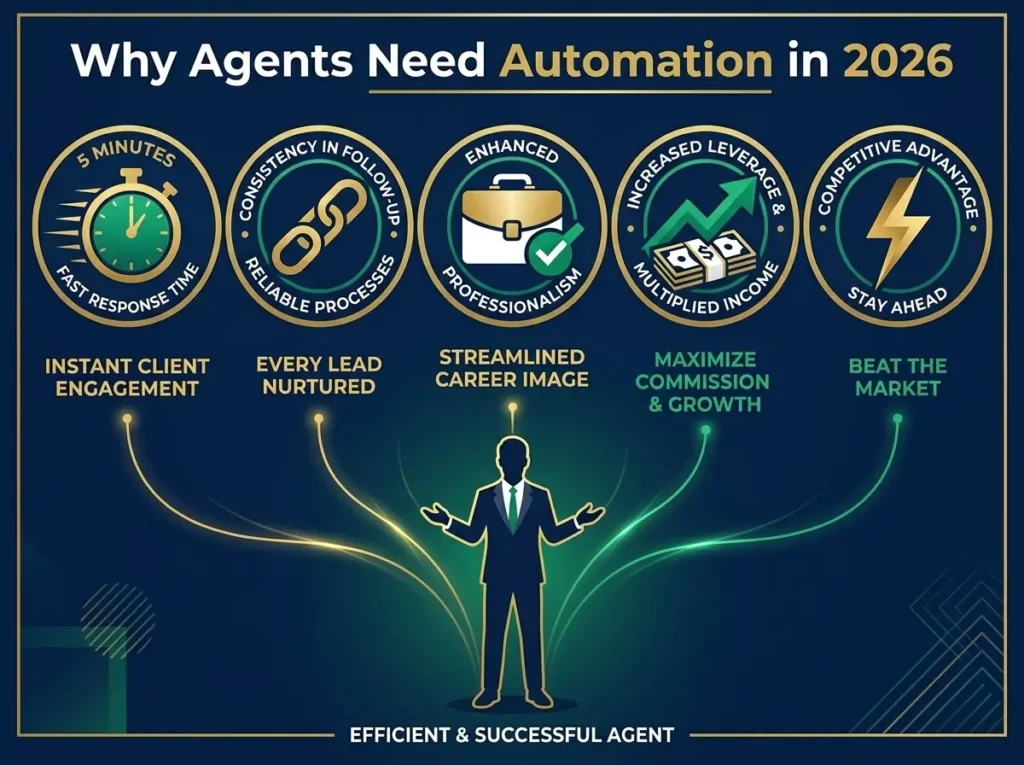
The marketplace has changed in ways that make automation no longer optional.
First is response time. When someone submits an inquiry to find homes, they’re likely submitting that same inquiry to three or four agents simultaneously. The agent who responds first usually gets the conversation. Not because they’re better. Just because they were faster. An automated response that goes out in five minutes beats a manual response that takes four hours. Time matters.
Second is consistency. One agent can’t maintain seven different marketing channels manually. You can’t post on Facebook every single day, send personalized email follow-ups, remember to text old leads, nurture past clients, update your CRM, manage open houses, and still show property. Something breaks. Usually it’s the follow-up that breaks. Leads get lost. Relationships go cold. The database becomes a graveyard of missed opportunities. Automation keeps the system moving even when you’re slammed.
Third is professionalism. Buyers and sellers don’t measure professionalism by how hard you work. They measure it by how they experience your business. They know if you respond fast or slow. They know if communication is organized or chaotic. An agent with systems in place looks more professional and trustworthy than a disorganized agent, even if that disorganized agent is technically more skilled.
Fourth is leverage. Most agents still operate like they can only earn income from their own time. You can only show so many homes. You can only make so many calls. Automation multiplies your capacity. Your system manages leads while you’re sleeping. Your system follows up while you’re showing property. Your system does work that used to require you to work longer hours.
Understanding how successful teams think about automation across their entire operation is enlightening. If you want to see how top performers structure their workflows, check out our comprehensive guide to generative AI workflows, which shows how automation connects across every part of a business operation.
Fifth is competitive advantage. Most agents still don’t have automation. Which means if you implement systems, you immediately operate faster and more consistently than your competition. That advantage compounds over time.
Decision Framework: Choosing Your Automated Marketing System
Before buying any tool, answer these questions. They determine which tools actually fit your situation.
Are you a solo agent, a small team, or managing a brokerage? A solo agent needs simple tools that capture leads, send follow-ups, schedule appointments, and post on social media. A team needs lead distribution, agent accountability, and shared visibility. A brokerage needs standardized workflows across multiple agents, compliance controls, and comprehensive reporting.
What’s your budget? You can start completely free. You can spend $50 per month. You can spend $500 per month. Your budget determines which tools you can actually sustain.
If you’re completely budget-constrained, it’s worth exploring tools beyond just CRM automation. Our article on free AI tools for marketing explores the broader toolkit available for real estate professionals without significant budget investment.
Which marketing channels matter most to you? Do you need email automation? SMS? Social scheduling? Landing pages? Video? Chat? Not every agent needs every channel. Understanding your channels determines which tools to prioritize.
Does it integrate with your CRM? This is critical. If your lead capture doesn’t connect to your CRM, if your email doesn’t update tasks, if your scheduling doesn’t sync with your calendar, you’ve created more work instead of less. Make sure integration exists before buying.
What’s your technical comfort level? Some tools are built for non-technical people. Others require workflow thinking. Some require basic coding. Be honest about what you can actually maintain.
35+ Automated Real Estate Marketing Tools Reviewed
Real Estate Specific CRM and Automation Platforms
Follow Up Boss is arguably the most popular CRM for real estate teams and serious solo agents. It captures leads from every source imaginable: your website, Zillow, Realtor.com, Facebook lead ads, Google Business Profile, texts, even manual entry. The system scores leads automatically based on activity. Hot leads get flagged immediately. Warm leads enter nurture sequences. Cold leads stay in the system for long-term cultivation. For teams, Follow Up Boss distributes leads to available agents, tracks follow-up, and creates accountability. The interface shows exactly which leads haven’t been contacted and for how long. Managers get reporting on which agents are most productive. The learning curve is real because the functionality is deep. But for agents with high volume, it’s worth it. Pricing starts around $60 per month for solo agents and scales up for teams. Best for serious agents and teams managing high lead volume.
HubSpot offers a free CRM that’s genuinely useful. You capture leads, organize them by stage in your sales pipeline, track communication history, and build basic automated sequences without paying anything. The free version has real limitations but those limits don’t make it useless. As your needs grow, you can add paid modules for marketing automation, sales tools, and customer service. Many real estate professionals start with the free version and upgrade later. It’s not specifically designed for real estate but it works. Best for beginners wanting to test automation without commitment.
kvCORE, now part of BoldTrail, is built specifically for real estate brokerages and teams. It combines a website builder with lead capture and CRM in one integrated system. Properties from your MLS pull in automatically. Buyers searching your site flow directly into the CRM. Behavior-based automation triggers follow-up based on what people actually do. The system is powerful but requires setup and adoption. Best for brokerages that want everything integrated and streamlined.
Real Geeks combines a professional IDX website with built-in lead capture and CRM. If you don’t have a strong website, Real Geeks solves multiple problems at once. Your website becomes a lead generation machine instead of just a business card online. Captured leads flow automatically into the CRM. Automated buyer and seller sequences work in the background. The system is designed specifically for real estate agents. Best for agents who need both a professional website and automated lead management.
Sierra Interactive is another real estate website and CRM platform popular with teams. It focuses on lead generation, lead routing, automation workflows, and digital marketing integration. If you’re running paid ads, Sierra tracks which ads produce which leads and which leads actually convert to deals. This helps you understand ROI on your marketing spend. Best for teams investing seriously in paid lead generation.
BoomTown is built for teams managing high-volume paid leads. It combines lead generation with CRM follow-up and conversion automation. The platform is designed around the idea that you’re buying leads and need systems to convert them systematically. Includes reporting on conversion rates by source, by agent, by price point. Best for teams running expensive paid lead campaigns.
CINC (Constellation Independent Network Cooperative) is similar to BoomTown. A lead generation and conversion platform built for teams managing paid campaigns. Both serve the same market. Choose based on interface preference and specific features. Best for brokerages and teams investing in paid lead generation.
Wise Agent is an affordable real estate CRM for solo agents and small teams. It includes contact management, transaction management, email marketing, SMS, task reminders, and basic automations. The interface is straightforward. The learning curve is gentle. The price is reasonable compared to enterprise platforms. You’re not getting the advanced features of bigger systems but you’re getting the fundamentals. Best for agents wanting affordable CRM automation without unnecessary complexity.
LionDesk is known for strong communication tools. It’s a CRM with email marketing, SMS, video email, and video messaging. Real estate agents like it because communication is the core of the business and LionDesk emphasizes communication. You can send video emails instead of just text emails. You can track whether people watched your videos. That personal touch matters in real estate. Best for agents who believe personalized communication drives conversion.
Lofty is an AI-powered real estate platform combining CRM, lead generation, marketing automation, and AI-assisted workflows. It’s positioning itself as the modern real estate platform. The AI helps with tasks like writing email copy, suggesting follow-up strategies, and identifying which leads might be ready to move. It’s newer than some competitors but gaining traction. Best for agents wanting AI-assisted automation.
Propertybase is a back-office platform used primarily by brokerages. It handles CRM, marketing, transactions, and operational workflows. It’s designed to be the central system that brokerages use to run their entire business. Best for brokerages needing comprehensive business management tools.
General Purpose CRMs That Work for Real Estate
Pipedrive is a sales CRM that works well for agents who think in pipeline stages. Instead of seeing contacts as a list, Pipedrive shows deals moving through stages. Where is each deal in the process? What’s the next step? Pipedrive visualizes this beautifully. It’s not real estate specific but it adapts well. Some agents find the visual pipeline approach more intuitive than traditional CRM organization. Best for agents who prefer thinking about deals in stages rather than contact lists.
Zoho CRM is flexible and affordable. A free version exists that handles basic CRM needs. Paid plans are inexpensive. You can customize it for real estate workflows. It’s not built specifically for real estate but it’s customizable enough to work. Useful if you’re budget-conscious and willing to set up your own workflows. Best for budget-conscious agents comfortable with customization.
Email and Marketing Automation
Mailchimp is free for up to 500 contacts. Create newsletters, set up automated welcome sequences, segment your contact list. If you have a database of past clients and leads who want regular updates, Mailchimp delivers that. The free version has limits but those limits don’t prevent you from actually using the tool. Best for budget email marketing and newsletters.
Constant Contact is built for small business email marketing. More user-friendly than some platforms. Strong templates. Basic automation. Affordable. Not as powerful as ActiveCampaign but easier to learn. Best for straightforward email campaigns without complex automation.
Brevo (formerly Sendinblue) handles both email and SMS. Send email campaigns, build automated sequences, send SMS reminders, all in one platform. Useful for real estate because you can combine channels. Email when someone first engages, SMS for reminders closer to appointments. Affordable pricing. Best for combining email and SMS in one platform.
ActiveCampaign is built for sophisticated marketing automation. Conditional logic means the next email someone receives depends on what they did previously. Complex segmentation lets you target specific types of leads differently. Lead scoring identifies which leads are most engaged. If you want automation that’s actually smart, ActiveCampaign delivers it. More expensive than simpler platforms but the power justifies it. Best for advanced automation and sophisticated nurture sequences.
SMS and Messaging Automation
Twilio is a developer platform but works with Zapier for non-developers. You can automate SMS messages. When a lead is created, send an SMS. When a showing is scheduled, send a reminder text 24 hours before. SMS typically gets higher engagement than email so the extra setup is often worth it. Best for developers or agents comfortable with Zapier workflows.
SimpleTexting is SMS marketing built for small business. Create campaigns, set up keyword triggers, automate reminders. Straightforward interface. No technical skills required. Best for simple SMS automation without developer knowledge.
Social Media Automation
Buffer schedules posts to Facebook, Instagram, Twitter, and LinkedIn. Write your content, schedule it for optimal times, Buffer posts automatically. You maintain consistent social presence without living on social media. Free version available with limits. Paid versions unlock more features. Best for consistent social media posting without daily manual work.
Later specializes in visual platforms: Instagram, Pinterest, TikTok. Particularly strong for property photography. You can build a content calendar visually, see how posts will look before publishing, schedule everything at once. Real estate is visual so Later works well. Best for Instagram-heavy real estate marketing.
Hootsuite is team-focused social management. Multiple people can schedule content across multiple accounts. Team approval workflows ensure brand consistency. Reporting shows engagement and reach. Best for brokerages and teams managing multiple social accounts.
Meta Business Suite is free. Manage Facebook and Instagram in one place. Schedule posts, manage messages, see basic analytics. Not as full-featured as paid tools but it doesn’t cost anything. Best for agents focused primarily on Facebook and Instagram.
Landing Pages and Lead Capture
Leadpages builds landing pages designed to capture leads. Choose a template, customize for your property or offer, add a lead capture form, and publish. The templates are specifically designed for real estate. Property pages, buyer guides, seller guides, consultation request pages. You don’t need design skills. Best for building multiple lead capture pages quickly.
Unbounce is similar to Leadpages. High-converting landing pages. Good templates. Easy customization. Best for high-performing landing pages without technical knowledge.
Design and Graphics
Canva is free and genuinely powerful for real estate. Create property listing graphics, social media posts, buyer guides, open house flyers, postcards, anything visual. You don’t need design training. Real estate templates exist. Professional-looking results without hiring a designer. Best for visual content creation without design skills.
Adobe Express is similar to Canva. Choose based on interface preference. Both work well. Best for professional design feel.
Analytics and Measurement
Google Analytics 4 is free. See who visits your website, where they come from, what pages they view, whether they fill out forms. Critical for understanding whether your marketing investments work. Best for website traffic analysis.
Google Search Console is free. See which keywords your website ranks for, which pages get search traffic, which pages have issues. Essential for SEO. Best for understanding search engine performance.
Looker Studio creates dashboards from Google Analytics, Search Console, ads data, and other sources. Visualize your marketing data. Share reports with team members or brokers. Free tool. Best for marketing analytics dashboards.
Video Communication
Loom records your screen or camera. Create property walkthroughs, explain buyer processes, record neighborhood guides. Video gets more engagement than text. Free version available. Best for video content creation.
BombBomb specializes in video email and SMS. Record yourself talking, BombBomb delivers it via email or text, you can see whether people watched. Personal video communication stands out. Best for personal video follow-up without cold emails.
Scheduling
Calendly is free. Buyers book their own showing times instead of emailing back and forth. Integrates with your calendar. Prevents double-booking. Sends automatic reminders. This single tool saves hours per month. Best for appointment scheduling automation.
Workflow Automation
Zapier connects tools that don’t connect natively. When a form is submitted, Zapier sends data to your CRM, triggers an email, creates a calendar event, notifies you via Slack. Automations happen without manual intervention. Free version available with limits. Paid versions unlock more automations. Best for connecting all your tools together.
Make is similar to Zapier. Visual workflow builder. More flexible for complex automations. Alternative to Zapier with similar functionality. Best for advanced workflow automation.
Databases and Organization
Airtable is a flexible database. Create custom systems for content calendars, lead tracking, transaction checklists. More powerful than spreadsheets but less technical than databases. Best for custom tracking systems.
Trello is simple project management. Track campaigns, manage team tasks, coordinate open houses. Visual cards on columns. Collaborative. Best for simple task and campaign management.
Asana is more robust project management. Better for teams managing complex campaigns. Reporting shows progress. Best for team workflow management.
AI Assistance
ChatGPT and Claude help create email sequences, write property descriptions, generate social media posts, draft follow-up messages, create buyer guides. AI doesn’t write the entire article but speeds up content creation significantly. Best for writing assistance and content generation.
Feature Comparison Table: 35+ Tools
| Tool | Category | Lead Capture | Email Auto | SMS | CRM Native | Social | Landing Pages | Pricing Start | Best For |
|---|---|---|---|---|---|---|---|---|---|
| Follow Up Boss | RE CRM | Yes | Yes | Yes | Yes | No | No | $60/mo | Teams, volume |
| HubSpot | General CRM | Yes | Yes | No | Yes | No | No | Free | Beginners |
| kvCORE/BoldTrail | RE Platform | Yes | Yes | Yes | Yes | Yes | Yes | Custom | Brokerages |
| Real Geeks | RE Platform | Yes | Yes | Yes | Yes | Yes | Yes | Custom | RE agents |
| Sierra Interactive | RE Platform | Yes | Yes | Yes | Yes | Yes | Yes | Custom | Paid lead teams |
| BoomTown | Lead Gen | Yes | Yes | Yes | Yes | Yes | Yes | Custom | Paid leads |
| CINC | Lead Gen | Yes | Yes | Yes | Yes | Yes | Yes | Custom | Paid campaigns |
| Wise Agent | RE CRM | Yes | Yes | Yes | Yes | No | No | $40/mo | Solo agents |
| LionDesk | RE CRM | Yes | Yes | Yes | Yes | No | No | $50/mo | Communications |
| Lofty | RE Platform | Yes | Yes | Yes | Yes | No | Yes | Custom | AI automation |
| Propertybase | Enterprise | Yes | Yes | Yes | Yes | Yes | Yes | Custom | Brokerages |
| Pipedrive | Sales CRM | Yes | Yes | No | Yes | No | No | $14/mo | Pipeline-focused |
| Zoho CRM | General CRM | Yes | Yes | No | Yes | No | No | Free | Budget users |
| Mailchimp | Forms | Yes | No | No | No | No | Free | Newsletters | |
| Constant Contact | Forms | Yes | No | No | No | No | $20/mo | Simple email | |
| Brevo | Email+SMS | Forms | Yes | Yes | No | No | No | Free | Email+SMS combo |
| ActiveCampaign | Email Auto | Yes | Yes | No | Good | No | No | $30/mo | Advanced auto |
| Twilio | SMS | No | No | Yes | No | No | No | $0.01/msg | Dev users |
| SimpleTexting | SMS | No | No | Yes | No | No | No | $20/mo | Simple SMS |
| Buffer | Social | No | No | No | No | Yes | No | Free | Social scheduling |
| Later | Social | No | No | No | No | Yes | No | Free | Visual social |
| Hootsuite | Social | No | No | No | No | Yes | No | $99/mo | Team social |
| Meta Business Suite | Social | Messages | No | No | No | Yes | No | Free | FB/Instagram |
| Leadpages | Landing Pages | Yes | No | No | No | No | Yes | $19/mo | Lead pages |
| Unbounce | Landing Pages | Yes | No | No | No | No | Yes | $74/mo | High-convert |
| Canva | Design | No | No | No | No | No | No | Free | Graphics |
| Adobe Express | Design | No | No | No | No | No | No | Free | Design |
| GA4 | Analytics | No | No | No | No | No | No | Free | Traffic tracking |
| Google Search Console | Analytics | No | No | No | No | No | No | Free | SEO tracking |
| Looker Studio | Reporting | No | No | No | No | No | No | Free | Dashboards |
| Loom | Video | No | No | No | No | No | No | Free | Screen recording |
| BombBomb | Video | No | No | Yes | Good | No | No | $30/mo | Video email |
| Calendly | Scheduling | Form | No | No | Good | No | No | Free | Appointment book |
| Zapier | Automation | Yes | Yes | Yes | Yes | No | No | Free | Tool connector |
| Make | Automation | Yes | Yes | Yes | Yes | No | No | Free | Complex workflows |
| Airtable | Database | Forms | No | No | No | No | No | Free | Custom tracking |
| Trello | Tasks | No | No | No | No | No | No | Free | Task management |
| Asana | Projects | No | No | No | No | No | No | Free | Team projects |
| ChatGPT | AI | No | No | No | No | No | No | Free | Content help |
Seven Automated Marketing Strategies That Work
Strategy 1: Lead Capture Automation
Every lead source flows into one system automatically. Your website form, Zillow, Realtor.com, Facebook ads, Google Business Profile, text message keywords, open house sign-ins. Multiple sources in one CRM. Nothing gets lost in an inbox. Leads are tagged by source so you know where they came from. This matters for measuring marketing ROI.
Strategy 2: Email Nurture Sequences
Most real estate leads aren’t ready today. Some buyers take three months. Some sellers take six months. Some investors watch the market for a year. Manual follow-up can’t maintain that consistency. Email sequences do. A new buyer goes into a sequence that sends helpful information over time. A seller gets staged advice and market education. Past clients get periodic updates. All automated. Building top-of-mind awareness without you writing individual emails.
For real estate specifically, conversational AI takes automation further. Our article on conversational AI tools for real estate agents shows how agents are using AI chatbots to qualify leads even before email sequences begin.
Strategy 3: SMS Follow-Up Workflows
Text messages get opened way more than emails. Use SMS for time-sensitive follow-ups. New lead confirmation. Showing reminder 24 hours before. Open house follow-up. Missed call response. Appointment confirmation. Short, helpful SMS that respects people’s time. Compliant with all regulations. Best for near-term follow-up.
Strategy 4: Social Media Scheduling
You can’t post daily if you don’t automate. Schedule a month of content at once. Mix listings, market updates, neighborhood info, helpful tips, just sold announcements. Schedule posts for optimal posting times. Let the system manage posting. You maintain consistent visibility even when you’re slammed.
Strategy 5: Lead Scoring and Routing
Not all leads deserve the same urgency. A pre-approved buyer ready to close in 30 days needs immediate attention. Someone casually browsing doesn’t. Your system scores leads automatically. Hot leads get flagged for immediate follow-up. Warm leads go into nurture. Cold leads stay in the system for long-term cultivation. For teams, hot leads get routed to available agents. For solo agents, you know which leads to call first.
Strategy 6: Open House Follow-Up Automation
Open houses generate leads but most agents don’t follow up properly. Attendees sign in. They get added to your database. An automated thank-you goes out. An automated email asks what they’re looking for. A follow-up reminder gets created for you. The open house becomes a lead generation event instead of just a showing.
Strategy 7: Database Reactivation
Your database is full of old leads, past clients, and cold contacts. Most agents ignore them and buy new leads instead. Reactivation campaigns are often cheaper. Send an automated email: “Are you still looking?” “Want a market update?” “Know anyone planning to move?” A text asking about referrals. Many people respond. Database reactivation is high ROI.
Three Real-World Workflows That Work
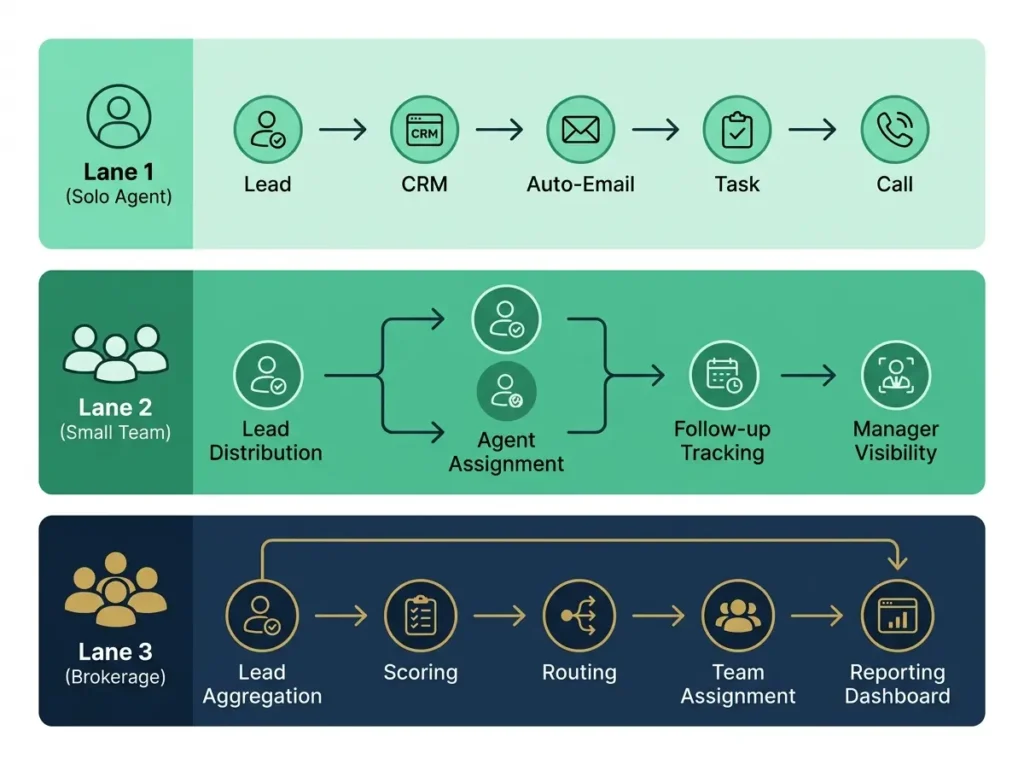
Workflow 1: Solo Agent Lead to Appointment
Lead comes from your website or Facebook. Automated response goes out immediately. Qualification questions happen automatically. Lead gets scored automatically. If hot (pre-approved, wants to buy soon), you get notified immediately and call same day. If warm (interested but timeline unclear), they go into a helpful email sequence and you follow up in a week. If cold (casually browsing), they get added to your database and receive long-term nurture. You only call the leads worth your time. The system filters everything else. You respond fast. Your response time becomes a competitive advantage.
This lead prioritization approach is used successfully across different industries. Our guide on AI tools for affiliate marketing shows how other professionals structure lead qualification and prioritization in their automated systems.
Workflow 2: Small Team Lead Management
Leads come from multiple sources simultaneously. System captures everything. Scores automatically. Distributes to available agents based on geography, specialty, or availability. Each agent knows exactly what to do with each lead. Receives automated notification immediately. Team leader can see in real-time which leads are being followed up and which are being ignored. Accountability becomes automatic. No more leads falling through cracks. Team member doesn’t follow up? The system shows exactly which leads aren’t being contacted. Management addresses it. Leads get managed consistently.
Workflow 3: Brokerage Lead Distribution
Hundreds of leads per month from various sources. System qualifies and scores everything. Distributes by price point, area, agent specialty. Each team gets their leads pre-filtered. Management gets reporting on conversion rates by source, by agent, by price point. Which sources produce best leads? Which agents convert best? Where are leads dropping? Data answers these questions. The business scales because leads move systematically through the pipeline.
Pricing Breakdown and ROI Analysis
Free or Minimal Cost: Use Google Business Profile, Calendly, Meta Business Suite, Mailchimp free tier, Canva free, HubSpot free CRM, Google Analytics, Google Search Console. This works for testing automation. You can run a real estate business on free tools if you’re starting. Limitations exist but you can actually work.
Budget $50-100 Per Month: Add Wise Agent or basic CRM about $40-60. Keep free tools. Add SimpleTexting for SMS at about $20. Use Zapier free tier to connect things. You’re capturing leads, following up via email and SMS, scheduling appointments, tracking website traffic. This setup scales to about 50-100 active clients. Works for solo agents just starting or part-time agents.
Serious $150-250 Per Month: Follow Up Boss about $60-80. ActiveCampaign about $30 for email automation. Zapier paid about $20. Canva Pro about $10 per month. You’re handling serious lead flow, building sophisticated nurture sequences, maintaining accountability. This scales to a few hundred active clients. Works for full-time solo agents and small teams.
Enterprise $500-1000+ Per Month: Follow Up Boss team plan, HubSpot paid tier, dedicated SMS platform, call tracking, advanced analytics, possibly a full platform like kvCORE. You’re managing multiple teams, hundreds of leads per month, sophisticated reporting. This scales to multiple hundreds of active clients across agents.
The key insight: your automation costs should scale with your revenue. If you’re closing 10 deals per year, you’re not spending $500 per month on tools. If you’re closing 100 deals per year, that $500 per month pays for itself many times over.
Tools should generate returns. The best professionals view automation as an investment, not an expense. Our comprehensive guide on the 17 best AI tools to make money explores how successful professionals think about tools generating revenue.
Common Mistakes in Automated Real Estate Marketing
Mistake 1: Choosing Tool Before Workflow
Agents buy software first and think strategy later. Wrong. Define your workflow first. What do you want to automate? How should leads flow? What should happen automatically? Then choose tools that fit the workflow. Not the other way around.
Mistake 2: Over-Automating
You can automate initial contact. You can automate welcome sequences. You can automate some follow-up. You cannot automate the entire relationship. At some point a real person talking to a real person matters. Too many automated touches and people feel ignored. Automation handles administration. You handle relationships.
This balance between efficiency and personal touch is important across all industries. The best HR professionals face the same challenge. If you’re interested in how other professionals handle this balance, our guide on the best AI tools for HR professionals explores similar automation versus relationship tradeoffs.
Mistake 3: Poor Lead Quality
Garbage in, garbage out. The best automation sequences can’t convert bad leads. Be thoughtful about lead sources. Are they actually qualified? Do they fit your market? Are they ready to transact? Quality matters more than quantity.
Mistake 4: Not Integrating With CRM
If your lead capture doesn’t go into your CRM, if your emails don’t update your tasks, if your scheduling doesn’t sync with your calendar, you’ve created more work. Make sure everything integrates. Native integrations are best. Zapier connections work if native integrations don’t exist.
Mistake 5: Ignoring Compliance
Real estate has regulations. Fair housing laws, advertising claims, privacy requirements, SMS consent rules. Review your automated messages. Make sure they’re compliant. Automation doesn’t excuse you from following the rules.
Mistake 6: Not Tracking Metrics
You set up automation and assume it’s working. You have no idea. Track response time, open rate, click rate, conversion rate, actual deals closed. If you’re not measuring, you’re guessing.
Mistake 7: Expecting Immediate Results
Automation improves systems but results take time. Give workflows 60-90 days before deciding if they work. Adjust based on data, not emotion.
60-Day Implementation Plan
Week 1-2: Assess and Choose Platform
Identify your biggest bottleneck. Is it response time? Follow-up consistency? Social media posting? Appointment scheduling? Choose one. Don’t try to fix everything at once.
Evaluate tools. If you need just scheduling, Calendly. If you need full CRM, HubSpot or Follow Up Boss. If you need everything integrated, Real Geeks or a similar platform. Test one tool with free trial if available.
Make a decision. Pick the tool you’ll actually use, not the fanciest tool.
Week 3-4: Set Up Automation
Build your first workflow. Could be simple. Lead comes in, gets CRM entry, receives welcome email, gets a task reminder for you to call. Could be more complex. But start simple. Get it working before adding complexity.
Create templates for emails, SMS, responses. Test them with real data. Make sure they work.
Configure integrations. Connect lead source to CRM, CRM to email, email to your task list. Make sure data flows correctly.
Train yourself. Use the tool. Learn how it works. Don’t try to learn everything but understand the basics.
Week 5-8: Optimize and Test
Run your workflow with real leads. See what works. See what breaks. See what converts. Track results.
Optimize based on data. Are leads responding? Are they converting? Are tasks actually reminding you? Adjust accordingly.
Add the next piece slowly. Once one workflow is working, add another. Don’t add everything at once.
Teams that scale successfully understand workflow design. Our detailed guide on generative AI workflows shows how to think about connecting multiple automations into a cohesive system.
Day 60: Full Launch and Scaling
Your workflows are working. Leads are flowing automatically. Your follow-up is consistent. Now scale. Add more lead sources. Add more sequences. Add team members if appropriate. Scale gradually.
Review results. Are you saving time? Are you closing more deals? Are you more organized? If yes, keep scaling. If no, troubleshoot.
FAQ: Automated Real Estate Marketing
Will automation replace real estate agents?
No. Automation handles repetitive tasks. Agents are needed for relationship building, trust, expertise, negotiation. Nothing replaces that.
How much time does automation actually save?
Most agents report 5-10 hours per week. That’s significant.
Can I start automation as a solo agent?
Yes. Many solo agents run complete automated systems. Start small. Scale gradually.
What’s the easiest automation to implement first?
Calendly. Takes 30 minutes. Immediately reduces scheduling emails.
How much should I spend on automation?
Start small. $0-50 per month. Add as you grow. Don’t spend more than you earn from additional deals automation helps you close.
When do I know automation is working?
Track metrics. Response time should decrease. Lead follow-up should improve. Conversion rates should increase. Compare before and after.
Can automation work for different lead sources?
Yes. Build separate workflows for different sources if needed. Or combine them. Depends on your business.
Is automation legal in real estate?
Yes. Follow regulations. Be transparent. Don’t mislead. Don’t violate privacy. Otherwise automation is fine.
How long until I see results?
Time investment upfront, probably 30-40 hours to implement properly. Results come in 30-60 days. Give it time.
Should I get professional help setting up?
Not necessary. Most tools have good support. But if you can afford help and want to save time, implementation specialists exist.
Best Automated Real Estate Marketing System for You
Best overall for serious teams: Follow Up Boss. Specifically built for real estate. Strong lead management. Good team features.
Best for brokerages: kvCORE/BoldTrail. Everything integrated. Scales across many agents.
Best for budget-conscious solo agents: HubSpot free tier plus Calendly plus Mailchimp plus Canva. Free or cheap. Actually works.
Best for agents wanting everything connected: Real Geeks. Website plus lead capture plus CRM integrated.
Best for teams wanting sophisticated automation: ActiveCampaign plus Follow Up Boss. Powerful combination.
Best for just getting started: Calendly plus Google Sheets plus Mailchimp plus Zapier. Low cost, high functionality.
Conclusion
Automated real estate marketing isn’t revolutionary. It’s practical.
The agents dominating in 2026 aren’t working longer hours. They’re working with systems. Systems that capture leads without them thinking about it. Systems that follow up consistently without manual work. Systems that schedule appointments without back-and-forth emails. Systems that keep everyone organized and accountable.
You don’t need every tool. You don’t need the most expensive platform. You don’t need a tech team. You need one workflow that works. Get that working. Measure the results. Then add more.
The technology exists. The strategies work. The only thing left is implementation. Start this week. Pick one bottleneck. Pick one tool. Get it working. You’ll be amazed at how much time you save and how much better organized your business becomes.
Your competition isn’t doing this yet. That’s your advantage. Implement now and you’ll operate faster, more consistently, and more professionally than the agents around you. That advantage compounds. By next year you’ll be closing more deals, working less, and making more money.
Start somewhere.









Comments (1)
AI Business Solutions: 50+ Tools & ROI Strategies for 2026says:
June 15, 2026 at 5:52 pm[…] For specific examples of how AI is applied in real estate marketing, see our articleon automated real estate marketing tools and strategies, which shows industry-specific […]