

You publish a useful article. Google indexes it. A few days later, you open Search Console to see how it’s performing.
The impressions are rising, but the clicks aren’t moving much.
You start wondering whether Google is showing your content in an AI-generated answer instead of a traditional search result. Maybe people are seeing your website mentioned in AI Overviews. Maybe a page is appearing in AI Mode. Or perhaps the article simply isn’t attracting the clicks you expected.
Until recently, answering those questions was frustrating.
Search Console could tell you a great deal about your overall search performance, but it didn’t provide a dedicated view of your website’s visibility across Google’s generative AI experiences.
That changed in 2026.
Google introduced new Generative AI performance reports in Search Console on June 3, 2026, and expanded the reporting worldwide by August 31.
For publishers, bloggers, SEO professionals, and business owners, this is an important development. You can now investigate which pages appear in Google’s AI-powered search experiences without relying entirely on screenshots, manual searches, or third-party visibility estimates.
But there’s a catch.
The new reporting doesn’t automatically tell you how many people read an AI answer, how much revenue those appearances generated, or whether a particular AI citation caused a conversion.
Understanding that distinction is the key to using the reports properly.
In this guide, we’ll explain what Google Search Console AI reports actually measure, where to find them, how to interpret the information, and how to turn those insights into better content decisions.
What are Google Search Console AI reports?
Google Search Console AI reports are dedicated performance reports showing how often URLs from your website appear in Google’s generative AI search experiences.
The official name is the Generative AI performance report.
Google announced it in a June 3, 2026 Search Central blog post.
The reports cover generative AI experiences in Google Search, including AI Overviews and AI Mode, as well as supported generative AI features in Discover.
Previously, AI-feature data was incorporated into broader Search Console performance reporting without a dedicated view that clearly separated generative AI visibility.
The new reports make that visibility easier to examine.
What information can you see?
Google’s initial announcement identifies five important reporting dimensions:
| Metric or dimension | What it tells you |
|---|---|
| Impressions | How often URLs from your website appeared in supported generative AI features |
| Pages | Which URLs appeared in those experiences |
| Countries | Where your website received generative AI visibility |
| Devices | Which device types were involved, where supported for Search |
| Dates | How visibility changed over time |
This is useful information, particularly for publishers who want to understand whether their content is being discovered in newer search experiences.
However, these are visibility reports—not complete audience-behavior or conversion reports.
Why did Google introduce them?
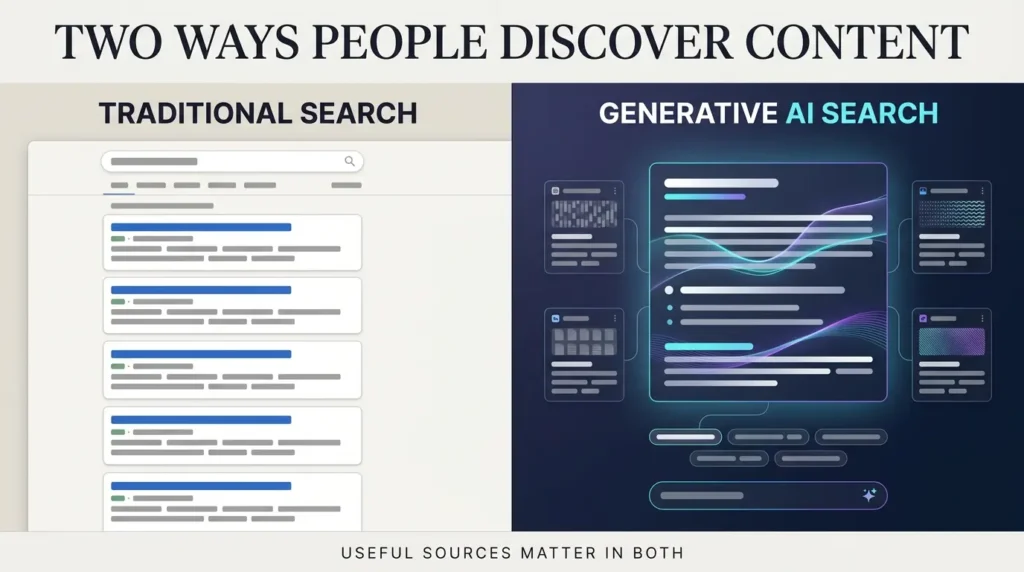
Google Search is no longer limited to a familiar list of blue links.
People can ask complex questions, receive generated summaries, explore related topics, and follow sources surfaced inside AI experiences.
That creates a measurement problem.
A website may appear as a supporting source in an AI-generated response even when the user doesn’t click through to the original article.
For publishers, that appearance matters. But it’s different from a website visit.
Google’s dedicated reporting gives site owners a clearer starting point for understanding this part of search.
What changed in June and August 2026?
There are two dates worth remembering.
June 3, 2026: Google announced the Generative AI performance reports and began rolling them out to a subset of websites.
August 31, 2026: Google updated its announcement to confirm that the insights had been rolled out to websites worldwide.
That means this is no longer simply an experimental announcement affecting a small initial group.
However, a worldwide rollout does not mean every website will show substantial data.
A new blog with limited search visibility may have little or no reportable generative AI activity.
A large established publisher may have much more.
The amount of information available depends on the site’s actual appearances and applicable reporting rules.
A separate report doesn’t mean separate traffic
One detail is easy to miss.
Google explains that generative AI visibility data remains included in overall performance reporting.
The dedicated report provides an additional way to examine that activity.
It is not necessarily a completely separate pool of impressions that you should add to your existing Search Console totals.
If you combine the numbers carelessly, you risk double-counting visibility.
Think of the dedicated report as a new analytical lens on part of your existing search performance.
How to find the Generative AI performance report in Search Console
You don’t need a paid SEO subscription to use Google Search Console.
You do need access to a verified website property.
Here’s how to get started.
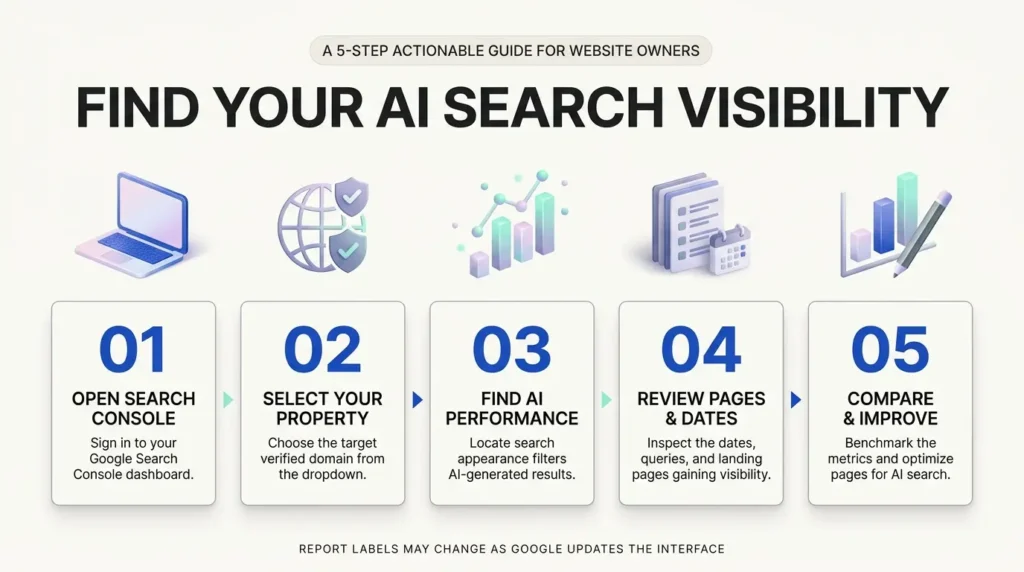
Step 1: Open Google Search Console
Visit Google Search Console and sign in with the Google account that has access to your website.
If you manage multiple websites, choose the correct property.
For example, someone managing a blog and an online store should make sure they’re reviewing the intended domain.
Step 2: Find the performance reports
Look at the Search Console navigation and locate the performance reporting area.
Google’s generative AI reporting provides dedicated views for Search and Discover.
Look for the Generative AI performance reporting option available to your property.
Because Google may adjust the interface, rely on the current report labels rather than an old screenshot or an assumed menu position.
Step 3: Select the relevant report
If you’re interested in appearances in AI Overviews or AI Mode, focus on the Search-related generative AI report.
If you’re analyzing generative AI visibility in Discover, use the corresponding Discover report.
Don’t combine the two experiences without considering their differences.
Search typically begins with an explicit query.
Discover is a content-discovery experience where users may encounter information without typing a search query.
Step 4: Choose a useful date range
Start with a recent period that contains enough activity to reveal a pattern.
For many websites, comparing several weeks is more useful than examining a single day.
Look for changes over time rather than reacting to every small fluctuation.
Step 5: Examine the pages
Find the pages dimension and identify which URLs are receiving impressions.
This is one of the most valuable parts of the report.
Instead of asking whether your entire website appears in AI search, you can investigate the individual articles and landing pages receiving visibility.
Step 6: Review countries and devices
Check whether visibility is concentrated in particular countries.
For the Search report, device information can also help you understand whether appearances differ across supported device types.
Be careful not to confuse device distribution with audience preference unless you have enough evidence.
Step 7: Record your findings
Create a simple weekly record containing the reporting period, important pages, impression trends, and editorial observations.
You don’t need an elaborate dashboard to begin.
A spreadsheet is enough.
What do AI search impressions actually mean?
This is where many people misunderstand the data.
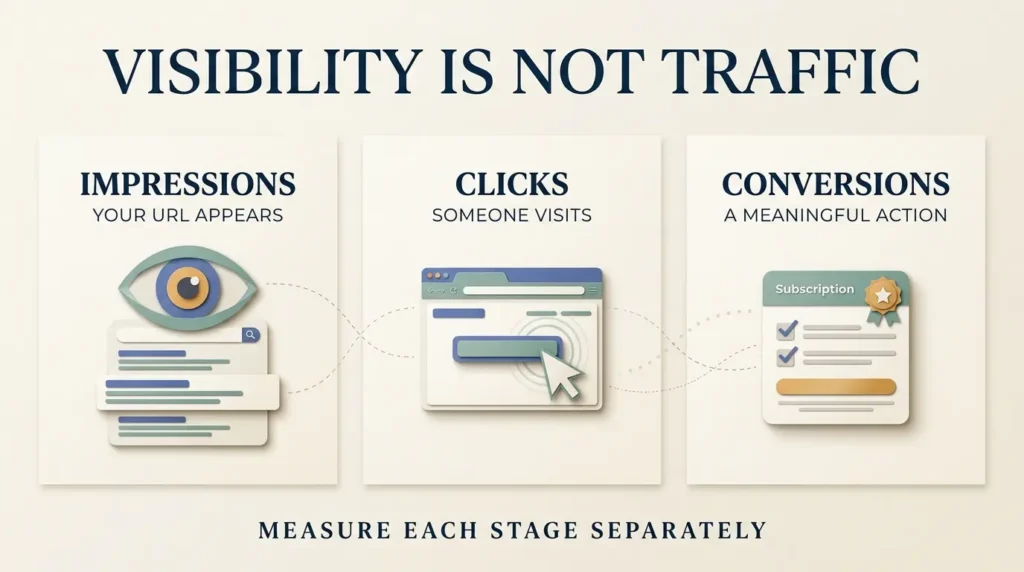
An impression is a visibility measurement.
It does not automatically mean a visitor clicked your website, read your article, subscribed to your newsletter, or purchased something.
Google’s dedicated generative AI report measures how often URLs from your website appeared in supported AI features.
Suppose one of your articles receives 3,000 generative AI impressions during a reporting period.
That is evidence that the URL appeared in those experiences.
It is not proof that 3,000 people visited your website.
It also doesn’t establish that 3,000 different people saw the URL.
An illustrative example
Imagine a website publishes a detailed guide about choosing a home office chair.
Over one month, its Search Console reporting shows:
| Measurement | Example value |
|---|---|
| Generative AI impressions | 3,000 |
| Overall Search impressions | 18,000 |
| Overall Search clicks | 640 |
| Newsletter sign-ups | 24 |
These numbers are fictional and provided only to illustrate how the measurements differ.
The 3,000 generative AI impressions indicate visibility in supported AI features.
The 18,000 overall Search impressions represent a broader performance total, which may already include generative AI visibility.
The 640 clicks are visits initiated through Google Search as reported in the relevant overall performance view.
The 24 sign-ups represent a separate website conversion measurement.
You cannot simply divide the 640 clicks by 3,000 AI impressions and call the result an AI Overview click-through rate.
That would mix measurements from different scopes.
Why this matters for SEO decisions
A publisher might notice rising AI visibility and assume their SEO strategy is succeeding.
Perhaps it is.
But that conclusion needs additional evidence.
Are organic visits increasing?
Are visitors reading the content?
Are newsletter subscriptions or product inquiries improving?
Is the website reaching people who are genuinely interested in the topic?
The AI report adds valuable context, but it shouldn’t replace your other analytics.
AI Overviews vs AI Mode: What’s the difference?
AI Overviews and AI Mode are related Google experiences, but they aren’t identical.
AI Overviews
AI Overviews can appear within Google Search results to provide generated summaries of certain questions.
They may include links to supporting websites.
For example, someone searching for an explanation of a technical concept might receive a summary with several relevant sources.
A website appearing as a source may receive visibility even if the searcher doesn’t immediately click through.
AI Mode
AI Mode offers a more conversational search experience.
People can explore complex questions and follow-up questions, and Google may surface supporting links throughout the experience.
That can create additional ways for useful content to be discovered.
Google’s documentation on AI features explains how these experiences relate to its broader Search systems.
Can you see exactly which AI answer included your website?
Don’t assume the initial dedicated report provides a complete transcript of every generated answer containing your URL.
Google’s launch announcement emphasizes impressions and reporting dimensions such as pages, countries, devices, and dates.
It does not promise a complete archive of AI-generated responses or all the prompts that triggered them.
Similarly, don’t assume you can always separate every AI Overview appearance from every AI Mode appearance using a dedicated metric.
Use the dimensions actually available in your account.
If a third-party tool claims to provide more granular AI citations or prompt tracking, evaluate its methodology separately.
The difference between AI visibility and organic traffic
Let’s imagine two publishers.
The first publisher writes a clear, comprehensive explanation of a topic.
Google frequently surfaces that article in generative AI responses.
The article receives considerable AI visibility, but relatively few readers click through.
The second publisher publishes a practical tutorial with original screenshots, a downloadable checklist, and detailed troubleshooting instructions.
It may receive fewer appearances in AI summaries, but visitors who click through have a strong reason to stay.
Which publisher is performing better?
There’s no universal answer.
The first may be building recognition and visibility.
The second may be generating more meaningful visits, subscriptions, or business inquiries.
The right evaluation depends on what the website is trying to accomplish.
For an independent publisher, useful measures may include:
- Qualified organic sessions.
- Newsletter sign-ups.
- Returning visitors.
- Engagement with original tutorials.
- Affiliate conversions, where relevant.
- Leads or inquiries.
- Revenue per relevant visit.
The new AI report adds an important visibility dimension to this picture.
It doesn’t replace the rest.
How to analyze your AI search performance without getting misled
A useful analysis starts with questions, not conclusions.
Here is a practical method.
1. Identify pages with meaningful AI visibility
Start by looking at the pages appearing in the report.
Are they mostly informational guides?
Are they recent news articles?
Do product comparisons appear more frequently than opinion pieces?
Avoid making sweeping conclusions from a handful of URLs.
Look for recurring patterns across a reasonable period.
2. Compare each page with its overall Search performance
Open the relevant page in the regular Search performance report.
Examine its overall impressions and clicks.
Then consider its dedicated AI visibility.
These measurements provide different perspectives on the same page.
Remember that the overall performance totals can include generative AI activity.
3. Check whether the page satisfies the reader’s real question
Open the article itself.
Does it answer the question clearly?
Is the explanation current?
Does it provide something useful beyond what a short generated summary can deliver?
A page might be visible because it provides useful background information.
But if readers don’t have a compelling reason to visit, additional visibility may not translate into many clicks.
4. Look for content gaps
Suppose a guide about WordPress security receives AI visibility.
Readers may still need detailed instructions, configuration examples, screenshots, or a checklist.
Those are opportunities to improve the page.
The goal isn’t to hide the answer behind unnecessary text.
It’s to provide deeper practical value.
5. Examine country differences
If your website serves an international audience, geographical differences can matter.
An article written for one country may receive visibility elsewhere.
That might suggest an opportunity to explain regional availability, pricing differences, or local requirements.
But don’t create dozens of nearly identical country pages just because one market shows more impressions.
Each new page should have a genuinely useful reason to exist.
6. Check technical accessibility
Even excellent content can struggle if Google cannot properly access it.
Use Search Console’s indexing tools to investigate relevant technical problems.
Confirm that important pages are indexable and eligible to appear with snippets.
7. Review results over time
A single week rarely tells the whole story.
Compare consistent periods.
Record major editorial updates.
Look for sustained changes rather than treating every spike as proof that a new strategy works.
Seven practical ways to improve your chances of appearing in AI search
Google’s official guide to optimizing for generative AI features makes an important point: foundational SEO still matters.
You don’t need to abandon everything you know about search optimization.
You do need to focus on providing content that people genuinely find valuable.
1. Publish information that goes beyond common summaries
Generic articles are easy to reproduce.
A page that simply repeats familiar advice may give readers little reason to visit.
Try adding original observations, firsthand testing, clear comparisons, useful examples, or practical demonstrations.
For example, a generic article about website speed might explain what Core Web Vitals are.
A more useful article might document how a real page was improved, what changes were made, and which measurements changed.
Only present real testing results when you’ve actually performed the tests.
2. Answer the main question clearly
Readers shouldn’t have to scroll through several paragraphs of filler to find a basic answer.
If your article explains what an AI tool does, provide a straightforward definition early.
Then expand with details, examples, limitations, and practical guidance.
Clear writing helps readers and makes the information easier to interpret.
3. Keep important content accessible
Make sure Google can crawl and index your important pages.
Check robots directives, canonical URLs, server responses, and any technical issues affecting discovery.
A page blocked from indexing cannot be expected to appear normally in Google’s search experiences.
Google’s AI search guidance continues to rely on core Search infrastructure.
4. Use descriptive headings and readable structure
Organize articles so readers can find what they need.
Use headings that accurately describe each section.
Break up complicated explanations with examples and useful comparisons.
Avoid creating dozens of artificial headings merely to repeat keyword variations.
5. Add useful original images
Images can explain a process faster than text alone.
For tutorials, authentic screenshots are especially valuable.
For conceptual topics, original illustrations can help readers understand the idea.
Google’s September 2026 announcement about multimodal Search performance reporting also highlights the growing importance of understanding how users discover content through visual searches.
That doesn’t mean every article needs decorative graphics.
It means images should contribute real explanatory value.
6. Maintain accurate information
AI products and search features change quickly.
A tutorial written six months ago may contain outdated menus, prices, or availability information.
Review important articles periodically.
Correct errors.
Add meaningful updates when features change.
Show readers when substantial revisions were made.
7. Build a connected body of useful content
One isolated article may answer a single question.
A well-organized group of related articles can help readers understand the subject more deeply.
For example, a website might publish separate guides on AI search visibility, image optimization, helpful content, and search analytics.
Link them together where the connection genuinely helps the reader.
Internal linking isn’t about inserting as many links as possible.
It’s about making useful information easier to discover.
Does Google require special AI SEO or GEO techniques?
You may have seen terms such as AEO, GEO, and AI search optimization.
They are commonly used to describe efforts to improve visibility in answer engines and generative AI experiences.
But Google makes an important distinction.
Its official guidance says the underlying SEO fundamentals continue to apply.
There is no universal secret markup or guaranteed shortcut that forces a website into AI Overviews or AI Mode.
What about adding an llms.txt file?
Some website owners have experimented with additional files intended to describe content to AI systems.
Google’s generative AI optimization guide specifically cautions against treating tactics such as unnecessary AI text files as a replacement for effective SEO.
Don’t assume an extra file will improve your visibility in Google Search.
What about special schema markup?
Structured data can help Google understand supported content types.
But there is no special schema that guarantees your article will appear in an AI-generated answer.
Follow Google’s structured data guidelines and use markup that accurately represents the page.
Avoid adding irrelevant schema merely because an SEO plugin makes it easy.
Can an SEO agency guarantee AI Overview placement?
Be skeptical of guarantees.
No outside agency controls Google’s internal ranking or generative AI systems.
A credible SEO provider should explain its methods, report honestly, and distinguish observed outcomes from predictions.
A realistic example: A small publisher analyzes 30 days of AI visibility
Imagine a small technology website publishes three types of content:
- Beginner-friendly software tutorials.
- Short technology news articles.
- Detailed comparisons of digital tools.
After reviewing 30 days of generative AI reporting, the editor notices that several tutorials appear in the Pages report.
The news articles show less activity.
What should the editor do?
The tempting response would be to stop publishing news and produce only tutorials.
That would be premature.
Instead, the editor could investigate whether the tutorials have stronger evergreen value, whether they answer recurring questions, and whether their overall Search traffic is also performing well.
The editor could then improve the most useful tutorials with clearer steps, current screenshots, and better explanations.
The next month, the editor would compare the same reporting dimensions again.
That approach uses data to form and test an editorial hypothesis.
It doesn’t pretend that the report reveals exactly how Google’s AI systems rank content.
A simple tracking template
| Page | AI impressions | Overall clicks | Editorial observation |
|---|---|---|---|
| Beginner’s guide | 1,200 | 180 | Strong visibility; review tutorial clarity |
| Product comparison | 850 | 95 | Update specifications and alternatives |
| News article | 120 | 45 | Lower AI visibility; monitor over time |
All figures are illustrative, not actual Search Console data. Overall clicks are not necessarily attributable to AI features.
This kind of tracking is useful because it turns abstract visibility into an editorial review process.
For publishers who want to make that process repeatable, TrendOutsider’s guide to generative AI workflows explores how content teams can organize research, reporting, and editorial work without removing human review.
What if your AI performance report is empty?
An empty report can be disappointing, especially when you’ve spent weeks improving your website.
But it doesn’t necessarily mean Google has penalized your content.
There are several possible explanations.
Your website may have limited AI visibility
If the site’s pages haven’t appeared in supported generative AI features during the selected period, there may be little data to display.
Your date range may be too narrow
Try examining a longer period.
A few days of data may not reveal meaningful activity for a small website.
You’re viewing the wrong property
Make sure you’re analyzing the correct Search Console property.
This matters when you manage multiple domains or subdomains.
The pages may have indexing problems
Use the URL Inspection tool to examine important pages.
Check whether Google can access and index them.
You’re expecting a metric the report doesn’t provide
The initial dedicated report is centered on generative AI impressions and associated dimensions.
Don’t assume that a missing click-through rate or individual AI prompt history is a technical error.
Those details may simply not be available in the report you’re viewing.
The interface may have changed
Google can update Search Console’s navigation and reporting options.
Refer to its current help documentation rather than relying on a screenshot from an earlier release.
What should bloggers and website owners do every week?
You don’t need to spend hours staring at charts.
A short, consistent review is more valuable.
Here’s a practical routine.
Monday: Review visibility
Open the generative AI performance report and identify meaningful changes in the pages receiving impressions.
Tuesday: Compare overall Search performance
Check whether those pages are also attracting organic clicks and relevant visitors.
Wednesday: Review one important page
Choose a useful article that could be improved with clearer explanations, original examples, or updated information.
Thursday: Fix an issue
Resolve a technical problem, outdated instruction, missing internal link, or confusing section.
Friday: Record what changed
Document the update and its date.
Then give Google and your readers time to respond before drawing conclusions.
This process can also be incorporated into a broader editorial workflow. TrendOutsider’s AI agents workflow automation guide discusses how to structure repeatable tasks and retain human oversight.

What Google’s new reports cannot tell you
The new reporting is valuable, but there are limits.
Don’t assume it reveals:
- Every exact AI-generated answer mentioning your website.
- Every user prompt associated with an appearance.
- A guaranteed ranking position within AI Mode.
- Whether an impression produced a sale.
- The complete reason Google selected a particular source.
- A guaranteed formula for future AI visibility.
Some of those questions may be partially investigated through other analytics, manual research, or third-party tools.
But those methods have their own limitations.
The responsible approach is to distinguish between what Google directly reports and what you infer from the available evidence.
Frequently asked questions
What are Google Search Console AI reports?
They are dedicated reports that show how often URLs from a website appear in supported generative AI experiences in Google Search and Discover.
When did Google launch the AI reports?
Google announced them on June 3, 2026.
Are the reports available worldwide?
Google says the reporting was rolled out to websites worldwide by August 31, 2026.
Can Search Console track AI Overviews?
Yes. The Generative AI performance reporting includes visibility in supported Search generative AI features such as AI Overviews.
Does the report include AI Mode?
Yes. Google identifies AI Mode as one of the experiences covered by the Search-related reporting.
Can I see which pages appear in AI search?
Yes. The Pages dimension identifies URLs receiving reportable generative AI visibility.
Does an AI impression mean someone visited my website?
No. An impression is a visibility measurement, not a website visit.
Can I see how many sales AI Overviews generated?
The initial dedicated report does not provide complete sales attribution. You need separate conversion measurement and should avoid assuming every sale can be tied to a particular AI appearance.
Are AI impressions separate from regular Search impressions?
Google says generative AI data remains included in overall performance reporting. Do not add overlapping totals together without understanding their scope.
Why is my report empty?
Your website may have little reportable AI visibility during the selected period, or you may need to review the property, date range, and indexing status.
Do I need special schema for AI Overviews?
No special schema guarantees inclusion. Use relevant structured data correctly and follow Google’s normal technical SEO guidance.
Is traditional SEO still important?
Yes. Google’s official guidance says foundational SEO remains important for generative AI search experiences.
Does publishing AI-written content guarantee AI search visibility?
No. Content quality, usefulness, accessibility, and Google’s Search systems matter. AI-generated text alone is not a shortcut.
Should I optimize every article for AI Mode?
Focus first on producing helpful content that serves real readers. Avoid creating thin variations of pages solely to target speculative AI prompts.
How often should I check the report?
A weekly or monthly review is a reasonable starting point for many publishers. The appropriate frequency depends on how often your website publishes and how much data it receives.
Final verdict: Search visibility is changing, but useful content still matters
Google’s new Generative AI performance reports answer a question publishers have been asking for some time:
Is my website appearing in Google’s AI-powered search experiences?
For the first time, Search Console provides a dedicated reporting view designed to help answer that question.
You can investigate which pages appear, where visibility occurs, and how it changes over time.
That’s a meaningful improvement.
But it doesn’t mean every AI impression is a visitor, every citation is a conversion, or every visibility increase is a business success.
The most useful strategy is to combine the new reporting with traditional Search Console analysis, website analytics, and careful editorial judgment.
Look for patterns.
Improve pages that genuinely help readers.
Keep your website accessible.
Measure outcomes that matter to your goals.
The future of SEO isn’t simply about appearing in more AI answers. It’s about creating information worth discovering—and giving people a reason to visit your website when they need more.
Sources and editorial methodology
This guide draws on Google’s official announcements and Search documentation available as of October 10, 2026. It does not claim access to private Search Console accounts, internal ranking systems, or unpublished Google metrics.
- Google Search Central — Introducing Search Generative AI performance reports
- Google Search Central — AI features and your website
- Google Search Central — Optimizing your website for generative AI features
- Google Search Central — Announcing web multimodal Search performance reporting
- Google Search Central — Creating helpful, reliable, people-first content
- Google Search Central — General structured data guidelines
- Google Search Console Help — Performance reports
Editorial disclosure: Numerical examples are fictional and included solely to explain reporting concepts. Product interfaces and documentation should be rechecked before the scheduled October 30 publication.









Leave a Reply