

For most of the internet’s history, website owners have understood the basic arrangement.
Publish something useful, make it easy for search engines to discover, and hope that someone searching for that information eventually arrives on your website.
That visitor might read an article, purchase a product, subscribe to a newsletter or click through to another page.
Artificial intelligence is beginning to complicate that arrangement.
An AI assistant does not necessarily need to browse a website in the same way a person does. It might retrieve a few paragraphs from a technical guide, compare information from several product pages or search an entire collection of articles before presenting an answer somewhere else.
On November 25, 2026, Cloudflare introduced a feature designed specifically for this emerging behavior.
Called Search for Agents, it gives website owners a way to create a searchable index of their content and make that index discoverable by compatible AI agents through their own domain.
The setup begins with a dashboard setting. Behind it sits a system capable of crawling website content, organizing information and retrieving relevant passages in a format that AI applications can process.
For bloggers, publishers, online retailers and businesses, the announcement raises an important question.
If AI systems increasingly become intermediaries between websites and their audiences, how should those websites prepare?
And perhaps more importantly, who benefits when an AI assistant can retrieve useful information without sending a reader to the original page?
Here is what Cloudflare has introduced, how it works, what it costs and what website owners should understand before enabling it.
What Is Cloudflare Search for Agents?
Cloudflare Search for Agents is a beta feature that allows compatible AI applications to search information from a particular website through a dedicated endpoint.
It builds on Cloudflare’s existing AI Search infrastructure, which already supports collecting and indexing website content.
The new feature reduces the manual integration work previously needed to expose that search capability through a website.
Instead of building a custom retrieval service, configuring an index and developing a discovery mechanism independently, a website owner can begin with the configuration offered in Cloudflare’s dashboard.
According to Cloudflare’s original November 25 announcement, enabling the feature creates an AI Search instance and makes its search capabilities available through the website’s own domain.
For a hypothetical website called example.com, the endpoint would be:
An AI agent that recognizes the discovery information can use this endpoint to submit a question or a keyword query and retrieve relevant content.
It receives retrieved information rather than an answer composed by Cloudflare’s AI.
The distinction is important. Cloudflare supplies the search infrastructure. The agent accessing it can use the returned material within its own application.
Cloudflare Search for Agents at a Glance
| Feature | Details |
|---|---|
| Launch date | November 25, 2026 |
| Developer | Cloudflare |
| Availability | Beta across all plans |
| Initial setup | Cloudflare domain dashboard |
| Content source | Website content |
| Search technology | Hybrid retrieval by default |
| Endpoint | /.well-known/search |
| Returned content | Markdown |
| Website sitemap | Helpful but not mandatory |
| Content updates | Scheduled synchronization |
| Access restrictions | Existing applicable security controls |
| Pricing | AI Search usage allowances and charges |
| Direct SEO ranking benefit | Not established |
Search for Agents does not turn every website into a chatbot. It does not automatically submit a website to ChatGPT, Claude or Google.
It creates an additional way for compatible applications to retrieve information.
Why Websites Need a Different Kind of Search
Consider a person researching which smartphone to buy.
They might open a search engine, click several reviews, compare specifications and read a buying guide before making a decision.
An AI shopping assistant could approach the same task differently.
It might identify relevant websites, gather their available product information, compare specifications and return a shortlist to the user.
An agent following a conventional browsing process may need to fetch several individual pages to find the relevant information.
A website offering a searchable content index gives that agent another option.
Instead of guessing which pages contain the information it needs, the agent can submit a specific question to the website’s search endpoint.
For example:
“Which affordable smartphones have the longest remaining security support?”
The search service could retrieve relevant passages from the website’s smartphone comparisons, buying guides and software support explainers.
The agent can then use those passages as part of its own research.
This example illustrates the potential workflow. It is not evidence that any particular shopping assistant currently uses Cloudflare Search for Agents.
The broader development is the changing role of websites in an environment where software increasingly retrieves information on behalf of people.
Our guide to AI agent startups and business operations explores the wider ecosystem of applications capable of performing tasks beyond ordinary conversation.

How Cloudflare Search for Agents Works
There are four main components behind the feature.
1. Website discovery
Cloudflare identifies pages belonging to the configured website using available sitemaps and links.
This matters because a website’s content may be spread across hundreds or thousands of URLs.
Clear navigation, meaningful links between articles and an accurate sitemap make that collection easier to understand.
2. Content indexing
The discovered material is processed and stored in an AI Search index.
Rather than treating an entire website as a single enormous document, the system organizes information into retrievable sections.
This makes it possible to find relevant passages from different pages in response to a particular query.
3. Hybrid search
The default configuration combines keyword retrieval and vector retrieval.
Keyword search is particularly useful when the query contains an exact phrase, product name or technical identifier.
Vector retrieval attempts to identify related meaning, even when the words used in a question do not precisely match the words on the original page.
For example, a website might contain an article about smartphone software support.
A reader could ask which phones are safer to keep for several years without using the exact phrase “software support.”
A semantic retrieval system may still identify relevant material.
Combining the two approaches gives the search engine different ways to locate potentially useful information.
4. Agent discovery and retrieval
Cloudflare adds discovery information to website responses so a compatible agent can find the search endpoint.
An agent can then submit a question and retrieve relevant passages with their associated source information.
The quality of the final answer still depends on the agent, its model, the retrieved information and how those elements are used.
Cloudflare’s technical launch documentation explains the configuration and supported query mechanisms in greater detail.

Search for Agents vs Markdown for Agents
Cloudflare already offers a feature called Markdown for Agents.
Although the names are similar, the two technologies solve different problems.
Markdown for Agents helps an application retrieve the contents of an individual webpage in a simplified text format.
Search for Agents helps the application find relevant content across the indexed website.
Imagine a library.
Markdown for Agents is like receiving a readable copy of a book you have already selected.
Search for Agents is like asking the librarian which books or chapters are most relevant to your question.
| Feature | Markdown for Agents | Search for Agents |
|---|---|---|
| Main purpose | Convert a specific page into Markdown | Find relevant content across a website |
| Prior page selection | Generally required | Not required in the same way |
| Search index | Not the main function | Central component |
| Typical input | A webpage request | A search question or keyword |
| Typical output | Page content | Relevant retrieved passages |
| Main advantage | Simpler content consumption | Easier information discovery |
The features can operate together.
One helps agents access readable content from an individual page. The other provides a mechanism for discovering which content may be worth accessing.
Neither guarantees that an external AI platform will use the website, mention it in an answer or recommend it to users.

How to Enable Cloudflare Search for Agents on WordPress
A WordPress website can use the feature if the relevant domain is configured in Cloudflare and satisfies the applicable requirements.
There is no separate WordPress installation process described in the basic Search for Agents setup.
However, enabling a new public retrieval mechanism deserves more consideration than installing an ordinary design plugin.
Before starting, make sure you understand which parts of your website should be searchable and which should remain restricted.
Step 1: Check whether your domain uses Cloudflare
Sign in to the Cloudflare dashboard and confirm that your website appears in the account.
If your WordPress website currently uses another DNS provider or content delivery network, do not change its nameservers simply to experiment with this feature.
Moving DNS management can affect website availability, email delivery, subdomains and verification records.
First review the existing hosting configuration and establish a safe migration plan if one is necessary.
Search for Agents is not a reason to make an unplanned production infrastructure change.
Step 2: Review the content that should be included
Create a short inventory of your website’s content.
A public blog might want to expose published articles, product reviews and reference guides.
An online store might include public product specifications, delivery information and return policies.
A business could make its public documentation and service information searchable.
Private membership content, customer account information, unpublished material and internal business documentation should not become publicly searchable by accident.
Step 3: Open the Cloudflare domain overview
Select the relevant website in your Cloudflare account.
Open its Overview page and locate the Quick Actions area.
Cloudflare’s official Search for Agents setup guide identifies the feature within this section.
Because the product is in beta, the interface and configuration experience may evolve.
Step 4: Review the settings before confirming activation
Read the presented configuration and pricing information carefully.
Pay particular attention to the source website, crawling behavior, indexing limits and account usage allowances.
If your website contains sensitive or restricted information, resolve those concerns before enabling indexing.
Activate the feature only when you are comfortable with the information that may become searchable and the potential cost.
Step 5: Allow the initial indexing process to complete
Cloudflare needs time to discover and process the website’s content.
The time required will vary according to the website’s size, the content available to the crawler and the account’s applicable limits.
Do not assume that every published article will become searchable immediately.
Open the newly created AI Search instance and review the available indexing information.
Step 6: Test the search endpoint
Once indexing has progressed, submit a few harmless queries about public information you know exists on the website.
Compare the returned passages with their original pages.
You are checking whether the search service retrieves the right information, not simply whether the endpoint responds.
Step 7: Review costs, security and ongoing retrieval quality
The initial activation is only the beginning.
Monitor whether the index includes the appropriate pages, whether search results remain current and whether requests consume a reasonable amount of your account’s usage allowance.
Review security rules and any unexpected access patterns.
A small pilot with documented results is a more sensible starting point than enabling the feature across several websites simultaneously.

How to Test Your Website’s AI Search Endpoint
You do not need to develop an entire AI agent to verify that your search endpoint works.
Once the feature is enabled and your content has been indexed, you can submit a search request using a browser or a terminal.
Test with your browser
Replace example.com with your configured website domain and open the following example URL:
The query asks the search service for information relating to website security.
Choose a topic that actually appears in your own published content when testing.
Test with Windows PowerShell
Open PowerShell and use the following command:
curl.exe --get "https://example.com/.well-known/search" --data-urlencode "q=website security"Using curl.exe explicitly avoids confusion with PowerShell aliases.
Test with macOS or Linux
Open Terminal and enter:
curl --get "https://example.com/.well-known/search" \
  --data-urlencode "q=website security"
Cloudflare also documents support for an HTTP QUERY request. The ordinary GET request is sufficient for an initial manual test.
These are example commands. They have not been executed against a live TrendOutsider Search for Agents instance.
What should you look for in the response?
A useful result should retrieve material related to the query and provide source information that allows you to locate the original content.
Inspect whether the response contains the correct passages and whether outdated, irrelevant or restricted information appears.
The following testing framework can help.
| Test | What you are checking |
|---|---|
| Exact article title | Whether a known published article is retrievable |
| Technical product name | Whether precise terminology produces relevant results |
| Natural language question | Whether related meaning is understood |
| Recently updated information | Whether the index reflects recent changes |
| Unrelated query | Whether irrelevant results are returned |
| Known excluded test page | Whether your exclusion controls work |
For the final test, use harmless sample information deliberately created for the purpose. Never place genuine secrets or sensitive customer records in public content to test whether they can be retrieved.
A working endpoint does not establish that major AI platforms have discovered or adopted it. Those are separate questions.
Is Cloudflare Search for Agents Free?
This is where website owners need to be particularly careful.
The feature is available to customers across Cloudflare’s plans, including the Free plan. However, availability does not mean unlimited free usage.
Cloudflare states that AI Search billing is scheduled to begin on December 1, 2026.
Its current AI Search pricing documentation, updated in November, describes monthly included allowances and additional usage rates.
Included monthly usage
| Resource | Included allowance |
|---|---|
| Content ingestion | 5 million tokens |
| Index storage | 10 GB-month |
| Semantic queries | 1,000 |
| Full-text queries | 1,000 |
The allowances apply at the account level. Check the current documentation and your specific account to understand how multiple instances share the available usage.
Workers Free vs Workers Paid
| Limit | Workers Free | Workers Paid |
|---|---|---|
| AI Search instances | 100 | Default limit of 5,000, with additional capacity available |
| Pages crawled per day | 500 | No published daily limit in the cited table |
| Maximum discovered pages per crawl | 100,000 | 100,000 |
| Included monthly semantic queries | 1,000 | 1,000 |
| Included monthly full-text queries | 1,000 | 1,000 |
Other instance, account and service restrictions still apply.
In particular, the maximum number of pages per crawl should not be confused with the daily crawl limit.
A large website on the Free plan may encounter the daily restriction well before reaching the maximum size of an individual crawl.
Additional usage rates
Where paid excess usage applies, Cloudflare has published the following rates.
| Resource | Published price |
|---|---|
| Base content ingestion | $0.75 per million tokens |
| Additional image processing | $0.50 per million tokens |
| Index storage | $2 per GB-month |
| Semantic, vector and hybrid queries | $0.75 per 1,000 |
| Full-text queries | $0.10 per 1,000 |
The additional image processing rate is separate from the base ingestion component. Consult the full pricing documentation for how these operations are counted.
Do not assume that a Free account automatically permits paid overages. Account configuration, service restrictions and the applicable billing plan determine whether excess usage can continue.
An illustrative cost example
Suppose an eligible paid account processes 11,000 hybrid queries in a month, with 1,000 covered by its applicable monthly allowance.
The remaining 10,000 queries would represent $7.50 at the published rate of $0.75 per thousand.
That does not include ingestion, storage, the underlying Workers plan or other applicable charges.
For a small publisher, these numbers may be manageable.
For a larger website receiving substantial automated traffic, query volume and repeated indexing deserve closer attention.
The relevant question is not simply how much a single request costs.
It is whether the total expense of providing that information creates measurable value for the website.

Will Search for Agents Improve Your Google Rankings?
There is currently no established evidence that enabling Cloudflare Search for Agents directly improves a website’s Google rankings.
That is not a criticism of the technology. It reflects the difference between two separate systems.
Google Search has its own crawling, indexing, ranking and content quality mechanisms.
Cloudflare’s search endpoint gives compatible agents another mechanism for retrieving information from a particular website.
The two approaches may coexist, but they should not be confused.
Google’s official guide to optimizing for generative AI features emphasizes that traditional SEO foundations continue to matter.
Useful content, technical accessibility, clear website structure and genuine originality remain relevant. Special AI text files or custom markup are not required simply to appear in Google’s generative search experiences.
This means website owners should continue to address familiar problems:
Poorly organized content, weak internal links, slow pages, misleading headlines, broken URLs and articles that offer little beyond information already available elsewhere.
A new search endpoint cannot compensate for those weaknesses.
If the underlying information is outdated, incomplete or incorrect, making it easier for machines to retrieve does not solve the editorial problem.
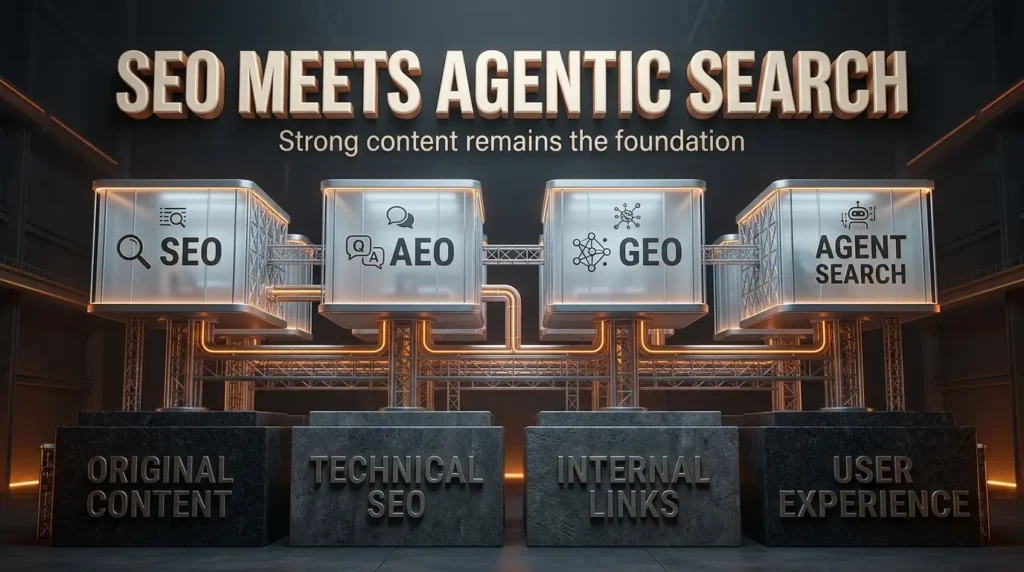
SEO, AEO, GEO and Agentic Search: What Is the Difference?
Several terms are being used to describe the changing relationship between websites and artificial intelligence.
Although there is considerable overlap, the distinction can help website owners make better decisions.
| Approach | Main objective |
|---|---|
| Search Engine Optimization (SEO) | Improve discoverability and usefulness within conventional search systems |
| Answer Engine Optimization (AEO) | Provide clear information that can help answer specific questions |
| Generative Engine Optimization (GEO) | Improve the discoverability and usefulness of content within generative AI experiences |
| Agentic search preparation | Make appropriate information accessible to compatible task oriented AI systems |
These terms are not universally standardized.
There is also no requirement to create a separate article, website section or content strategy for every one of them.
A thoroughly researched guide with accurate facts, clear headings and useful original material can serve people and several types of discovery system simultaneously.
The important difference with Cloudflare’s feature is infrastructural. It introduces a way to retrieve information, rather than an established ranking formula.
For many websites, that makes it an interesting supplement to their existing strategy rather than a replacement for it.
Will ChatGPT, Claude and Gemini Automatically Find Your Website?
Not necessarily.
Enabling Search for Agents advertises the retrieval mechanism through the website’s responses.
For an external application to benefit, it must recognize that information, have access to the endpoint and decide to use it.
The fact that an endpoint is discoverable does not establish that every major AI service currently supports it.
As of November 27, 2026, the reviewed launch documentation does not establish universal adoption by ChatGPT, Claude or Gemini.
Nor does it guarantee that retrieved passages will appear as citations in their answers.
Several things must happen between a website publishing information and an AI assistant recommending the original source.
The information must be accessible. It must be relevant to the user’s task. The agent must retrieve it or discover it through another mechanism. The application must decide how to present it.
A website owner controls only some of those stages.
This is why claims that enabling a single setting guarantees AI visibility should be treated with skepticism.
What Search for Agents Means for Bloggers and AdSense Publishers
For an advertising funded website, the economic implications are particularly interesting.
A traditional article visit may generate revenue through advertisements displayed alongside the content.
If an external AI application retrieves the information without sending the reader to the page, those ordinary page advertisements may never be displayed.
The website could therefore provide useful information without receiving the same monetization opportunity associated with a human visit.
There is also another possibility.
An AI assistant may identify a particularly useful source and direct a reader to it, potentially delivering a visitor who is more interested in the subject than someone browsing casually.
Both outcomes are plausible.
Neither is guaranteed by Search for Agents.
Three possible outcomes for publishers
| Scenario | Potential effect |
|---|---|
| An agent retrieves content and sends a reader to the original website | Possible qualified referral traffic |
| An agent retrieves content and answers without a visit | Information usage without an ordinary monetized page view |
| An agent rarely discovers or uses the endpoint | Little measurable benefit despite maintaining the infrastructure |
These are analytical scenarios, not measured Cloudflare Search for Agents results.
Publishers should also avoid treating machine requests as equivalent to human advertising impressions.
Google’s AdSense program policies require legitimate traffic and prohibit practices that artificially generate ad impressions or clicks.
An agent querying a text endpoint should not be counted as a normal human article visit merely to create the appearance of additional audience growth.
The distinction between readership and machine retrieval needs to remain visible in website analytics.
What should publishers measure?
Start with separate measurements for:
- Human organic search visits.
- Identifiable AI referral sessions.
- Automated requests to the search endpoint.
- AI Search infrastructure costs.
- Newsletter subscriptions or other genuine visitor conversions.
- Actual advertising revenue from legitimate traffic.
Even if automated retrieval increases dramatically, that alone does not establish business success.
The meaningful question is whether the technology contributes to useful discovery, valuable readership or another measurable objective.

How to Protect Your Website and Content
Making a website easier to search does not require making everything publicly accessible.
Cloudflare states that access to the Search for Agents endpoint remains subject to applicable AI Crawl Control, bot management and Web Application Firewall configurations.
Website owners should consider those controls before permitting broad agent access.
Keep private information outside the public search index
The safest approach is to ensure confidential information is not publicly accessible in the first place.
Authentication and authorization remain essential.
Do not rely exclusively on a robots.txt instruction or a WordPress noindex setting to protect genuinely private material.
These are discovery and indexing controls, not substitutes for access restrictions.
Review which pages are included
Check whether your search index contains duplicate category archives, unnecessary pagination, outdated documents or irrelevant website pages.
A large index is not automatically a good index.
Depending on the available configuration, content selection and path restrictions can help keep retrieval focused on information that serves a useful purpose.
Review bot management settings
Different automated systems may access a website for different reasons.
An ordinary search crawler, an AI training crawler and an assistant retrieving information for a user’s task do not necessarily have identical purposes.
Review the available controls and decide which forms of access are consistent with your publishing policy.
Do not disable all existing security rules simply because an AI search request receives an error.
Monitor abuse and unexpected costs
A public retrieval endpoint may attract repeated or unwanted automated requests.
Review the applicable security and rate control options, monitor account usage and investigate abnormal request patterns.
If legitimate requests and abusive requests are difficult to distinguish, begin with a narrow pilot rather than exposing additional content.
Understand the limits of content removal
Removing a webpage or excluding it from future retrieval does not necessarily erase information already collected by an external application.
When testing content removal, examine the current search index, synchronization behavior and any applicable caches.
For genuinely sensitive information, prevention is more reliable than attempting to recover information after exposure.
The 15 Point Website AI Readiness Checklist
Website owners do not need to wait for universal adoption of agentic search before improving their websites.
Many of the most useful preparations benefit conventional readers and search engines as well.
The following checklist is an original editorial framework for evaluating readiness before and after adopting a service such as Cloudflare Search for Agents.
1. Publish original information
Offer more than a rewritten version of someone else’s announcement.
Original comparisons, documented experiments, useful examples and transparent editorial analysis give readers a reason to visit your website.
2. Answer specific questions clearly
When a page explains a concept, make the main answer easy to identify.
Readers should not need to work through several unrelated paragraphs to find it.
3. Maintain accurate publication dates
Distinguish between the original publication date and the date of a meaningful update.
This is particularly important for technology releases, pricing information and product comparisons.
4. Use descriptive headings
Organize information into logically connected sections.
A heading should tell the reader what the following content actually explains.
5. Maintain a useful XML sitemap
Include the public pages you intend search engines to discover.
Avoid treating the sitemap as a collection of every technically accessible URL.
6. Check your canonical URLs
Make sure duplicate versions of important content do not create unnecessary confusion.
Use canonical references consistently.
7. Strengthen contextual internal links
Connect related articles where they genuinely help readers understand the subject.
For example, a guide about AI search infrastructure can lead naturally into a broader discussion of AI search optimization tools.
8. Provide authoritative source references
Support technical claims with reliable documentation and distinguish original reporting from interpretation.
9. Make important information available as readable text
Avoid placing essential facts exclusively inside decorative graphics.
Images can explain a concept beautifully, but important technical information should also remain accessible within the article.
10. Use accurate structured data
Apply schema that describes the real content of a page.
Do not invent ratings, authors, publication dates or product information.
11. Review website performance
Optimize images, avoid unnecessary scripts and maintain a layout that works well on mobile devices.
12. Protect restricted content
Use appropriate authentication and authorization for private pages, personal information and account records.
13. Review automated access policies
Understand which services can retrieve your content and how those requests are controlled.
14. Test retrieval quality
If you implement an agent search endpoint, use real public topics to check whether it returns useful, accurate and current information.
15. Measure actual outcomes
Track human visitors, referrals, genuine conversions, retrieval activity and costs separately.
Do not confuse increased automated requests with increased readership.
A website does not need to score perfectly on every item before experimenting with AI discovery. The purpose of the framework is to reveal the most important weaknesses and establish a practical order for addressing them.

Common Search for Agents Problems and How to Investigate Them
The Search for Agents option is missing
Confirm that you have selected the correct Cloudflare domain and that your account has the relevant administrative access.
Review the current feature documentation for beta availability and any account requirements.
Do not make unrelated production configuration changes to force the setting to appear.
The search endpoint returns an error
Check whether the feature has been enabled for the correct hostname.
Review the request URL and the applicable security rules.
An error may result from access restrictions, incomplete configuration or another issue. Inspect the available logs and documentation rather than assuming a particular cause.
The endpoint works but returns no useful information
The initial index may not be complete, or the relevant page may not have been discovered.
Try an exact title from a known public article and review the indexing status.
Recently updated information is missing
Check the synchronization schedule and any applicable retrieval caching.
Cloudflare documents a default daily synchronization interval and a separate similarity cache that can retain retrieval results.
That means published changes may not be reflected immediately.
Too many irrelevant pages appear
Review the website’s navigation, content structure and the AI Search configuration.
Where supported, refine the content included in the index rather than simply increasing the number of search results.
Unexpected usage costs appear
Inspect the account’s AI Search usage, including ingestion, storage and queries.
Check whether several instances share the same account allowances.
Review traffic patterns and decide whether the feature should remain enabled while the issue is investigated.
A 30 Day Pilot Plan for Website Owners
Rather than enabling Search for Agents and immediately expecting traffic growth, treat the first month as a controlled experiment.
| Period | Recommended activity |
|---|---|
| Days 1 to 3 | Review website eligibility, permissions, content scope and pricing |
| Days 4 to 7 | Enable the approved pilot and verify the initial index |
| Days 8 to 14 | Test relevant questions and review retrieval quality |
| Days 15 to 21 | Monitor request volume, costs and identifiable referral activity |
| Days 22 to 30 | Evaluate results and decide whether to retain, refine or disable the feature |
Before starting, establish a baseline for your website’s existing traffic and conversions.
Record the activation date so later changes can be compared with the period before activation.
However, remember that changes in Google rankings, seasonal demand and other website updates can also affect traffic.
An increase in visits after enabling Search for Agents would not, by itself, prove that the feature caused the increase.
A useful experiment documents its limitations as carefully as its results.
Who Should Consider Cloudflare Search for Agents?
The feature may be particularly interesting for public technical documentation, extensive knowledge bases, websites with substantial product information and publishers offering original research.
A software company could make relevant support documentation easier to discover.
An online retailer could explore retrieval of public product specifications.
A publisher with a large archive could investigate whether its guides become easier for compatible agents to find.
However, websites with substantial confidential information, complex membership restrictions or limited monitoring capabilities may need additional preparation before exposing a new search endpoint.
Small websites should also ask whether their existing content justifies maintaining an additional search infrastructure.
Sometimes improving ten useful articles is more valuable than creating another way to search a hundred weak ones.
Frequently Asked Questions
What is Cloudflare Search for Agents?
It is a Cloudflare feature that creates a searchable index of website content and exposes a discoverable retrieval endpoint for compatible AI applications.
Is Search for Agents available on Cloudflare’s Free plan?
Yes. The beta is available across Cloudflare plans, including Free, subject to applicable usage limits and account restrictions.
When does Cloudflare AI Search billing begin?
Cloudflare’s November pricing documentation identifies December 1, 2026, as the scheduled billing start date.
Can I use Search for Agents with WordPress?
Yes, provided the relevant website domain is correctly configured with Cloudflare and meets the applicable requirements. The basic setup takes place in Cloudflare’s dashboard rather than through a dedicated WordPress plugin.
Do I need a sitemap?
Cloudflare’s discovery system can use both links and sitemaps, so a sitemap is not mandatory for the feature. Nevertheless, maintaining an accurate sitemap remains good website practice.
Does Search for Agents improve Google SEO?
There is no established direct ranking benefit. Conventional SEO and Google’s existing technical and content requirements remain important.
Is Search for Agents the same as Markdown for Agents?
No. Markdown for Agents helps deliver individual page content in a simpler format. Search for Agents retrieves relevant material from a website index.
Will ChatGPT automatically use my search endpoint?
Universal adoption has not been established. External applications need to discover, access and choose to use the endpoint.
Can I prevent certain content from being searchable?
Cloudflare AI Search provides configurable indexing controls, and website access restrictions remain important. Review the available configuration before activation, particularly for restricted content.
Will AI agents generate AdSense revenue for my website?
An agent retrieving text from a search endpoint does not automatically create a human advertising impression. Revenue depends on legitimate monetizable activity and compliance with the advertising platform’s policies.
Does Search for Agents replace Google Search Console?
No. Search Console remains a separate service for understanding a website’s performance and technical status in Google Search.
Should every website enable Search for Agents?
Not necessarily. Evaluate your content, security requirements, costs and business objectives. A controlled experiment is preferable to enabling it simply because the technology is new.
Final Thoughts: The Future of Search Is Not Just About Rankings
Cloudflare’s announcement offers a glimpse of a web where software can search individual websites more directly.
That could make useful information easier to discover. It could also change the relationship between publishers and the applications that use their content.
For website owners, the immediate priority is not to abandon SEO or rebuild an entire website around artificial intelligence.
It is to understand what these new retrieval systems can access, decide what information should be available and determine whether making that information searchable produces meaningful benefits.
A website still needs something worth discovering.
That might be an original product comparison, a carefully maintained reference guide, a thoughtful explanation of a complicated subject or knowledge that a reader cannot easily obtain elsewhere.
Cloudflare can help build the infrastructure through which some of that information is retrieved.
It cannot create the value of the information itself.
The websites best prepared for the next era of search may not be those that install every emerging AI technology first.
They may be the ones that give both people and machines a genuinely good reason to find them.
Editorial methodology: This article is based on Cloudflare’s November 25 announcement, official technical and pricing documentation, and Google’s published search and advertising guidance, reviewed on November 27, 2026. The implementation instructions and terminal commands follow documented functionality but have not been independently executed on a TrendOutsider Search for Agents instance. Cost examples and the publisher impact scenarios are illustrative, not observed results.
Visual disclosure: AIl editorial illustrations accompanying this guide explain technical concepts. Conceptual dashboards are not official Cloudflare screenshots or evidence of a completed implementation.








Leave a Reply