
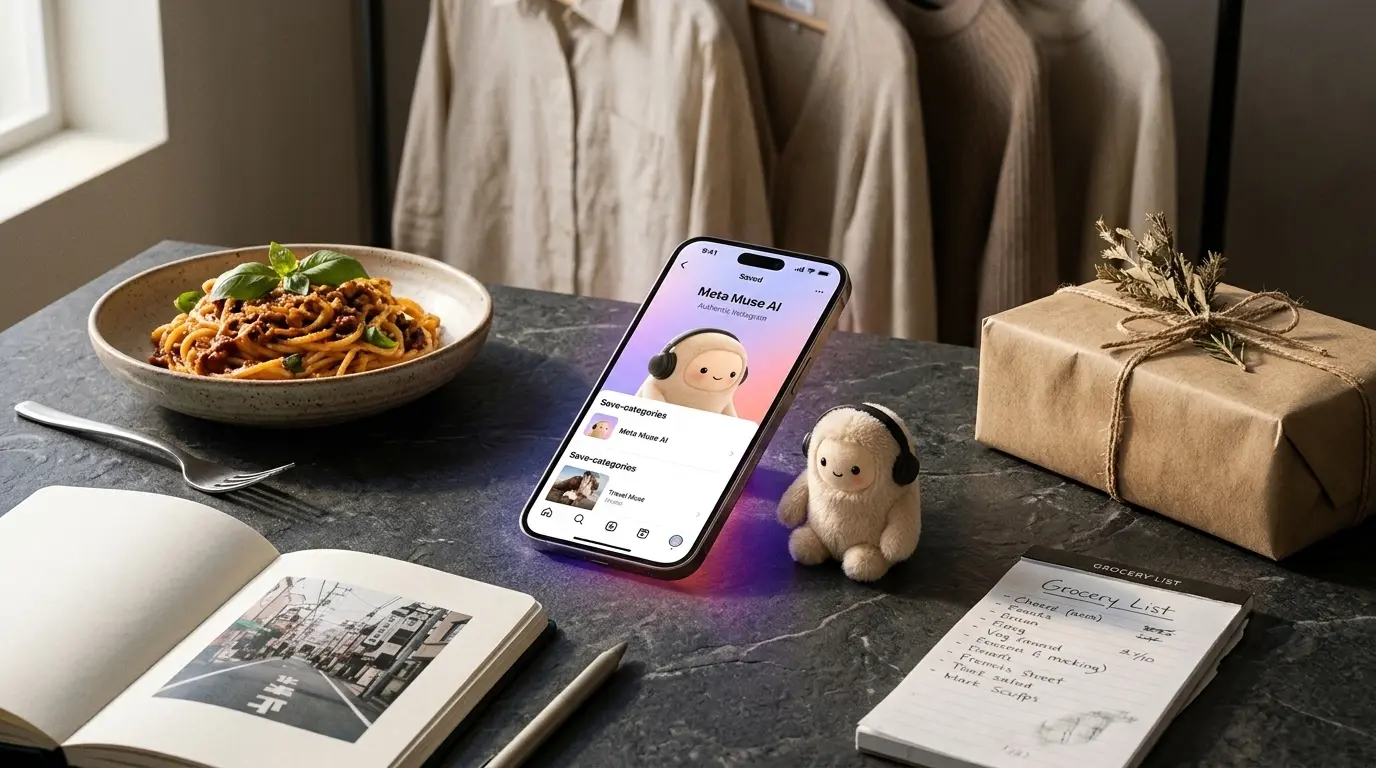
There is probably a recipe somewhere in your Instagram saves that you have been meaning to cook for months. Somewhere beneath it is a restaurant you promised yourself you would visit, a holiday destination you wanted to explore, and an outfit you thought would look perfect with something already in your wardrobe.
You saved them for a reason. You just never got around to doing anything with them.
Meta wants to change that.
On November 24, 2026, the company began bringing its personal AI agent, Muse, directly into Instagram’s messaging experience. Instead of leaving your favorite Reels buried inside an ever growing collection of bookmarks, you can now ask Muse to help turn that inspiration into something useful.
That could mean creating a grocery list from a recipe video, building a holiday itinerary from your favorite travel creators, finding an outfit inspired by saved fashion posts, or simply locating a Reel you remember watching but cannot find anymore.
It is a surprisingly practical development in a year dominated by increasingly powerful AI models. Meta is not just asking people to talk to artificial intelligence. It is bringing AI into a place where people already spend time discovering things they want to experience in real life.
But what exactly can Muse do, who can access it, and how much personal information does it need?
Here is everything you should know about Muse AI on Instagram, including 15 practical prompts you can try, regional availability, privacy controls and the limitations worth understanding before you connect your account.
Muse AI on Instagram: Everything You Need to Know
Muse is Meta’s personal AI agent, now being integrated into Instagram direct messages. Eligible users can share posts with Muse, ask questions about content, organize saved Reels and request practical plans based on their Instagram activity.
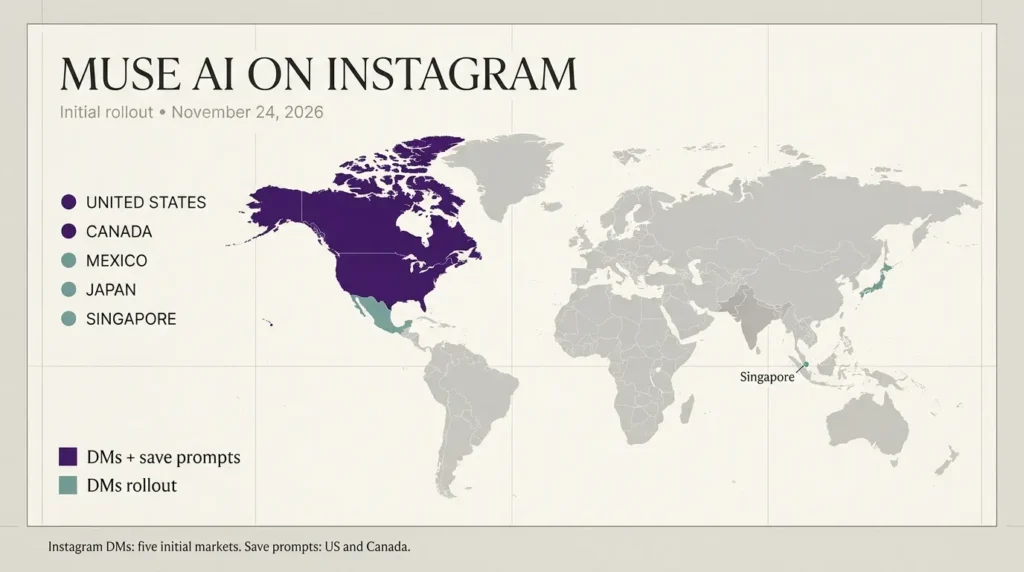
The Instagram messaging integration began rolling out on November 24, 2026, for iPhone and Android users in five countries.
| Feature | Details |
|---|---|
| AI agent | Muse |
| Developer | Meta |
| Underlying AI model | Muse Spark |
| Instagram rollout | November 24, 2026 |
| Supported devices | iOS and Android |
| Initial DM markets | United States, Canada, Mexico, Japan and Singapore |
| Prompts when saving posts | United States and Canada initially |
| Main capabilities | Content organization, planning, research and contextual assistance |
| Pricing | Free access with usage limits and optional subscriptions |
| Account requirements | Connected Muse and Instagram accounts |
| User controls | Permissions, approvals and memory settings |
The rollout is gradual. Not every account in a supported country will necessarily receive the feature at the same time.
What Is Meta Muse AI?
Muse is a personal artificial intelligence agent introduced by Meta in September 2026. Powered by the company’s Muse Spark model, it is designed to help people accomplish tasks rather than simply provide conversational answers.
That distinction matters.
Imagine asking an ordinary chatbot for suggestions about a weekend trip. It might provide a list of interesting places and restaurants. You would then need to organize those suggestions, check their locations and build an itinerary yourself.
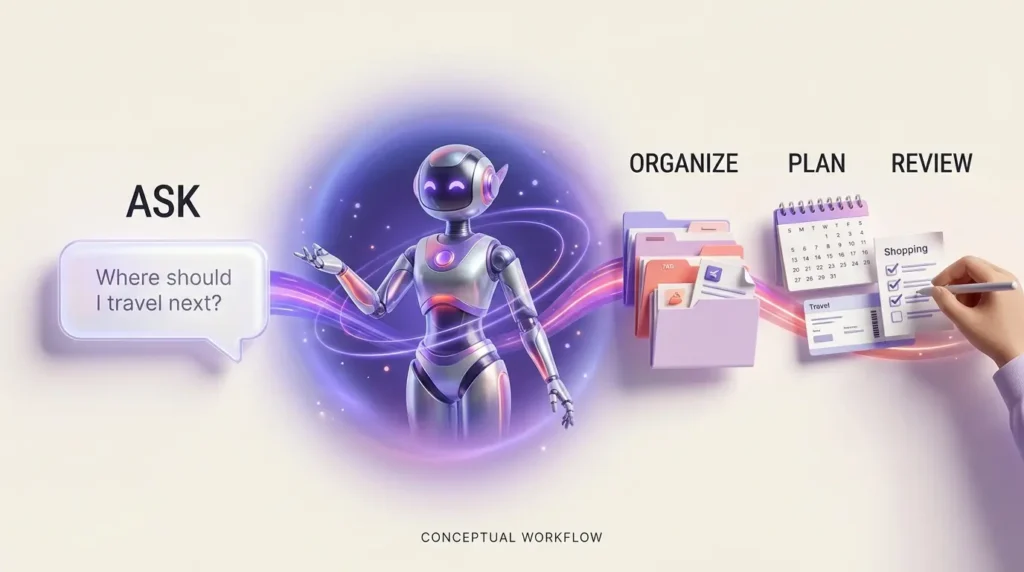
A personal AI agent aims to assist with more of that process. With the appropriate permissions and connected services, it can gather relevant information, organize the results and help move a task closer to completion.
Meta’s original Muse announcement describes an agent operating within a dedicated virtual computing environment. This gives Muse access to tools beyond the chat interface, allowing it to work with supported websites and services.
The Instagram integration makes that experience more accessible by bringing it directly into a familiar social app.
Instead of opening a separate AI tool and explaining everything from the beginning, you can start with something you have already discovered on Instagram.
What Changed on Instagram in November 2026?
Meta’s November update introduces two particularly useful ways to interact with Muse through Instagram.
1. Muse now has a presence in Instagram direct messages
The first change brings Muse into the Instagram inbox.
You can share a post with the agent and ask for assistance related to its contents. A travel video could become the starting point for planning a holiday. A product Reel could lead to research about its price, availability or alternatives.
The integration also means you do not always need to switch between Instagram and the standalone Muse application.
As reported by TechCrunch, Instagram conversations with Muse can appear as separate conversations within the main Muse app, helping users continue their work across the two experiences.
2. Your saved posts become easier to organize
The second development addresses the growing collection of Reels and posts people save for later.
Instagram already allows users to create Collections. However, manually sorting hundreds of saved posts into meaningful folders takes time.
Muse can assist with that organization. In the United States and Canada, Instagram is also introducing a prompt when people save content, offering AI assistance at the moment they discover something worth keeping.
MacRumors reports that these capabilities include organizing collections, producing shopping lists from recipes and developing travel itineraries.
The result is a more useful connection between discovering an idea and deciding what to do with it.
How to Use Muse AI on Instagram
You do not need programming experience or advanced knowledge of artificial intelligence to get started.
However, you do need access to the feature, an eligible account and the appropriate connection between Instagram and Muse.
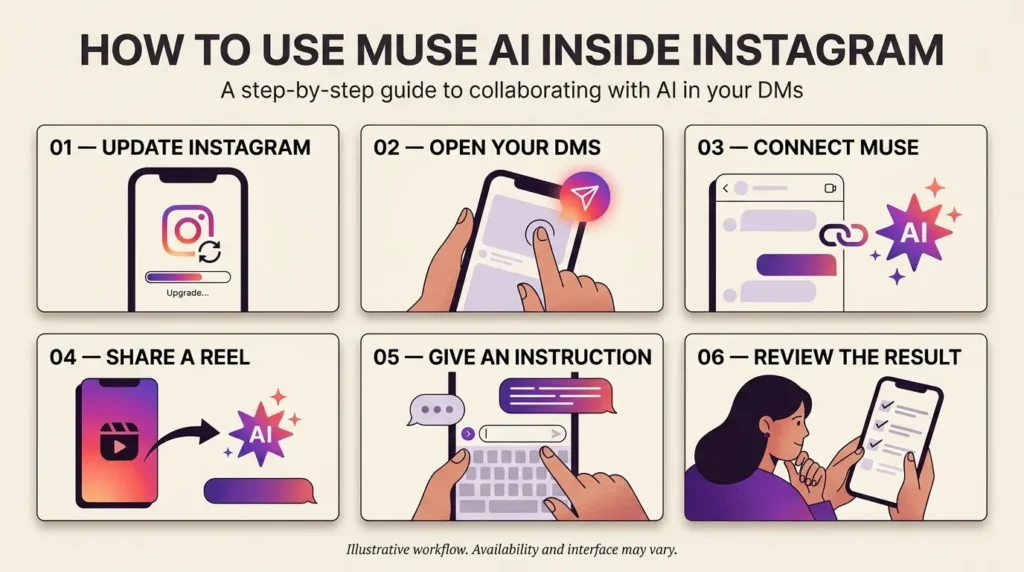
Step 1: Update Instagram
Visit the Apple App Store or Google Play Store and install the latest available version of Instagram.
Updating the app does not guarantee immediate access because Meta is controlling the rollout separately. It does ensure you are using the latest application version available for your device.
Step 2: Open your Instagram messages
Go to the Instagram inbox and look for the Muse conversation or an official invitation to access the agent.
The precise appearance of the feature can vary depending on the account, region and rollout stage.
Step 3: Connect your Muse and Instagram accounts
If Instagram presents an account connection or onboarding screen, follow the official instructions.
Read the requested permissions before accepting them. You should understand which information the agent needs and whether those permissions are necessary for the task you want to accomplish.
Step 4: Share a Reel or post with Muse
Choose something you have saved or recently discovered.
If Muse is available as a sharing destination, send the content to the agent. You can also describe the post or Collection you want it to work with inside the Muse conversation.
Step 5: Give Muse a specific instruction
Start with one simple request.
For example:
Find the recipe in this Reel and make a grocery list for two people. Separate ingredients with confirmed quantities from anything the video does not clearly explain.
A specific instruction is more useful than asking the agent to organize your entire account without any boundaries.
Step 6: Review the result
Check the information Muse returns before relying on it.
If the task involves changing a Collection, sharing information or taking another meaningful action, review any approval request carefully.
The most useful way to begin is with a task you can easily verify yourself.
Which Countries Have Muse AI on Instagram?
One of the most confusing aspects of the launch is that the availability of the standalone Muse agent is not identical to the availability of its Instagram integration.
Meta has announced the following initial markets for Muse inside Instagram DMs.
| Country | Muse in Instagram DMs | AI prompts when saving posts |
|---|---|---|
| United States | Rolling out | Rolling out |
| Canada | Rolling out | Rolling out |
| Mexico | Rolling out | Not announced |
| Japan | Rolling out | Not announced |
| Singapore | Rolling out | Not announced |
| United Kingdom | Not announced | Not announced |
| Australia | Not announced | Not announced |
| India | Not announced | Not announced |
| Pakistan | Not announced | Not announced |
Availability information is current as of November 26, 2026.
The United Kingdom is a particularly interesting example. Meta announced that the standalone Muse service was becoming available to UK adults on November 23, but the UK was not included in the initial five country Instagram DM rollout.
You can read the company’s official UK Muse announcement for more information about that separate launch.
Meta has not provided a confirmed worldwide release schedule for the Instagram integration.
If you live outside the initial markets, the absence of the feature does not necessarily indicate an issue with your account.
What Can Muse Actually Do With Your Saved Reels?
The most interesting part of the update is not the presence of another AI conversation inside Instagram. It is the possibility of making saved content useful again.
Here are six ways that could change how people use the platform.
1. Find a Reel you cannot remember saving
Instagram Collections are useful when you remember where something is stored. But what happens when you remember the content and nothing else?
Perhaps it was a video showing how to make creamy pasta. You remember the kitchen, the ingredients and the final dish, but not the creator’s username.
Muse is intended to help users retrieve saved material through conversational requests rather than relying entirely on manual browsing.
The quality of the result will depend on the information available to the agent. Deleted posts, restricted content and inaccessible media may still be difficult or impossible to retrieve.
2. Turn recipe videos into grocery lists
Recipe Reels are often beautifully presented but inconvenient when you are standing in a supermarket.
Ingredient quantities might appear briefly on screen. Some measurements may be included in the caption, while others are not mentioned at all.
Muse can help organize the available recipe information into a more practical shopping list.
For better results, ask it to separate confirmed ingredients from inferred ones, identify quantities that need checking and organize everything by supermarket section.
You should still review the original recipe, particularly if you have allergies or specific dietary requirements.

3. Build a trip from saved travel inspiration
Travel content is one of the clearest examples of the potential value of Muse.
Imagine you have spent six months saving videos about Japan. Your Collection contains ramen shops, scenic streets, museums, hotels and shopping destinations.
Rather than trying to remember everything when it is time to book the trip, you could ask Muse to develop an itinerary based on those saved places.
The important part is verification. A popular travel Reel may be years old. Businesses close, opening hours change and transport routes are updated.
Treat the generated itinerary as a planning draft. Confirm opening hours, locations, ticket prices and booking requirements through official sources before travelling.

4. Turn fashion inspiration into wearable outfits
A saved fashion Reel often shows an entire outfit that looks appealing on someone else.
Recreating that look can be expensive, particularly when the original includes designer clothing or accessories you do not own.
Muse could help bridge the gap between inspiration and practicality.
For example, you could describe the clothes already in your wardrobe and ask the agent to suggest combinations inspired by your saved looks.
The objective does not have to be buying new clothes. Sometimes the most useful recommendation is a different way to wear something you already own.
5. Research products before buying them
Seeing an attractive product in a Reel does not necessarily mean it is worth buying.
The product could be overpriced, sold by an unreliable retailer or promoted through advertising that does not reveal its limitations.
Muse can assist with product research and help users compare options. During shopping events such as Black Friday, that could mean checking different retailers or finding alternatives within a budget.
For a broader understanding of this developing market, read our guide to the best AI shopping assistants in 2026.
Never treat an AI recommendation as proof that a retailer is legitimate. Our Black Friday scam guide explains several warning signs worth checking before making an online purchase.

6. Catch up on conversations
Muse can also assist with understanding conversations you may have missed.
That might be useful after a busy day, particularly when an Instagram group chat contains dozens of new messages and several different discussions.
However, accessing messages is more privacy sensitive than organizing saved recipe videos.
Review the relevant account connection and permissions before using conversation assistance. Remember that private conversations contain information about other people, not just you.
15 Best Muse AI Prompts to Try on Instagram
Knowing what to ask an AI agent is often the difference between getting a generic answer and receiving something genuinely useful.
The following prompts are original examples prepared for this guide. They are intended to demonstrate possible workflows using Muse’s announced capabilities, not to represent independently tested results.
1. Find a forgotten recipe
Find the pasta recipe I saved recently that included mushrooms and cream. Show me the original Reel and tell me if there is more than one possible match.
2. Organize your Instagram saves
Review the saved content you have permission to access. Suggest Collections for recipes, travel, fashion, home ideas and technology. Show me the proposed organization before making changes.
3. Create a grocery list
Turn this saved recipe into a grocery list for two people. Group the ingredients by supermarket section and flag any quantities that are missing from the original video.
4. Plan five dinners
Use my saved recipe Reels to suggest five different dinners. Prioritize meals that share ingredients so I can reduce food waste.
5. Build a holiday itinerary
Use my saved Tokyo travel posts to draft a three day itinerary. Group nearby attractions together and identify opening hours or ticket information that still needs verification.
6. Find something to do this weekend
Review my saved activity ideas and suggest three realistic weekend plans within my stated budget. Include links to the original posts.
7. Recreate an outfit without overspending
Use this fashion Reel as inspiration. Suggest five outfit combinations using the black trousers, cream sweater, white shirt and brown boots I already own.
8. Organize Christmas gift ideas
Turn my saved gift inspiration into a shortlist for friends and family. Keep each suggestion under $50, exclude duplicate ideas and do not make purchases.
9. Research a Black Friday offer
Identify the product shown in this Reel if possible. Compare current offers from reputable retailers, including shipping costs and return policies. Flag anything you cannot verify.
10. Plan a home makeover
Organize my saved interior design ideas by room and color palette. Suggest which projects are affordable and which require additional measurements or research.
11. Organize fitness inspiration
Group my saved exercise videos by activity and equipment requirements. Flag any exercises that may require professional guidance rather than assuming they are suitable for me.
12. Develop original creator ideas
Identify common storytelling structures in the Reels I have saved. Suggest five original video concepts for my niche without copying any creator’s script or distinctive visual identity.
13. Turn educational Reels into a learning plan
Group my saved educational posts by subject. Create a seven day learning checklist and identify any claims that should be checked against authoritative sources.
14. Catch up on an authorized conversation
Summarize only the conversation I have explicitly authorized you to access. Identify important questions and commitments. Do not send messages on my behalf.
15. Declutter your saved posts
Identify potentially duplicate or outdated items in my saved content. Explain your reasons and give me a review list before removing or changing anything.
The common principle behind these prompts is simple: tell the agent what you want, define the limits of the task, and specify which decisions require your approval.
You can use that principle with other personal AI assistants as well. Our article about Google Gemini Tasks becoming available for free explores another development in this growing category.

Muse AI vs Meta AI: What Is the Difference?
Meta already has an artificial intelligence assistant, so introducing another AI product naturally creates confusion.
Muse and Meta AI are related experiences, but they have different primary purposes.
| Capability | Muse | Meta AI |
|---|---|---|
| Primary emphasis | Personal assistance and task completion | General conversational assistance |
| Typical request | Organize my saved travel ideas into a plan | Suggest places to visit |
| Connected services | Central to its agent capabilities | Varies by available feature |
| Continuing tasks | Designed to support ongoing work | Depends on the specific product experience |
| Instagram integration | Dedicated Muse experience in eligible markets | Existing Meta AI features |
| Action permissions | Designed around task access and approvals | Varies by action and feature |
These distinctions describe the products’ general emphasis, rather than an exhaustive list of exclusive capabilities.
Muse does not replace Meta AI inside Instagram.
The two experiences can coexist, and users do not necessarily need Muse when they simply want an answer to a general question.
Is Muse AI Free on Instagram?
Muse is available with free usage and optional paid subscriptions.
Meta describes the standalone service as free for ordinary usage, with subscription plans available to users who need additional capacity.
That should not be confused with unlimited access.
An AI agent can consume more computing resources than a simple chatbot, particularly when a request involves searching, processing content, interacting with websites or carrying out several steps.
The applicable allowances and subscription options may differ by market.
The November Instagram announcement does not establish a single universal price for every user. Check the official Muse product experience for the current limits and subscription offers available to your account.
For most people, starting with small tasks and evaluating whether the results are useful is more sensible than immediately paying for additional usage.
Is Muse AI Safe to Use on Instagram?
There is a genuine tradeoff when you give an AI agent access to personal information.
The more context it receives, the more useful its recommendations may become. At the same time, greater access creates greater responsibility around privacy, account permissions and the reliability of automated actions.
Meta has described several controls intended to address these concerns.
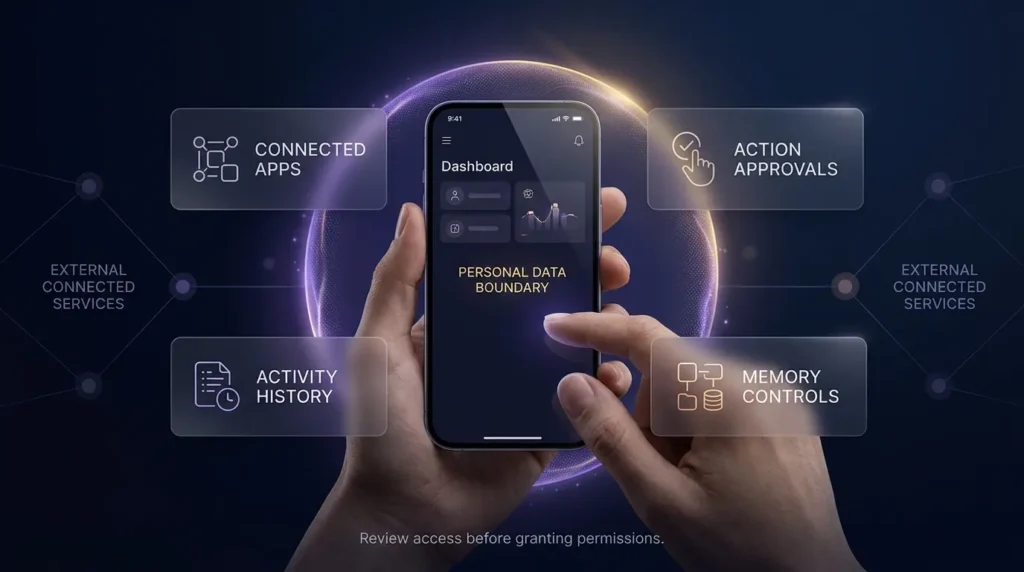
In its official explanation of Muse’s user controls, the company discusses permission management, approval requirements and visibility into the agent’s activities.
Meta also states that Muse conversations and information retained within its virtual computing environment are not shared with its advertising systems. The company provides separate controls over the use of Muse interactions to improve its AI models.
These are the company’s stated policies. They should not be interpreted as proof that software errors, incorrect actions or security incidents are impossible.
Does Muse automatically read your private messages?
Connecting Instagram and using conversation assistance are not necessarily the same thing.
Message access can depend on the relevant connector and the permissions granted to the agent.
Before requesting summaries of private conversations, review exactly what access Muse has and whether it needs access beyond the conversation you want summarized.
Avoid granting broad messaging permissions simply because the option is available.
Can Muse publish posts or send messages without permission?
Meta says its Instagram experience is designed to require approval before sharing, publishing or sending content.
Nevertheless, users should review the actual permissions and approval settings available to their accounts.
An AI agent’s proposed action can contain mistakes even when the approval mechanism works correctly. Reading the proposed message or checking the intended destination is still necessary.
Can you ask Muse to forget something?
Meta offers memory controls and the ability to ask Muse to forget information.
However, disconnecting a service, clearing a conversation and removing retained information should not automatically be treated as identical operations.
Review the available memory and data management controls if your intention is to remove previously retained information.
How to Protect Your Privacy While Using Muse AI
You do not need to give an AI agent access to every available service to benefit from it.
Start with the narrowest permissions needed for your task.
| Privacy action | Why it matters |
|---|---|
| Review connected services | Understand which accounts Muse can access |
| Restrict messaging access | Avoid unnecessary exposure of private conversations |
| Keep important approvals enabled | Review sensitive actions before execution |
| Review activity records | Understand what the agent has done |
| Check memory settings | Manage information retained for future tasks |
| Review training preferences | Decide how your interactions may be used to improve AI |
| Disconnect unused services | Reduce unnecessary ongoing access |
| Verify important outputs | Avoid acting on incorrect information |
Do not share passwords, authentication codes, payment card details or confidential information in an ordinary AI conversation.
If you are experimenting with Muse for the first time, organizing saved public recipes or fashion posts is a sensible starting point. You can evaluate its usefulness without immediately granting access to your most private conversations.
Why Is Muse AI Not Showing on My Instagram?
If you cannot find Muse in your Instagram inbox, there are several possible explanations.
Your country is not included in the initial rollout
The Instagram integration initially covers five markets. Availability of the standalone agent elsewhere does not guarantee Instagram access.
Your account has not received the update
Meta is introducing the feature gradually. Two people using the same app version in the same country may not necessarily receive it simultaneously.
Your Instagram app needs updating
Check the official application store for an available update.
Your Muse account is not connected
The Instagram integration may require you to complete the relevant account setup before using the agent.
You are looking for a different feature
The prompt that appears when saving a post is being introduced in fewer countries than the Instagram messaging integration.
You might receive one feature without receiving the other.
If none of these explanations resolves the issue, consult Instagram’s official Help Center or wait for further rollout information.
There is no confirmed workaround that guarantees access ahead of Meta’s account rollout. Avoid unofficial applications, modified Instagram downloads and websites claiming they can unlock Muse in exchange for your login credentials.
What Muse Still Cannot Be Trusted to Do Automatically
The ability to organize a social media collection is impressive, but there are limits to what an AI agent can reliably understand.
A recipe video might omit an ingredient. A travel influencer might recommend somewhere that has since closed. A fashion post might contain sponsored products without explaining their actual quality.
Muse can organize information, but organizing it does not automatically make it accurate.
These are particularly important limitations to remember:
- Some saved posts may no longer be accessible.
- Videos and captions may contain incomplete information.
- Generated product identifications may be incorrect.
- Prices and availability can change.
- Travel plans require current verification.
- Sensitive health or financial decisions require appropriate expertise.
- AI agents can misunderstand instructions.
Muse is most useful when it reduces the work involved in preparing a decision without taking away your responsibility for making that decision.
Why This Update Matters Beyond Instagram
The traditional social media experience follows a familiar pattern.
You discover something, save it and continue scrolling.
The platform is exceptionally good at helping people discover what they might want. It is not always equally good at helping them accomplish what they intended to do with those discoveries.
Muse introduces a different possibility.
A saved restaurant could become part of a weekend plan. A collection of interior design videos could become a renovation checklist. Months of recipe inspiration could become a meal plan.
That is a shift from content consumption toward practical assistance.
It also creates an interesting opportunity for creators. A recipe with clearly stated ingredients, a travel video with accurate locations or a fashion post with useful product details may be easier for people and AI tools to turn into actionable information.
This does not establish a new Instagram ranking factor. Meta has not announced that content optimized for Muse will receive preferential distribution.
However, it suggests a broader direction for digital content: information that is clear, structured and genuinely useful may become increasingly valuable when AI agents help people act on what they discover.
There is another side to this development.
As personal AI assistants become more deeply integrated into everyday apps, the distinction between using a social platform and granting an agent access to your digital life becomes increasingly important.
Convenience should come with understandable permissions, reliable oversight and meaningful choices about personal information.
The long term success of these tools will depend not only on how much they can do, but also on how confidently people can control what they do.
Frequently Asked Questions
What is Muse AI on Instagram?
Muse is Meta’s personal AI agent, now being integrated into Instagram DMs. It can assist with saved content, planning, product research and questions about posts.
When did Muse AI launch on Instagram?
The initial Instagram messaging rollout began on November 24, 2026.
Can Muse find Reels I saved months ago?
Finding saved content is among the announced capabilities. Success depends on whether the original post remains available and accessible to Muse.
Is Muse AI available worldwide?
No. The initial Instagram DM rollout covers the United States, Canada, Mexico, Japan and Singapore.
Is Muse AI available on Instagram in the UK?
The standalone Muse service is available in the UK for adults, but the UK was not included in the initial Instagram messaging rollout.
Can I use Muse AI on Android?
Yes. The announced Instagram rollout supports both Android and iOS devices in eligible markets.
Does Muse replace Meta AI?
No. Muse is a separate personal agent experience that can coexist with existing Meta AI features.
Can Muse organize my saved Instagram posts?
Yes, saved content organization is among the announced features. The exact interface and availability depend on the rollout and account permissions.
Can Muse download Instagram Reels?
Automatic downloading of Reels was not established as part of the announced Instagram integration. Organizing or accessing saved content is not the same as downloading video files.
Can Muse buy products for me?
The broader Muse agent supports certain shopping tasks through compatible services and approval mechanisms. Do not assume every shopping transaction can be completed directly inside an Instagram DM.
Can I disconnect Muse from Instagram?
Meta provides controls for connected services and permissions. Review the available connector settings to manage or disconnect Instagram access.
Is Muse AI worth using?
It could be useful for people who regularly save recipes, fashion inspiration, travel ideas or product recommendations. Start with a simple task and evaluate whether it actually saves you time.
Final Thoughts
The most compelling thing about Muse AI on Instagram is not that it adds another chatbot to an already crowded social media landscape.
It is that it gives a purpose to something millions of people already do: save interesting things with the intention of returning to them later.
For anyone with hundreds of forgotten Reels, that is an appealing idea.
Whether Muse becomes an essential part of everyday Instagram use will depend on the reliability of its recommendations, the quality of its organization tools and the confidence users have in its privacy controls.
For now, the best approach is straightforward. Start small, keep control of your permissions and check important information before acting on it.
That recipe you saved six months ago might finally become dinner.
And that is a much more meaningful achievement for artificial intelligence than simply giving you another reason to keep scrolling.
Editorial methodology: This article is based on Meta’s published product documentation and independent reporting available as of November 26, 2026. The Instagram integration was not independently tested by TrendOutsider for this guide. Prompt examples are original editorial illustrations of potential workflows, not documented test results. Feature availability, interface details and subscription limits may change.
Visual disclosure: Editorial illustrations accompanying this article may be AI generated. Conceptual interface illustrations are not official Instagram screenshots.








Leave a Reply