
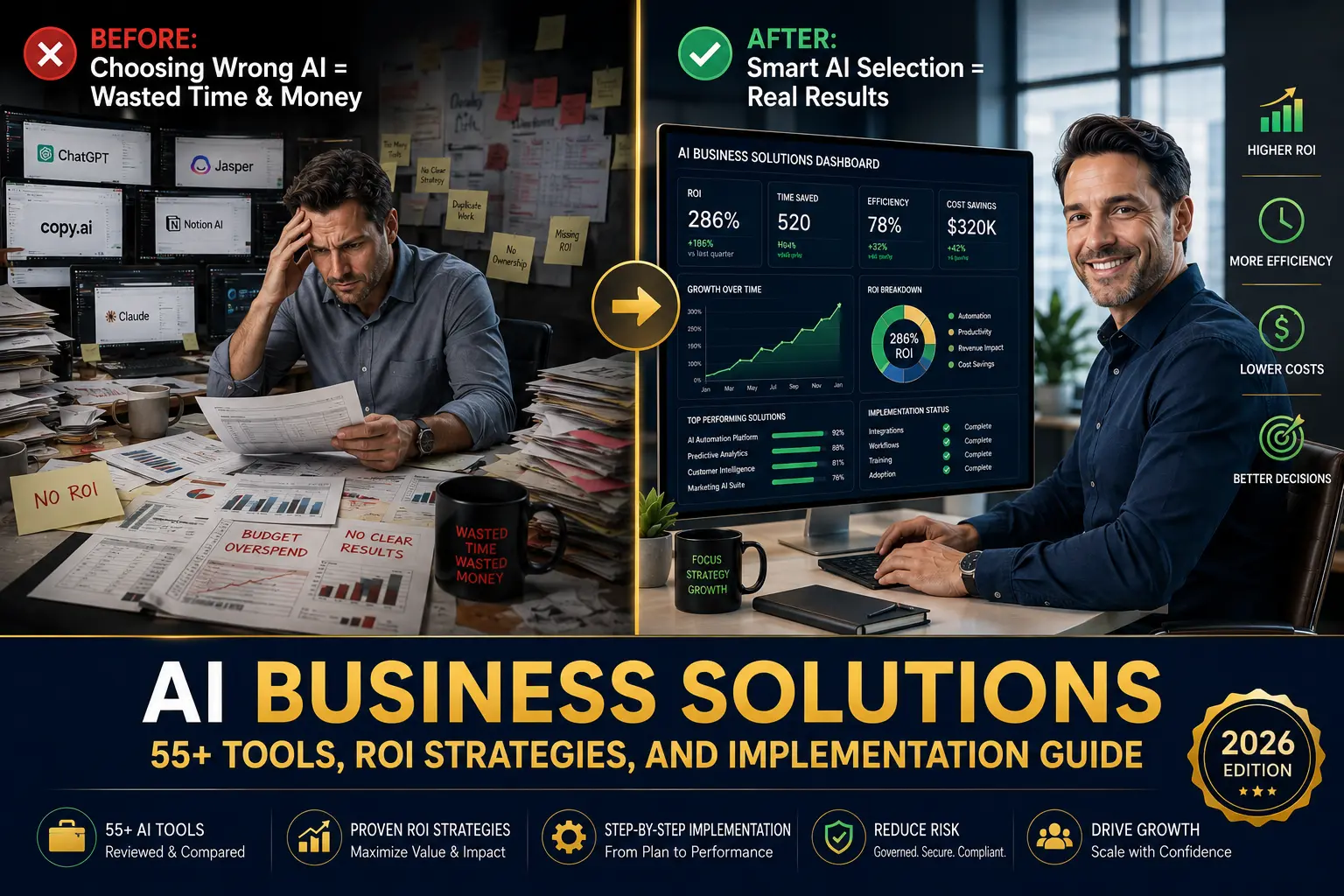
In 2026, the question isn’t whether AI can help your business anymore. The real question is which AI business solutions will actually deliver measurable results without breaking the bank.
Most business leaders tell me the same thing. They understand AI is important. They’ve read the articles. They know their competitors are using it. But when it comes to actually choosing and implementing an AI business solution, they hit a wall.
There are too many tools. The pricing models are confusing. The ROI claims sound unrealistic. Implementation timelines keep getting longer. And most concerning, they don’t know if their teams will actually use these systems once they’re deployed.
That’s what makes this guide different. This isn’t promotional content from a software company. This is practical advice for business owners, managers, and decision-makers who need to know what actually works, what costs what, and whether the time investment is worth it.
Over the next several sections, you’ll learn how to evaluate AI business solutions based on your specific needs, understand realistic ROI, and implement a solution in under twelve weeks. You’ll also see detailed reviews of 55 real tools across different categories, complete pricing information, and case studies showing actual results from businesses like yours.
Let’s start with the fundamentals.
What Exactly Are AI Business Solutions?
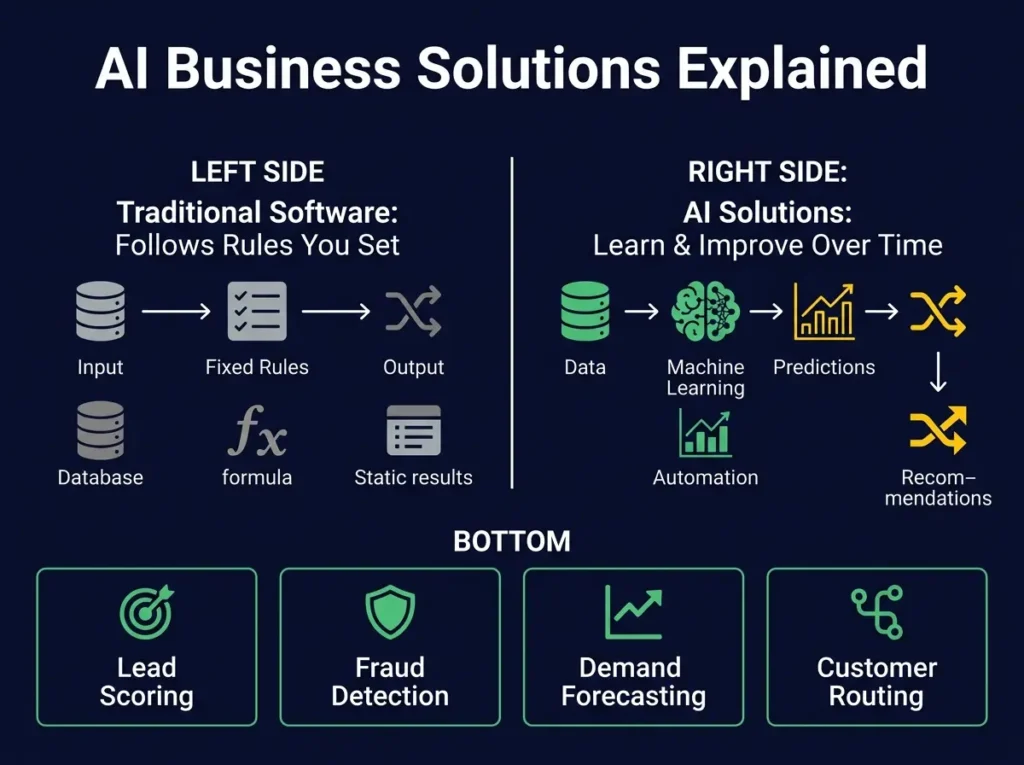
AI business solutions are software tools, platforms, or systems that use artificial intelligence to help organizations solve specific business problems and make faster, more accurate decisions.
Here’s what makes them different from regular business software. Traditional software does what you tell it to do. If you build a spreadsheet formula, it calculates exactly what you programmed it to calculate. If you create a customer database, it stores exactly what you input. It follows rules.
AI business solutions go further. They learn from patterns in your data. They make predictions about things that haven’t happened yet. They can analyze thousands of documents and find the ones most relevant to what you’re looking for. They can write first drafts of content. They can route customer support tickets to the right agent the first time. They can flag unusual expenses that look like fraud.
This happens because modern AI systems use machine learning and natural language processing. Machine learning means the system improves over time by seeing patterns in historical data. Natural language processing means the system can actually understand human language, not just keywords.
For practical business purposes, AI business solutions typically fall into several categories. There are AI tools that automate repetitive work, reducing manual tasks. There are tools that improve decision-making by analyzing data you already have but haven’t fully utilized. There are tools that help teams collaborate more effectively by summarizing information. And there are tools that create entirely new capabilities, like AI agents that can handle customer service conversations without human involvement.
The key to understanding whether an AI tool will work for you is being clear about which category solves your specific problem.
Why Businesses Are Actually Adopting AI in 2026
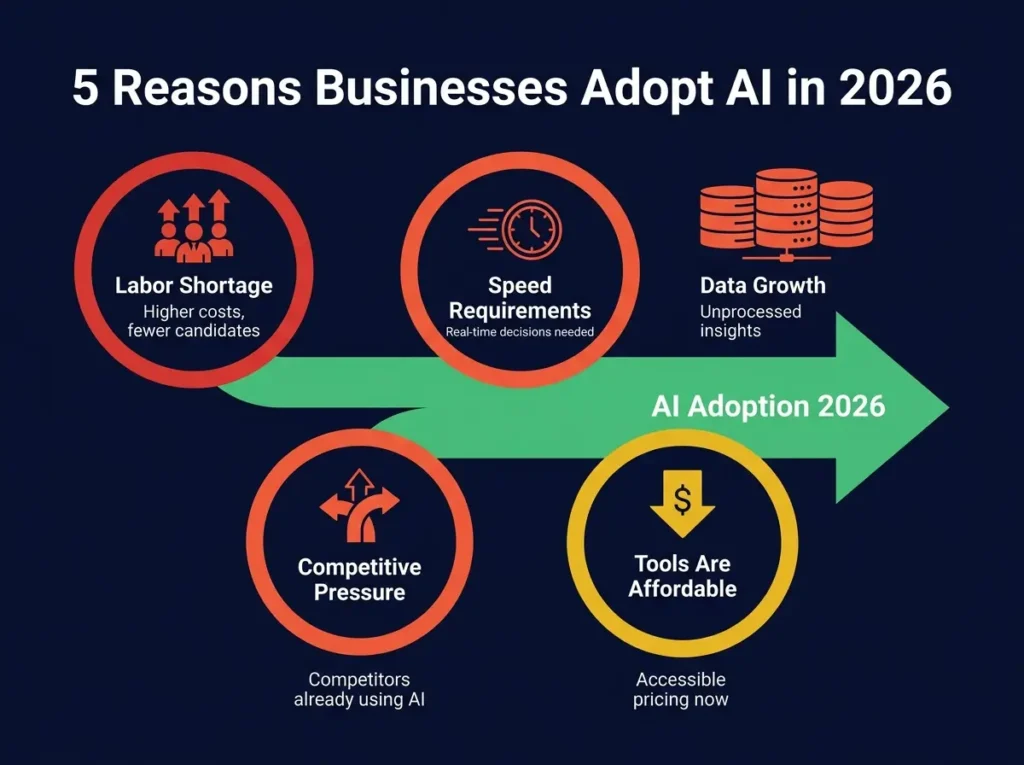
The statistics might surprise you. Most businesses aren’t rushing to adopt AI because it sounds futuristic. They’re doing it because they’re running out of other options.
First, there’s the labor problem. Salaries for skilled workers keep rising. The pool of candidates keeps shrinking. Meanwhile, the amount of work keeps growing. Many managers I talk to are dealing with smaller teams than they had three years ago, but the same amount of work coming through the door. Something has to give. AI helps teams be more efficient with fewer people.
Second, there’s the speed issue. Markets move faster than they did even five years ago. Customers expect faster responses. Competitors make moves faster. If your business still relies on reports that take two weeks to put together, you’re already behind. AI can deliver insights in real time.
Third, data is piling up faster than anyone can manually process it. Companies collect customer data, transaction data, employee data, operational data. Most of it never gets analyzed because there simply aren’t enough people to look at it all. AI can process this data and find the patterns humans would miss.
Fourth, competitors are already doing this. In many industries, using AI isn’t the differentiator anymore. Not using it is becoming the competitive disadvantage.
And finally, the tools are getting cheaper and easier to use. Five years ago, implementing an AI solution meant hiring data scientists and spending months on custom development. Today, many AI tools are available for a reasonable subscription fee and can be deployed in weeks.
How AI Business Solutions Actually Impact Different Departments
Rather than talking about AI as one general category, it’s more useful to understand how different departments use AI to solve their specific problems.
Marketing and Sales Teams
Marketing teams use AI to find the best customers, create better campaigns, and show ROI more clearly.
A marketing leader might use AI for lead scoring, where the system looks at all your historical customers and identifies which leads in your current pipeline look most similar to customers who actually bought and stayed loyal. This helps sales teams focus their energy on the highest probability opportunities.
Another common use is content creation. An AI system can help write first drafts of emails, ads, website copy, and social media posts. This doesn’t mean writing without humans, but it means writers spend less time on first drafts and more time on actually improving and refining the work.
Email marketing has been completely transformed by AI. Instead of sending the same message to everyone, AI systems can personalize based on what the system knows about each person. Open rates and click-through rates typically improve by thirty to forty percent.
Sales teams specifically see benefits in call recording and analysis. An AI system can listen to sales calls, pull out the key moments where the sales rep was most effective, and use that to coach other team members.
Finance and Accounting
The finance department has one of the clearest ROI cases for AI because much of the work is repeatable and measurable.
Invoice processing is probably the most common use case. Instead of someone manually entering invoice data into the system, an AI tool reads the invoice, extracts the relevant information, and enters it. Errors go down by seventy to eighty percent. Processing time drops from minutes to seconds.
Financial forecasting is another area where AI delivers value. Rather than building complicated spreadsheet models and updating them monthly, an AI system can factor in multiple variables, seasonal patterns, and historical trends to generate more accurate forecasts. Finance teams can then spend their time on analysis rather than data compilation.
Fraud detection is another serious use case. An AI system learns what normal expenses look like for different departments and flags anything unusual. It catches fraudulent transactions that human review would miss.
Accounts receivable is also transforming. Instead of customers paying late because invoices get lost or forgotten, an AI system can trigger payment reminders at the right time, predict which customers might struggle to pay, and automatically generate reports on cash flow.
Human Resources
HR departments are using AI in three main ways.
Recruitment: An AI system can screen resumes and identify the candidates most likely to be a good fit based on your historical hiring data. This cuts screening time by fifty to sixty percent.
Employee engagement: An AI system can analyze survey data, exit interviews, and other signals to predict which employees might be at risk of leaving. HR teams can then address concerns before they lead to departures.
Learning and development: An AI system can recommend the right training for each employee based on their role, their skill gaps, and what’s available internally.
Customer Service
Customer service has some of the most dramatic AI impact because so many inquiries are similar.
An AI chatbot can handle common questions without human involvement. Customers get answers immediately, 24/7. The interesting part is that it actually improves customer satisfaction because people don’t like waiting on hold. Many companies report chatbots resolving sixty to eighty percent of routine inquiries without escalation.
Questions the chatbot can’t handle get routed to human agents more intelligently. Instead of random assignment, the system routes each ticket to the agent most likely to resolve it well.
Sentiment analysis means the system understands when a customer is frustrated and can escalate automatically, getting upset customers to experienced representatives faster.
Operations and Supply Chain
Operations teams use AI for forecasting what customers will want, predicting when equipment will fail, and optimizing logistics.
Demand forecasting is valuable because it prevents both stockouts and overstocking. An AI system factors in seasons, trends, promotions, and external events to predict demand more accurately, often improving forecast accuracy by twenty to thirty percent.
Predictive maintenance is valuable in manufacturing. Instead of equipment failing unexpectedly and stopping production, an AI system predicts when maintenance is needed. This prevents unplanned downtime and reduces maintenance costs.
Logistics optimization looks at all possible routes, considers current traffic and weather, and recommends the most efficient path for deliveries, typically reducing delivery costs by ten to fifteen percent.
Understanding the Real Costs of AI Business Solutions
This is where most conversations get uncomfortable, but it’s essential to understand.
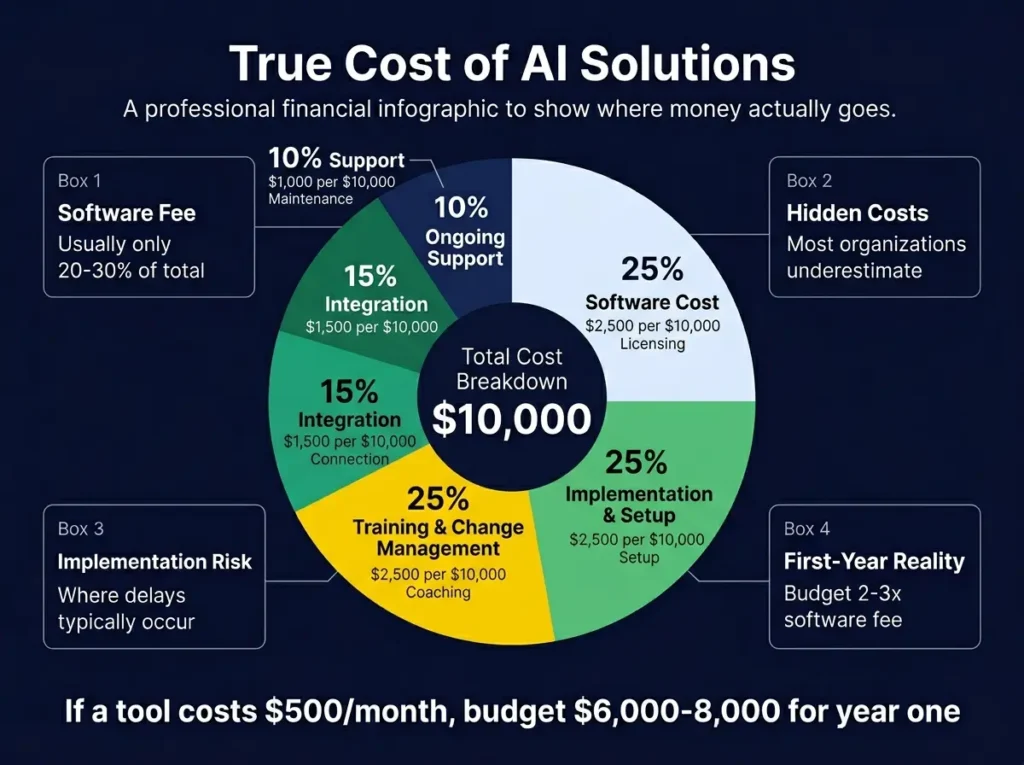
The software subscription itself is only part of the cost. A typical breakdown looks like this:
Software cost is usually twenty to thirty percent of the total investment. This is the monthly or annual fee for the tool itself.
Implementation and setup is typically twenty to thirty percent. This is the work to get the system running, connect it to your existing systems, clean up your data, and configure it properly.
Training and change management is often twenty to thirty percent. This is making sure employees understand how to use the tool and actually adopt it. Many implementations fail not because the software is bad, but because teams weren’t properly trained.
Integration with other systems is often ten to twenty percent. Most tools don’t work alone. They need to connect to your CRM, your accounting system, your data warehouse, or other platforms.
Ongoing support and optimization is another ten to fifteen percent annually. After initial implementation, you’ll need ongoing help as you expand usage or encounter issues.
For a small business looking at a five hundred dollar per month AI tool, the total cost in the first year might be six to eight thousand dollars. For a mid-market company with a five thousand dollar per month platform, first year costs might be seventy to one hundred thousand dollars.
This is why ROI is so important to calculate upfront. If your goal is only saving five thousand dollars per year, the math doesn’t work. But if you’re solving a problem worth fifty thousand dollars or more annually, then the investment makes sense.
How Much Financial Return Should You Actually Expect
Let’s be honest about realistic ROI numbers, because much of what you read online is overly optimistic.
Cost reduction ROI is most predictable. If you currently spend one hundred hours per month on invoice processing, and an AI tool does that work instead, and you value that time at thirty dollars per hour, that’s three thousand dollars monthly in saved labor. The tool might cost five hundred dollars monthly. That ROI is easy to calculate and relatively certain. You should see returns within the first month.
Revenue improvement ROI is harder to predict. If you implement an AI sales tool that helps your team close five percent more deals, the benefit is significant. But that five percent improvement isn’t guaranteed. It depends on your sales team actually using the tool, the tool being good at what it claims, and no changes to market conditions. This type of ROI usually takes three to six months to realize.
Quality improvement ROI is somewhere in between. If an AI tool reduces errors by half, that’s measurable. Fewer errors mean happier customers, fewer refunds or corrections, and less work for service teams. This typically shows up in two to four months.
Most businesses see positive ROI within six months to a year. Some see it in months. A few take eighteen months. The ones that see it fastest are usually solving high-volume, repetitive problems where the ROI is easy to measure.
For specific real-world examples of how businesses are using AI to improve revenue and
profitability, our detailed guide on seventeen best AI tools to make money provides case
studies of companies earning money through strategic AI implementation. These examples
complement the ROI frameworks discussed here.
The Framework for Selecting the Right AI Business Solution
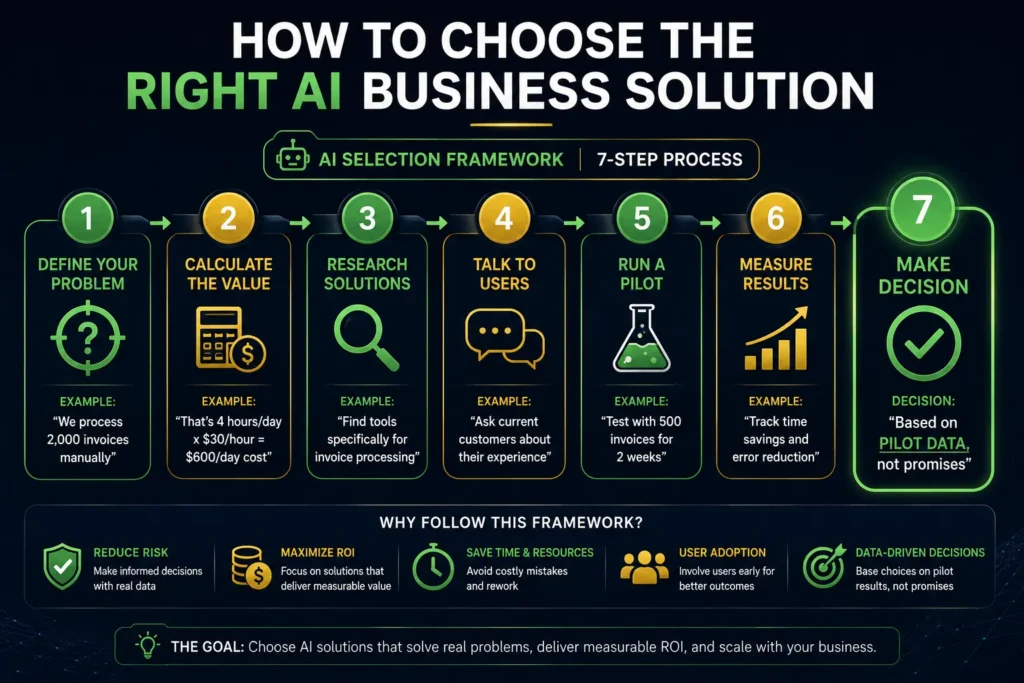
Here’s a process that works better than just picking the tool that seems most popular.
Step one is clearly defining your problem. Not “we need to use AI.” But specifically, “we process two thousand invoices per month manually and it takes four hours per day to do it.” Or “we lose qualified leads because our team can’t follow up fast enough.” Or “customer service response time is seventy-two hours and we want it to be under four hours.”
Step two is calculating the value of solving that problem. What does it cost your business if this problem persists? If it’s invoices, what does the manual labor cost? If it’s lost sales, what’s the margin on those deals?
Step three is researching tools that solve that specific problem. Not tools that claim to solve everything, but tools that clearly address your problem. This might narrow your options significantly.
Step four is talking to current customers of those tools. Ask them specifically whether it solved their version of this problem. Ask about actual implementation time, whether their teams actually use it, and whether they achieved the ROI they expected.
Step five is doing a pilot. Run the tool with a subset of your business for two to four weeks. See if it actually works as described. See if your team uses it. Measure the actual results, not the promised results.
Step six is making a go or no-go decision based on pilot results.
This process sounds obvious, but many organizations skip steps and just buy based on marketing materials. That’s why so many expensive tools end up unused.
A Look at Real Implementation Timelines
Most AI business solution providers quote optimistic timelines. Reality is usually different.
Simple integrations, like adding an AI writing assistant to your existing tools, might be one to two weeks. Everyone can be trained and productive quickly.
Department-level tools, like an AI system for your finance or marketing department, typically require four to eight weeks. This includes data setup, connecting to existing systems, configuration, and training.
Company-wide implementations, like a new ERP system with AI or a comprehensive business intelligence platform, typically take three to six months. This includes significant change management and integration work.
Custom or highly complex implementations can take six months to two years.
The most important thing to understand is that the software implementation is often faster than the organizational change. Getting your team to actually use a new system effectively takes longer than just getting it running.
When AI Business Solutions Actually Fail
It’s useful to understand why some implementations don’t work out, so you can avoid these pitfalls.
The most common failure is mismatched expectations. The business expects the tool to solve a problem it’s not actually designed to solve, or they expect it to work without their team making any behavioral changes.
The second common failure is poor data quality. AI systems learn from historical data. If that data is messy, incomplete, or inaccurate, the AI system will make poor decisions. This is called garbage in, garbage out. Before implementing, audit your data quality.
The third failure is lack of adoption. The tool is implemented, but employees don’t actually use it. This usually happens because it makes their job harder, not easier, at least in the short term. Or they weren’t included in the selection process and don’t understand why they need it.
The fourth failure is poor integration. The tool doesn’t actually connect well with the systems your team is already using, so it becomes another system to check rather than something that improves existing workflows.
The fifth failure is unrealistic ROI expectations. The tool does what it claims, but the benefit isn’t as large as the business hoped. This is usually because the problem being solved isn’t actually as painful as anticipated.
Understanding these failure modes helps you avoid them when you implement your own solution.
Implementation Checklist for Success
Before you start implementation, make sure you have everything in place.
Document your current processes in detail. If you can’t describe how work currently gets done, you won’t recognize whether the AI tool has improved it.
Set specific, measurable success metrics. Define what success looks like before you start. Don’t measure after implementation and decide whether it was successful.
Identify your project team. Who will oversee implementation? Who will handle data setup? Who will be your main contact with the vendor? Assign clear ownership.
Plan your data cleanup. Most implementations hit delays because historical data is messy. Budget time to clean and validate your data.
Design your training approach. How will your team learn to use the tool? Will you have formal training sessions? Online resources? A power user who coaches others?
Plan your rollout approach. Will you deploy company-wide immediately, or start with a pilot? Phased rollouts typically have higher adoption rates.
Set up your measurement systems. How will you actually track whether the tool is delivering the promised benefits?
Plan for support after launch. Who will handle questions and troubleshooting once the tool is live?
Once your AI business solution is implemented, the next phase involves optimizing how it
integrates into actual workflows. Rather than running parallel processes, successful implementations
embed AI into the day-to-day work itself. Our guide to generative AI workflows demonstrates
how to design business processes that leverage AI capabilities rather than treating AI as a
separate system.
55+ AI Business Solutions Tools Reviewed
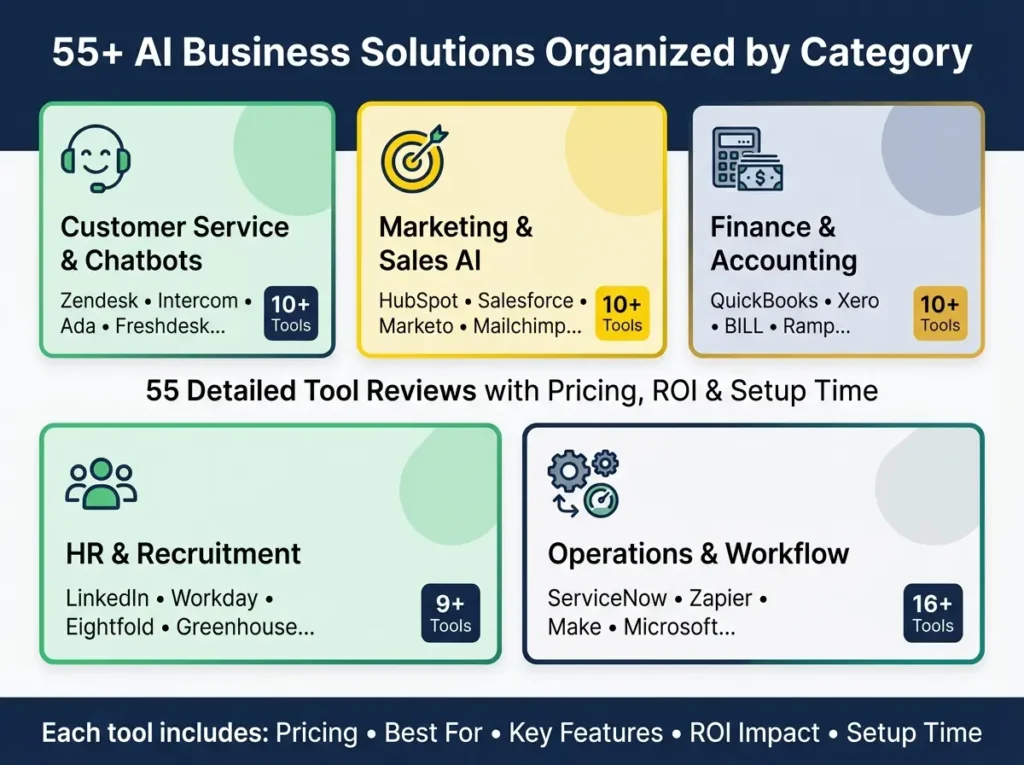
Below is a practical list of AI business solutions organized by category. Pricing changes frequently, so always verify the current cost on the vendor website before purchasing.
CUSTOMER SERVICE AND CHATBOT SOLUTIONS
1. Zendesk AI
Zendesk is one of the most established customer service platforms with AI built throughout. The AI features include intelligent ticket routing, automated responses to common questions, and agent assistance that suggests responses in real time. Zendesk works best when your support team deals with repeated questions or high ticket volume.
Best For: Support teams at SMB to enterprise scale Pricing: $500-2,000 per month Key Features: AI ticket routing, response suggestions, sentiment analysis, knowledge base automation ROI Impact: 60-70% reduction in support costs, 40% faster resolution time Setup Time: 4-6 weeks
2. Intercom Fin
Intercom Fin is a customer service AI agent designed specifically for SaaS companies and product-led growth businesses. It handles customer conversations, answers questions, and routes complex issues to humans. Intercom Fin is particularly good for companies with limited support staff because the AI agent handles the first interaction.
Best For: SaaS companies, startups, product-led businesses Pricing: $100-1,500 per month Key Features: AI support agent, website chat, self-service capabilities, human handoff, conversation automation ROI Impact: 40-50% reduction in support tickets, improved customer satisfaction Setup Time: 2-3 weeks
3. Ada
Ada is an enterprise-focused AI customer service platform that specializes in automating customer interactions across multiple channels including chat, email, voice, and messaging apps. Ada’s strength is handling conversations across many channels at scale.
Best For: Enterprise and mid-market companies with high support volume Pricing: $2,000-10,000+ per month Key Features: Omnichannel automation, AI conversation management, support deflection, escalation workflows ROI Impact: 70-80% of questions answered without human involvement Setup Time: 8-12 weeks
4. Freshdesk Freddy AI
Freshdesk is an affordable helpdesk platform that includes AI features through Freddy. It helps with ticket summarization, suggested responses, and overall support team productivity. Freshdesk is a good entry point for smaller teams that want AI support without enterprise pricing.
Best For: Small to mid-market support teams Pricing: $15-49 per agent per month (Freddy included) Key Features: Ticket summaries, response suggestions, spam detection, automated tagging ROI Impact: 30-40% faster ticket handling, fewer errors Setup Time: 1-2 weeks
5. Help Scout AI
Help Scout focuses on keeping customer support personal while adding AI assistance. The AI helps with drafting replies, summarizing conversations, and improving response quality without replacing the human touch.
Best For: Small businesses that want human-focused support Pricing: $20-50 per user per month Key Features: Reply drafting, conversation summaries, knowledge base support, AI coaching ROI Impact: 25-35% faster response writing, improved consistency Setup Time: 1 week
6. Tidio AI
Tidio is a beginner-friendly platform combining live chat and AI chatbots. It’s particularly popular with ecommerce stores and small service businesses that want to handle customer questions 24/7. Tidio is easy to set up and doesn’t require technical skills.
Best For: Small businesses, ecommerce stores, service websites Pricing: Free tier available, paid plans $25-99 per month Key Features: Website chatbot, live chat, AI conversations, lead capture, visitor tracking ROI Impact: 45-minute average response time, 24/7 availability Setup Time: 1-2 days
7. Gorgias AI
Gorgias is built specifically for ecommerce customer support, particularly Shopify stores. The AI understands order data, inventory, and returns policies to handle customer inquiries automatically. Gorgias is powerful for online stores because it connects directly to your Shopify data.
Best For: Ecommerce brands, Shopify stores Pricing: $10-100 per month depending on features Key Features: Shopify integration, AI order status replies, refund automation, return management, multichannel support ROI Impact: 60-70% of common questions answered automatically Setup Time: 2-3 days
8. Drift
Drift is a conversational marketing platform that combines live chat with AI to qualify website visitors and route them to sales teams. It’s popular with B2B companies that want to capture leads from website traffic.
Best For: B2B companies, SaaS companies, service providers Pricing: $500-5,000+ per month Key Features: Website chat, AI visitor qualification, meeting booking, sales routing, conversation intelligence ROI Impact: 30-40% increase in qualified leads, faster sales cycle Setup Time: 3-4 weeks
While Drift works well for general B2B, industry-specific conversational AI tools are becoming
popular in specialized fields. For instance, our article on conversational AI for real estate
agents shows how real estate professionals are using AI-powered chat to qualify serious buyers
and schedule showings automatically, demonstrating how general AI principles apply to specific
verticals.
9. Salesforce Service Cloud AI
Salesforce Service Cloud includes extensive AI features through Agentforce. It can automate customer service workflows, case routing, and create AI agents for customer interactions. Salesforce is the strongest option when customer service, sales, and CRM data need to work together.
Best For: Salesforce-based businesses, enterprise companies Pricing: Custom pricing, typically $5,000-50,000+ per month Key Features: Case automation, AI service agents, CRM-connected support, customer history summaries ROI Impact: 50% reduction in manual case work, improved customer satisfaction Setup Time: 8-16 weeks
10. Amazon Connect
Amazon Connect is a cloud-based contact center solution with AI features for voice, chat, routing, analytics, and customer experience. It’s scalable and doesn’t require traditional contact center infrastructure.
While customer service AI is crucial, marketing teams benefit equally from intelligent automation.
Teams often combine customer service automation with marketing AI to create comprehensive business
solutions. For a deeper look at how marketing automation works with AI, check out our comprehensive
guide to free AI tools for marketing, which covers budget-friendly options that complement your
customer service stack.
Best For: Contact centers, larger support operations, phone-based support Pricing: $0.00875 per minute for calls, plus AI features $0.01 per request Key Features: AI contact center, voice support, call analytics, customer routing, self-service workflows ROI Impact: 50-60% cost reduction vs traditional contact centers Setup Time: 4-8 weeks
MARKETING AND SALES AI SOLUTIONS
11. HubSpot Breeze AI
HubSpot Breeze is HubSpot’s AI assistant that helps with lead qualification, content creation, email drafting, and customer insights across marketing, sales, and service. It’s designed to augment human teams, not replace them.
Best For: SMBs, growing teams, B2B marketing teams Pricing: Included with HubSpot Pro and higher plans ($800-3,200 per month) Key Features: Lead qualification, content creation, prospecting, CRM insights, customer support automation, marketing workflows ROI Impact: 30-45% improvement in conversion rates, 25% reduction in content creation time Setup Time: 1-2 weeks
12. Salesforce Agentforce
Salesforce Agentforce helps companies build AI agents connected to CRM data. It can support sales, service, marketing, commerce, and internal workflows. Agentforce is powerful but requires significant implementation effort.
Best For: Enterprise teams already using Salesforce Pricing: Custom enterprise pricing, typically $10,000+ per month Key Features: AI sales agents, customer support agents, CRM automation, lead follow-up, sales coaching, workflow automation ROI Impact: 40-50% increase in sales productivity, significant time savings Setup Time: 12-20 weeks
13. Marketo Engage
Adobe Marketo Engage is a marketing automation platform with AI for lead nurturing, segmentation, and campaign optimization. It’s popular with B2B companies doing account-based marketing.
Best For: B2B marketing teams, enterprise demand generation Pricing: Custom pricing, typically $2,000-10,000+ per month Key Features: Lead nurturing, campaign automation, email marketing, segmentation, account-based marketing ROI Impact: 35-50% improvement in marketing-generated revenue Setup Time: 6-12 weeks
14. Mailchimp AI
Mailchimp is an affordable email marketing platform that includes AI for content optimization, audience segmentation, and send-time personalization. It’s popular with small businesses, creators, and ecommerce brands.
Best For: Small businesses, creators, ecommerce brands Pricing: Free tier available, paid plans $13-350+ per month Key Features: Email campaigns, AI content suggestions, audience segmentation, campaign recommendations ROI Impact: 20-30% improvement in open rates Setup Time: 1-3 days
15. ActiveCampaign AI
ActiveCampaign is strong for marketing automation, email sequences, segmentation, and customer journey workflows. It’s a good choice for companies that want both marketing and sales automation in one platform.
Best For: Small to mid-market companies needing automation Pricing: $9-229 per month Key Features: Email automation, lead scoring, sales automation, customer journeys, segmentation ROI Impact: 25-40% improvement in lead conversion, faster sales cycles Setup Time: 3-6 weeks
16. Klaviyo AI
Klaviyo is an ecommerce-focused marketing platform with AI for segmentation, email, SMS, product recommendations, and customer prediction. Klaviyo is powerful for online stores because it understands product data and purchase behavior.
Best For: Ecommerce brands, online retailers Pricing: Free tier available, paid plans start at $20 per month Key Features: Ecommerce email, SMS marketing, product recommendations, customer segmentation, predictive analytics ROI Impact: 25-40% increase in email revenue, improved customer retention Setup Time: 2-4 weeks
Beyond internal ecommerce optimization, many businesses use AI to expand into affiliate
marketing and partnership programs. If you’re considering leveraging AI for revenue beyond
your core business, our detailed article on AI tools for affiliate marketing shows how
marketing professionals use AI to identify and optimize high-value partnership opportunities.
17. Apollo
Apollo helps sales teams find prospects, enrich contact data, build outreach lists, and run outbound campaigns. Apollo works by identifying decision makers at target companies and suggesting the best way to contact them.
Best For: B2B sales teams, inside sales teams Pricing: $49-199 per user per month Key Features: Lead generation, prospecting, sales outreach, contact enrichment, email sequences ROI Impact: 30-50% increase in outbound meetings booked Setup Time: 1-2 weeks
18. Clay
Clay helps sales and marketing teams enrich leads, research accounts, personalize outreach, and automate prospecting workflows. Clay is stronger than basic outreach tools because it enriches lead data and creates truly personalized messages.
Best For: Advanced growth teams, agencies, sales development teams Pricing: $99-249 per month Key Features: Lead enrichment, AI-powered research, personalized outreach, sales automation ROI Impact: 40-60% improvement in lead quality, higher response rates Setup Time: 2-3 weeks
19. Gong
Gong uses AI to analyze sales conversations, calls, deals, and pipeline activity. It’s popular with sales teams focused on improving performance using conversation intelligence.
Best For: Sales teams with regular calls, revenue teams Pricing: Custom pricing, typically $3,000-15,000+ per month Key Features: Sales call analysis, deal intelligence, coaching, pipeline risk analysis, revenue insights ROI Impact: 15-25% improvement in win rates through coaching insights Setup Time: 3-4 weeks
20. Outreach
Outreach supports sales engagement, email sequences, pipeline management, and AI-assisted selling. It’s useful for larger sales teams that need structured sales engagement and follow-up automation.
Best For: Sales development teams, enterprise sales organizations Pricing: Custom pricing, typically $2,000-10,000+ per month Key Features: Sales sequences, follow-up automation, rep productivity, pipeline workflows ROI Impact: 20-35% improvement in rep productivity and pipeline Setup Time: 4-8 weeks
FINANCE AND ACCOUNTING AI SOLUTIONS
21. QuickBooks Intuit AI
QuickBooks is the most popular accounting software for small businesses. Their AI features help with invoicing, expense categorization, and financial insights. QuickBooks AI learns your spending patterns and automatically categorizes expenses.
Best For: Small businesses, freelancers, accountants Pricing: $15-80 per month depending on features Key Features: Invoicing, expense categorization, financial suggestions, cash flow support, small business accounting ROI Impact: 50% reduction in accounting time, fewer errors Setup Time: 1 week
22. Xero
Xero is a cloud accounting platform with automation features for bank reconciliation, invoices, expenses, and reporting. It’s particularly strong for accountants managing multiple clients and companies with international operations.
Best For: Small businesses, accounting practices Pricing: $15-80 per month Key Features: Cloud accounting, bank reconciliation, invoice automation, financial reporting ROI Impact: 40-50% reduction in manual accounting work Setup Time: 1-2 weeks
23. BILL
BILL automates accounts payable and accounts receivable workflows. The AI learns approval patterns and can approve routine payments automatically. BILL is useful for companies processing hundreds of invoices monthly.
Best For: Finance teams managing invoices and payments Pricing: Custom pricing based on transaction volume Key Features: Invoice processing, payment approval automation, vendor payments, AR/AP automation ROI Impact: 60-70% reduction in AP processing time, early payment discounts Setup Time: 4-6 weeks
24. Ramp
Ramp offers corporate cards, expense management, procurement, bill payments, and finance automation. The AI prevents fraud and ensures compliance with company policies.
Best For: Startups, growing companies managing spend Pricing: Card fees plus $5-25 per person per month Key Features: Expense automation, spend management, bill payments, finance controls ROI Impact: 30-40% reduction in expense time, fraud prevention savings Setup Time: 2-3 weeks
25. Expensify
Expensify helps teams manage receipts, expense reports, reimbursements, and spending workflows. Employees take photos of receipts and the AI automatically reads and enters the information.
Best For: Teams with travel, reimbursements, or frequent expenses Pricing: $5-10 per active user per month Key Features: Expense reports, receipt scanning, reimbursements, company spending tracking ROI Impact: 70% reduction in expense report processing time Setup Time: 1 week
26. BlackLine
BlackLine supports financial close automation, account reconciliation, intercompany accounting, and controls. It’s used by larger finance teams to streamline operations and ensure compliance.
Best For: Mid-market and enterprise finance teams Pricing: Custom pricing, typically $2,000-10,000+ per month Key Features: Financial close automation, reconciliation, compliance, accounting automation ROI Impact: 3-5 days faster month-end close, fewer restatements Setup Time: 6-12 weeks
27. Workday Financial Management
Workday uses AI across HR and finance workflows, including forecasting, planning, financial operations, and process automation. It’s best for larger organizations where people, finance, and planning data need to work together.
Best For: Enterprise finance and HR teams Pricing: Custom enterprise pricing, typically $10,000+ per month Key Features: Finance automation, workforce planning, forecasting, HR and finance insights ROI Impact: 20-30% improvement in financial planning accuracy Setup Time: 12-24 weeks
28. SAP Concur
SAP Concur automates travel, expense, invoice, and compliance workflows. It’s useful for organizations with significant travel budgets and complex expense policies.
Best For: Companies with significant travel and expense operations Pricing: Custom pricing, typically $500-5,000+ per month Key Features: Travel management, expense automation, invoice workflows, compliance reporting ROI Impact: 50% reduction in travel spend variance, faster reimbursement Setup Time: 4-8 weeks
29. Oracle NetSuite
NetSuite is an ERP platform supporting financial management, planning, inventory, commerce, and business operations. It’s for companies that need one system for accounting, operations, and inventory.
Best For: Growing companies needing ERP-level management Pricing: Custom pricing, typically $5,000-50,000+ per month Key Features: ERP, finance, inventory, planning, reporting ROI Impact: 25-35% improvement in operational efficiency Setup Time: 12-24 weeks
30. Anaplan
Anaplan supports business planning, forecasting, scenario modeling, and connected planning. It’s best for companies that need advanced planning and forecasting capabilities.
Best For: Finance, operations, and enterprise planning teams Pricing: Custom pricing, typically $2,000-20,000+ per month Key Features: Financial forecasting, workforce planning, sales planning, scenario modeling ROI Impact: 30-40% improvement in forecast accuracy Setup Time: 6-12 weeks
HR AND RECRUITMENT AI SOLUTIONS
31. Workday Illuminate
Workday Illuminate brings AI agents and automation into HR, finance, and workforce workflows. It’s strong for enterprises already using Workday or needing advanced HR AI.
Best For: Enterprise HR and finance teams Pricing: Included with Workday or custom pricing for standalone use Key Features: Hiring workflows, employee experience, finance operations, workforce insights ROI Impact: 30-40% reduction in HR admin time, improved employee experience Setup Time: 4-8 weeks
32. SAP SuccessFactors AI
SAP SuccessFactors is an enterprise HR management platform with AI for talent, learning, employee experience, and workforce planning. It’s best for large companies with complex HR needs.
Best For: Enterprise HR teams Pricing: Custom enterprise pricing Key Features: HR automation, talent management, employee learning, workforce planning ROI Impact: 25-35% improvement in HR efficiency Setup Time: 8-16 weeks
33. LinkedIn Recruiter
LinkedIn Recruiter helps hiring teams find, contact, and manage candidates using LinkedIn’s professional network and AI-supported search. It’s valuable because it reaches passive candidates not actively job hunting.
Best For: Recruiting teams hiring professional talent Pricing: Custom pricing, typically $500-2,000+ per month Key Features: Candidate sourcing, hiring pipelines, talent search, recruiting outreach ROI Impact: 40% reduction in time to hire specialized roles Setup Time: 1-2 weeks
34. Eightfold AI
Eightfold AI is a talent intelligence platform for recruiting, internal mobility, skills mapping, and workforce planning. It’s valuable for large organizations that want deeper talent insights.
Best For: Enterprises hiring at scale Pricing: Custom pricing, typically $2,000-20,000+ per month Key Features: Talent intelligence, candidate matching, skills mapping, internal mobility ROI Impact: 50% improvement in hiring quality, reduced time to hire Setup Time: 4-8 weeks
35. HireVue
HireVue supports video interviewing, assessments, structured hiring, and candidate evaluation workflows. It’s useful for organizations needing consistent interview and assessment processes.
Best For: High-volume recruiting teams Pricing: Custom pricing per assessment or interview Key Features: Video interviews, skills assessments, hiring workflows, candidate screening ROI Impact: 40-50% reduction in hiring bias, faster hiring process Setup Time: 2-3 weeks
36. Greenhouse AI
Greenhouse is an applicant tracking system with AI-supported hiring workflows, structured recruiting, and candidate management. It’s a strong fit for companies wanting organized and fair hiring.
Best For: Growing companies with structured hiring needs Pricing: Custom pricing, typically $400-2,000+ per month Key Features: ATS, interview planning, candidate summaries, hiring collaboration ROI Impact: 30-40% improvement in hiring quality Setup Time: 3-4 weeks
37. Lattice AI
Lattice helps with performance management, employee engagement, goals, compensation, and people analytics. It’s useful for companies focused on performance and employee growth.
Best For: People teams and managers Pricing: Custom pricing, typically $5-15 per employee per month Key Features: Performance reviews, employee feedback, goals, engagement, manager support ROI Impact: 20-30% improvement in employee satisfaction and retention Setup Time: 2-4 weeks
38. Culture Amp
Culture Amp supports employee engagement, performance, surveys, and people insights. It’s strong for understanding employee experience at scale and predicting turnover.
Best For: HR teams focused on employee experience Pricing: Custom pricing, typically $1,000-5,000+ per month Key Features: Engagement surveys, employee sentiment, performance feedback, people analytics ROI Impact: 15-25% improvement in employee retention through early action Setup Time: 2-3 weeks
39. Gusto
Gusto supports payroll, HR, benefits, onboarding, and small business people operations. It’s practical for small businesses needing simple HR and payroll workflows.
Best For: Small businesses Pricing: $12-40 per employee per month Key Features: Payroll, benefits, onboarding, HR admin, employee records ROI Impact: 80% reduction in payroll processing time Setup Time: 1-2 weeks
The 39 HR and recruitment tools covered above represent just the beginning of HR automation
opportunities. For organizations looking to deepen their HR transformation, our comprehensive
resource on best AI tools for HR professionals provides additional insights on talent management,
employee development, and organizational planning that extend beyond recruiting and payroll.
OPERATIONS, WORKFLOW, AND PRODUCTIVITY AI SOLUTIONS
40. ServiceNow AI
ServiceNow helps enterprises automate workflows across IT, customer service, HR, security, and business operations. It’s best for large organizations needing workflow automation across departments.
Best For: Enterprises with complex workflows Pricing: Custom enterprise pricing, typically $5,000-50,000+ per month Key Features: IT service management, workflow automation, employee service, customer workflows, enterprise operations ROI Impact: 30-40% reduction in IT tickets and manual work Setup Time: 12-24 weeks
41. UiPath Autopilot
UiPath supports robotic process automation and AI-assisted business automation. Autopilot helps users run or design automations through conversational interfaces. It’s strong for operations teams with repetitive work.
Best For: Operations teams and enterprises Pricing: Custom pricing based on automation complexity Key Features: RPA, document processing, workflow automation, process mining, task automation ROI Impact: 50-70% reduction in manual work for repetitive processes Setup Time: 4-12 weeks
42. Zapier
Zapier connects thousands of apps and helps businesses automate workflows without code. It’s one of the easiest ways to start business process automation for small teams.
Best For: Small businesses, startups, quick integrations Pricing: Free tier available, paid plans $19-51+ per month Key Features: App automation, lead routing, email workflows, CRM updates, AI workflow triggers ROI Impact: Quick automation of manual processes, 10-20 hours saved per month Setup Time: Minutes to hours (no coding required)
43. Make
Make is a visual workflow automation tool for building multi-step automations across apps. It gives more control than simple automation tools but has a learning curve.
Best For: Intermediate users, agencies, custom automations Pricing: Free tier available, paid plans $9-485+ per month Key Features: Workflow automation, CRM updates, data routing, API workflows, business process automation ROI Impact: 15-30 hours saved per month through automation Setup Time: Varies by complexity (a few hours to a few days)
44. n8n
n8n is a workflow automation platform popular with technical teams, startups, and users wanting flexibility and self-hosting options. It’s best for businesses wanting deeper control over automation.
Best For: Technical teams, enterprises needing self-hosting Pricing: Open source (free) or cloud plans $25-150+ per month Key Features: API workflows, AI automations, data workflows, internal tools ROI Impact: 20-40 hours saved per month, consolidating tools cost savings Setup Time: 1-2 weeks (requires technical knowledge)
45. Microsoft Power Automate
Power Automate helps automate tasks across Microsoft 365, Dynamics, Teams, SharePoint, and other business apps. It’s a strong choice for businesses already using Microsoft tools.
Best For: Microsoft ecosystem companies Pricing: Free tier available, premium plans $5-15 per user per month Key Features: Workflow automation, approval flows, document processing, Microsoft app integrations ROI Impact: 10-20 hours saved per month for typical users Setup Time: 1-2 weeks for basic workflows
46. Microsoft 365 Copilot
Microsoft 365 Copilot helps employees work inside Word, Excel, PowerPoint, Outlook, Teams, and other Microsoft tools with AI assistance. It’s one of the most practical AI productivity tools for businesses already living inside Microsoft apps.
Best For: Companies using Microsoft 365 Pricing: $30 per user per month (Copilot Pro) or included with enterprise licenses Key Features: Email summaries, document drafting, meeting notes, data insights, presentation support ROI Impact: 15-25% improvement in productivity across document work Setup Time: Minutes (built into the app)
47. Google Gemini for Workspace
Gemini for Workspace brings AI into Gmail, Docs, Sheets, Meet, and other Google tools. It’s useful for teams using Google tools daily.
Best For: Google Workspace users Pricing: $30 per user per month for Gemini add-on Key Features: Email writing, document drafting, meeting summaries, spreadsheet help, Workspace search ROI Impact: 15-20% improvement in productivity for Google Workspace users Setup Time: Minutes (built into the app)
48. Asana AI
Asana AI supports work management, project summaries, task creation, workflow automation, and team coordination. It’s useful for teams needing better project visibility and execution.
Best For: Project teams, operations managers Pricing: Free tier available, paid plans $13.49-30+ per user per month Key Features: Project updates, work summaries, task automation, workflow planning ROI Impact: 15-25% improvement in project visibility and team productivity Setup Time: 1-2 weeks
49. Monday AI
Monday AI supports work management, project tracking, automations, dashboards, and team workflows. It’s a good fit for teams wanting a flexible visual work platform.
Best For: Operations teams, project managers Pricing: Free tier available, paid plans $8-24+ per user per month Key Features: Project workflows, task automation, dashboards, team operations ROI Impact: 20-30% improvement in project management efficiency Setup Time: 1-2 weeks
50. Notion AI
Notion AI helps teams write, summarize, organize knowledge, create docs, and manage internal information. It’s strong for businesses using Notion as their workspace.
Best For: Startups, content teams, knowledge-heavy teams Pricing: $10 per month for Notion AI Key Features: Internal documentation, meeting notes, knowledge base, content planning, summaries ROI Impact: 20-30% reduction in documentation time Setup Time: 1 week
51. ClickUp Brain
ClickUp Brain helps teams summarize tasks, create content, manage projects, and search across workspaces. It’s useful for companies wanting project management and AI in one place.
Best For: Teams using ClickUp for tasks Pricing: $5 per user per month add-on Key Features: Project summaries, task automation, document search, AI writing ROI Impact: 15-20% improvement in team productivity Setup Time: Minutes (built into the app)
52. Slack AI
Slack AI helps summarize channels, threads, and conversations so teams can catch up faster. It’s useful for reducing communication overload.
Best For: Teams heavily using Slack Pricing: Included with Slack Pro and above ($125+ per month) Key Features: Channel summaries, thread summaries, search, internal communication ROI Impact: 5-10 hours saved per week for active Slack users Setup Time: Automatic (no setup needed)
53. Zoom AI Companion
Zoom AI Companion helps with meeting summaries, chat assistance, and productivity features inside Zoom. It’s helpful for remote and hybrid teams with many video meetings.
Best For: Remote and hybrid teams Pricing: Included with Zoom Pro ($159.99 per year) and above, or $12 per month add-on Key Features: Meeting summaries, action items, chat assistance, meeting productivity ROI Impact: 2-4 hours saved per week for meeting-heavy teams Setup Time: Automatic (no setup needed)
54. Grammarly Business
Grammarly Business helps teams improve writing quality, tone, clarity, and communication consistency. It’s useful for any team that communicates with customers or clients.
Best For: Sales, support, HR, marketing, professional teams Pricing: $144 per user per year Key Features: Email writing, tone improvement, grammar, brand voice, communication clarity ROI Impact: Improved communication quality, better customer perception, fewer misunderstandings Setup Time: 1 day (browser extension or app)
55. Canva AI
Canva AI supports design, social graphics, presentations, video, marketing assets, and brand content. It’s one of the easiest AI business tools for visual marketing.
Best For: Marketing teams, small businesses, non-designers Pricing: Free tier available, Canva Pro $120 per year, Canva Teams $300 per year Key Features: Social posts, presentations, ads, flyers, brand graphics, video assets ROI Impact: 60-70% reduction in design creation time, improved visual quality Setup Time: 1-2 days
Each of these 55 AI business solutions brings different strengths to different departments and company sizes. The right choice depends on your specific problem, budget, and implementation capacity. Use the 7-question selection framework earlier in this article to evaluate which tools best fit your situation.
Industry-Specific Examples
Different industries get different value from AI business solutions.
In professional services firms, AI is used to automate client intake, standardize proposals, and improve resource allocation. One accounting firm reduced proposal creation time from eight hours to two hours using AI.
In ecommerce, AI is used for personalized product recommendations, demand forecasting, and customer service. One online retailer increased average order value by twenty-three percent using AI personalization.
In real estate, AI is transforming how agents manage leads and marketing. Agents using AI
tools for lead nurturing and marketing automation are closing deals faster and managing larger
pipelines. For specific examples of how AI is applied in real estate marketing, see our article
on automated real estate marketing tools and strategies, which shows industry-specific applications.
In manufacturing, AI is used for quality control, maintenance prediction, and supply chain optimization. One manufacturer reduced unplanned downtime by forty percent using predictive maintenance.
In healthcare, AI is used for patient intake, appointment scheduling, and billing. One medical practice reduced administrative overhead by thirty-five percent.
In financial services, AI is used for fraud detection, customer onboarding, and investment analysis. One credit union reduced fraud losses by sixty percent using AI detection systems.
Key Takeaways
AI business solutions help companies reduce repetitive work, improve decision-making, and serve customers better. The most successful implementations solve specific problems and are chosen carefully, not impulsively.
ROI typically comes from cost reduction, revenue improvement, or quality improvements. Be realistic about which type applies to your situation. Cost reduction ROI is easiest to measure and achieve first.
Implementation requires more than just buying software. Budget for setup, training, and integration. First-year costs are typically two to three times the software fee alone.
Start with a clear understanding of your problem and the value of solving it. Use that to guide your research and selection process.
Pilot test before company-wide rollout. This prevents expensive mistakes and builds team buy-in.
Involve your team in the selection and implementation process. Tools that are chosen collaboratively have higher adoption rates.
Plan for ongoing support and optimization after launch. Implementation is the beginning, not the end.
FAQ: Questions You’re Probably Still Asking
Do we actually need an AI business solution, or is this just hype?
If your business involves processing data, making decisions, or serving customers, you’d probably benefit from at least one AI tool. Even a ten to twenty percent efficiency improvement in a high-volume process usually justifies the cost. Start small with a low-cost tool and measure the results.
What’s the typical cost, really?
From under one hundred dollars per month for simple tools to fifty thousand plus monthly for enterprise platforms. Most mid-market solutions fall between one thousand and ten thousand monthly. Budget for total first-year costs at two to three times the software fee.
Will this actually work for our specific industry?
Probably. AI tools exist for most industries. But always verify that others in your industry are using the same tool successfully before committing. Ask for industry references during your evaluation.
How long until we see ROI?
Usually between three and twelve months. Simple, high-volume problems see ROI fastest, sometimes within weeks. Complex problems take longer because organizational change takes time.
What if implementation goes wrong?
Most vendors offer some level of support. But choose your vendor partly based on their support reputation, not just the software features. Ask about their support SLAs before signing.
Does our team need special skills to use AI tools?
Modern business AI tools are increasingly designed for non-technical users. You don’t need a data scientist or software engineer. Some training is always needed, but it’s usually achievable within two to four weeks.
What’s the biggest risk we’re taking?
Usually spending money on a tool that doesn’t actually get adopted by the team, or that doesn’t solve the problem you thought it solved. Pilot testing minimizes this risk significantly.
Can we start with a pilot or free trial?
Yes, most vendors offer pilots or free trials. Use this time to involve actual users, measure real results, and build the business case for full implementation.
The Strategic Takeaway
AI business solutions aren’t optional anymore in 2026. But they’re also not magic. The successful implementations we see have several things in common.
They solve specific, painful problems. Not generic “let’s use AI” initiatives, but targeted solutions to real challenges.
They’re chosen after research and pilot testing, not based on hype or competitor moves.
They’re implemented with realistic expectations and adequate budget for training and integration, not just the software cost.
Teams are involved in selecting and implementing the tool, not just told to use a new system.
Success is measured against clear metrics defined before implementation, not guessed at afterward.
When you follow this approach, AI business solutions deliver significant value. When you skip these steps and just buy based on marketing, you’re more likely to end up with expensive software that nobody uses.
The choice is yours to make thoughtfully.









Comments (1)
Best AI Freelance Writing Jobs 2026: Tools & Earningssays:
June 20, 2026 at 6:00 pm[…] Sell at $1,500-3,000 per project. Do 1-2 per month and earn $3,000-6,000 monthly. For example, businesses using AI to improve their operations need exactly this type of strategic […]