

Google Lens SEO is becoming an important part of how websites prepare for visual search. On September 24, 2026, Google announced new multimodal search reporting in Search Console, giving website owners more insight into searches that begin with images instead of typed keywords.
The update covers experiences including Google Lens, Circle to Search, image uploads to Google Search, and Chrome’s “Search this image” feature.
For bloggers, online stores, publishers, and marketers, this raises an interesting question:
If someone searches with a photo instead of typing a question, is your website ready to be discovered?
Picture someone standing in a furniture store.
They notice a beautifully designed chair but don’t know its manufacturer, model, or even the right words to describe its shape.
Instead of searching for “modern wooden chair with curved back,” they take a photograph.
Google Lens can use that image as the starting point for finding visually relevant information.
Now imagine you’re a furniture retailer with a detailed product page featuring an original photograph of that exact chair.
Or a design blogger who has published a useful guide explaining the differences between similar chair styles.
Your images are no longer just decorative elements that make the page look attractive.
They can help people discover the information you publish.
The same principle applies to clothing, electronics, home improvement, plants, travel destinations, food, and many other visually recognizable subjects.
But optimizing for visual search is not as simple as adding “Google Lens SEO” to every image’s alt text.
Google needs to discover the image, understand its relationship to the page, and determine whether the content is relevant to the user’s search.
This guide explains what changed in Search Console, how visual search works, and ten practical improvements you can make to your WordPress website.
What is Google Lens SEO?
Google Lens SEO refers to the practices that help website images and their associated pages become discoverable and useful in Google’s visual search ecosystem.
It’s not an official standalone Google ranking program.
There is no separate Google Lens SEO certification, and installing a particular WordPress plugin does not guarantee inclusion in Lens results.
Instead, the approach builds on established image SEO principles.
These include:
- Making images accessible to search engine crawlers.
- Using clear, relevant photographs or illustrations.
- Writing accurate image descriptions.
- Publishing images on useful, contextually relevant pages.
- Providing appropriate metadata.
- Keeping pages fast and mobile-friendly.
Google’s official image SEO best practices explain that image discovery depends on both the image itself and the page where it appears.
That second part is easy to underestimate.
A beautiful image on a thin, confusing page may provide less useful context than a clear image embedded in a detailed, relevant guide.
Google Lens SEO versus traditional SEO
Traditional SEO often begins with a text query.
Someone types:
“Best desk lamp for reading.”
The search engine evaluates pages that may answer that question.
Visual search can begin with a photograph of a lamp.
The person may be trying to identify the product, find similar designs, compare prices, or understand a particular feature.
The searcher’s intent can be similar, but the starting point is different.
That makes accurate visual representation especially important.
A website cannot rely entirely on written keywords when the search begins with what an object looks like.
What changed in Google Search Console in September 2026?
On September 24, 2026, Google announced multimodal search reporting in Search Console.
This is the news behind our guide.
Google said the new reporting covers visual searches involving:
- Google Lens.
- Circle to Search on Android.
- Images uploaded to Google Search.
- Chrome’s “Search this image” feature.
Google also introduced a multimodal search-type filter within its performance reporting.
According to the official Search Central announcement, the update began rolling out globally on September 24.
The reporting is designed to help website owners understand how their content performs when people search using images.
Why this matters
Before this update, a publisher might have known that certain pages were receiving traffic from Google without being able to examine the same visual-search breakdown now being introduced.
The new reporting creates an opportunity to ask more specific questions.
Which pages are appearing for multimodal searches?
Are those pages attracting clicks?
Are particular countries or devices responsible for more of the activity?
Does visual-search visibility change after you improve an image-heavy page?
These are more useful questions than simply asking whether Google has indexed an image.
Is this the same as Google Images reporting?
No.
Google Images is an established image-search experience, while the new multimodal reporting concerns supported searches that use images as part of the query.
The two can overlap in a publisher’s broader image-search strategy, but they should not be treated as identical reporting categories.
Google Lens, Circle to Search, and image uploads represent different ways people can initiate visual searches.
How Google Lens and multimodal search work
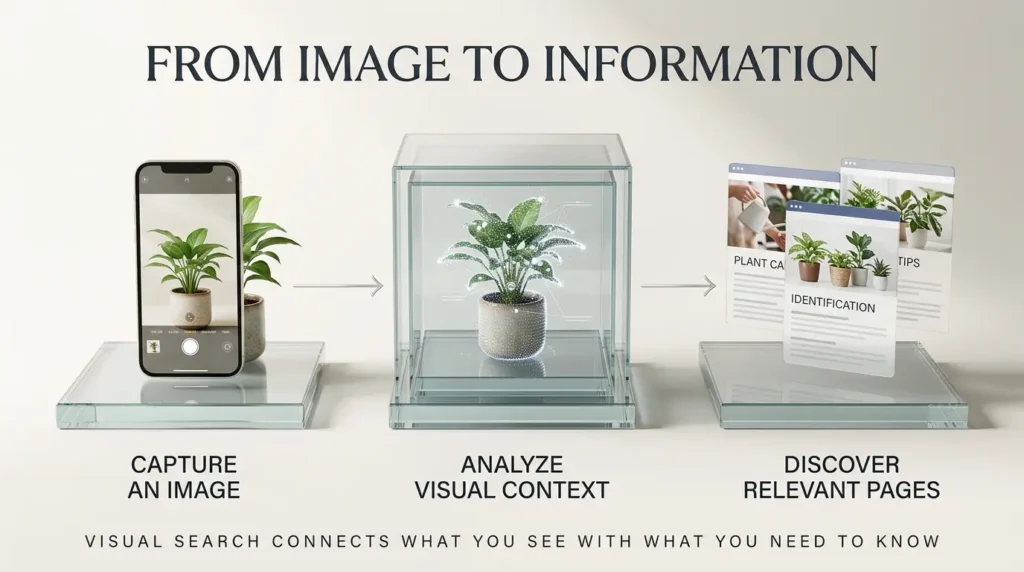
A conventional search begins with words.
A visual search may begin with a camera image, screenshot, or selected portion of a screen.
Google’s systems can analyze visual information and use it to identify potentially relevant objects, concepts, or content.
The results depend on the search context and available features.
For example, a photograph of a pair of shoes might lead someone toward similar products.
A picture of a plant could help someone identify it.
A screenshot of an unfamiliar device might lead to a support guide.
A photo of a historic building could help someone discover information about the location.
These are illustrative use cases, not guarantees of particular results.
A visual search can involve more than one type of information
A person might combine an image with additional text.
For example:
“Where can I buy this chair?”
“Is this plant safe for cats?”
“How do I repair this connector?”
The image provides visual context, while the text clarifies the user’s intention.
That’s why visual search optimization shouldn’t ignore the written page.
The image and the surrounding explanation work together.
How to find multimodal search data in Google Search Console
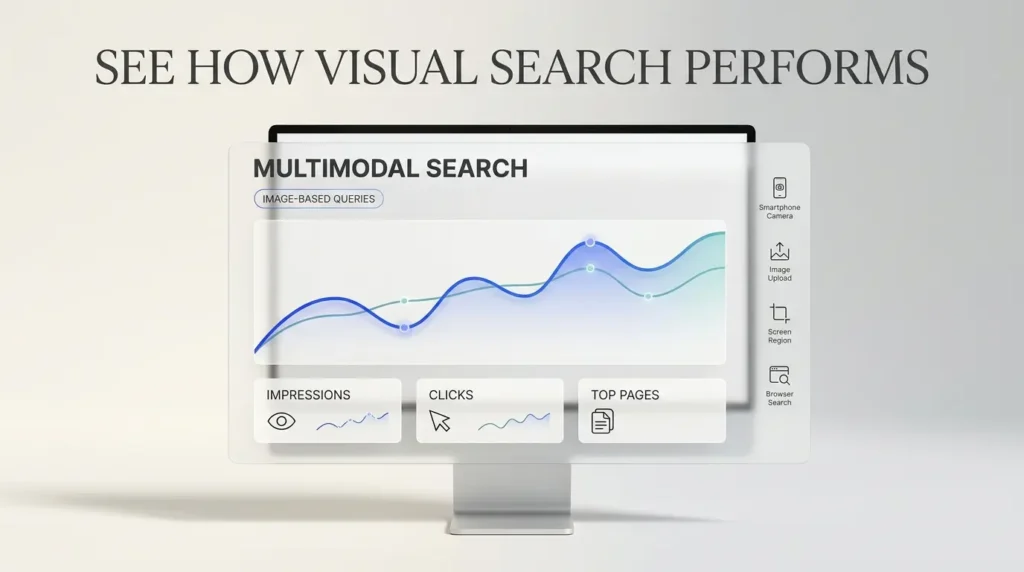
Google’s new reporting provides a practical way to investigate visual-search performance.
You need a verified Search Console property and relevant reporting data.
Step 1: Open the correct property
Visit Google Search Console.
Select the website property you want to analyze.
If you manage several properties, check that you’re looking at the correct domain or URL prefix.
Step 2: Open the Search results performance report
Navigate to the performance reporting area for Google Search results.
Review the available date range and filters.
Step 3: Find the multimodal search-type filter
Google’s September announcement describes a new multimodal search type filter.
Use that filter to isolate the relevant visual-search activity where the feature is available.
If you don’t see it, remember that Google described a gradual global rollout and that metrics appear when a site has relevant activity.
Step 4: Review the performance metrics
Depending on the report and selected filters, examine available metrics such as impressions, clicks, click-through rate, and average position.
Don’t assume every metric has identical meaning across every Search feature.
In particular, distinguish the ordinary Search performance report from the separate Generative AI performance report, where reporting may focus on impressions.
Step 5: Examine individual pages
Identify which URLs are attracting the most visual-search activity.
Are they product pages?
Tutorials?
Image-heavy articles?
Travel guides?
Pages with original photographs?
This is where the report becomes useful for editorial planning.
Step 6: Compare time periods carefully
Compare a recent period with an earlier period only when the reporting windows are reasonably comparable.
Because the feature began rolling out in September, an apparent increase may reflect reporting availability rather than a sudden improvement in rankings.
Step 7: Export the data
Google’s announcement confirms that you can use the Export function to download performance data for further analysis.
A spreadsheet can help you organize pages by topic, image type, impressions, and clicks.
But don’t treat a single week of data as proof that an image change caused a ranking improvement.
10 ways to optimize your images for Google Lens and visual search
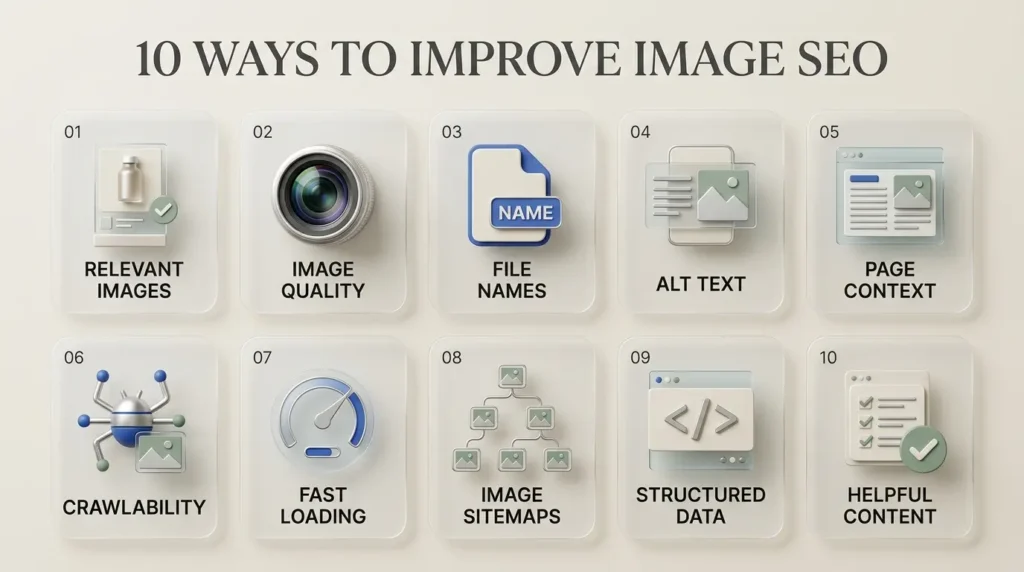
These ten recommendations combine Google’s published image SEO guidance with practical WordPress implementation advice.
Not every recommendation is a direct ranking factor, and no single change guarantees Lens visibility.
Together, they create a stronger technical and editorial foundation.
1. Use images that genuinely represent the subject
Start with the image itself.
If you’re writing about a specific smartphone, show the correct smartphone.
If you’re reviewing a camera lens, include a photograph that accurately represents the product.
If you’re explaining a repair, use an image of the relevant part or procedure.
This sounds obvious, but many websites use generic visuals that look attractive while contributing little information.
A stock image of someone holding a laptop doesn’t necessarily help a reader understand a particular laptop model.
For visually specific searches, accurate representation is especially important.
Practical example: A furniture retailer should show clear photographs of the actual chair being sold rather than relying exclusively on lifestyle images where the product is difficult to see.
2. Publish clear, high-quality images
Google recommends using high-quality images that are clear and relevant.
Blurry, heavily compressed, or poorly cropped images can frustrate readers.
For a product page, useful images may include front, side, rear, and detail views.
For a tutorial, a clear close-up of the relevant component may be more valuable than an artistic wide shot.
Image quality doesn’t mean uploading enormous uncompressed files.
The goal is to preserve useful visual detail while keeping the page efficient.
A well-optimized image can look excellent without slowing down the website unnecessarily.
3. Write descriptive image filenames
Consider these two filenames:
IMG_4839.webp
and
black-adjustable-desk-lamp.webp
The second gives a clearer indication of what the image contains.
Google says filenames can provide a light clue about an image’s subject.
That’s helpful, but it shouldn’t be exaggerated into a powerful standalone ranking trick.
Keep filenames short, descriptive, and accurate.
Avoid adding a long list of keywords.
For a WordPress blog, rename image files before uploading them when practical.
Changing an image’s filename after publication can change its URL, so avoid breaking existing references without a plan.
4. Write useful alt text
Alternative text helps people using screen readers understand meaningful images.
It also helps Google interpret image content.
A good description should explain what matters about the image in its context.
For example:
Weak alt text:
“lamp”
Keyword-stuffed alt text:
“best lamp desk lamp LED lamp office lamp Google Lens SEO lamp”
Useful alt text:
“Black adjustable LED desk lamp with a circular base and articulated arm.”
The third version describes the object naturally.
It doesn’t force unrelated search phrases into the description.
Remember that decorative images may be better served by empty alt text, depending on their purpose and accessibility context.
Alt text should primarily help someone understand the image—not manipulate search results.
5. Place images beside relevant written content
Google uses information from the surrounding page to understand images.
That means placement matters.
If you publish a photograph of a camera’s charging port, place it near the section explaining the charging port.
Don’t bury it in an unrelated image gallery.
Use meaningful headings and captions when they improve clarity.
A caption such as “USB-C charging port on the left side of the camera body” can help a reader understand exactly what they’re seeing.
The surrounding text should answer the questions that naturally arise from the image.
6. Make images accessible to Google
An image cannot contribute much to Search visibility if Google cannot discover or access it.
Google recommends using standard HTML image elements.
For example:
<img src="desk-lamp.webp" alt="Black adjustable LED desk lamp">
Google explains that it can discover images referenced in the src attribute of an HTML image element.
By contrast, images used only as CSS backgrounds are not indexed in the same way.
This is especially relevant for WordPress websites built with visual page builders.
A decorative hero background may look impressive, but it isn’t necessarily the right implementation for an important editorial or product image.
For images you want discovered, use a proper image element and verify that it appears in the rendered page.
7. Use modern image formats and responsive delivery
Google supports several common image formats, including JPEG, PNG, WebP, and AVIF.
WebP and AVIF can offer useful compression advantages, depending on the image and encoding settings.
But the format alone doesn’t make an image rank.
For WordPress, focus on:
- Appropriate image dimensions.
- Good visual quality.
- Reasonable file sizes.
- Responsive image delivery.
- Correct intrinsic width and height.
- Avoiding unnecessary loading delays.
The objective is to make the image useful and accessible without harming the visitor’s experience.
You can evaluate page performance using Google PageSpeed Insights.
8. Use image sitemaps where appropriate
Google supports image sitemaps to help discover images that might otherwise be difficult to find.
This can be useful for large websites, galleries, or unusual image-loading implementations.
However, an image sitemap is not a requirement for every ordinary WordPress blog.
If your images are embedded in crawlable pages using standard HTML and your existing sitemap setup works correctly, adding another sitemap may not be the highest-priority task.
Check your current SEO plugin’s sitemap output before installing an additional plugin.
Avoid duplicate or conflicting sitemap configurations.
9. Add relevant structured data
Structured data can help Google understand the type of content on a page.
For example, supported markup may describe an article, product, recipe, or other eligible content type.
Images may be included as part of that structured information.
A product page should use appropriate product information where applicable.
An article can identify a representative image.
Google’s image metadata documentation also explains how image creators and publishers can provide licensing and credit information.
But structured data is not a shortcut to guaranteed visual-search placement.
It must accurately describe visible content and follow Google’s guidelines.
For WordPress publishers using Rank Math, review the existing schema before adding custom markup.
Don’t create multiple conflicting versions of the same information.
10. Improve the page behind the image
This may be the most important recommendation.
A useful image should lead to a useful page.
Imagine a user searches for a particular type of laptop connector using a photograph.
They find a relevant image on your website.
What happens after they click?
Does the page explain what the connector is?
Does it show compatible devices?
Does it include accurate photographs?
Does it answer common questions?
Or does it contain a few generic sentences surrounded by advertising?
The quality of the landing page matters because image discovery is only the beginning of the visitor’s experience.
Google’s broader people-first content guidance emphasizes useful, reliable information.
For publishers, the strongest long-term strategy is to combine good images with genuinely helpful content.
Google Lens SEO for WordPress: A practical implementation example
Let’s imagine you publish an article titled:
“How to Identify Different USB-C Charging Cables.”
You want the page to be useful for people searching with a photo of a cable.
Here’s how you could structure it.
The page
Write an introduction explaining that USB-C describes the connector shape, while capabilities such as charging power and data transfer can differ.
Avoid claiming that all USB-C cables perform identically.
The images
Include original, clearly labeled photographs showing relevant connectors and any manufacturer markings.
Where visual inspection alone cannot establish a cable’s full specifications, say so.
That limitation is important.
The filenames
Use descriptive names such as:
usb-c-cable-connector-closeup.webp
usb-c-cable-manufacturer-markings.webp
The alt text
Write what the image shows.
For example:
“Close-up of a USB-C connector showing its symmetrical oval shape.”
The surrounding content
Explain what a reader can and cannot determine from the photograph.
Add a practical comparison table and link to reliable technical documentation where appropriate.
The WordPress setup
Insert the photographs as proper Image blocks or Elementor image widgets.
Add descriptive alt text.
Use the correct article schema.
Make sure the page is indexable.
Check mobile loading performance.
The outcome to measure
After publication, monitor the page’s Search performance.
If the new multimodal filter shows activity, examine the available data.
If it doesn’t, don’t assume the content has failed.
The page may still help visitors through ordinary Search, internal navigation, social sharing, or other discovery channels.
This example is an editorial implementation scenario, not a claim that TrendOutsider has tested the page or achieved specific Lens rankings.
Original photography versus AI-generated images
AI-generated visuals are increasingly common in online publishing.
They can be excellent for explaining abstract ideas.
A conceptual illustration of an AI agent network, for example, may communicate a complicated process more clearly than a generic office photograph.
But visual search introduces an important distinction.
An image designed to explain an idea is not always suitable as evidence of a real object.
Consider three situations.
Situation 1: A conceptual technology article
You’re writing about how AI agents coordinate tasks.
A clearly presented conceptual AI illustration can be appropriate.
It helps readers visualize an abstract system.
Situation 2: A product review
You’re reviewing a particular smartphone.
An AI-generated image that invents the phone’s camera arrangement, buttons, or screen design would be misleading.
Authentic product photographs or accurate manufacturer-provided images are more appropriate.
Situation 3: A repair tutorial
You’re explaining how to replace a laptop component.
A generated image with an incorrect screw position could confuse readers or contribute to a costly mistake.
For this type of content, verified photographs and carefully checked diagrams are preferable.
Does Google ban AI-generated images from Search?
Google’s guidance does not establish a blanket prohibition on AI-generated images.
Instead, Google emphasizes accuracy, relevance, and quality when using generative AI in website content.
Its guidance on generative AI content also discusses providing context about how material was created and applicable metadata requirements.
The important question is not simply whether an image was made with AI.
It’s whether the image accurately serves the reader’s needs.
For TrendOutsider, that means using AI-generated conceptual graphics for abstract technology topics while avoiding fabricated visual evidence of products, interfaces, or experiments.

What about Google Discover?
Visual search and Google Discover are not the same feature.
But both benefit from relevant, high-quality imagery.
Google recommends large, compelling images for Discover and provides specific guidance about image dimensions and preview settings.
According to Google’s Discover documentation, publishers should generally use images at least 1,200 pixels wide, with suitable high resolution, and enable large image previews where appropriate.
For WordPress, that means checking the actual featured image used in your article metadata.
A beautiful image inside the article doesn’t automatically mean the same image will be selected for a Discover preview.
Google can choose images automatically using several signals.
You can influence the preferred image through appropriate metadata, including supported structured data and og:image.
However, there is no guarantee that Google Discover will display a particular article or image.
A 30-day Google Lens SEO improvement plan
If your website has hundreds of images, trying to optimize everything in one weekend is unrealistic.
A focused 30-day plan is more manageable.
Week 1: Audit
Select ten important pages.
Check whether their images load correctly, whether the files are relevant, and whether alt text is meaningful.
Review Search Console for existing image and multimodal activity.
Week 2: Improve the strongest opportunities
Replace blurry or misleading images.
Add useful captions.
Improve filenames for newly uploaded images.
Fix missing or inaccurate alt text.
Make sure important images are accessible through HTML image elements.
Week 3: Improve the surrounding pages
Review the articles themselves.
Are the explanations complete?
Do the images appear near relevant sections?
Are there missing comparisons, specifications, or answers?
Strengthen the content before adding more images.
Week 4: Measure and document
Review Search Console again.
Record any changes in relevant impressions, clicks, and page performance.
Be cautious about attributing improvements to a single edit.
A month of data can reveal useful patterns, but it may not be enough to establish a causal effect.
If you manage a content team, this work can become part of a repeatable publishing process. Our generative AI workflows guide explains how structured workflows can reduce repetitive production tasks without removing editorial judgment.
Seven image SEO mistakes worth avoiding
Mistake 1: Keyword-stuffing alt text
Alt text should describe the image naturally.
Repeating the same search phrase in every image can reduce accessibility and create low-quality metadata.
Mistake 2: Using irrelevant stock images
A decorative picture may improve the appearance of an article without helping readers understand the topic.
Use visuals that contribute information.
Mistake 3: Uploading huge files
Large, unoptimized images can slow down mobile pages.
Preserve clarity while keeping files reasonably efficient.
Mistake 4: Treating filenames as a ranking shortcut
A descriptive filename is useful, but it doesn’t compensate for a poor image or irrelevant page.
Mistake 5: Publishing fake product visuals
AI-generated images should not misrepresent real products, software interfaces, or results.
Accuracy matters more than visual spectacle.
Mistake 6: Ignoring the landing page
An image that attracts attention but leads to a weak page may fail to satisfy the visitor.
Mistake 7: Assuming every impression creates a visitor
Visibility, clicks, engagement, and revenue are different metrics.
Evaluate them separately.
How visual search connects to the wider AI discovery landscape
Visual search is part of a broader shift in how people interact with information.
Instead of relying entirely on typed questions, users can increasingly provide images and other context.
That changes how content is discovered.
For publishers, it also creates an opportunity to rethink what makes a page valuable.
An article with original photographs, a clear explanation, and accurate technical details may serve a different purpose from a generic summary.
The strongest pages often combine several elements:
Useful text.
Relevant visuals.
Accurate metadata.
Clear organization.
Good technical performance.
This is similar to a broader lesson in AI-powered digital workflows: technology works best when individual components support a clear objective.
Our AI agents workflow automation guide explores how different systems and tools work together to complete tasks.
And our AI productivity tools guide looks at how to choose tools based on practical value rather than hype.
The same principle applies to image SEO.
Don’t optimize images merely because a new Search Console report exists.
Optimize them because they help people find and understand something useful.
Frequently asked questions
What is Google Lens SEO?
Google Lens SEO is the practical process of making images and their associated web pages easier for Google to discover, understand, and potentially surface in visual-search experiences.
Is Google Lens SEO different from Google Images SEO?
They are related but not identical. Google Images is an established image-search product, while Google Lens supports visual queries initiated with images. Many foundational optimization practices overlap.
When did Google introduce multimodal reporting in Search Console?
Google announced the global rollout beginning September 24, 2026.
Where can I see Google Lens traffic in Search Console?
Look for the new multimodal search-type filter in supported Search Console performance reports, subject to rollout and relevant activity.
Can I see Google Lens clicks?
The standard Search performance reporting can provide relevant performance metrics for supported multimodal searches. Reporting in generative AI features may differ, so don’t assume every report provides the same measurements.
Does adding alt text guarantee Google Lens rankings?
No. Alt text helps describe images and supports accessibility, but it does not guarantee inclusion or ranking.
Are WebP images good for Google Search?
Yes. Google supports WebP. Use appropriate compression, dimensions, and delivery settings.
Should I use AI-generated images for Google Lens SEO?
AI-generated conceptual images can be useful, but they should not misrepresent real products, places, procedures, or test results.
Do I need an image sitemap?
Not always. An image sitemap can help discovery in certain situations, but many ordinary WordPress websites already expose images through crawlable pages and existing sitemap configurations.
Does Rank Math automatically optimize every image for Lens?
No. Rank Math can assist with SEO metadata and schema, but it cannot guarantee image quality, relevance, indexing, or Lens visibility.
What image size should I use?
Choose dimensions appropriate to the page and viewing device. For Google Discover, Google’s guidance recommends images at least 1,200 pixels wide and suitable large-image preview settings.
How long does Google Lens SEO take to work?
There is no guaranteed timeline. Crawling, indexing, search demand, competition, and reporting availability all influence when results may appear.
Final verdict: Images are becoming part of the search conversation
Google’s September 2026 Search Console update gives publishers a better view of how their websites participate in image-based and multimodal searches.
That’s useful progress.
But the new reporting doesn’t mean every publisher needs a completely new SEO strategy.
The fundamentals remain important.
Publish clear, accurate images.
Describe them naturally.
Place them on useful pages.
Make them accessible to crawlers.
Keep your website fast.
Measure what happens.
For WordPress publishers, the best starting point is not to install another plugin or rewrite hundreds of filenames.
It’s to identify the pages where better imagery would genuinely help readers.
Because the opportunity in visual search isn’t simply to make an image appear in Google.
It’s to help someone move from seeing something they don’t understand to finding an answer worth visiting your website for.
Sources and editorial methodology
This article uses seven primary external references:
- Google Search Central — Multimodal Search performance reporting, September 24, 2026
- Google Search Central — Image SEO best practices
- Google Search Central — Image metadata and licensing
- Google PageSpeed Insights
- Google Search Central — Creating helpful, reliable content
- Google Search Central — Guidance on generative AI content
- Google Search Central — Google Discover guidance
Editorial disclosure: This is a research-based guide grounded in Google’s published documentation. TrendOutsider has not claimed to conduct a controlled Google Lens ranking experiment. Examples are illustrative, and no specific ranking, traffic, or revenue outcome is guaranteed.









Leave a Reply