

For years, one of Android’s biggest attractions has been the freedom to install an app without going through Google’s Play Store.
You could download an APK from a developer’s website, use an independent app store, try an experimental open-source application or install software you’ve built yourself.
That flexibility has helped distinguish Android from more tightly controlled mobile ecosystems.
Now Google is introducing one of the most significant changes to that arrangement in years.
On November 19, 2026, the company confirmed that Android developer verification will begin expanding worldwide in January 2027, bringing new identity and app registration requirements to software distributed through major app stores and other installation sources.
The announcement has raised an uncomfortable question for Android users: will Google eventually decide which apps they’re allowed to install?
The answer requires some nuance.
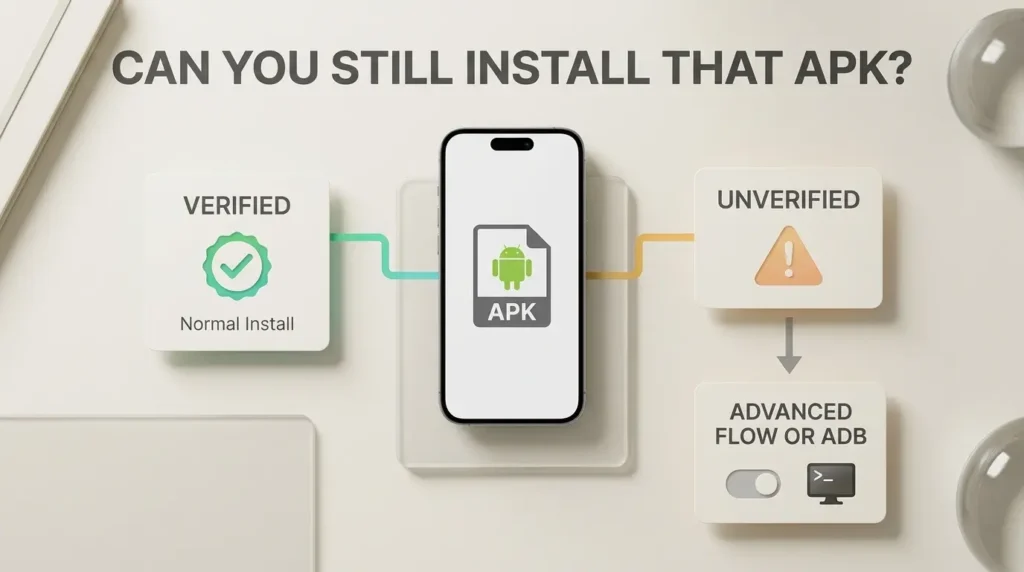
Google is not banning APK files or eliminating sideloading outright. Verified developers can still distribute software outside Google Play. Experienced users can continue installing unregistered apps through an additional security process, while developers retain the option of using Android Debug Bridge.
But installing software from an unverified developer will no longer be as straightforward on affected certified Android devices.
And for independent developers, open-source projects and anyone who values Android’s traditional flexibility, that distinction matters.
Here’s what is changing, when the new rules take effect, how the 24-hour waiting period works and what the global rollout means for your next Android phone.
What Did Google Actually Announce?
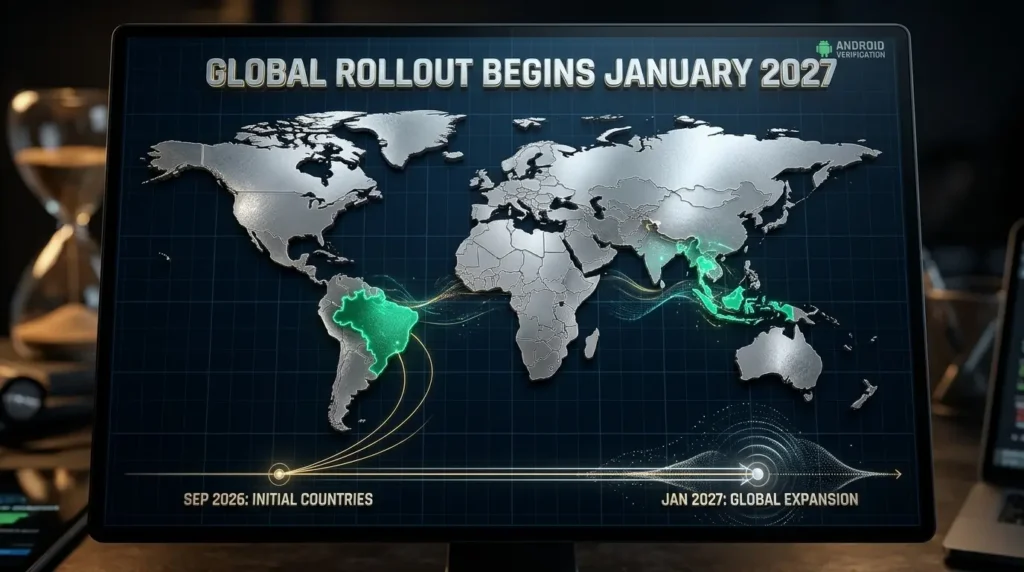
Google’s November 19 announcement confirms that Android developer verification will expand globally beginning in January 2027.
The initiative first went live on September 30, 2026, for installations from participating app stores in Brazil, Indonesia, Singapore and Thailand.
Google now plans to expand those protections across additional markets and installation sources over several months.
The program is based on a relatively simple principle: developers distributing Android applications to affected devices must establish a verified identity and register their applications.
Think of it as an identity check attached to the app developer rather than a requirement to sell everything through Google’s store.
Google says registration does not require developers to submit an application for Google Play publication.
Developers can still distribute registered software through their own websites or independent marketplaces.
The controversial part is what happens when an application is not registered.
Android’s New Verification Rules at a Glance
| Question | What Google has confirmed |
|---|---|
| When does the global rollout begin? | January 2027 |
| Where did enforcement begin? | Brazil, Indonesia, Singapore and Thailand in September 2026 |
| Which devices are affected? | Certified Android devices running Android 8 or newer |
| Are APK files being banned? | No |
| Can verified developers distribute outside Google Play? | Yes |
| Can users install apps from unverified developers? | Yes, through an advanced flow or ADB |
| Is there a waiting period? | The advanced flow includes a one-time 24-hour wait |
| Are all Android devices affected? | No, certain non-certified and AOSP devices are outside the requirement |
| Can developers still test their own apps? | Yes, ADB installation remains available |
| Does verification prove an app is safe? | No, it establishes developer identity and registration rather than guaranteeing app security |
Google says that millions of applications have already been registered and represent more than 99% of global Android app installations.
That figure suggests most ordinary users may see little immediate disruption.
But installation volume is not the same as application diversity.
An independently developed app used by a small community could have relatively few installs while still being extremely important to the people who depend on it.
That is where the debate becomes more complicated.
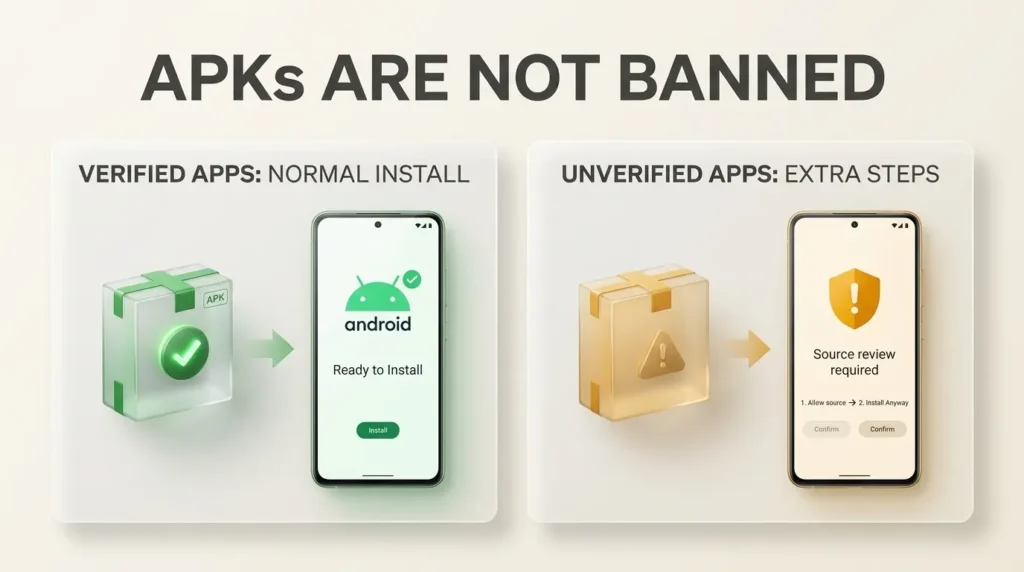
Is Google Banning APK Installation in 2027?
No. And that is the most important misconception to clear up.
An APK, short for Android Package Kit, is an application installation package.
APK files are not inherently suspicious, illegal or unsafe. They are simply one of the formats Android uses to distribute and install applications.
An APK from a trusted developer can be legitimate software. An APK from an unknown or malicious source can be dangerous.
The file format itself doesn’t determine whether the software is trustworthy.
Under the new system, the developer’s verification status becomes an additional factor in the installation experience.
If the app is registered to a verified developer, Google says users should generally be able to continue installing it through their preferred distribution channel.
That includes installation outside Google Play.
If the developer is unverified, however, an ordinary installation may be blocked once the protection is active on the device.
Google’s official Android developer verification FAQ confirms that experienced users can still install such apps after completing a special advanced process.
Developers can also continue using Android Debug Bridge, commonly known as ADB.
The result is not the end of sideloading.
It is a more controlled version of sideloading, where Google adds friction to installations from developers who haven’t completed its registration requirements.
Verified APK vs Unverified APK: What Changes?
| Installation situation | Expected experience |
|---|---|
| App from a verified developer on Google Play | Normal installation |
| Registered app from an independent store | Normal installation, subject to existing device protections |
| Registered APK downloaded from a developer website | Sideloading remains available |
| App from an unverified developer | Advanced flow or ADB required once enforcement applies |
| Developer testing an unpublished app through ADB | ADB remains available |
| App on an exempt non-certified Android device | New certified-device verification requirement does not apply |
The difference is important because some headlines imply that Android users will be forced to download every application through Google Play.
Google has not announced that requirement.
The company is extending verification to applications regardless of which supported distribution channel they use.
That still represents a meaningful change to Android’s openness, but it is not equivalent to banning third-party app stores.
When Will the Changes Reach Your Country?
Google’s rollout is not a single worldwide switch.
The first phase began on September 30, 2026, in four countries: Brazil, Indonesia, Singapore and Thailand.
The November announcement establishes January 2027 as the beginning of the broader global expansion.
The seven initial distribution partners include:
Google Play, Samsung’s Galaxy Store, Honor, Oppo, Xiaomi, Transsion and Vivo.
Google’s resources for app distributors set out preparations continuing into early 2027, including a March 1 readiness target for participating distributors.
That should not be misunderstood as a promise that every country and every app installation source will become subject to identical enforcement on the same day.
Google says coverage will expand gradually.
United States
US Android users should expect the requirements to arrive during the global expansion, but Google has not provided a specific enforcement date for every US device.
United Kingdom and Europe
The global plan includes these markets, but country-specific activation dates have not been confirmed.
The impact may be especially interesting in Europe, where access to alternative distribution channels has become part of a wider conversation about digital markets and competition.
Australia
Australian Android users are also within the intended worldwide expansion.
However, Google has not announced an exact Australian start date.
India and Other Major Android Markets
The same general uncertainty applies.
Developers serving international audiences should prepare before their region’s enforcement begins rather than relying on the absence of a specific local date.
Android Developer Verification Timeline
| Date | Confirmed milestone |
|---|---|
| 2025 | Google originally announced the developer verification initiative |
| March 2026 | Registration opened broadly to developers |
| August 2026 | Limited distribution accounts and advanced user protections launched |
| September 30, 2026 | Initial protections began in four countries through participating stores |
| November 19, 2026 | Google confirmed the January global expansion |
| January 2027 | Worldwide rollout begins |
| March 2027 | Distributor readiness and wider enforcement milestones |
| Later in 2027 | Protections continue extending across eligible countries and installation sources |
This is a phased rollout. Users should verify their local status through official Android information rather than assuming worldwide enforcement begins simultaneously.
What Happens When You Try to Install an Unverified App?
Imagine downloading an APK from a small developer’s website.
You recognize the project. You’ve used previous versions. The developer provides source code and documentation.
Today, you might authorize installation from that source and install the package.
Under the new verification system, that familiar process may change if the app isn’t registered and the protection is active on your device.
Android can display a notice indicating that the developer hasn’t been verified.
For ordinary users, the installation will not simply continue.
But Google has preserved a separate path for people who understand the risks and still want to proceed.
It calls this the advanced flow.
How Android’s Advanced Flow Works
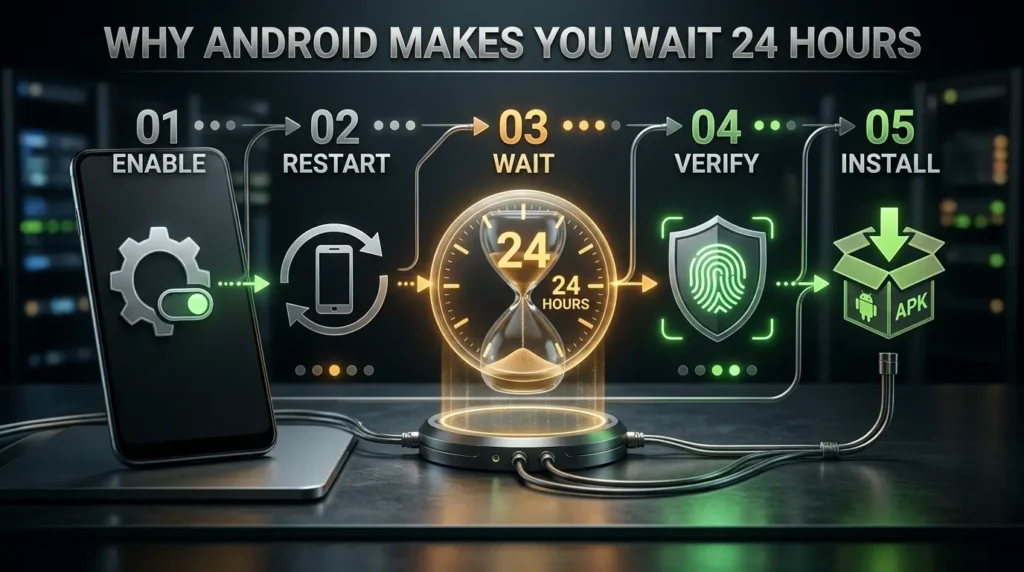
Google describes a process involving several deliberate steps.
First, enable Developer Mode. This is intended to prevent a security restriction from being bypassed casually through a single unexpected tap.
Second, complete an anti-coercion check. Android asks the user to confirm that another person isn’t pressuring them to weaken the protection.
Third, restart the device and authenticate again. Google says this step is intended to interrupt remote sessions or ongoing calls that could be used to manipulate someone.
Fourth, wait 24 hours. The protective delay gives users time to reconsider before enabling the ability to install software from unverified developers.
Fifth, confirm the decision. After the wait, the user authenticates with a device PIN or supported biometric method.
Finally, choose how long the exception should remain available. Google describes options lasting seven days or indefinitely.
The device will still warn the user when installing an unverified application.
This is not quite the same as the ordinary permission to install applications from an external source.
It introduces an additional process specifically for unregistered developers.
Why Is There a 24-Hour Waiting Period?
Google says the waiting period is designed to combat social engineering.
In some scams, a criminal contacts a victim and creates a sense of urgency.
The victim may be told to install an application immediately to resolve a banking issue, claim a prize or fix a supposed device problem.
An attacker may guide the victim through disabling protections while keeping them on a phone call.
By requiring a restart and a full day’s wait, Google hopes to break that immediate pressure.
There is a reasonable security argument behind the design.
But it also creates a practical inconvenience for legitimate users who knowingly want to install experimental or unregistered software.
A security safeguard can reduce certain kinds of abuse while still making legitimate activities more cumbersome.
Both consequences deserve attention.
Can Android Developers Still Use ADB to Install APKs?
Yes.
Google explicitly says that Android Debug Bridge installations remain available for developers and advanced users.
ADB is a development tool that allows a computer to communicate with an Android device.
Developers commonly use it to install test builds, inspect application behavior and work with software that hasn’t been published to an app store.
The new advanced flow’s 24-hour waiting period does not apply to ADB installations.
That is important for students, independent developers and professional development teams.
An application does not need to be publicly registered merely to be tested through the established ADB workflow.
However, using ADB is not the same as providing a convenient installation experience for ordinary customers.
A developer can test an app successfully while still facing registration requirements when distributing it to the general public.
That distinction matters for anyone planning to launch an Android application.
What Changes for Samsung, Xiaomi, Oppo, Vivo and Other Android Phones?
The verification program extends beyond Google’s own phones and Play Store.
Samsung’s Galaxy Store and other participating marketplaces are part of the rollout.
Google’s requirements are designed to work across certified Android devices, rather than being limited to a particular manufacturer.
The key technical detail is Android certification.
Google’s documentation says the protections apply to certified devices running Android 8 or newer.
A device does not need to receive an entirely new major Android version for the verification system to become relevant.
Google identifies a system component called Android Developer Verifier that helps check application registration.
According to Google’s Android Help documentation, the service validates whether an application is registered to a verified developer.
What About Phones Without Google Certification?
Android is not identical across every device or operating system derived from its open-source code.
Google says the new requirement does not apply to non-certified devices or devices built from the Android Open Source Project that fall outside the certified ecosystem.
Certain regions without supported Google Mobile Services are also excluded.
That does not guarantee any particular unofficial Android system will support every APK.
Such devices may have their own software restrictions or security mechanisms.
It means Google’s developer verification requirement has a defined technical scope, not universal control over every device capable of running Android software.

What Does Developer Verification Actually Check?
This is where the security discussion becomes more interesting.
Google is not claiming that developer verification is a complete review of every application’s code.
Its documentation distinguishes verification of the developer’s identity from evaluation of the application’s content and behavior.
In simplified terms, the system helps connect an application package and signing identity to a registered developer.
That can make it harder for an abusive developer to repeatedly distribute harmful software under anonymous identities.
But a developer having a verified identity does not automatically prove that every app they release is secure.
A legitimate account could be compromised.
A well-known developer could make a programming mistake.
A registered application could contain vulnerabilities or misuse sensitive permissions.
Developer verification is an accountability mechanism, not a substitute for security analysis.
Google also operates other protections within Android, including Play Protect and the existing application permission system.
Users still need to consider the source of an APK, the app’s requested permissions and whether the software is trustworthy.
Does Google Have Evidence of a Sideloading Security Problem?
In earlier developer verification communications, Google said its analysis found substantially more malware associated with sideloaded sources than with Google Play.
That statistic comes from Google’s own analysis and should be treated as a company-reported measurement, not independent proof that every third-party store is dangerous.
There are important distinctions between malicious websites distributing APKs, established independent marketplaces and an individual developer sharing a legitimate open-source tool.
Those sources do not necessarily present identical risks.
The security argument for verifying developers is therefore understandable, but the design and consequences of the system still deserve scrutiny.
What Does This Mean for F-Droid and Open-Source Android Apps?
For some Android users, independent application distribution is not an occasional convenience.
It is a central reason they choose the platform.
Open-source app repositories allow developers to publish software under licenses that permit examination, sharing and modification.
Community projects may operate without the same commercial structure as major app companies.
That makes developer verification particularly relevant.
Google has published a dedicated guide for registering applications distributed through open-source repositories.
The guidance confirms that developers can continue distributing apps through open-source repositories.
If they register the app with a verified identity, their users can generally retain the ordinary installation experience.
If they choose not to register, users on affected certified devices will need the advanced installation process.
Why the Debate Is Bigger Than APK Files
The issue is not whether a repository can continue hosting an APK.
A website can still provide a download.
The more significant question is how easily a person can install that software on their own device.
If ordinary installation becomes dependent on developer registration with Google, the company gains an additional point of influence over distribution outside its store.
Supporters argue this is a reasonable accountability requirement for a mobile ecosystem exposed to large-scale fraud and malicious software.
Critics worry that it introduces more central control over independent developers and creates burdens for people who prefer not to associate their legal identity with every experimental project.
The advanced flow preserves an alternative, but the added waiting period changes the experience.
A user who wants to install a trusted open-source utility immediately may now face a longer process if the developer remains unregistered.
That tradeoff is likely to remain part of the discussion throughout 2027.

What Independent Developers Need to Do Before 2027
The changes will be particularly important to developers who distribute applications through their own websites, open-source repositories, smaller marketplaces or direct downloads.
Google recommends preparing now.
If You Already Publish on Google Play
Start with Google Play Console.
Check whether your applications are registered and whether there are any outstanding developer verification requirements.
Google says most applications distributed through Play have already been registered automatically, but developers should check rather than assume every package is covered.
This is especially important if you distribute additional APK variants outside the Play Store.
If You Distribute Only Outside Google Play
Google provides a separate Android Developer Console for developers who don’t publish through Play.
The process connects a verified developer identity to the applications and relevant signing information.
Developers should review package registration, signing keys and any documentation needed to establish ownership.
If You Build Open-Source Applications
Review how your repository signs and distributes the APK.
Some repositories may use their own signing keys, which makes correct registration more complicated than entering a package name.
Google’s official open-source guidance explains the available registration paths.
If You’re a Student or Hobbyist
Google has introduced limited distribution accounts for developers who want to share software on a small scale.
These accounts do not require a registration fee or government-issued identity document for that limited use case.
In its November announcement, Google confirmed that the authorized-device limit has increased to 50.
That may help students, teachers and hobbyists who share test applications with a small group.
It is not a substitute for full registration when distributing an app broadly to the public.
If Your Team Manages Many Applications
Google has also introduced APIs intended to automate parts of the registration workflow.
These include the Android Developer ID Status API and Android Developer Console API.
Teams with continuous integration systems may find them useful for checking registration status and managing package information across multiple applications.
That connects to a wider challenge for software teams: automation is only useful when it is supported by clear ownership, reliable processes and appropriate review.
TrendOutsider’s guide to generative AI workflows and practical automation tools explores the broader principles of designing repeatable digital processes.
For Android developers, the immediate priority is straightforward: establish which packages you distribute, which keys sign them and which registration obligations apply.

Is Android Becoming More Secure or Less Open?
There isn’t a simple answer.
Google’s security objective is clear.
When malicious developers can create new identities and distribute harmful applications repeatedly, tracing and discouraging abuse becomes difficult.
Developer verification adds accountability.
The advanced flow’s waiting period is also designed around a specific problem: scammers pressuring people into disabling safety protections.
For someone who rarely installs apps outside established stores, these changes may reduce some forms of risk without noticeably altering daily use.
But there is another side.
Android has historically supported direct software distribution and alternative marketplaces as part of its identity.
An independent developer might want to share an application without registering with a centralized platform operator.
A privacy-conscious user might deliberately prefer applications distributed outside mainstream stores.
A researcher may want to install modified or experimental software.
For these groups, additional verification and waiting procedures represent a meaningful change.
The Balance Between Safety and Control
The deeper question is who should make the final decision about software installation.
Google’s position is that identity checks and deliberate security steps can reduce harm while preserving alternatives for advanced users.
A more skeptical view is that even with an override, the company is gaining influence over software distribution beyond its own marketplace.
Both concerns are legitimate.
Security controls can be valuable without being perfect.
User choice can matter without meaning every APK is safe.
The quality of the new system will depend partly on whether it meaningfully reduces malicious activity, whether legitimate developers can register without unnecessary obstacles and whether the advanced installation route remains reliable and understandable.
The program’s long-term effects cannot be determined from the announcement alone.
What Should Ordinary Android Users Do Now?
Most people do not need to make immediate changes.
If you mainly install applications through Google Play or another established participating store, Google expects the ordinary experience to remain largely unchanged for registered applications.
If you sometimes download APKs directly, however, it is worth understanding the difference between developer verification and the older permission to install software from an external source.
Before installing any APK, check that you’re using the legitimate developer’s website or a trusted repository.
Be cautious about messages asking you to install an urgent security update outside your usual app store.
Do not follow a stranger’s instructions to disable phone protections, especially during a call claiming to involve a bank, delivery company or technical support service.
If an app is blocked because the developer is unverified, consider contacting the developer and asking whether registration is planned.
Advanced users who deliberately choose to proceed should review Google’s current instructions and understand the additional risk.
And remember that a verified developer identity is not a guarantee of safe software.
The fundamental precautions remain the same.
Pay attention to app permissions, install security updates, avoid unknown download sites and think carefully before granting a new application access to messages, accounts or sensitive data.
What Businesses Should Consider
Organizations that distribute private or customer-facing Android apps should determine which devices and distribution methods are involved.
Google’s FAQ explains that certain managed enterprise distribution arrangements are treated differently.
Businesses should review the specific exemption conditions rather than assume that every private APK is excluded.
Technology deployment is as much a question of governance as it is of software packaging.
A broader discussion of those responsibilities appears in TrendOutsider’s article on AI governance, accountability and technology risk.
Businesses considering new digital products can also review our AI business implementation and technology planning guide for wider operational considerations.
These resources are not substitutes for Google’s Android documentation, but they help place software deployment within a larger business risk framework.
Frequently Asked Questions
Is Google banning APK files in 2027?
No. APK files remain part of Android software distribution. Google is introducing developer identity and app registration requirements for ordinary installations on affected certified devices.
Can I still sideload Android apps in 2027?
Yes. Apps registered to verified developers can continue to be distributed outside Google Play. Unregistered apps require the advanced installation flow or ADB once the new protections apply.
When does Android developer verification begin worldwide?
Google says the global rollout begins in January 2027. Enforcement will expand gradually rather than begin everywhere simultaneously.
Does the new rule affect Samsung phones?
Yes, certified Samsung Android devices within the supported Android version range are part of the broader ecosystem. Samsung’s Galaxy Store is also among the initial distribution partners.
What is Android’s 24-hour sideloading wait?
It is a one-time protective delay in the advanced process for installing apps from unverified developers. Google says it is intended to reduce scams that pressure users into weakening security immediately.
Can I bypass the waiting period with ADB?
Google says ADB installations continue to work and are not subject to the advanced flow’s 24-hour waiting period.
Will Google Play be the only allowed Android app store?
No. Google says developers can continue distributing registered apps through independent stores, websites and other supported channels.
Will F-Droid stop working?
The new rules do not ban open-source repositories from distributing applications. However, unregistered apps on affected certified devices require the advanced installation route or ADB. The impact on specific repositories and individual apps depends on how they handle registration and distribution.
Are verified Android apps automatically safe?
No. Identity verification helps establish developer accountability. It is not a guarantee that an app contains no malware, vulnerabilities or privacy risks.
Which Android versions are affected?
Google specifies certified Android devices running Android 8 or later.
Do I have to verify my identity to install apps?
Ordinary users are not being asked to register as developers simply to install verified apps. Developers distributing applications broadly may need identity verification and app registration.
Can I continue testing my own unpublished apps?
Yes. Google says ADB remains available for development and testing without requiring registration of every local test build.
Do hobby developers need to pay?
Google offers limited distribution accounts without registration fees or government-issued ID verification for eligible students and hobbyists sharing apps with up to 50 authorized devices. Broader distribution has different requirements.
Does this affect Android phones without Google services?
Google’s documentation excludes certain non-certified devices and environments without supported Google Mobile Services. Other operating-system restrictions may still apply.
Does the system apply in the US, UK, Europe and Australia?
The global expansion is intended to reach eligible certified Android devices across supported markets, including these regions. Google has not announced a precise activation date for every country.
The Bottom Line: Android Is Not Losing APKs, but Installing Them Is Changing
Google’s new verification requirements are not the sudden end of Android sideloading.
People will still be able to install APK files, use alternative app stores and develop software outside Google Play.
But the system is moving toward a more regulated installation experience.
For registered developers, much of the existing process may remain familiar.
For people who want to install software from unverified developers, the experience will involve more deliberate choices, additional checks and potentially a 24-hour wait.
The security reasoning is understandable. Scams and malicious apps are real problems, and making harmful distribution more difficult is a worthwhile objective.
Yet Android’s openness has also helped independent developers, open-source communities and technically curious users build alternatives to conventional app stores.
The challenge for Google is to strengthen protection without making that independence unnecessarily difficult.
January 2027 marks the beginning of the global expansion, not the end of the debate.
The most important questions will be answered by what happens after the rollout: how smoothly legitimate applications continue to install, how effectively users can exercise their choices and whether the new requirements meaningfully improve safety.
For now, one conclusion is clear.
Android users are not losing the ability to install APKs. They are entering a new era in which developer identity and installation permissions carry much greater weight.

Editorial research note: Based on Google’s November 19, 2026 announcement, Android developer documentation, Android Help guidance and independent reporting available on November 20, 2026. The implementation timetable may change.
This article explains Google’s published policies and does not claim that TrendOutsider independently tested enforcement on affected devices.
Visual disclosure: Illustrations accompanying this article are conceptual editorial artwork, not authenticated Android screenshots or evidence of specific installations.








Leave a Reply