

Introduction: Why Smart Teams Are Building AI Workflows
If you’ve watched your team work lately, you’ve probably noticed something that has nothing to do with talent or effort.
Brilliant people are trapped inside repetitive work.
A marketer spends two hours rewriting the same client brief template. A support manager answers the exact same password reset question fifteen times a week. A founder bounces between email, spreadsheets, and a CRM, updating the same information across three different systems. A developer writes documentation that follows the same structure they’ve documented a hundred times before. A sales rep manually enters lead information that already exists in three other places.
This isn’t laziness. This isn’t poor planning. This is the reality of modern work. And it’s exactly where generative AI workflows make their biggest difference.
Here’s what I mean by that term: a generative AI workflows is a repeatable business process where AI handles the language-heavy, repetitive parts so humans can focus on the parts that actually require judgment.
For example, instead of a support manager reading fifty tickets one by one and typing responses from scratch, an AI workflow can summarize each ticket, identify the issue type, suggest the best response, flag urgent cases, and send everything to the right person. The manager reviews the important stuff. The workflow handles the rest.
Or imagine a content team. Instead of spending three hours turning a podcast into blog content, an AI workflow transcribes the audio, extracts the main ideas, creates an outline, drafts the post, generates social media variations, and drops everything into the content calendar. The writer adds experience and judgment. The workflow handles the busywork.
This is what separates real AI workflow automation from just asking ChatGPT random questions.
The goal isn’t to remove people. The goal is to return those ten to fifteen hours per week that talented people are losing to repetitive tasks. When you do that, teams move faster. Quality actually improves. People feel less burnt out.
This guide covers what AI workflows actually are, how they save time in different departments, which tools actually work, and how to build them without creating automation that breaks down the moment something changes.
You’ll also find a detailed comparison of 50+ AI workflow tools across content creation, customer support, sales automation, data analysis, admin processes, coding, and multi-purpose platforms.
The goal is practical: help you understand where AI workflows can help your team work smarter, not just faster.
If you’re curious about the companies building these AI workflow tools and platforms, our comprehensive guide to generative AI startups that are reshaping technology covers the companies creating the AI models and tools that power workflow automation
The Hidden Time Crisis Affecting Every Team
Let me be honest about what’s happening in most businesses right now.
Your team isn’t losing time because people don’t work hard. They’re losing time because work itself is structured poorly.
Modern work has a hidden structure problem. A huge portion of the day goes toward coordination and data movement rather than actual creation or strategy.
People spend time chasing updates. They rewrite information that already exists somewhere else. They copy data between tools. They search for files that should be easier to find. They attend meetings that could have been a summary. They answer questions they’ve answered before. They produce reports that could have been generated automatically.
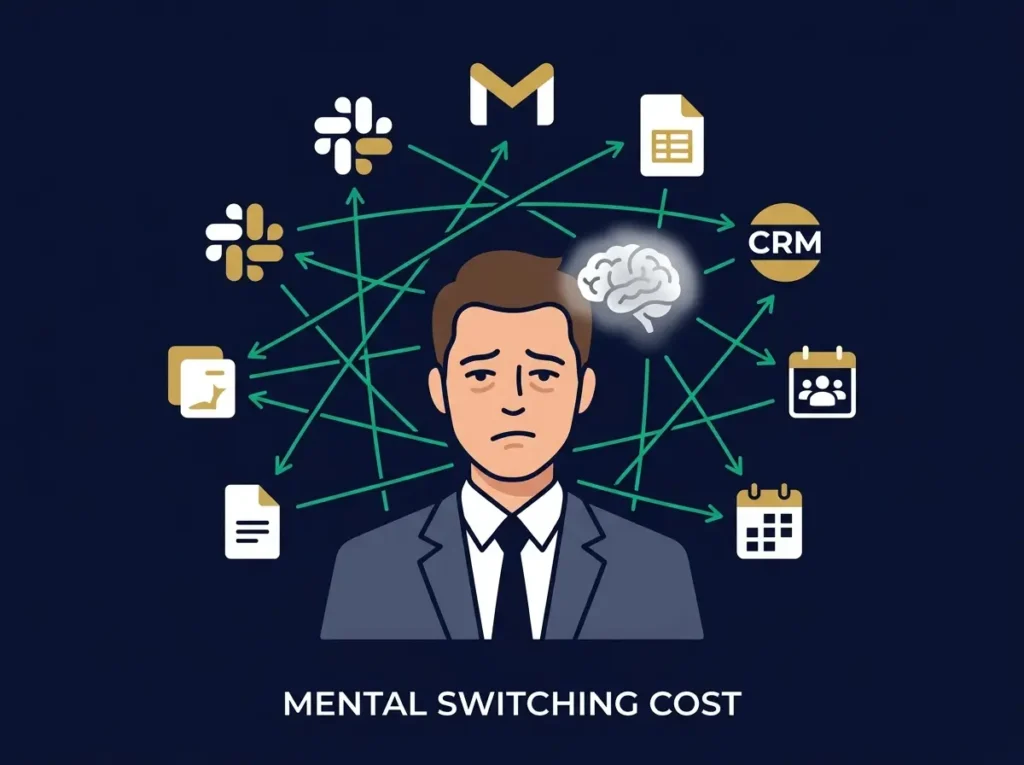
This kind of work feels necessary. Honestly, it is necessary. But it also has a hidden cost that most teams don’t measure: mental switching cost.
Behind every AI workflow tool you use is specialized hardware and infrastructure processing information. If you’re interested in learning about the companies building the chips, processing systems, and infrastructure that make AI workflows possible, our detailed guide to AI hardware startups explains the physical technology layer.
Every time someone moves from Slack to Gmail, from Gmail to their CRM, from their CRM to a spreadsheet, and then back to a meeting, their focus gets weaker. That switching happens dozens of times per day. By the end of the week, people are exhausted even though they might not have completed as much high-value work as they could have.
Here’s where the real math gets interesting:
If a marketer spends three hours per week on repetitive format work, a support team spends eight hours per week on repeated answers, a sales team spends six hours per week on manual data entry, and a founder spends ten hours per week jumping between systems, that’s 27 hours per week of valuable talent doing work that could be automated.
In a five-person team, that’s literally one full-time equivalent of skilled work being wasted on coordination and busywork.
Generative AI workflows fix this by removing the unnecessary steps between an idea and execution.
The key word is “unnecessary.” AI workflows don’t remove strategy work, judgment work, or client-facing work. They remove the repetitive formatting, the data copying, the answer writing, the summary creation, and the information organization that sits between thinking and doing.
What Exactly Is a Generative AI Workflow?
This is important to understand because most people think “AI workflow” means asking ChatGPT a question.
That’s not what this is.
A generative AI workflow is a structured, repeatable business process where AI handles one or multiple tasks automatically, without a human needing to ask it to do something each time.
Here’s the difference that matters:
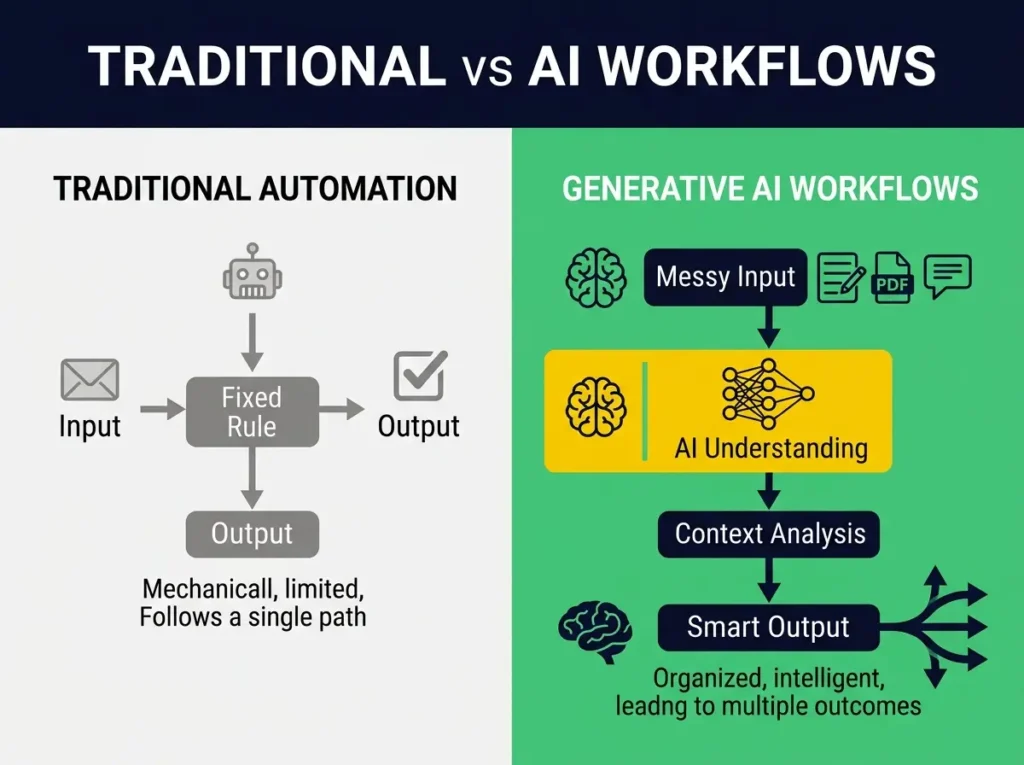
Traditional automation says: “When a form is submitted, add the contact information to a spreadsheet.” This works. It’s helpful. But it only handles structured data following predictable rules.
Generative AI workflows automation says: “When a customer sends a support message, read the message, understand what they’re asking, check if it’s a common question, suggest an answer if we have one, detect if they’re frustrated, create a task for a human if needed, and update our knowledge base.” That’s much more powerful because it handles language, context, and judgment.
The reason this matters is because real business information is messy. It doesn’t arrive in clean fields. It arrives through emails, Slack messages, PDF documents, voice notes, support tickets, meeting notes, and customer complaints.
AI can help turn that messy information into structured action.
Why This Works Better Than Regular Automation
Traditional automation works when tasks are predictable and follow fixed rules. Generative AI workflows work when tasks involve language, require judgment about what information means, or need to handle information that arrives in different formats.
Think about the difference:
Regular automation: “If customer spends over $5,000, mark them as VIP in the CRM.”
AI workflow: “Read customer communication, understand their needs, evaluate the value of their account, detect satisfaction level, check for churn risk, suggest a loyalty offer if they’re at risk, and update their CRM profile with all of this context.”
One follows a rule. The other actually understands the situation.
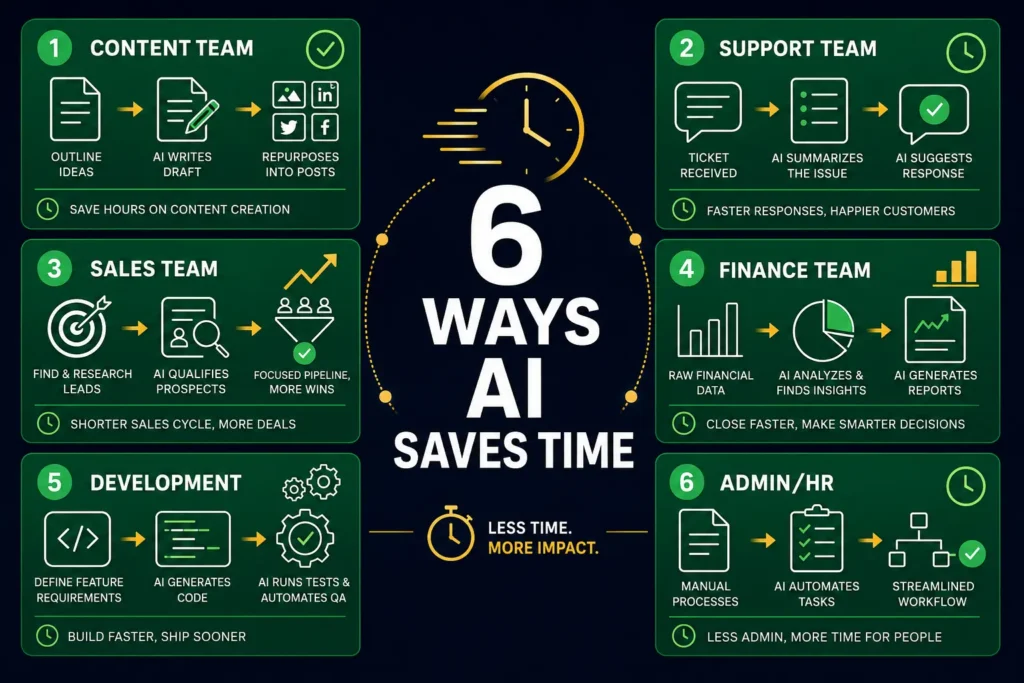
Six Ways AI Workflows Save Time in Real Teams
Let me break down how this actually works across different departments.
Content Teams Produce Faster
Content teams spend enormous amounts of time on structural work. A single topic might need a blog post, social media posts for five different platforms, an email newsletter, a LinkedIn article, and Pinterest pin text.
Before AI workflows, this means taking the core idea and manually reformatting it for each platform. With AI workflow automation, this happens automatically:
Create content outlines from research notes. Convert those outlines into first drafts. Automatically rewrite blog posts into social media versions. Create email subject line variations. Summarize long articles into short-form content. Generate FAQ content from support tickets. Create product descriptions from feature lists. Draft video scripts from blog posts.
The human writer still does the strategic work. The human editor still improves the voice and accuracy. But the formatter work that used to take three hours? That’s now an hour.
Support Teams Handle More Cases With Less Stress
Customer support is a natural place for AI workflows because many requests follow patterns.
An AI support workflow can do this:
Automatically summarize long customer messages. Identify what the customer is actually asking. Check if it’s a common question and suggest the best help article. Draft a response based on similar past responses. Detect whether the customer sounds frustrated or angry. Create a priority level for the ticket. Route it to the right person or team. Update the CRM automatically.
This doesn’t mean the support team disappears. It means a support person spends most of their time on complex, emotional, or unique customer issues. The routine stuff handles itself.
While AI workflows are transforming customer-facing teams, HR departments are also using AI tools to streamline recruiting, onboarding, and employee management. Our comprehensive guide to the best AI tools for HR professionals shows how human resources teams are automating people processes
Sales Teams Qualify Faster
Sales teams receive leads from forms, LinkedIn, webinars, and campaigns. Right now, most teams manually review each lead to decide whether it’s worth reaching out to.
With AI workflows, this becomes automated:
Pull basic information about the company from available sources. Analyze the message they sent. Check if they match your ideal customer profile. Score the lead quality. Draft a personalized response. Send the high-quality leads to sales. Automatically add low-quality leads to a nurture sequence. Update your CRM.
Sales people spend more time with actual prospects and less time sorting data.
Finance and Operations Generate Reports Faster
Most teams create weekly or monthly reports that follow the same structure. This is boring, repetitive work.
AI workflows handle it:
Pull data from accounting software. Analyze trends automatically. Flag unusual expenses or activity. Summarize revenue changes and growth. Identify areas of concern. Draft a management summary. Create visualizations. Send the report to the right people.
This saves the finance person three to five hours per week and actually improves the quality of insights because the AI doesn’t miss patterns that humans might overlook.
Development Teams Move Faster
Software teams are already using AI to speed up coding. AI workflows make this even more powerful:
Suggest implementation approaches for new features. Generate code for routine tasks. Create unit tests automatically. Review pull requests and flag common issues. Summarize what changed. Generate documentation. Create deployment notes.
The developer still owns the final decision. But the time spent on boilerplate, testing, and documentation shrinks significantly.
Admin and HR Handle Paperwork Faster
Administrative work is mostly paperwork. AI workflows can handle it:
Extract information from resumes and documents automatically. Summarize employment contracts. Create onboarding checklists automatically. Generate policy summaries. Process expense reports. Extract invoice information. Create meeting summaries.
This means HR and operations teams spend more time on actual people work and less time on document work.
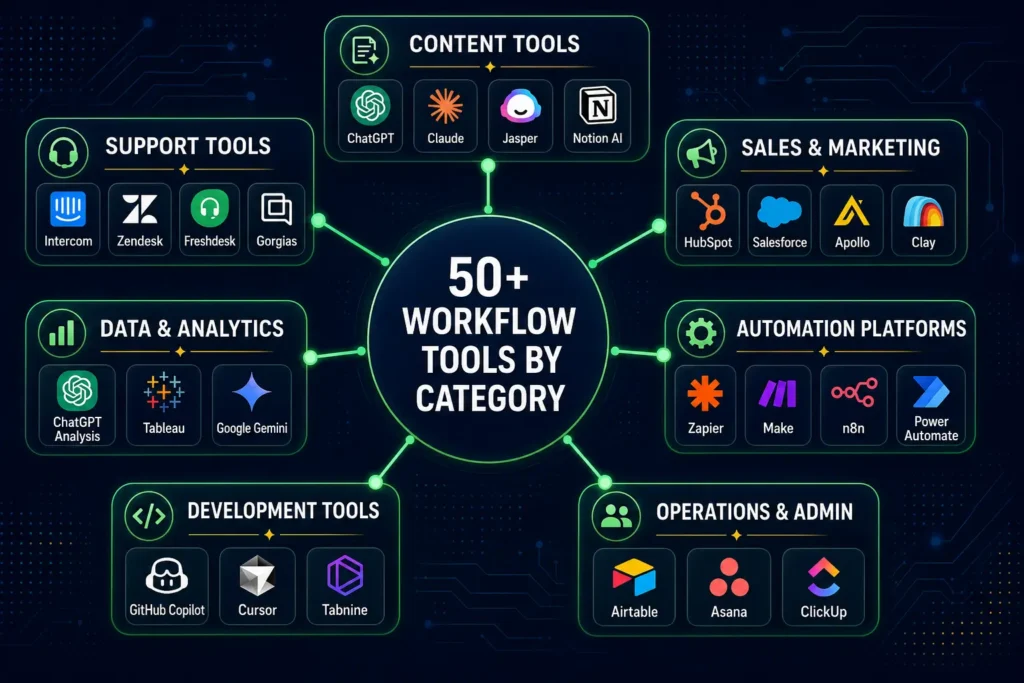
50+ AI Workflow Tools Organized by What They Do
Finding the right tool depends on what you’re trying to automate and what other tools your team already uses.
Let me organize this by department, then by company size.
For Content Teams
ChatGPT is the starting point for most teams. It can create outlines, draft content, summarize documents, brainstorm ideas, and help with rewriting.
Claude is particularly good if you’re working with long documents. It can analyze big PDFs, summarize reports, and produce more natural-sounding content than some alternatives.
Jasper is built specifically for marketing teams that want consistent brand voice across campaign copy, social posts, and ads.
Notion AI is useful if your team already uses Notion for planning. It can summarize pages, draft content from notes, and help organize scattered thoughts.
Surfer SEO helps optimize blog posts for search engines while you’re writing. It checks keyword placement, readability, and content structure.
Grammarly improves clarity and tone across everything your team writes. It works in email, documents, and web apps.
Descript is excellent for teams working with audio and video. It transcribes automatically, creates captions, and lets you edit video by editing text.
Canva Magic Studio helps create social graphics, presentations, and design assets without needing design skills.
For Customer Support
Intercom Fin is built for support teams and can handle first responses to common questions automatically.
Zendesk AI helps larger support teams manage ticket routing, suggested responses, and knowledge base suggestions.
Freshdesk Freddy AI is useful if you’re using Freshdesk. It summarizes tickets and suggests replies.
Gorgias AI is built specifically for ecommerce teams on Shopify. It handles order questions, refund requests, and shipping updates.
Help Scout AI keeps support personal. It drafts replies but in a way that doesn’t make customer service feel robotic.
Ada is an enterprise option for teams that need AI support across multiple channels and languages.
For Sales and Marketing
HubSpot Breeze is built into HubSpot and helps with lead scoring, email suggestions, and CRM updates.
Salesforce Agentforce helps enterprise sales teams with AI agents that understand customer context from Salesforce.
Apollo helps with lead generation and outreach automation.
Clay helps sales teams enrich leads with company information and create personalized outreach at scale.
ActiveCampaign AI helps with email marketing automation and customer journey workflows.
Klaviyo AI is built for ecommerce email and SMS campaigns.
Hootsuite OwlyWriter AI creates social media captions and can help schedule content across platforms.
For Data and Analytics
ChatGPT Advanced Data Analysis lets you upload spreadsheets and get insights without writing SQL.
Microsoft Copilot for Excel helps analyze spreadsheet data and create charts and summaries.
Tableau AI helps business intelligence teams create dashboards with AI-powered insights.
Google Gemini for Sheets helps analyze data and create formulas inside Google Sheets.
Julius AI is simpler for quick data analysis and spreadsheet summarization.
Obviously AI helps non-technical people build predictive models without a data team.
For Admin and Operations
Zapier is probably the easiest way to start. It connects most business apps and can automate workflows without coding.
Make is similar to Zapier but with more visual control over multi-step workflows.
n8n is for technical teams that want more control and flexibility.
Airtable AI helps teams that use Airtable as a lightweight database.
Asana AI helps with project status updates and task summaries.
ClickUp Brain helps teams using ClickUp for task management.
Microsoft Power Automate is best if your company uses Microsoft 365.
For Developers
GitHub Copilot assists with code generation inside GitHub.
Cursor is an AI-native code editor that understands your entire codebase.
Replit Agent helps build applications quickly with AI assistance.
Tabnine helps with code completion as you type.
CodeRabbit does AI-powered code reviews on pull requests.
How to Actually Build AI Workflows That Don’t Fall Apart
The biggest mistake businesses make is buying a tool before understanding what they’re automating.
A good AI workflow starts with a real problem, not a shiny platform.
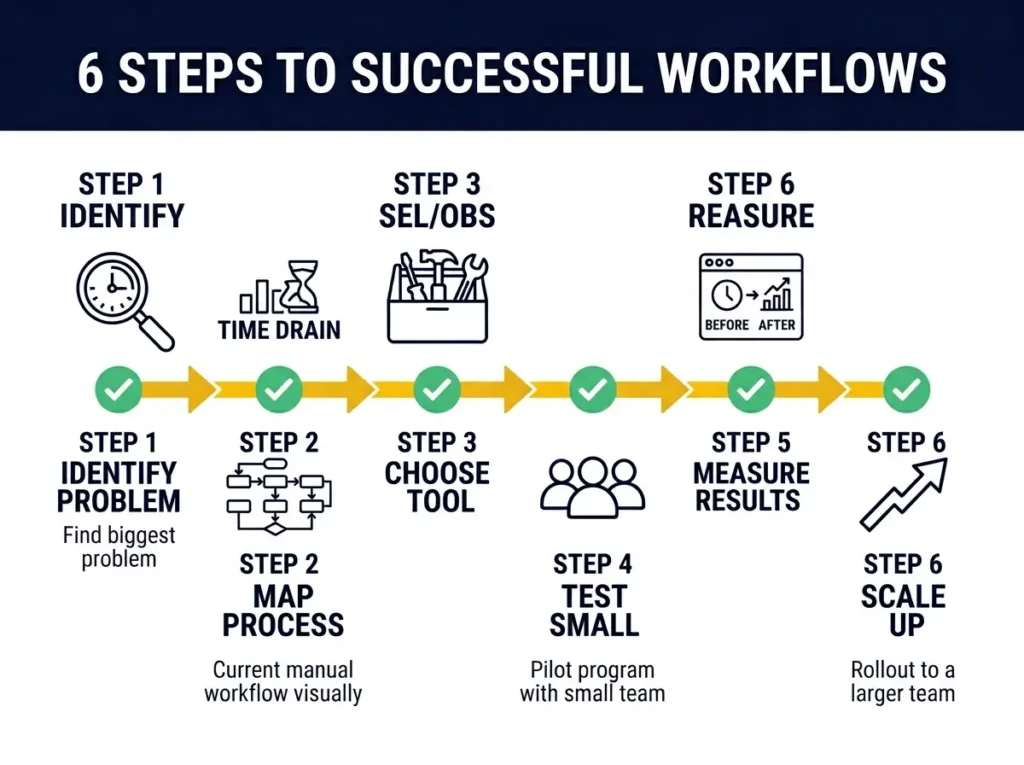
Start With Your Biggest Time Drain
Look at your team. Where does three to five hours get lost every week on repetitive work?
For many teams, it’s support ticket responses. For others, it’s content formatting. For some, it’s lead qualification.
Pick that one workflow. Don’t try to automate everything at once.
Map Out The Current Process
Write down how the workflow actually works right now. Not how you wish it worked. How it actually works.
Example process for support:
Customer sends message. Support person reads it. They search the knowledge base. They type a response. They mark it as resolved or escalate it. They create a note in the CRM.
Now you can see where AI can help. AI can read the message, search the knowledge base, draft a response, and update the CRM. A human still needs to review and decide whether to send it or escalate.
Decide What AI Should and Shouldn’t Do
This is crucial. AI should handle data tasks and language tasks. Humans should handle judgment, sensitive decisions, strategy, and situations that require empathy.
Example: AI can draft a customer refund email. A human should decide whether to approve the refund.
Choose Tools That Work With Your Existing Stack
This matters more than picking the “best” tool.
If your team uses HubSpot, start with HubSpot’s tools or Zapier connected to HubSpot. If you use Microsoft 365, consider Copilot Studio. If you’re technical, n8n gives more control. If you want simple, Zapier is easier.
If your team is developing AI products or integrating AI into your own services, understanding how AI accelerates product development cycles is critical. Our analysis of how AI improves time-to-market shows how to manage development while implementing AI workflow automation
Test With A Small Group First
Run the workflow with three people before rolling it out to the whole team.
Watch for mistakes, quality issues, and whether people actually use it.
Don’t expect perfection in week one. Workflows improve when the process, instructions, and examples improve.
Measure Time Saved
Track how long the task took before and after. This is how you prove value to the team and to your finance person.
Example measurement:
Support ticket summaries used to take 8 minutes per ticket. Now it takes 2 minutes for human review. 60 tickets per week means 6 hours saved weekly.
When you stack several small improvements across content, support, and sales, you hit 15+ hours saved per week.
Real Examples: AI Workflows That Actually Work
Let me show you how this looks in practice.
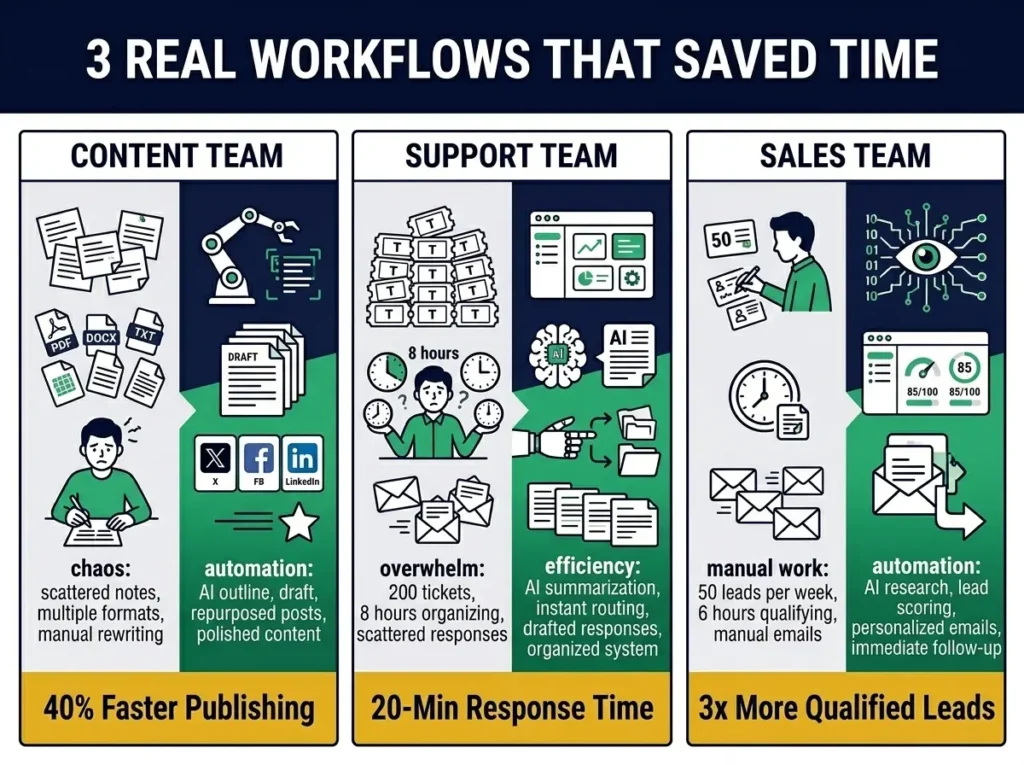
Example 1: Content Team Publishing Faster
A small content team publishes four blog posts per week. Previously, this took lots of formatting and organizing time.
The workflow now:
Editor adds a keyword to their project management tool. AI creates a content outline and research summary. Writer reviews and adds original insights. AI generates an SEO meta description and FAQs. Editor improves the structure. AI creates LinkedIn post, email snippet, and Pinterest pin text automatically. Final content gets reviewed by a human before publishing.
Result: Content published 40% faster. Quality improved because the writer spends more time on strategy and voice.
Example 2: Support Team Handling More With Less Burnout
A support team received 200 tickets per week. Previously, managers spent eight hours per week just reading and organizing tickets.
The workflow now:
Ticket arrives. AI reads it and detects the issue type. AI checks the knowledge base. AI drafts a response. Simple, common issues are suggested to agents with auto-response capability. Complex issues go to specialized support people with summaries. Ticket tags update automatically.
Result: Response time dropped from 2 hours to 20 minutes for common issues. Support team has more mental space for complex customer problems.
Example 3: Sales Team Qualifying Faster
A sales team received 50 leads per week from webinars and website forms. Previously, sales people spent six hours per week sorting leads and writing initial emails.
The workflow now:
Lead enters the system. AI researches the company. AI scores lead quality based on multiple factors. High-quality leads get a personalized email from sales immediately. Lower-quality leads enter a nurture email sequence. CRM updates automatically.
Result: Sales team talks to more serious prospects. Nurture sequence captures leads that aren’t ready yet.
Comparison Table: 50+ AI Workflow Tools
| Tool | What It Does Best | Best Team Size | Price | Best Integration |
|---|---|---|---|---|
| ChatGPT | General writing, analysis, drafting | Any | Free/Paid | Works everywhere |
| Claude | Long-form content, document analysis | Small to mid | Free/Paid | Works everywhere |
| Jasper | Marketing copy, brand voice | Marketing | Paid | Works everywhere |
| Notion AI | Notes, summaries, internal docs | Small | Paid add-on | Notion |
| Zapier | Connecting apps, multi-step workflows | Any | Free/Paid | 7,000+ apps |
| Make | Visual workflow automation | Technical teams | Free/Paid | 1,000+ apps |
| n8n | Self-hosted, technical workflows | Technical | Free/Self-hosted | Custom |
| HubSpot Breeze | CRM automation, sales | Sales teams | Paid | HubSpot |
| Intercom Fin | Support automation | Support | Paid | Intercom |
| Zendesk AI | Ticket management | Support | Paid | Zendesk |
| Freshdesk Freddy AI | Support automation | Support | Paid | Freshdesk |
| Gorgias AI | Ecommerce support | Ecommerce | Paid | Shopify |
| Apollo | Lead generation | Sales | Paid | Any CRM |
| ActiveCampaign AI | Email marketing | Marketing | Paid | ActiveCampaign |
| Klaviyo AI | Ecommerce email | Ecommerce | Paid | Shopify |
| Microsoft Copilot | Office automation | Microsoft users | Paid | Microsoft 365 |
| Google Gemini | Google Workspace automation | Google users | Paid | Google Workspace |
| Airtable AI | Database automation | Operations | Paid | Airtable |
| Asana AI | Project management | Project teams | Paid | Asana |
| ClickUp Brain | Task management | Any team | Paid | ClickUp |
| GitHub Copilot | Code generation | Developers | Paid | GitHub |
| Cursor | AI code editor | Developers | Free/Paid | GitHub |
| Surfer SEO | Blog optimization | Content teams | Paid | Browser |
| Descript | Audio and video | Content teams | Free/Paid | YouTube, podcasts |
| Grammarly | Writing quality | Any | Free/Paid | Works everywhere |
| Canva Magic Studio | Design automation | Marketing | Free/Paid | Canva |
| Help Scout AI | Support | Support | Paid | Help Scout |
| Ada | Enterprise support | Large teams | Custom | Custom |
| Clay | Sales enrichment | Sales | Paid | Salesforce, HubSpot |
| Outreach | Sales engagement | Sales | Paid | Salesforce |
| Mailchimp AI | Email marketing | Small business | Free/Paid | Mailchimp |
| Hootsuite AI | Social media | Marketing | Paid | Social platforms |
| Sprout Social AI | Social media | Brands | Paid | Social platforms |
| Salesforce Agentforce | Enterprise AI | Enterprise | Paid | Salesforce |
| UiPath | Process automation | Operations | Paid | Enterprise apps |
| Power Automate | Microsoft automation | Microsoft users | Paid | Microsoft 365 |
| Workato | Enterprise automation | Enterprise | Custom | Enterprise apps |
| Tabnine | Code completion | Developers | Free/Paid | Any IDE |
| CodeRabbit | Code review | Developers | Paid | GitHub |
| Julius AI | Data analysis | Analysts | Free/Paid | Spreadsheets |
| Obviously AI | Predictive analytics | Non-technical | Paid | Spreadsheets |
| Tableau AI | BI analytics | Data teams | Paid | Tableau |
| ThoughtSpot | Data questions | Business users | Paid | Data warehouse |
| MonkeyLearn | Text analysis | Support teams | Paid | Slack, email |
| Kustomer AI | Customer CRM | Support | Paid | Kustomer |
| Akkio | Predictive modeling | Business | Paid | Spreadsheets |
| Polymer | Dashboard creation | Operations | Paid | Spreadsheets |
| Replit Agent | App building | Developers | Free/Paid | Replit |
| Sourcegraph Cody | Code understanding | Developers | Paid | GitHub |
| Devin | Autonomous engineering | Advanced teams | Paid | Custom |
Mistakes That Kill AI Workflows
Before you build a workflow, know what kills them.
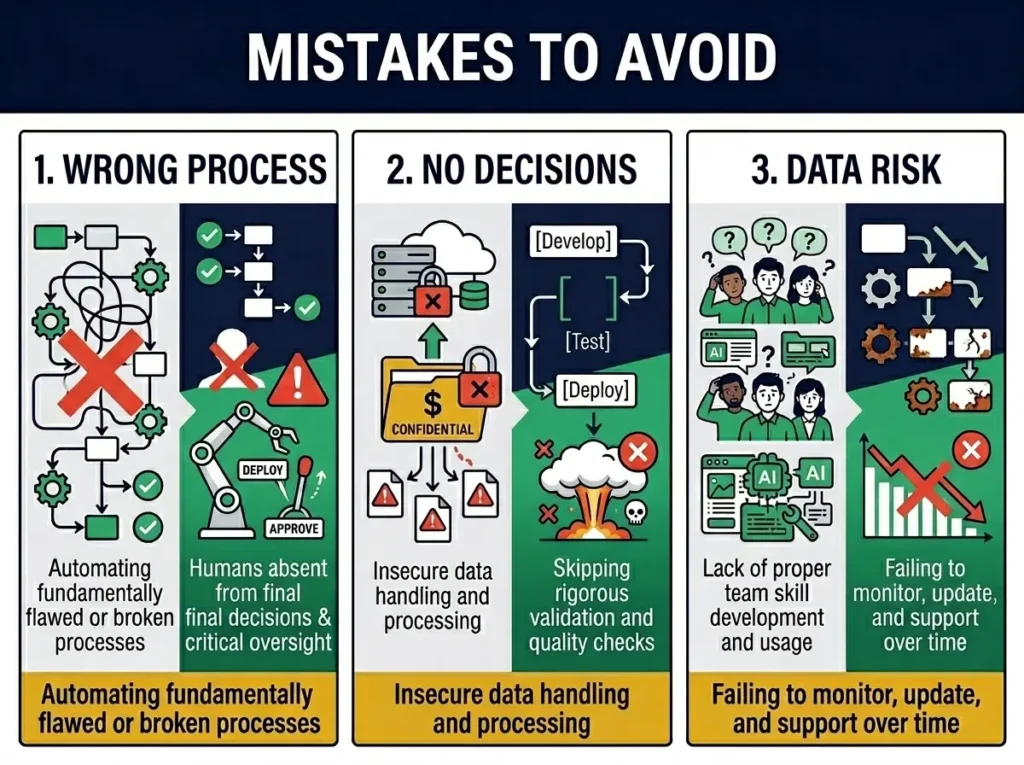
Automating the Wrong Process
If the manual process is messy or broken, automation just makes the mess happen faster.
Fix the process first. Then automate it.
Expecting AI to Make Final Decisions
AI is helpful for analysis, suggestions, and information organization. It’s not reliable for final decisions on hiring, firing, refunds, customer disputes, or anything that requires judgment.
Keep human approval in place for important decisions.
Uploading Sensitive Data Without Thinking
Don’t put customer information, employee records, contracts, or financial data into tools without understanding privacy and compliance.
Check where data is stored. Verify that your data isn’t used to train models. Understand who can access it.
Building Complex Workflows Without Testing
Start simple. Test with a small group. Get feedback. Then improve.
A workflow that fails on day one can damage trust in AI at your company.
Not Training the Team
A tool doesn’t create productivity by itself. People need to know when to use it, how to review outputs, and when not to rely on it.
Train your team.
Ignoring Maintenance
Workflows need updates. APIs change. Business rules shift. Prompts become less effective. Monitor your workflows and adjust them.
How to Know If Your Workflow Is Actually Working
You should measure the results. This is how you prove value to your team and justify investment.
Track these metrics:
Hours saved per week. Measure the time before and after automation.
Quality of outputs. Are AI-generated summaries useful? Are drafted emails appropriate?
Team adoption rate. Does the team actually use the workflow?
Error rate. How often does the workflow need major correction?
Cost savings. Is money being saved from reduced manual work or outsourcing?
Customer impact. For customer-facing workflows, does response time improve?
Why AI Workflows Matter in 2026
The future of work is not AI replacing people. The future is AI and people working together better.
Teams that figure out AI workflows first will move faster. They’ll have more space for strategy and creativity. People will feel less burnt out because they’re not trapped in repetitive work.
The key is building workflows with structure. Know what you’re automating. Keep humans in the loop. Measure results. Improve constantly.
That’s what winning teams are doing right now.
FAQ: Questions You Probably Have
What’s the difference between AI workflows and regular automation?
Regular automation follows fixed rules: “If X happens, do Y.” AI workflows understand language and context: “Read the message, understand what the person wants, check our knowledge base, and draft an appropriate response.”
Can AI workflows handle sensitive data?
They can, but you need to be careful. Check privacy settings, avoid uploading confidential information into unapproved tools, and always keep human approval for sensitive decisions.
How much time can one workflow save?
Typically, a single workflow saves two to five hours per week. A content team might save three hours per week on formatting. A support team might save four hours on summaries. A sales team might save three hours on lead research. When you combine them, you’re looking at 10 to 15+ hours saved weekly.
Can small teams use AI workflows?
Absolutely. Small teams often benefit the most because people are stretched thin. One person might handle sales, operations, and customer support. AI workflows help them move faster in each area.
What’s the best first workflow to automate?
Start with your biggest time drain. Spend three to five hours per week on something repetitive? Start there. Measure the time saved. Then move to the next process.
Do AI workflows replace employees?
Not in most businesses. The better goal is giving employees back the 10 to 15 hours per week they lose to repetitive work so they can focus on strategy, creativity, and customer relationships.
How long does it take to build a workflow?
Simple workflows can be built in a few hours using Zapier or Make. Complex workflows might take a week to build, test, and refine. Plan for iteration. Workflows improve over time.
What happens when AI makes a mistake?
This is why human review is important. For most workflows, AI does 80 to 90% of the work and a human reviews the final output. For critical decisions, humans should always have final say.
Conclusion: Start Building
AI workflows are one of the most practical ways to use AI in your business.
The real power isn’t in asking AI random questions. The real power is building repeatable systems that save time every single week.
A content team can use AI to create outlines, drafts, summaries, and social posts. A support team can use AI to classify tickets and draft responses. A sales team can use AI to research leads and personalize outreach. A finance team can use AI to summarize data. A development team can use AI to assist with coding.
The key is structure. Start with one workflow. Map the process. Choose the right tool. Test with a small group. Measure time saved. Improve and scale.
For most teams, the best first step is simple: pick one workflow this week and improve it with AI.
If that saves three hours, build the next workflow. If the next one saves five hours, keep going. Over time, these small improvements add up to 15+ hours saved every week.
That’s the real power of generative AI workflows. They help your team work faster, cleaner, and smarter.








Comments (8)
AI Tools for Affiliate Marketing: 35+ Tools That Multiply Your Commissions in 2026 - Trendoutsidersays:
June 2, 2026 at 7:07 pm[…] in the deeper technical and strategic aspects of AI-powered workflows across organizations, our article on generative AI workflows explores automation patterns that […]
15+ Best Topview AI Alternatives That Create Viral Videos in 2026says:
June 5, 2026 at 5:36 pm[…] managing multiple client projects often find that understanding generative AI workflows helps them structure video creation processes, optimize team workflows, and deliver consistent […]
13 Best Conversational AI Tools for Real Estate Agents 2026says:
June 5, 2026 at 7:28 pm[…] is why real estate teams are adopting broader conversational AI workflows. Our complete guide to generative AI workflows covers how automation extends beyond lead response to property management, email sequences, […]
Automated Real Estate Marketing: 35+ Tools and Strategies to Close 40% More Deals in 2026says:
June 8, 2026 at 2:36 pm[…] you want to see how top performers structure their workflows, check out our comprehensive guide to generative AI workflows, which shows how automation connects across every part of a business […]
AI Transformation Is a Problem of Governance | Expert Guide for 2026says:
June 9, 2026 at 9:33 pm[…] properly document AI systems can integrate them into complete workflow automation. Our guide to generative AI workflows shows how governance-managed AI systems can be embedded into enterprise workflows while maintaining […]
AI Business Solutions: 50+ Tools & ROI Strategies for 2026says:
June 15, 2026 at 5:29 pm[…] processes, successful implementationsembed AI into the day-to-day work itself. Our guide to generative AI workflows demonstrateshow to design business processes that leverage AI capabilities rather than treating AI […]
AI Tutor Jobs 2026: Which Companies Hire + Income Guidesays:
July 6, 2026 at 9:01 pm[…] Companies hire AI tutors because they’re scaling faster than they can hire engineers. They need hundreds or thousands of people providing quality feedback simultaneously. The work is temporary, project-based, and flexible by design. You’re not an employee in the traditional sense. You’re a contractor evaluating specific tasks on your schedule while contributing to the development of generative AI workflows. […]
AI and Productivity Tools: Save 10+ Hours Weekly (2026 Guide)says:
July 11, 2026 at 9:03 pm[…] faster than any single tool can save it). Understanding how these tools function through generative AI workflows helps explain why context matters so […]