

Your product team just finished requirements last week. Design is halfway done. Development hasn’t even started. And you’re already three months behind schedule.
This is the reality for most product teams in 2026.
The traditional way of building products takes forever. A feature that should take two months ends up taking six. A product launch scheduled for Q2 slips to Q4. By the time you finally ship, your competitor already launched something better.
Here’s the hard truth: if your team isn’t using AI in product development, you’re working with one hand tied behind your back.
I’m not talking about replacing your engineers or product managers with AI. That’s not what this is about. What I’m talking about is using AI to eliminate the stupid bottlenecks that waste weeks every single month.
According to research from McKinsey, companies that effectively integrate AI into their product development process are seeing their time-to-market cut by 20 to 50 percent. At the same time, they’re reducing development costs by 30 to 40 percent. That’s not a small improvement. That’s a fundamental shift in how fast you can move.
The question isn’t whether you should be using AI in product development. The question is how quickly you can implement it before your competitors do.
This guide walks you through exactly how to do it. I’ll show you where AI saves the most time, which tools actually work, how to implement them without breaking anything, and how to measure whether you’re actually getting faster or just buying expensive software.
The Real Problem With Traditional Product Development
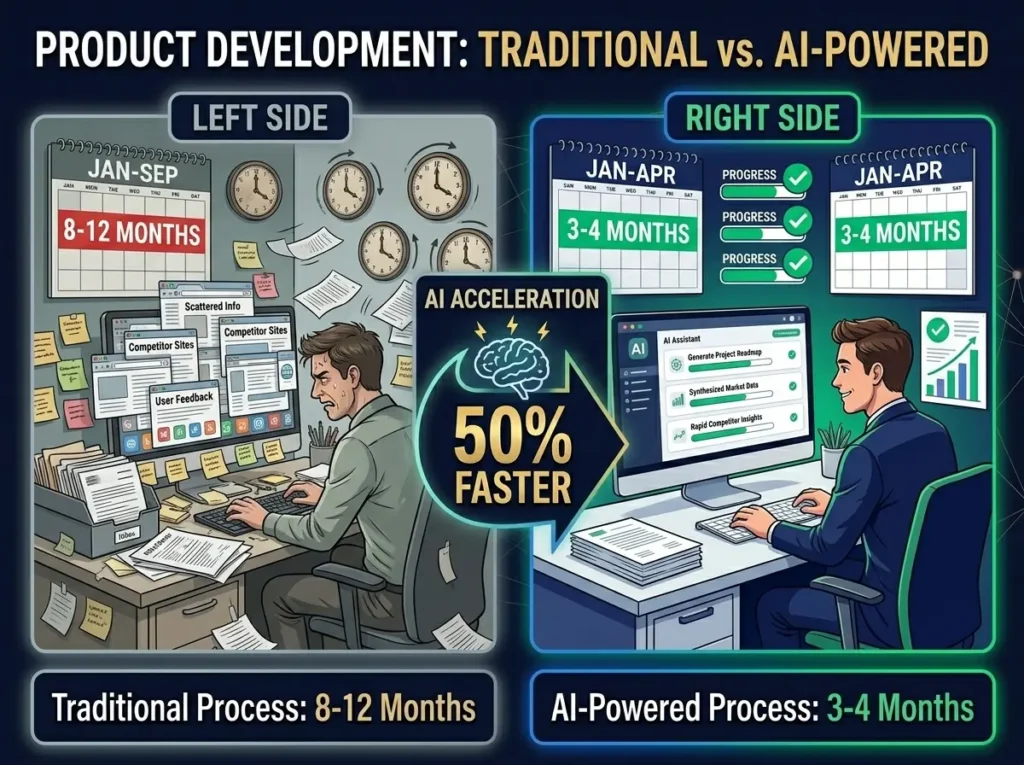
Let me paint a picture of what product development looks like without AI.
It’s Monday morning. Your product manager starts writing requirements for a new feature. They spend three hours outlining the user stories. They add acceptance criteria. They write edge cases. They create mockups with the designer, who takes another five hours to build variations.
Then they send it to the engineering team for estimation. The engineers ask clarifying questions. The PM spends another two hours answering those questions. The requirements change slightly. The design changes. More questions come in.
By Wednesday, you finally have agreement on what you’re building.
Development starts. Engineers write code, but they spend time looking at documentation, checking examples, and writing boilerplate. Code review takes a day because the senior engineer is busy. The code needs changes. More review. More changes.
By the time code review is done, it’s Friday. The feature goes to QA.
QA needs to test it across browsers, devices, and different user scenarios. They find bugs. Engineers fix them. More QA. More bugs. This cycle alone can take two to four weeks depending on how complex the feature is.
The whole process from idea to launch takes eight to twelve months for a moderately complex feature. And that’s assuming nothing goes wrong. If a security review finds issues, or legal has concerns, or a stakeholder changes their mind, you add another month.
This isn’t because your team is slow. It’s because the process itself is slow.
The good news is that AI can fix most of these bottlenecks.
Where AI Actually Saves Time in Product Development
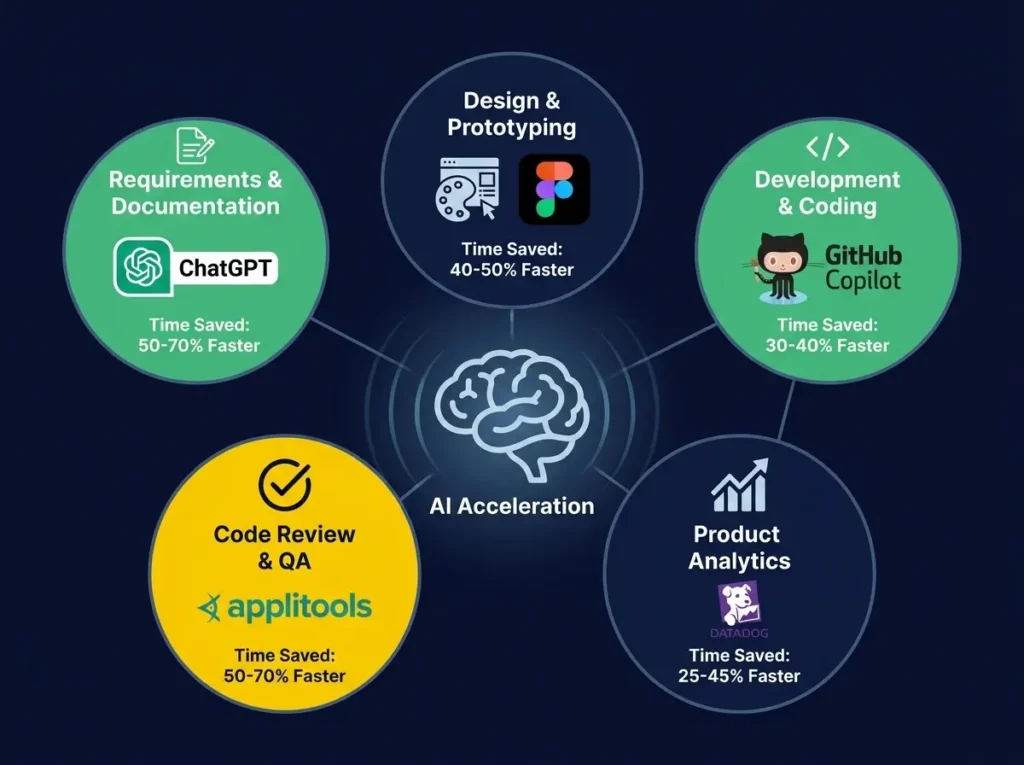
AI isn’t useful everywhere in your product development process. But in specific places, it can cut development time dramatically.
The key is understanding where your biggest bottlenecks actually are.
Speeding Up Requirements and Product Documentation
This is where many teams waste the most time, and it’s also where AI can have the biggest immediate impact.
A product manager without AI starts with a blank page. They think through the feature. They write rough notes. They refine them. They get feedback from stakeholders. They rewrite. They get more feedback. They rewrite again. The whole process takes a week.
With AI assistance, a PM can describe the feature in two or three sentences and ask an AI tool to generate a full product requirements document. The AI creates user stories, acceptance criteria, edge cases, data considerations, API requirements, and even testing scenarios.
Is the AI-generated output perfect? No. But it’s a solid first draft. The PM spends the next two hours refining it rather than starting from scratch. That’s a significant time savings right there.
Beyond requirements, AI can help summarize customer feedback, identify common requests from support tickets, and pull quotes for product briefs. Normally this takes a product manager a full day or two. With AI, it takes a few hours.
Making Design Iteration Faster
Designers spend a lot of time on visual exploration. They create one design direction. They present it. Stakeholders want something different. They create another direction. More feedback. More iterations.
AI design tools like Figma with integrated AI or Adobe Firefly can generate multiple design directions from a simple description. Instead of spending three hours creating variations yourself, you can ask AI to generate five different approaches and pick the best elements from each.
This doesn’t replace good design thinking. It just removes the tedious part of creating multiple options.
Development Time Reduction Through AI-Assisted Coding
GitHub Copilot and similar tools have changed how developers work. When a developer needs to write a function, they can describe what it should do and get a code suggestion instantly. Some developers report that routine coding tasks now take 30 to 40 percent less time.
More importantly, developers spend less time on boilerplate code, API integrations, and standard patterns. They can focus on architecture decisions and complex logic where human judgment matters most.
The time savings aren’t just about typing faster. It’s about reducing mental effort on repetitive tasks.
Making Code Review and Quality Assurance Faster
Slow code review is a silent killer of product velocity. A pull request sits in review for a day or two. The developer is blocked. Momentum dies.
AI-powered code review tools can check code before human review. They flag potential bugs, security issues, performance problems, and style inconsistencies. This means humans review cleaner, better-prepared code. Code review time drops from a day to a few hours.
Similarly, AI testing tools can generate test cases automatically from requirements, maintain tests when the UI changes, and detect visual changes that might indicate bugs. This is where you see the biggest time savings. QA teams that traditionally spend four to eight weeks testing a feature can often finish in two to four weeks with AI assistance.
Faster Product Launch Preparation
After development and QA are done, you still need release notes, documentation, help articles, email announcements, and support scripts. Preparing all of this manually can take another week or two.
AI writing tools can draft all of this content quickly. A product manager can spend an hour refining AI-generated launch materials instead of a full week creating them from scratch.
The Real Numbers Behind Time-to-Market Reduction
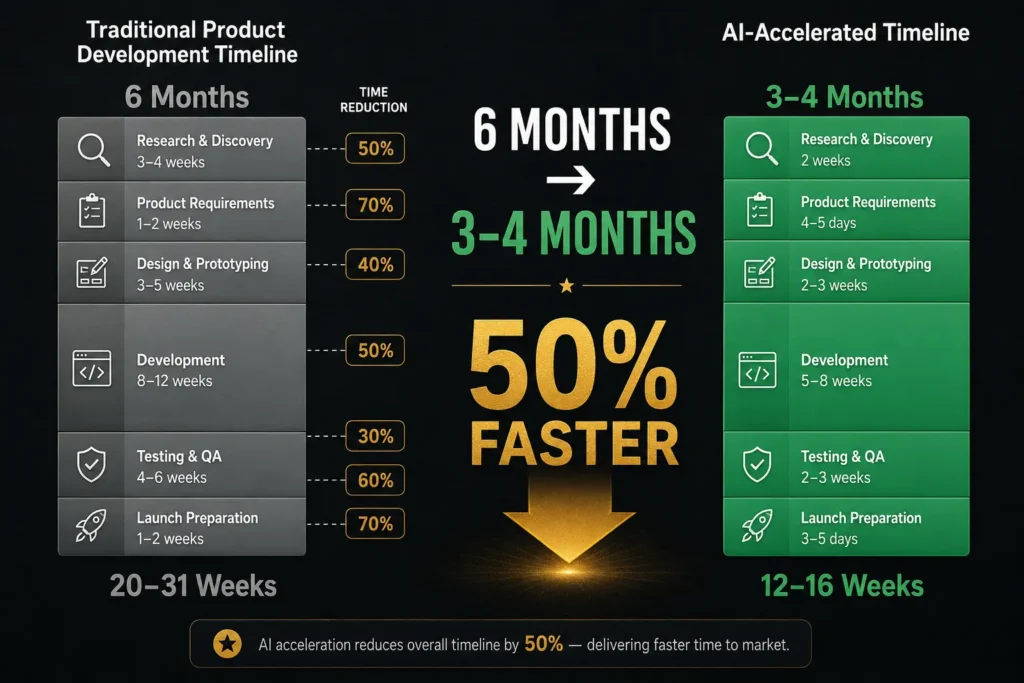
Let me give you concrete numbers so you understand what “50 percent faster” actually means.
A typical feature without AI might look like this:
Research and discovery: 3 to 4 weeks
Product requirements: 1 to 2 weeks
Design and prototyping: 3 to 5 weeks
Development: 8 to 12 weeks
Testing and QA: 4 to 6 weeks
Launch preparation: 1 to 2 weeks
Total: 20 to 31 weeks, let’s call it six months on average.
With AI helping across these phases, the same feature might look like:
Research and discovery: 2 weeks (AI speeds up feedback analysis)
Product requirements: 4 to 5 days (AI drafts the document)
Design and prototyping: 2 to 3 weeks (AI generates variations)
Development: 5 to 8 weeks (AI-assisted coding saves 30 percent)
Testing and QA: 2 to 3 weeks (AI testing automation saves 50 percent)
Launch preparation: 3 to 5 days (AI drafts marketing materials)
Total: 12 to 16 weeks, or about three to four months.
That’s roughly a 40 to 50 percent reduction. And this is realistic if your team actually uses the tools properly.
The biggest time savings come from testing automation and requirements clarity. Those are the two places where AI has the most impact.
Implementing AI Without Breaking Your Product Development Process
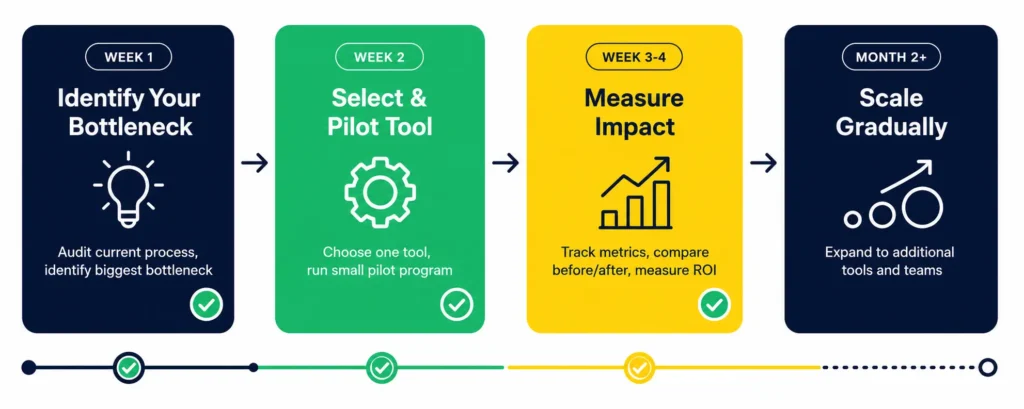
The worst way to adopt AI in product development is to buy five tools and force everyone to use them immediately.
The best way is to start with one bottleneck and fix it properly.
Week One: Identify Your Biggest Bottleneck
Have a conversation with your team. Where does work actually slow down?
Is it requirements that are unclear and cause rework later? Is it code review that takes forever? Is it QA that’s swamped? Is it design iteration that never ends? Is it customer research that’s never done?
Pick one thing. Just one.
Week Two: Select One Tool and Run a Small Pilot
If your bottleneck is requirements, start with ChatGPT or Claude. If it’s coding, start with GitHub Copilot. If it’s testing, start with Applitools or Sauce Labs.
Run a small pilot with one team or one feature. Don’t go company-wide. Just test it with a small group.
Week Three to Four: Measure the Impact
Compare the time it took to complete work before and after the tool. Did requirements actually get written faster? Did the code review process improve? Did QA cycles shorten?
Don’t just measure time. Measure quality too. If you got faster but the quality got worse, you haven’t actually improved anything.
Month Two: Expand Gradually
If the first tool worked, add a second tool in a different part of your process. Maybe you’ll add an AI code review tool or an AI testing platform.
Expand slowly. Make sure each new tool actually integrates well with your team’s workflow. If it creates friction instead of removing it, drop it.
Month Three and Beyond: Build Your Full AI-Powered Workflow
Over time, you’ll build a complete AI-augmented development process. But it won’t happen overnight. It happens through deliberate decisions based on actual results.
Tools That Actually Work for Product Development
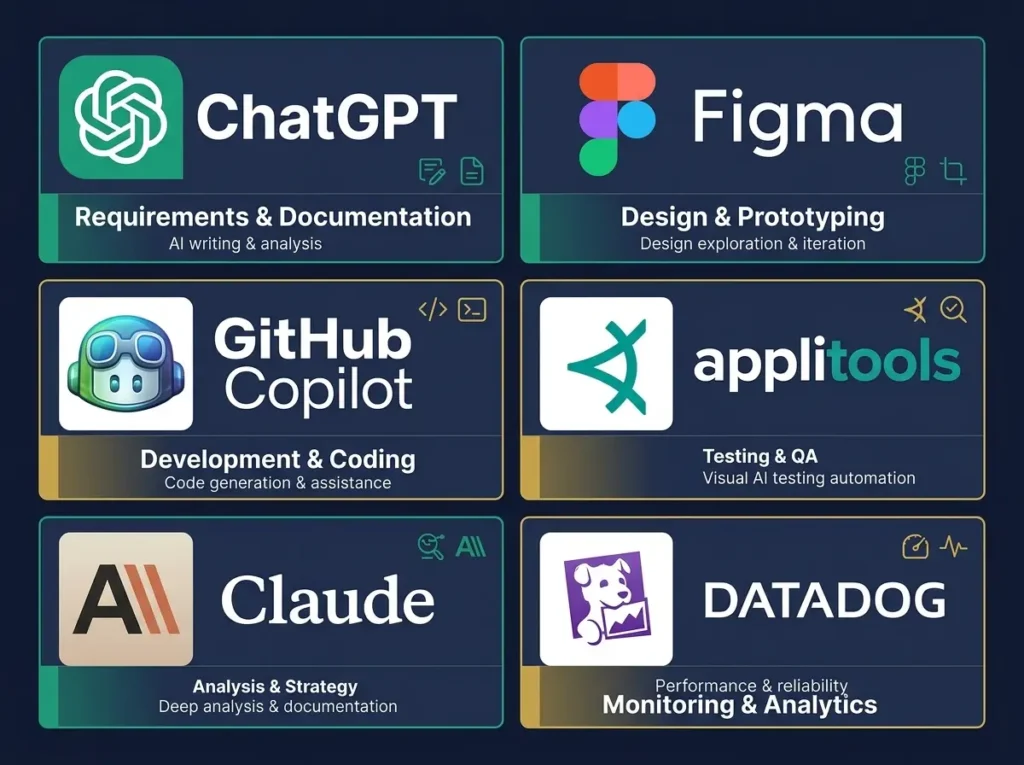
There are dozens of AI tools claiming to speed up product development. Most of them are useful in specific situations. A few are genuinely transformative.
Here’s an honest breakdown of which tools deliver real value.
For Product Management and Requirements
ChatGPT and Claude are the two best general-purpose AI tools for product work. Both can help draft requirements, analyze customer feedback, create product briefs, and prepare documentation.
Claude tends to be stronger at analyzing longer documents and providing more detailed analysis. ChatGPT is more conversational and easier for quick brainstorming.
For product managers, either tool is worth the subscription cost just for the time savings on documentation alone.
For Design
Figma has integrated AI features directly into their design tool. You can describe what you want and generate UI suggestions. Adobe Firefly works similarly for visual design.
Midjourney is useful if you need concept visuals or mood boards quickly, though the output requires more refinement.
For most teams, Figma AI is the best choice because it integrates into existing design workflows.
For Development
GitHub Copilot is the dominant tool here. Most developers report that it’s genuinely useful for routine coding work.
Cursor is an alternative for teams that want an AI-first code editor experience.
For most teams, GitHub Copilot is the practical choice because it works inside existing development environments.
For Testing
Applitools and Sauce Labs are the two strongest AI testing platforms. Both can generate tests automatically, detect visual changes, and maintain tests when the UI updates.
For teams that need serious test automation, these are worth the investment.
For Analytics and Monitoring
Datadog and New Relic both offer AI features that help detect performance issues and anomalies before they impact customers.
These tools are more expensive but essential for teams that care about product reliability.
Why This Matters Beyond Just Speed
Faster time-to-market isn’t just about shipping features quicker. It’s about learning faster.
When you ship faster, you get customer feedback sooner. You understand what works and what doesn’t before you’ve invested heavily in the wrong direction. You can pivot quickly if needed. You can double down on what’s working.
This is why startups that move fast often beat larger competitors. They get more learning cycles in the same amount of time.
AI in product development gives you more learning cycles. That’s the real advantage.
Making Sure AI Doesn’t Break Your Quality
The biggest risk of using AI in product development is building faster but worse.
Here’s how to prevent that.
First, always have humans review AI-generated code before it ships. AI can suggest code, but humans are responsible for the final quality.
Second, don’t use AI to skip important steps. Requirements still need stakeholder feedback. Design still needs user testing. Code still needs review. AI should reduce friction around these processes, not eliminate them.
Third, measure quality as carefully as you measure speed. Track bugs per release, escaped defects, customer satisfaction, and support tickets. If those metrics get worse, you’re not actually winning.
Fourth, be clear about when AI should be used and when it shouldn’t. AI is great for drafting and suggesting. It’s terrible for making strategic decisions that should be made by humans.
What Your Team Actually Needs to Learn
AI tools don’t come with instructions for how to use them well in your product development workflow.
Your team needs training. Not everyone needs to become a prompt engineer, but product managers need to know how to give AI good instructions. Developers need to understand how to review AI-generated code. QA needs to know when to trust AI testing results and when to add manual testing.
This training doesn’t need to be extensive. A few hours per person usually does it. But it’s important. Teams that just assign tools without training usually don’t see the benefits they expected.
Measuring Whether AI Is Actually Helping
Here’s the problem: it’s easy to feel busier when you’re using AI tools. You’re adopting new workflows. You’re learning new systems. But are you actually faster?
Track these metrics before and after implementing AI in product development:
Average time per feature shipped
Number of defects per release
Number of bugs found after launch
Time spent on requirements
Time spent on code review
Time spent on QA
Customer support tickets related to product issues
Feature adoption rates
Compare these numbers month by month. If you’re truly moving faster, most of these numbers should improve. If they’re not, the problem isn’t the tools. The problem is your workflow.
The Future of Product Development Is AI-Augmented
In five years, every product team will have some level of AI integration in their development process. The question for your team today is whether you’ll be early, on time, or late.
Early adoption gives you a huge advantage. Your team learns how to work with AI. You build processes around it. You get faster before competitors do. When they finally adopt, you’re already months ahead.
That advantage compounds over time.
A team that ships 50 percent faster can ship twice as many features in a year. They can learn twice as much from customers. They can respond to market changes twice as quickly.
That’s not a small advantage.
Getting Started This Week

You don’t need to overhaul your entire product development process to get benefits from AI.
Start small. Pick one bottleneck. Choose one tool. Run a small pilot. Measure the results.
If it works, expand to another bottleneck and another tool.
If it doesn’t work, figure out why and adjust.
The teams that win in 2026 and beyond won’t be the ones with the most advanced technology. They’ll be the ones that integrate technology smartly into strong human processes.
AI is a tool. A powerful tool. But still just a tool. The real advantage comes from using it well.
Summary Table: AI Impact by Development Phase
Below is a realistic expectation for time savings when you implement AI thoughtfully in each part of product development:
| Development Phase | Without AI | With AI | Time Saved | ROI Timeline |
|---|---|---|---|---|
| Requirements and planning | 2 to 3 weeks | 1 week | 50 to 70 percent | Immediate |
| Product design | 3 to 4 weeks | 2 weeks | 40 to 50 percent | Week 2 to 3 |
| Development | 8 to 12 weeks | 5 to 8 weeks | 30 to 40 percent | Week 6 to 8 |
| Code review | 3 to 5 days | 1 to 2 days | 50 to 60 percent | Immediate |
| Testing and QA | 4 to 6 weeks | 2 to 3 weeks | 50 to 70 percent | Week 3 to 4 |
| Launch preparation | 1 to 2 weeks | 3 to 5 days | 60 to 70 percent | Immediate |
| Total time-to-market | 6 months | 3 to 4 months | 40 to 50 percent | Month 2 onward |
Common Concerns About Using AI in Product Development

When I talk to product teams about adopting AI, they bring up several concerns. Let me address the main ones directly.
“Will AI-generated code have security issues?”
Possibly. But that’s why you still have code review. AI can suggest code faster, but humans remain responsible for what ships. Security review should happen regardless of whether the code came from AI or was written manually.
“Won’t our developers resist using AI?”
Some will, at first. This is normal. Framing it correctly helps. You’re not replacing developers. You’re freeing them from repetitive work so they can focus on interesting problems.
Developers who use AI well get to work on harder, more interesting problems. That’s usually attractive to good engineers.
“What if customers find out we used AI?”
Most customers don’t care how you built the product. They care whether it works well and solves their problem. If AI helps you build better products faster, that’s good for customers.
The teams that struggle with this narrative are the ones that use AI as an excuse for lower quality. If quality improves or stays the same while speed improves, there’s no story to tell.
“Isn’t this expensive?”
Not compared to the cost of hiring more people. A team of six developers might generate $50,000 a year in AI tool costs. They’d have to hire at least one more person to get similar productivity gains. That person costs $80,000 to $120,000 per year plus benefits.
The math on AI tools is favorable for most teams.
“How do we know this will actually help us?”
That’s the right question. You measure it. Before you adopt any AI tool, establish baseline metrics. Then measure again after three months. Compare.
If you’re not faster or you’re not maintaining quality, adjust your approach.
Final Thoughts
AI in product development is happening whether your team is ready or not.
The question isn’t whether to adopt it. The question is when, how thoughtfully, and how soon you can build it into your standard process.
Teams that move deliberately and measure their results will build lasting competitive advantages. Teams that rush without understanding the impact may waste money on tools that don’t fit their workflow.
As you think about AI in product development, understand that this connects to broader skills and market trends in tech.
If you’re interested in how AI skills are changing compensation in the technology industry, our guide on AI product manager salary trends in 2026 shows how companies are increasingly paying premium salaries for people who understand both product development and AI implementation.
Similarly, if you’re considering whether your team needs training on these tools and processes, you might find value in our breakdown of the best AI courses for product managers, which covers both conceptual understanding and practical implementation skills.
For product teams that need help with the specific AI tools mentioned here, our comprehensive review of the best AI search optimization tools includes detailed comparisons of platforms that support product analytics and monitoring, which we touch on in this guide.
Start with one tool. Fix one bottleneck. Measure the results. Expand from there.
That’s how you actually get faster without breaking anything.









Comments (4)
Generative AI Startups: The Complete Guide to 50+ Companies Changing Tech in 2026 - Trendoutsidersays:
May 30, 2026 at 6:58 pm[…] AI is transforming the entire product development process across companies, our detailed guide to AI in product development shows the specific workflows and tools that are changing how teams ship […]
AI Hardware Startups: The Complete Guide to 40+ Companies Building the Future of AI in 2026 - Trendoutsidersays:
May 31, 2026 at 5:45 pm[…] decisions impact your development cycles and go-to-market strategy, our detailed analysis of how AI accelerates product development in 2026 shows specific workflows that help teams ship AI products faster despite infrastructure […]
Best AI Tools for HR Professionals: The Complete 2026 Guide to 30+ Tools That Save Time and Money - Trendoutsidersays:
June 2, 2026 at 4:04 pm[…] how AI accelerates product development timelines is critical. Our detailed analysis of how AI improves time-to-market shows how to manage development cycles when implementing new AI tools and […]
Generative AI Workflows: The Complete 2026 Guide to 50+ Automation Tools That Save 15+ Hours Per Week - Trendoutsidersays:
June 2, 2026 at 5:49 pm[…] services, understanding how AI accelerates product development cycles is critical. Our analysis of how AI improves time-to-market shows how to manage development while implementing AI workflow […]