

It’s 6:15 p.m. You’ve closed your laptop, but your workday hasn’t really ended.
A supplier still hasn’t replied. Someone needs to chase an approval. Tomorrow’s meeting needs a briefing document, and a project that looked fine on Monday is quietly falling behind.
You could spend another hour sending reminders and checking messages.
Or you could leave those tasks for tomorrow and hope nothing important slips through.
Microsoft wants to offer a third option.
Its newly announced Copilot Autopilot is designed to act more like a digital teammate than a chatbot. Instead of waiting for you to ask another question, it’s intended to keep track of ongoing work, coordinate tasks, and follow up within the boundaries your organization sets.
That sounds appealing. But it also raises some obvious questions.
Can you actually use it yet? Is it included with Microsoft 365? What does it cost? And how comfortable should you feel letting an AI system contact colleagues or work with company information?
Here’s what Microsoft has announced, what remains uncertain, and where Autopilot could realistically fit into a working day.
What is Microsoft Copilot Autopilot?
Microsoft Copilot Autopilot is a persistent, proactive AI agent designed to carry out ongoing work within an organization’s Microsoft 365 environment.
The important word is persistent.
Most people are familiar with AI chatbots that respond when you type a message. You ask for a summary, receive an answer, and then decide what to do next.
Autopilot is designed for a different kind of interaction.
You give it a role, an objective, and boundaries. It can then continue coordinating work over time, without needing a fresh instruction for every step.
In Microsoft’s September 25, 2026 Copilot announcement, the company described Autopilot as a cloud-hosted agent that can watch channels, follow up on conversations, manage recurring work, and return to projects days later.
Microsoft says users can give the agent a name, role, and goal.
For example, you might want an agent to help coordinate a supplier review.
Rather than asking it to write a single email, you could define the broader objective: organize the review, prepare the schedule, collect updates, and keep the process moving.
Microsoft presents this as an example of what Autopilot is designed to handle.
It is not evidence that every customer can already deploy that workflow or that the system will complete it flawlessly.
Why is it called Autopilot?
The name reflects Microsoft’s broader vision of AI taking on continuing responsibilities rather than responding only to individual prompts.
There is an important naming detail, though.
Copilot Autopilot was previously called Microsoft Scout.
Microsoft introduced Scout in June 2026 as an always-on personal agent. The company subsequently positioned that work under the Autopilot name.
That history matters because you may still encounter Scout documentation, previews, or discussions online.
Not every Scout preview feature should automatically be assumed to be available in the newer cloud-hosted Autopilot experience.
What’s new in Microsoft’s September 2026 Copilot announcement?
On September 25, Microsoft introduced a redesigned Copilot experience organized around three major capabilities: Home, Code, and Autopilot.
Home brings together conversational assistance and delegated work, including Chat and Cowork.
Code focuses on helping people build solutions through natural-language instructions.
Autopilot extends the concept into persistent work that continues across time.
Microsoft also announced additional financial management capabilities intended to help organizations understand and control AI spending.
That matters because autonomous agents may carry out many actions over a longer period.
A chatbot conversation might involve a few requests. A persistent agent could potentially continue processing tasks, accessing tools, and generating work across a much longer period.
For businesses, that makes cost visibility and permission controls more important.
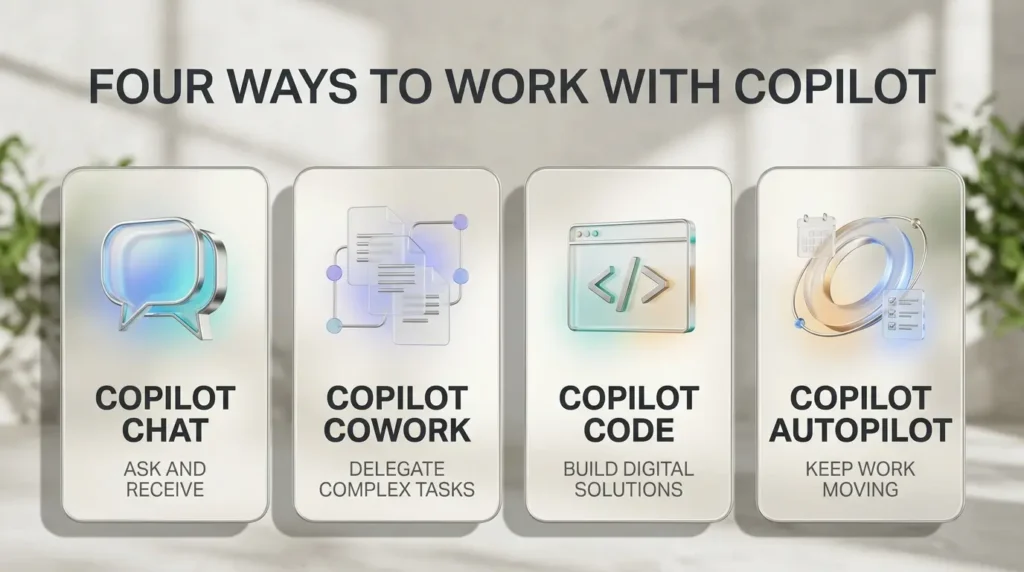
Microsoft Copilot Autopilot vs Chat, Cowork and Code
These names can become confusing, especially when they’re discussed together.
The easiest way to understand them is to focus on the type of work you’re trying to complete.
| Capability | Main purpose | Example |
|---|---|---|
| Copilot Chat | Immediate conversational assistance | Summarize a document or draft an email |
| Copilot Cowork | Delegated multi-step work | Prepare a customer briefing package |
| Copilot Code | Building applications and solutions | Create an internal tool or dashboard |
| Copilot Autopilot | Persistent, proactive work | Coordinate an ongoing supplier review |
These are Microsoft’s announced product roles, not results from independent comparative testing.
Copilot Chat: Ask and receive
Chat is the familiar starting point.
You ask a question, request a summary, or ask for help writing something.
It’s useful when you want an immediate result and remain closely involved.
Copilot Cowork: Delegate a task
Cowork is intended for work with multiple steps.
You describe an outcome, and the system works toward producing it.
For example, preparing a customer briefing might involve gathering relevant documents, reviewing previous discussions, and assembling a draft.
Copilot Code: Build something
Code focuses on creating applications, dashboards, and workflows.
Microsoft says the capability is powered by technology related to GitHub Copilot.
Its purpose is different from asking a chatbot to explain a programming concept.
Copilot Autopilot: Keep work moving
Autopilot is designed for tasks that continue over time.
It may need to notice a missing response, follow up with someone, or return to an unfinished project later.
The distinction isn’t simply that Autopilot performs more steps.
It’s that the agent is designed to maintain responsibility for an ongoing objective.
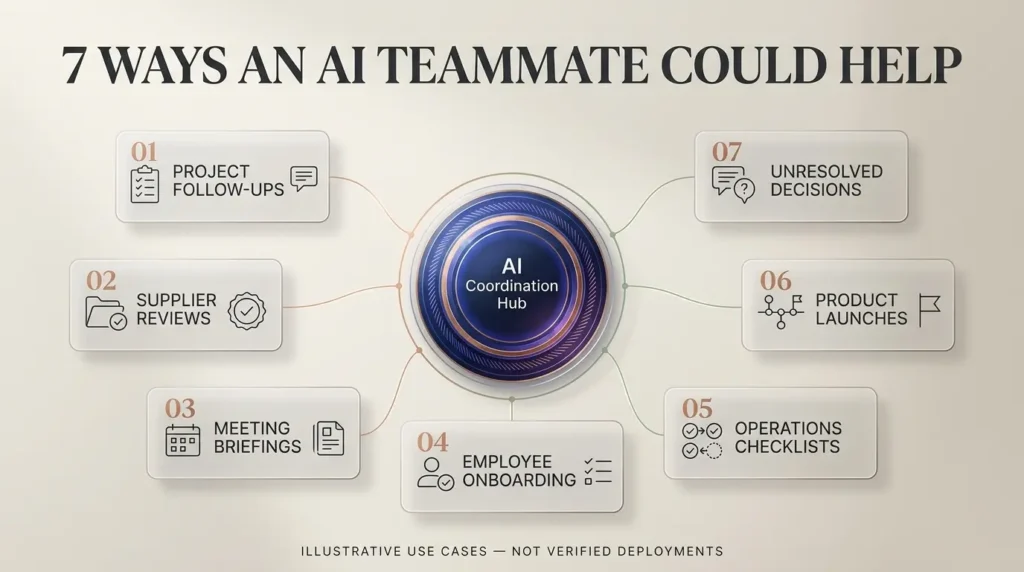
Seven real-world ways Microsoft Copilot Autopilot could be useful
The following examples are realistic business scenarios based on Microsoft’s announced direction.
They are potential applications, not independently tested Autopilot deployments. Actual capabilities will depend on the preview, permissions, connected systems, and product changes.
1. Following up on overdue project updates
Think about a project manager overseeing a website launch.
The designer has finished the homepage, but the legal team hasn’t approved the privacy policy. A developer is waiting for final copy, and the launch date is getting closer.
Normally, the project manager has to remember who owes what.
An Autopilot-style agent could potentially monitor the relevant project conversations, identify outstanding updates, and prepare follow-up messages.
The benefit wouldn’t be replacing the project manager’s judgment.
It would be reducing the amount of time spent chasing routine information.
Human oversight: The manager should remain responsible for deadlines, escalations, and any commitments made on behalf of the team.
2. Coordinating supplier reviews
This is particularly relevant because Microsoft specifically highlights supplier-review coordination in its announcement.
Imagine a company reviewing several software vendors.
Someone needs to organize meetings, gather information, remind stakeholders about deadlines, and keep track of outstanding questions.
An agent could help maintain that process over time.
For example, it might prepare a workback schedule, organize meeting materials, and coordinate requests for updates.
However, selecting a supplier involves commercial, security, and sometimes legal judgments.
Those decisions should remain with authorized employees.
3. Preparing recurring meeting briefings
Many professionals spend the first part of the morning gathering context for meetings.
They review emails, open documents, check calendars, and try to remember what happened in the previous discussion.
An agent connected to approved organizational information could potentially prepare a briefing before a recurring meeting.
The briefing might include outstanding decisions, recent updates, and questions that still need answers.
That could be useful for account managers, team leaders, and operations staff.
But the briefing would still need review.
AI-generated summaries can miss context, misunderstand a conversation, or give too much importance to the wrong detail.
4. Keeping internal onboarding tasks organized
When a new employee joins, several teams may need to coordinate.
HR handles documentation. IT manages access. The hiring manager prepares training, and someone needs to make sure equipment arrives.
A persistent agent could potentially track which administrative steps are complete and which require attention.
It might help remind responsible employees about outstanding tasks.
But granting system access, handling identity documents, and approving employment decisions should remain subject to the organization’s security and HR policies.
The useful role for AI is coordination, not unrestricted authority.
5. Monitoring recurring operational checklists
Consider a marketing agency that prepares a weekly client report.
The team needs campaign updates, outstanding approvals, and a summary of work completed.
An agent could potentially help gather status information from approved channels and organize it into a draft.
If something is missing, it could identify the gap and ask the relevant person for an update.
This is an example where persistent context could be more useful than a one-off chatbot conversation.
The final report should still be checked against the actual campaign data.
6. Coordinating cross-team launch activities
Launching a product often involves several departments.
Marketing prepares announcements. Product teams finalize documentation. Support needs training materials, and sales needs updated information.
A persistent agent could potentially track dependencies and remind teams when a task is waiting on another department.
It could also help organize recurring status updates.
But it shouldn’t be given unrestricted permission to publish announcements, change pricing, or make external commitments without approval.
7. Tracking decisions that haven’t been resolved
Some work doesn’t fail because people lack information.
It stalls because nobody follows up.
A decision is discussed in a meeting, everyone agrees to revisit it, and then the issue disappears into a long message thread.
An agent designed to maintain project context could potentially identify unresolved decisions and bring them back to the team’s attention.
For a busy manager, that might be one of the most valuable applications.
The goal is not to let AI make every decision.
It’s to stop important decisions from being forgotten.
How does Autopilot keep working when you’re offline?
Microsoft says Autopilot is cloud-hosted.
That means its intended persistent work does not depend on you keeping a personal laptop open and actively prompting it.
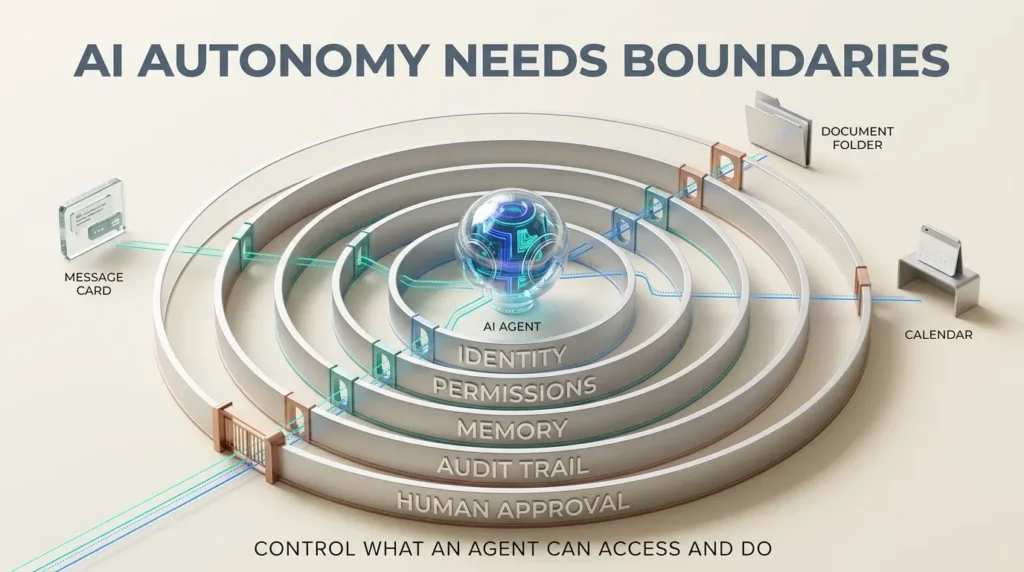
According to Microsoft, Autopilot operates within an organization’s tenant and has its own identity, memory, computer, and workspace.
It is designed to work across familiar Microsoft 365 environments, including Teams, Outlook, chats, channels, and documents.
This is different from a simple scheduled reminder.
A reminder tells you that something needs attention.
A persistent agent is intended to maintain context and carry out approved work toward an objective.
What does having its own identity mean?
In an organization, access to information is normally tied to identities and permissions.
Employees have accounts. Applications have authorized access. Administrators establish policies.
Microsoft says Autopilot has its own identity rather than acting as an anonymous system without accountability.
That makes it possible, in principle, to govern what the agent can access and attribute its actions.
What about memory?
Memory is part of Microsoft’s announced design.
A persistent agent needs some way to retain relevant context between tasks.
Otherwise, it would have to reconstruct the entire project every time it resumed work.
But memory also creates governance questions.
Which information is retained? Who can review it? How are permissions enforced when information changes?
Organizations should examine the available controls before relying on the agent for sensitive workflows.
Does it have unlimited access?
No. Microsoft describes Autopilot as operating within organizational permissions, auditing, and governance.
Its earlier Scout announcement also emphasized governed identities, scoped credentials, and controls around sensitive actions.
Those are important design commitments.
They should still be validated against the actual preview configuration before an organization deploys an agent.
Microsoft Copilot Autopilot pricing: How much will it cost?
This is one of the biggest practical questions.
Microsoft has confirmed the broad billing model, but that is not the same as publishing a simple universal monthly price for Autopilot.
In its September announcement, Microsoft distinguished between everyday Copilot assistance and longer-running agentic work.
Everyday Copilot: Subscription-based access
Microsoft describes a user subscription license for ordinary Copilot activities, including chat, drafting, summaries, and work across supported Microsoft 365 applications.
This provides a more predictable licensing model for everyday assistance.
Autopilot: Usage-based billing
Microsoft says Cowork, Code, and Autopilot run on usage-based billing.
That matters because a persistent agent may consume resources while carrying out a complex task over time.
The total cost could depend on the billing rules, model choices, and amount of agentic work performed.
Microsoft has also announced additional FinOps controls to help organizations manage spending.
These include capabilities related to spending policies, credit usage, and visibility into AI consumption.
Is Autopilot included with Microsoft 365 Copilot?
You should not assume that an existing Microsoft 365 Copilot subscription includes unlimited Autopilot usage.
Microsoft explicitly distinguishes user subscription licensing from usage-based agentic work.
An organization may need the appropriate access, preview eligibility, and billing configuration.
The exact requirements should be confirmed through Microsoft’s current commercial documentation or account team.
Is there a fixed price per Autopilot task?
Microsoft’s September announcement does not establish one universal, publicly applicable per-task price.
It would therefore be misleading to claim that every Autopilot task costs a fixed amount.
For a business considering adoption, the right questions are:
- Which activities are billable?
- How are usage credits or other consumption units calculated?
- Which models can the agent use?
- Can administrators establish spending limits?
- What happens when a task reaches its allowed budget?
- How can managers review the cost of completed work?
Until those answers are available for the actual deployment, any detailed cost projection should be treated as a scenario rather than a verified price quote.
Is Microsoft Copilot Autopilot available now?
As of the information verified on October 10, 2026, Copilot Autopilot is not generally available to all Microsoft 365 customers.
Microsoft’s September 25 announcement says the product is expanding to private preview at the end of October.
That is a future preview milestone, not a general-availability date.
The company also said Home and Code would begin rolling out through its Frontier program in the following weeks.
Those rollout statements should not be confused with a promise that every user will receive Autopilot on the same day.
What happened to Microsoft Scout?
Microsoft Scout was introduced earlier in 2026.
Microsoft’s Scout preview documentation describes a desktop experience available under specific preview conditions.
That documentation includes organizational-account and administrative prerequisites.
However, Scout’s desktop preview and the newer cloud-hosted Autopilot announcement are related but distinct product descriptions.
You should not assume that installing the Scout preview automatically provides access to every newly announced Autopilot capability.
Can personal Microsoft accounts use Autopilot?
Microsoft’s currently documented Scout preview requires an organizational work or school account rather than a personal Microsoft account.
For the newly announced Autopilot, access remains governed by Microsoft’s preview arrangements.
There is no verified basis to promise general access to ordinary personal Microsoft accounts.
When will Autopilot launch for everyone?
Microsoft has not established a confirmed universal general-availability date in the announcement reviewed for this article.
Its AI at Work roadmap is a useful place to monitor commercial rollout information.
Roadmap dates can change.
Publication update required: Before this article goes live on October 23, recheck whether Microsoft has announced new preview eligibility, access instructions, or commercial terms since October 10.
Can small businesses benefit from Copilot Autopilot?
Potentially, yes.
But the business case depends on more than how impressive the demonstration looks.
A company with ten employees might benefit from automating recurring follow-ups.
A company with hundreds of employees might have a much larger coordination problem.
Yet the smaller company could also have fewer resources for governance, testing, and monitoring.
That means the best starting point isn’t necessarily the most autonomous workflow.
It’s the workflow where an agent can provide useful assistance without creating unacceptable risk.
A simple evaluation example
Suppose an operations manager spends five hours per week preparing updates and chasing routine information.
If a future agent reduced that work by two hours per week, the company could potentially reclaim around eight hours in a four-week month.
That’s an illustrative calculation, not a measured Autopilot result.
To decide whether the investment makes sense, the company would need to compare the value of that time against subscription costs, usage charges, setup effort, supervision, and mistakes.
A useful automation should save more effort than it creates.
What could go wrong with an always-on AI agent?
Autonomous systems introduce risks that ordinary chatbots may not create to the same degree.
A chatbot might produce an incorrect paragraph.
An agent with permission to take actions could send that incorrect information to someone else or change a record.
That difference matters.
1. Incorrect actions
An agent might misunderstand an instruction or take an action at the wrong time.
For sensitive activities, require explicit human approval.
2. Excessive permissions
Giving an agent access to every document, mailbox, and system creates unnecessary exposure.
Start with the minimum access required for the workflow.
3. Confidential information
An agent working across emails and documents may encounter private company or customer information.
Organizations need appropriate access controls, data policies, and auditing.
4. Unexpected spending
Long-running agentic work may incur usage-based charges.
Without limits, costs could become difficult to predict.
5. Over-reliance
An agent may appear confident while misunderstanding the business context.
Teams should continue checking important outputs and decisions.
6. Unclear accountability
If an agent sends a message or updates a project, someone must remain accountable for the action.
AI should not create a gap in organizational responsibility.
How should a business prepare for Autopilot?
You don’t need to wait for general availability to improve your automation readiness.
Here is a practical starting process.
Step 1: Choose one recurring problem
Look for a task that happens every week and consumes meaningful staff time.
Good candidates include preparing status updates, collecting meeting information, or tracking routine follow-ups.
Avoid starting with payments, employee termination, or other high-risk decisions.
Step 2: Map the current workflow
Write down what triggers the work, who participates, which systems are involved, and where approval is required.
If your team can’t explain the current process clearly, adding AI may make it harder to manage.
Step 3: Decide what the agent should never do
Set boundaries before testing.
For example:
The agent can draft a supplier follow-up, but it cannot agree to a new contract.
It can prepare a meeting briefing, but it cannot disclose confidential documents to external participants.
It can flag an overdue task, but it cannot change the project’s contractual deadline.
Step 4: Establish a baseline
Measure the time currently spent on the workflow.
Also track errors, missed deadlines, and how often people need to intervene.
Without a baseline, it’s difficult to know whether automation is helping.
Step 5: Test with low-risk information
Start with a limited workflow and non-sensitive data where possible.
Review every output and action.
Document mistakes.
Step 6: Calculate the full cost
Include software charges, setup, administration, training, and review time.
Don’t measure value solely by the number of tasks an agent completes.
Step 7: Expand only when the results justify it
If the system is reliable, appropriately governed, and economically useful, consider expanding its responsibilities.
If it creates more confusion than it solves, reduce the scope.
For a deeper explanation of how autonomous systems coordinate tools and decisions, see TrendOutsider’s AI agents workflow automation guide.
Should you wait for Autopilot or use existing automation tools?
That depends on the problem.
If you simply need an email reminder sent every Friday, a conventional automation may be enough.
You don’t necessarily need a persistent AI agent.
If you need to gather information from several systems, interpret changing circumstances, and coordinate multiple people over time, an agent may eventually offer more flexibility.
But flexibility comes with additional complexity.
A useful distinction is:
Use simple automation for predictable steps. Consider AI agents for variable work that genuinely requires context and judgment.
If you’re still designing your internal processes, TrendOutsider’s generative AI workflows guide offers a broader introduction to building repeatable AI-assisted workflows.
And our AI productivity tools guide explores how to evaluate tools based on practical time savings rather than impressive marketing claims.

Microsoft Copilot Autopilot: Frequently asked questions
What is Microsoft Copilot Autopilot?
Microsoft Copilot Autopilot is a persistent, cloud-hosted AI agent designed to coordinate ongoing work within an organization’s Microsoft 365 environment.
Is Copilot Autopilot the same as Microsoft Scout?
Autopilot was previously called Scout. Microsoft’s earlier Scout preview and the newly announced cloud-hosted Autopilot are related, but their specific capabilities and access requirements should not be treated as identical.
When was Copilot Autopilot announced?
Microsoft introduced the new Copilot experience with Home, Code, and Autopilot on September 25, 2026.
Is Copilot Autopilot available to everyone?
No. As of the October 10 information verified for this article, Microsoft announced an expansion into private preview at the end of October rather than general availability.
Is Microsoft Copilot Autopilot free?
Microsoft has not established a general free-access offer for Autopilot in the announcement reviewed. The company says longer-running agentic capabilities use usage-based billing.
How much does Copilot Autopilot cost?
Microsoft has confirmed a usage-based billing approach but has not established a universal per-task price in the September announcement. Actual costs and requirements depend on the commercial offering.
Is Autopilot included with Microsoft 365 Copilot?
Do not assume unlimited Autopilot usage is included with an ordinary Microsoft 365 Copilot subscription. Microsoft distinguishes subscription-based assistance from usage-based agentic work.
Can Autopilot work while my laptop is turned off?
Microsoft describes Autopilot as cloud-hosted and designed to continue work while you’re offline. Actual task execution depends on the available product capabilities, configuration, and permissions.
Can Autopilot send emails and contact colleagues?
Microsoft describes capabilities such as following up on conversations and coordinating stakeholders. Organizations should verify which actions are supported and what approvals are required in their deployment.
Can Autopilot access company documents?
Microsoft says the agent works within an organization’s Microsoft 365 environment and governance controls. Access should be limited to approved information and permissions.
What’s the difference between Copilot Cowork and Autopilot?
Cowork is designed for delegated multi-step tasks. Autopilot is designed for persistent, proactive responsibilities that continue over time.
Does Autopilot replace employees?
Microsoft positions it as a digital teammate. Businesses still need human accountability, oversight, and judgment, particularly for sensitive or consequential decisions.
Is Autopilot suitable for small businesses?
It could be useful for recurring coordination work, but the decision depends on availability, cost, security requirements, and whether the business has a clear workflow worth automating.
Final verdict: The interesting part isn’t that AI can work longer
Microsoft Copilot Autopilot represents an important shift in how the company wants people to use AI at work.
Instead of treating AI as a tool you open whenever you need an answer, Microsoft is building toward agents that can take responsibility for continuing tasks.
That could make a meaningful difference for teams overwhelmed by coordination work.
But there is a gap between an attractive product vision and a dependable business system.
Autopilot’s wider availability, actual operating costs, and reliability across different workflows still need to be established.
For now, the sensible approach is to understand the product, identify a useful task, and prepare the right permissions and approval processes.
If Autopilot eventually becomes a reliable part of everyday work, its value won’t be measured by how many emails it sends or how many hours it stays active.
It will be measured by whether people spend less time chasing routine tasks and more time doing work that actually needs their attention.
Sources and editorial methodology
This article is based on Microsoft’s official product announcements and preview documentation. It does not claim hands-on testing of the newly announced Autopilot service.
Primary external references:
- Microsoft — Introducing the new Copilot with Home, Code and Autopilot
- Microsoft — Introducing Microsoft Scout
- Microsoft Learn — Get started with Microsoft Scout
- Microsoft — AI at Work Roadmap
- Microsoft Learn — September 2026 Partner Center announcements
- Microsoft — Microsoft 365 Copilot product information
- Microsoft Learn — Microsoft 365 Copilot documentation
Editorial disclosure: Business use cases are illustrative scenarios based on announced capabilities, not independently verified product tests. No specific time savings, reliability rate, or financial return is claimed. Availability and commercial terms should be rechecked immediately before publication.









Leave a Reply