

Editorial note: This guide is based on official product information and published documentation. It is a research-based comparison, not a claim that we independently tested every platform. Features and pricing may change.
Running a small business often means switching between a dozen responsibilities before lunch.
The best AI agents for small business in 2026 can help owners manage customer inquiries, organize sales leads, automate repetitive workflows, and reduce administrative work. But choosing the right AI agent depends on your business needs, budget, technical skills, and the level of human oversight required.
In this guide, we compare seven AI agent platforms, explain their practical applications, examine their pricing models, and explore the limitations small businesses should understand before getting started.
You might start the morning answering customer emails, spend the next hour updating a spreadsheet, follow up with potential clients, and then realize you still haven’t finished the work that actually brings in revenue.
AI agents promise to help with some of that workload.
Unlike a basic chatbot that only answers questions, a properly configured AI agent can interpret information, use connected software, and complete defined tasks. Depending on the platform, that could mean preparing a sales lead summary, organizing customer inquiries, or handling routine support conversations.
But here’s the problem: not every AI agent is suitable for every business.
Some platforms are designed for customer support. Others focus on automation across different apps. A few offer extensive customization but require technical expertise.
This guide compares seven AI agent platforms for small businesses in 2026, including their practical uses, pricing, strengths, and limitations.
We’ll also explain how to choose your first agent without wasting money on features you don’t need.
Quick comparison: 7 AI agents for small businesses
| AI Agent | Best For | Pricing Approach |
|---|---|---|
| Zapier Agents | Automating tasks across existing apps | Free allowance; paid activity plans |
| Relevance AI | Building custom business agents | Actions, credits, and subscription plans |
| Lindy | Email and administrative assistance | Subscription and usage allowances |
| HubSpot Customer Agent | Customer support within HubSpot | Eligible subscription plus credits |
| Intercom Fin | AI-powered customer support | Outcome-based pricing |
| Relay.app | Small-team workflows and approvals | Free and paid workflow plans |
| n8n | Technical teams needing customization | Self-hosted or cloud plans |
Our recommendation: Start with the job you want to automate, not the platform with the longest feature list.
A business that needs to organize incoming leads may benefit from Zapier or Relay.app. A company handling frequent customer support conversations may find HubSpot Customer Agent or Intercom Fin more appropriate.
What is an AI agent?
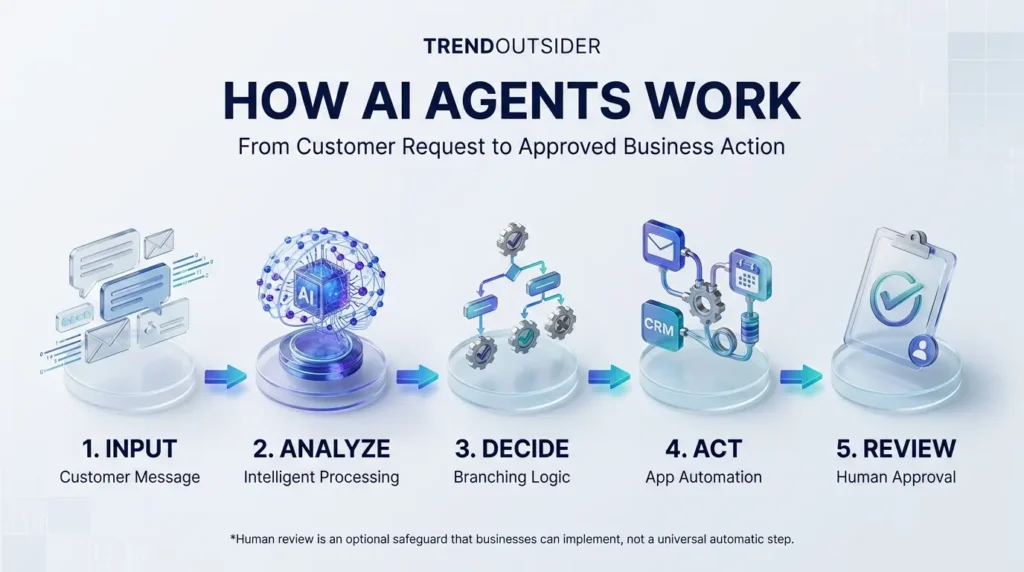
An AI agent is a software system that uses artificial intelligence to work toward a goal, often by interpreting information, selecting tools, and performing actions.
Think about a customer emailing an online store:
“Hi, I placed an order last week. Can you check where it is?”
A basic chatbot might provide a link to the shipping policy.
An AI agent connected to the store’s authorized systems could potentially identify the order, retrieve delivery information, prepare a response, and escalate the issue if the shipment is delayed.
That doesn’t mean every AI agent can perform those actions automatically. Its capabilities depend on its integrations, permissions, instructions, and configuration.
AI agents vs. chatbots vs. traditional automation
These technologies overlap, but they aren’t identical.
Traditional automation follows predefined rules. For example, when someone submits a form, the system automatically adds the contact to a spreadsheet.
Chatbots primarily interact through conversations. Modern chatbots may also connect to tools and perform actions.
AI agents can interpret less-structured information and select among available actions to work toward a defined goal.
The difference becomes important when tasks aren’t always identical.
For a deeper explanation of agent architecture and implementation, read our AI agents workflow automation guide.
1. Zapier Agents — Best for connecting your existing business apps
Official website: Zapier Agents
Zapier is already known for connecting business applications. Zapier Agents extends that ecosystem with AI-powered capabilities that can use connected tools and information sources.
This makes it a practical starting point for businesses that already rely on several cloud applications.
What can Zapier Agents do?
Depending on the integrations and permissions configured, an agent-supported workflow could:
- Categorize incoming customer inquiries.
- Prepare summaries of new leads.
- Organize information from connected applications.
- Help coordinate follow-up tasks.
- Assist with recurring administrative workflows.
A practical small-business example
Imagine a digital marketing agency receiving inquiries through its website.
Instead of manually reading and organizing every submission, the agency could configure an agent to interpret the inquiry, identify the requested service, and prepare a structured summary.
A staff member could then review the information before contacting the prospect.
The benefit isn’t necessarily replacing a person. It’s reducing repetitive preparation work.
Zapier Agents pricing
According to Zapier’s official pricing page, its Agents plans include:
| Plan | Published Allowance | Price |
|---|---|---|
| Agents Free | 400 activities/month | Free |
| Agents Pro | 1,500 activities/month | $33.33/month, billed annually |
| Agents Enterprise | Custom allowances | Contact sales |
These figures apply to Zapier Agents. Other Zapier products and automation plans may have separate pricing.
Advantages: Broad app connectivity, no-code configuration, and a free starting allowance.
Limitations: Activity limits, integration permissions, and workflows that still require careful setup and testing.
Best for: Small businesses already using multiple cloud applications.
2. Relevance AI — Best for building custom AI agents
Official website: Relevance AI
Relevance AI focuses on creating customizable agents that can work with tools, information, and business processes.
It may appeal to companies that want more than a ready-made assistant.
Instead of choosing only a predefined customer support or scheduling tool, businesses can design agents around particular operational needs.
What can Relevance AI do?
Potential applications include:
- Preparing structured sales research.
- Classifying and organizing requests.
- Coordinating recurring information-processing tasks.
- Generating internal reports from approved data.
- Routing work between connected tools.
A practical example
Consider a B2B company receiving inquiries from prospective clients.
A configured agent could organize information supplied by the prospect, identify missing details, and prepare a briefing for a sales representative.
The salesperson would still verify important facts before making decisions.
Relevance AI pricing
Relevance AI offers different subscription and usage allowances, including a free starting option.
Its pricing structure involves actions and potentially additional model-related consumption. Rather than assuming that the advertised subscription covers unlimited agent activity, review the current allowances on the official Relevance AI pricing page.
Advantages: Customization, flexible agent workflows, and the ability to build specialized processes.
Limitations: More setup decisions, usage accounting, and the need to monitor output accuracy.
Best for: Small businesses that want customized AI workflows rather than a single-purpose assistant.
3. Lindy — Best for administrative assistance
Official website: Lindy
Lindy focuses on AI assistance for professional and administrative work.
For founders, consultants, and service providers, that can be an attractive category because so much of the working day involves organizing information rather than creating something new.
What can Lindy help with?
Depending on the configured features and connected accounts, Lindy can support workflows involving:
- Email organization and triage.
- Meeting preparation.
- Follow-up tasks.
- Scheduling-related coordination.
- Recurring administrative processes.
A practical example
Imagine an independent consultant managing several clients.
Before each meeting, the consultant needs to review notes, identify outstanding tasks, and prepare a short agenda.
An AI-assisted workflow could gather relevant information from authorized sources and prepare a draft briefing.
The consultant would review it before the meeting.
Lindy pricing
Published comparisons, including Zapier’s AI agent-builder guide, list Lindy’s paid entry pricing from approximately $49.99 per month.
However, the final cost depends on the current subscription, included credits, and usage conditions. Verify those details directly with Lindy before purchasing.
Advantages: Administrative focus, assistant-style workflows, and potential convenience for individual professionals.
Limitations: Credit consumption, email permissions, and the need to review sensitive communications.
Best for: Consultants, founders, and professionals with repetitive administrative responsibilities.
4. HubSpot Customer Agent — Best for businesses already using HubSpot
Official website: HubSpot Customer Agent
HubSpot’s Customer Agent is designed to help businesses manage customer conversations using AI.
Its main advantage is its connection to the broader HubSpot customer platform.
For companies already managing contacts, support, and customer relationships within HubSpot, that integration can be more practical than introducing an entirely separate system.
What can HubSpot Customer Agent do?
Its documented capabilities include:
- Answering common customer questions.
- Using business knowledge to provide responses.
- Supporting customer conversations across eligible channels.
- Escalating issues when human assistance is needed.
- Helping qualify certain leads.
A practical example
A service company might receive repeated questions about appointments, available services, and account-related processes.
A configured customer agent could respond to straightforward inquiries using approved business information.
Complex issues could be transferred to a team member.
HubSpot Customer Agent pricing
HubSpot publishes a rate of $0.50 per resolved conversation.
However, Customer Agent requires an eligible Professional or Enterprise subscription and operates through HubSpot Credits.
HubSpot’s resolution rules also matter. A support conversation may qualify as resolved when the agent handles it without a human handoff for the specified 72-hour period. Successful lead qualification can also count.
See the official HubSpot Customer Agent documentation and pricing information.
Advantages: CRM integration, customer-focused capabilities, and a defined resolution-based charging model.
Limitations: Subscription eligibility, credit consumption, and dependence on accurate business knowledge.
Best for: Businesses already using HubSpot’s customer platform.
5. Intercom Fin — Best for AI-powered customer support
Official website: Intercom Fin
Fin is a specialized AI customer service agent.
Unlike general-purpose automation platforms, Fin focuses on customer-facing interactions and support outcomes.
That makes it particularly relevant to software companies, subscription businesses, and online services that handle recurring support questions.
What can Intercom Fin do?
Depending on the deployment, Fin can assist with:
- Answering documented customer questions.
- Resolving eligible support conversations.
- Following configured support procedures.
- Routing or escalating conversations.
- Supporting certain lead qualification workflows.
A practical example
A SaaS business might receive frequent questions about account settings, subscription features, and common troubleshooting procedures.
With a well-maintained knowledge base, Fin could handle some routine questions and transfer more complicated cases to the support team.
The knowledge base is important. If the source information is wrong, incomplete, or outdated, the agent may provide an unsatisfactory answer.
Intercom Fin pricing
According to Fin’s official pricing page, most billable outcomes cost $0.99 each.
However, Fin’s billing definition is broader than simply resolving a support question. Certain configured outcomes, such as procedure handoffs, may be billable, and qualifying a prospect under its specific qualification outcome is listed at $9.99.
Minimum commitments or additional plan conditions may apply.
Advantages: Customer-support specialization, integrations, and outcome-based billing.
Limitations: Outcome definitions, support-content quality, and potentially significant usage costs.
Best for: Businesses with recurring customer support volume.
6. Relay.app — Best for small teams that need human approvals
Official website: Relay.app
Relay.app is a workflow automation platform that combines integrations, AI-assisted steps, and human participation.
For small teams, the ability to keep people involved in important decisions can be more valuable than maximizing automation.
What can Relay.app do?
Possible workflows include:
- Organizing incoming requests.
- Preparing information for review.
- Moving information between connected tools.
- Coordinating recurring operational tasks.
- Including human checkpoints in automated processes.
A practical example
Consider a recruitment agency receiving candidate applications.
A workflow could organize submitted information, prepare a summary, and request a recruiter’s review before any communication is sent.
This reduces repetitive preparation without treating an AI-generated assessment as a final hiring decision.
Relay.app pricing
Relay.app offers a free starting plan.
According to Zapier’s published comparison of AI agent builders, paid plans start at approximately $19 per month, with allowances varying by plan.
Review the Relay.app website for current pricing, AI credits, and workflow-step limits.
Advantages: Accessible workflow design, human participation, and suitability for small teams.
Limitations: Integration coverage, workflow complexity, and usage limits.
Best for: Small teams that want automation while keeping control over important decisions.
7. n8n — Best for technically capable small businesses
Official website: n8n
n8n is a flexible workflow automation platform that supports AI-related integrations and agent-building workflows.
It is particularly interesting for technically capable businesses that want detailed control over their systems.
What can n8n do?
Depending on configuration, n8n can support:
- API-connected workflows.
- Custom business automation.
- Database and application integrations.
- AI-assisted information processing.
- Multi-step workflows with conditional logic.
A practical example
An online business might connect its contact forms, customer database, internal notifications, and reporting tools.
A workflow could interpret incoming information, update authorized systems, and notify a team member when human attention is required.
n8n pricing
n8n offers a self-hosted Community edition and paid cloud plans.
Published comparisons list cloud entry pricing from approximately $20 per month, depending on billing conditions.
Check the official n8n pricing page for current cloud pricing and execution allowances.
Self-hosting also has operational costs. Even when software is available without a subscription, businesses may still need to pay for servers, backups, monitoring, and maintenance.
Advantages: Customization, technical flexibility, and self-hosting options.
Limitations: Technical complexity, infrastructure responsibility, and security maintenance.
Best for: Businesses with development expertise or dedicated technical support.
How much do AI agents really cost?
One of the biggest mistakes small businesses make when evaluating AI software is comparing only the advertised monthly subscription price.
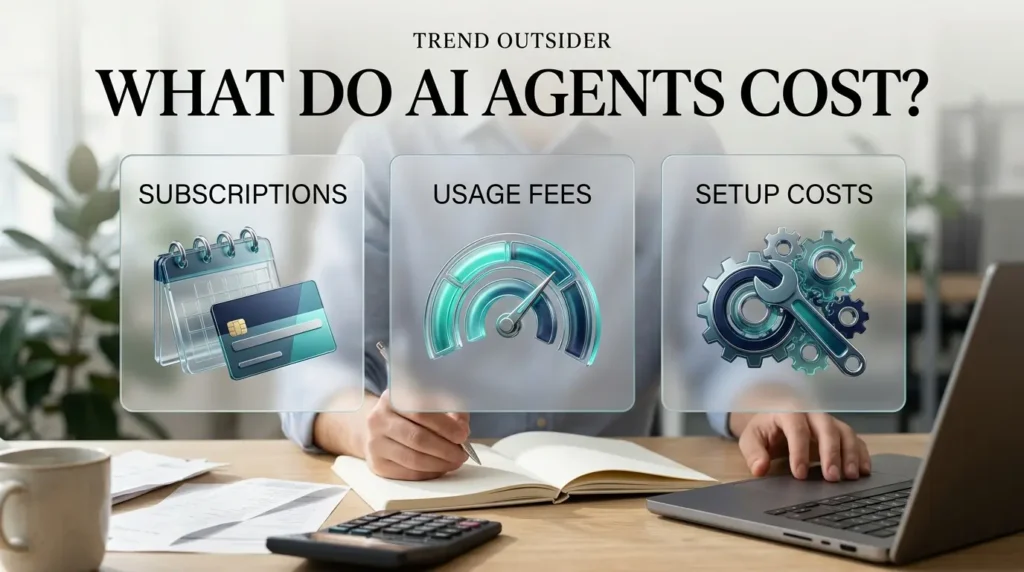
AI agent platforms use different billing models.
Some charge by monthly subscription. Others measure activities, workflow steps, model usage, or completed outcomes.
This makes direct comparisons difficult.
Example: Comparing customer support costs
Imagine a business with 600 customer conversations that qualify for a standard billable support resolution or outcome.
Using the published unit rates:
| Platform | Example Unit Price | 600 Billable Units |
|---|---|---|
| HubSpot Customer Agent | $0.50 | $300 |
| Intercom Fin standard outcome | $0.99 | $594 |
These are illustrative variable charges, not complete subscription quotes.
They exclude additional subscription requirements, minimum commitments, nonstandard outcomes, and other applicable costs.
For example, HubSpot requires an eligible subscription, while Fin has different rates for certain qualification outcomes.
What else should you budget for?
Before buying an AI agent, consider:
- Subscription fees.
- Usage-based charges.
- Setup and configuration time.
- Additional software integrations.
- Employee training.
- Monitoring and maintenance.
- Human review of important actions.
Our AI business solutions and ROI guide explores the broader financial and operational considerations involved in adopting AI tools.
The most affordable agent isn’t necessarily the one with the lowest starting price.
It’s the one that completes the required work reliably at an acceptable total cost.
Five small-business tasks worth automating first
AI agents become more useful when they’re assigned a specific, measurable responsibility.
Here are five practical starting points.
1. Categorizing customer inquiries
An AI-assisted workflow can help identify whether an incoming message concerns sales, billing, technical support, or another issue.
The business can then route the inquiry to the appropriate person or process.
2. Preparing sales lead summaries
Instead of manually reviewing every form submission, a configured agent can organize the supplied information and prepare a summary.
A salesperson can verify the details before following up.
3. Preparing meeting information
AI can help collect relevant notes, previous communications, and outstanding tasks from authorized systems.
This can reduce preparation work before recurring meetings.
4. Searching internal business knowledge
An agent connected to an approved knowledge base can help staff locate documented procedures, policies, and product information.
Responses should ideally reference their source material so employees can verify important details.
5. Drafting routine follow-up messages
An AI-assisted workflow can prepare messages based on approved information and templates.
For sensitive or commercially important communications, human approval remains advisable.
If you want to explore additional practical applications, our generative AI workflows guide covers a broader range of automation tools and approaches.
How to choose your first AI agent
Don’t begin by purchasing a platform.
Begin by identifying one problem that repeatedly consumes your time.
Step 1: Identify a specific task
For example:
“Every incoming website inquiry needs to be categorized, summarized, and assigned to the appropriate team member.”
That is much clearer than saying, “We want to automate our business with AI.”
Step 2: Measure your current workload
Suppose your team processes 200 inquiries every month.
If each inquiry requires five minutes of administrative preparation, the total workload is approximately 16.7 hours per month.
That gives you a starting point for evaluating potential time savings.
Step 3: Define the agent’s permissions
Decide exactly what the agent can and cannot do.
For example, it may be permitted to categorize inquiries and prepare summaries.
It may not be permitted to promise discounts, issue refunds, or send contractual commitments without approval.
Step 4: Run a controlled pilot
Start with a small sample of representative tasks.
Include ordinary cases, incomplete information, ambiguous requests, and unusual situations.
Review the results before expanding automation.
Step 5: Calculate the actual value
Suppose an agent-supported workflow saves 10 hours per month.
If the business values that time at $20 per hour, the gross time value would be $200.
If the total monthly automation cost is $80, the illustrative difference is $120 before accounting for setup and oversight.
This is a hypothetical calculation, not a guaranteed return.
The purpose is to measure whether the workflow is genuinely useful.
AI agent security risks every small business should understand
Giving software permission to perform actions on your behalf creates new responsibilities.
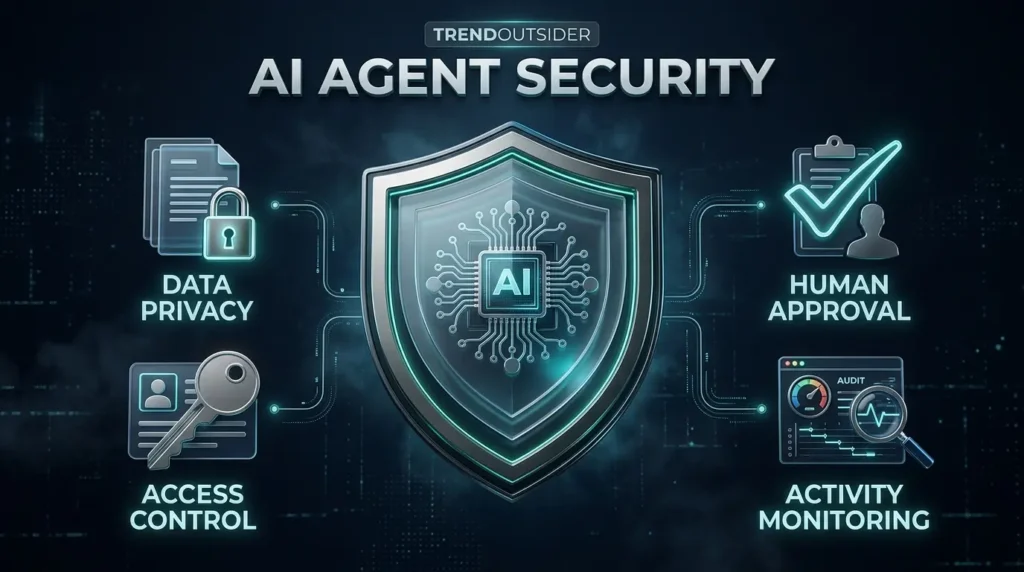
Before deploying an AI agent, understand these risks.
Incorrect information
AI agents can misunderstand requests or produce inaccurate answers.
A customer-facing agent that provides incorrect refund information could create confusion or damage trust.
Excessive account permissions
An agent connected to email, cloud storage, or customer databases may receive access to more information than it needs.
Grant the minimum permissions required for the task.
Prompt injection
Malicious instructions hidden inside emails, documents, or web pages may attempt to manipulate an AI agent into performing unintended actions.
This is particularly important when agents process information from external sources.
Unexpected usage costs
A poorly configured workflow may retry repeatedly, process unnecessary information, or consume more credits than expected.
Set alerts and spending limits where available.
Inadequate human oversight
Some decisions should not be fully automated.
Financial transactions, contractual commitments, sensitive customer information, and consequential account changes may require additional safeguards.
A practical rule: Begin with read-only access where possible, add permissions gradually, and require human approval for important actions.
Are AI agents worth it for small businesses in 2026?
For some businesses, absolutely.
For others, a conventional automation tool may be simpler, cheaper, and more reliable.
The deciding factor is not how advanced the AI sounds. It’s whether the technology solves a recurring problem.
A business that receives hundreds of similar inquiries may benefit from an AI support agent.
A consultant who spends hours organizing meetings may benefit from an administrative assistant.
A technically capable company with complex integrations may prefer a customizable workflow platform.
But a business with only a few repetitive tasks might be better served by ordinary software rules.
Not every productivity problem requires an autonomous agent.
Our AI productivity tools guide covers additional tools and approaches that may be easier to adopt for everyday work.
Which AI agent should you choose?
Here’s a practical summary.
Choose Zapier Agents if you want to connect AI-powered tasks with applications your business already uses.
Consider Relevance AI if you want to build customized agents around specific operational responsibilities.
Explore Lindy if administrative assistance, meeting preparation, and email-related workflows are your priorities.
Consider HubSpot Customer Agent if your business already uses an eligible HubSpot subscription and wants AI-powered customer conversations.
Evaluate Intercom Fin if customer support automation is a major requirement and you can justify outcome-based costs.
Try Relay.app if you want approachable workflow automation with opportunities for human involvement.
Consider n8n if your team has the technical expertise to manage more customizable automation.
None of these recommendations guarantees that a particular platform will be suitable for your business. Always evaluate its current capabilities, security controls, and pricing against your actual requirements.
Frequently asked questions
What is the best AI agent for a small business?
The best AI agent depends on the task. Zapier Agents may suit businesses connecting existing applications, while HubSpot Customer Agent and Intercom Fin focus on customer interactions. Relevance AI and n8n offer more customization.
Can small businesses use AI agents for free?
Yes. Some platforms, including Zapier Agents and Relay.app, offer free starting allowances. These plans generally have usage limits, and additional costs may apply.
Do AI agents require coding skills?
Not always. Several platforms provide no-code or low-code interfaces. However, reliable automation still requires planning, testing, and maintenance.
Can AI agents handle customer service?
Yes, some AI agents are specifically designed for customer support. Their effectiveness depends on accurate source information, suitable integrations, and appropriate escalation rules.
Are AI agents safe for business use?
They can be deployed with safeguards, but risks remain. Businesses should review permissions, protect sensitive information, monitor agent activity, and require approval for important actions.
Can AI agents replace employees?
AI agents can automate selected responsibilities, but they cannot be assumed to reliably perform every aspect of an employee’s role. Human judgment and oversight remain important.
How much should a small business spend on AI agents?
There is no universal budget. Start with a limited workflow, calculate the total cost, measure the results, and expand only when the value is clear.
Final verdict: Start small, measure results, and keep control
AI agents offer small businesses a practical opportunity to reduce repetitive digital work.
But the most impressive product demonstration doesn’t necessarily translate into the best business outcome.
The right approach is to identify a recurring problem, choose a suitable tool, configure limited permissions, and measure the results.
Start with one workflow.
Understand the billing model.
Keep people involved in important decisions.
And expand only when the automation proves useful.
The best AI agent for your business isn’t the one that promises to do everything. It’s the one that reliably handles a job you actually need done.
About this guide
This article was prepared through desk research using official product websites, pricing information, and published comparisons reviewed in October 2026.
TrendOutsider has not claimed to independently test all seven platforms. Prices, product features, and availability may change. Readers should verify current details directly with each provider before purchasing.
Disclosure: This article contains informational links to software providers. Any future affiliate relationships should be clearly disclosed where applicable.








Leave a Reply